00191021-02.pdf - 第127页
User’s Manual Test Program S ITEST 3 Calibration Functions Software Version 403.xx Edition 12/97 3.10 Calibration of the Flip-Chip Camera (SIPLACE 80F 4) 3 - 23 3.10 Calibration of the Flip-Chip Camera (SIPLACE 80F 4 ) ●…
3 Calibration Functions User’s Manual Test Program SITEST
3.9 Calibration of the IC Camera (SIPLACE 80F4) Software Version 403.xx Edition 12/97
3 - 22
●
Click on the
Calibrate IC head / camera
button.
The complete calibration will now be performed.
●
If you wish to view the values determined after the completion of the calibration procedure, click on the
Display camera coefficient...
button.
●
If you wish to view the values for the camera position and focus height, click on the
Display camera
and focus position...
button.
A comparison of the current versus the previous camera data (camera position in x and y-directions
and focus height) is displayed.
NOTE
The x and y-values of the current camera position are also displayed in the "Camera position" field.
●
Click on the icon to return to the main view.
User’s Manual Test Program SITEST 3 Calibration Functions
Software Version 403.xx Edition 12/97 3.10 Calibration of the Flip-Chip Camera (SIPLACE 80F4)
3 - 23
3.10 Calibration of the Flip-Chip Camera (SIPLACE 80F
4
)
●
Carry out the preparatory steps proceeding as described in section 3.1.
●
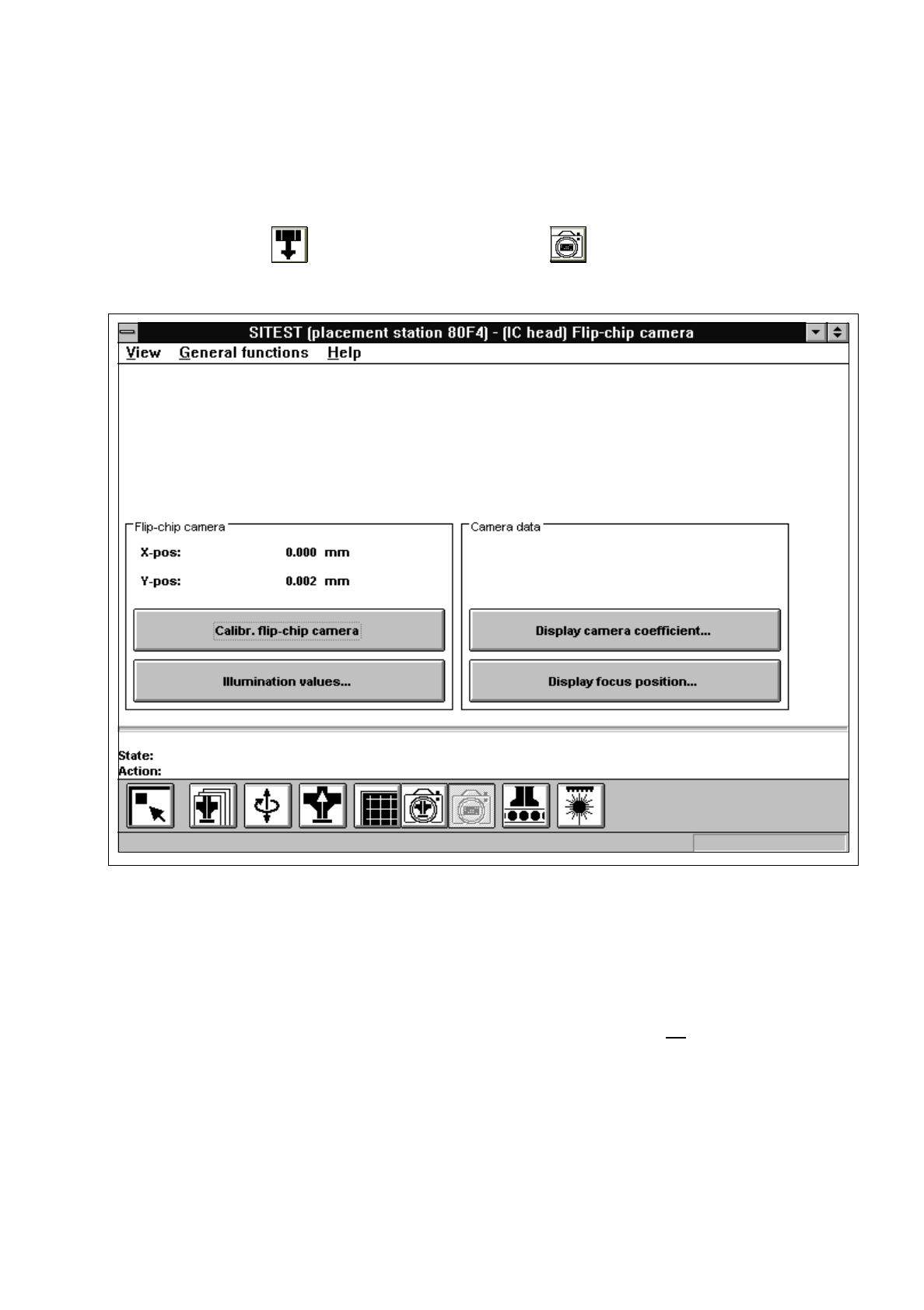
In the "IC head" display (see Fig. 0.3.6) click on the icon to switch to the "Flip-chip camera"
display.
Fig. 3.10.1 "Flip-chip camera" Display
Overview of the functions:
–
Calibr. flip-chip camera to calibrate the Flip-Chip camera
–
Illumination values... to display the illumination values
(Normally, the illumination values do not need to be changed.
Changing the values in a non-expert manner will lead to incorrect
calibration results).
–
Display camera coefficient... to display the Flip-Chip camera values determined
–
Display focus position... to display the camera position and focus height determined
3 Calibration Functions User’s Manual Test Program SITEST
3.10 Calibration of the Flip-Chip Camera (SIPLACE 80F4) Software Version 403.xx Edition 12/97
3 - 24
●
Click on the
Calibr. flip-chip camera
button.
The calibration of the Flip-Chip camera is now performed.
●
If you wish to view the values determined after the completion of the calibration procedure, click on the
Display camera coefficient...
button.
●
If you wish to view the values for the camera position and focus height, click on the
Display focus
position...
button.
NOTE
The x and y-values of the current camera position are also displayed in the "Camera position" field.
●
Click on the icon to return to the main view.