00193463-01.pdf - 第187页
User Manual SIPLAC E S-25 HM 5 Station extensions Software Vers ion SR.503.xx 04/2002 US Edition 5.6 PCB data transfer 187 5.6 PCB dat a transfer 5.6.1 Functional description The ’Ma chine opt ions’ me nu contains a ’PCB…

5 Station extensions User Manual SIPLACE S-25 HM
5.5 Ceramic substrate centering Software Version SR.503.xx 04/2002 US Edition
186
Fiducial structure 5
Recommendation 1
Fiducial structure Black resistive paste as the background, with conductive paste printed on it as
the fiducial.
Recommendation Background 0.75 mm larger than the fiducial on all sides.
Method of illumination Normal light
Advantage Good contrast, good sharpness;
Reference Circuit-board conductor layer
Assessment This combination gives the best results. Highly recommended.
Recommendation 2
Fiducial structure Fiducial made from circuit-board conductor material, e.g. 6119, and overprinted
with passivated glass 4330.
Method of illumination Oblique light
Advantage No additional steps required
Reference Circuit-board conductor layer
Assessment Fiducials are less sharp than for recommendation 1. Recommended.
Recommendation 3
Fiducial structure Fiducials made from circuit-board conductor layer against a free ceramic back-
ground.
Method of illumination Oblique or normal light (depending on the paste)
Advantage No additional steps required
Reference Circuit-board conductor layer
Note Fiducials are less sharp than for recommendation 2.
The fiducial image depends on the surrounding free surface. It may be neces-
sary to teach every circuit separately.
Assessment Recommended under certain conditions.
User Manual SIPLACE S-25 HM 5 Station extensions
Software Version SR.503.xx 04/2002 US Edition 5.6 PCB data transfer
187
5.6 PCB data transfer
5.6.1 Functional description
The ’Machine options’ menu contains a ’PCB data transfer’ option. The aim of this function is to
increase the placement system’s performance on the line. To do this, an entire PCB is measured
at the first placement station and the associated fiducial, single circuit, ink spot, etc. data is deter-
mined, saved and sent to the next station. At subsequent stations, the data is then determined for
two fiducial positions only. These two fiducial positions are then used to correct the position for the
PCB to be processed at each station. It is thus not necessary to measure the entire PCB again,
together with its single circuits, ink spots etc. 5
5.6.2 Activating the ’PCB data transfer’ option
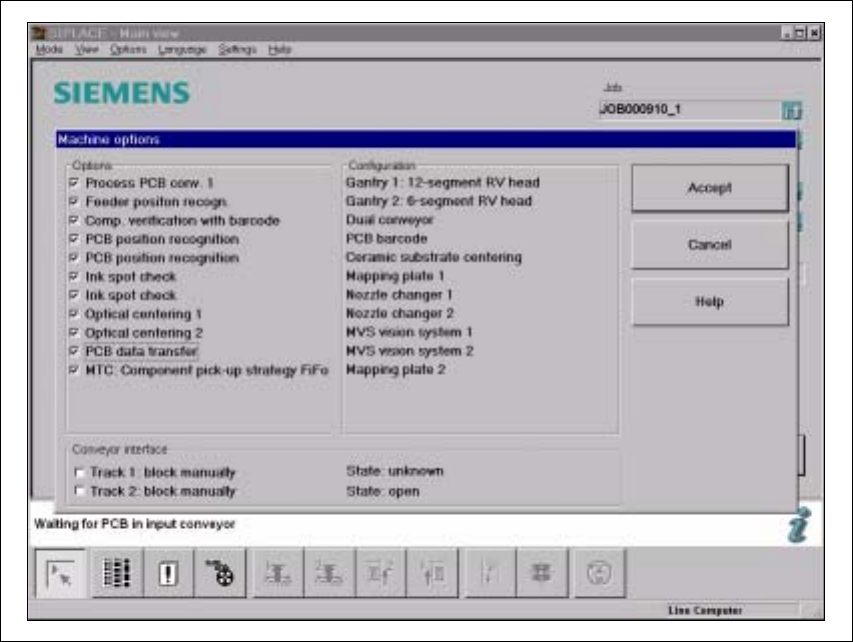
Fig. 5.6 - 1 Machine option: PCB data transfer

5 Station extensions User Manual SIPLACE S-25 HM
5.6 PCB data transfer Software Version SR.503.xx 04/2002 US Edition
188
Æ Click on the ’Machine options’ button in the basic view.
The ’Machine options’ window opens.
Æ In the ’Options’ box, check the ’PCB data transfer’ option for the station concerned.
Æ Click on the ’OK’ button. The ’PCB data transfer’ option is now active.
PLEASE NOTE: The ’PCB data transfer’ option can only be used in conjunction with a PCB bar-
code reader. 5