JO-072-006_w.pdf - 第69页
3-16 AKBEG-ID 0508-001 5. "System Setting" Window In the "System Setting" window , the set value peculiar to the machine can be dened. (1) How to open the "System Setting" window Only "…
3-15
AKBEG-ID
Manual Type Change
•
Specication in "Type Listup" Window
When the "T
ype Setting" window is active, press the [Setting]
button.
The "Type Listup" window opens.
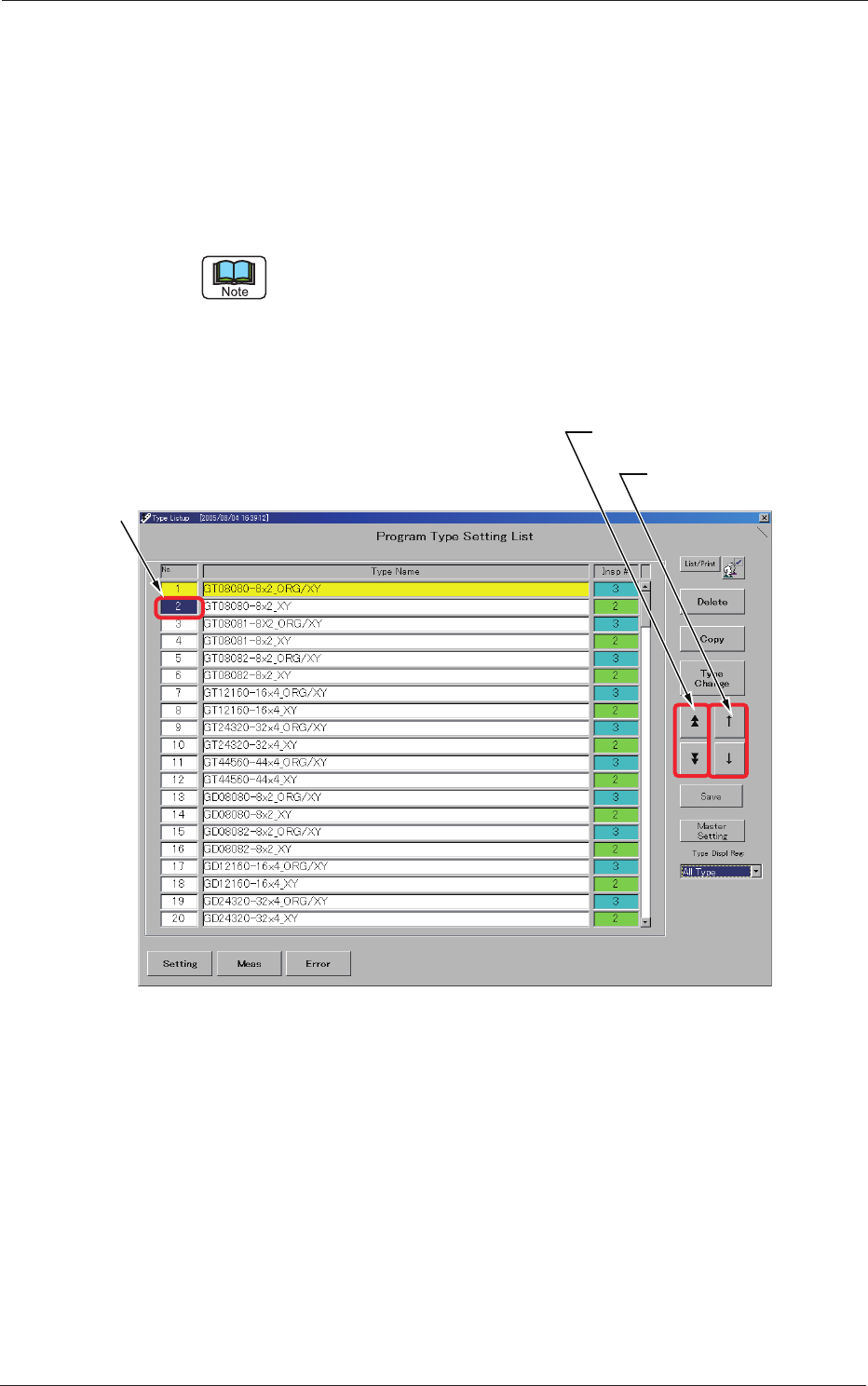
Use the [Page Selection] or [Cursor Movement] button to move the
subcursor to the target type No.
The subcursor can also be moved by clicking the scroll bar, directly the No. of
the pertinent line in the list, or the type name area.
Press the [Type Change] button.
The type data corresponding to the No. specied by the subcursor is
called and displayed.
Subcursor
[Page Selection] Button
[Cursor Movement]
Button
Fig. C13 "Type Listup" Window
4. "Type Setting" Window
0508-001
3-16
AKBEG-ID
0508-001
5. "System Setting" Window
In the "System Setting" window, the set value peculiar to the machine can be
dened.
(1) How to open the "System Setting" window
Only "Administrator" can open the "System Setting" window and
change the settings.
Change the current authority level to "Administrator".
Reference
Refer to "1. Administrative
Authority Change" in "Section 3" for how to change
the authority.
Make the subcursor appear in the "Type Listup" window and press the
[Setting] button.
The subcursor can be located at any place regardless of whether the type data is
already registered or not.
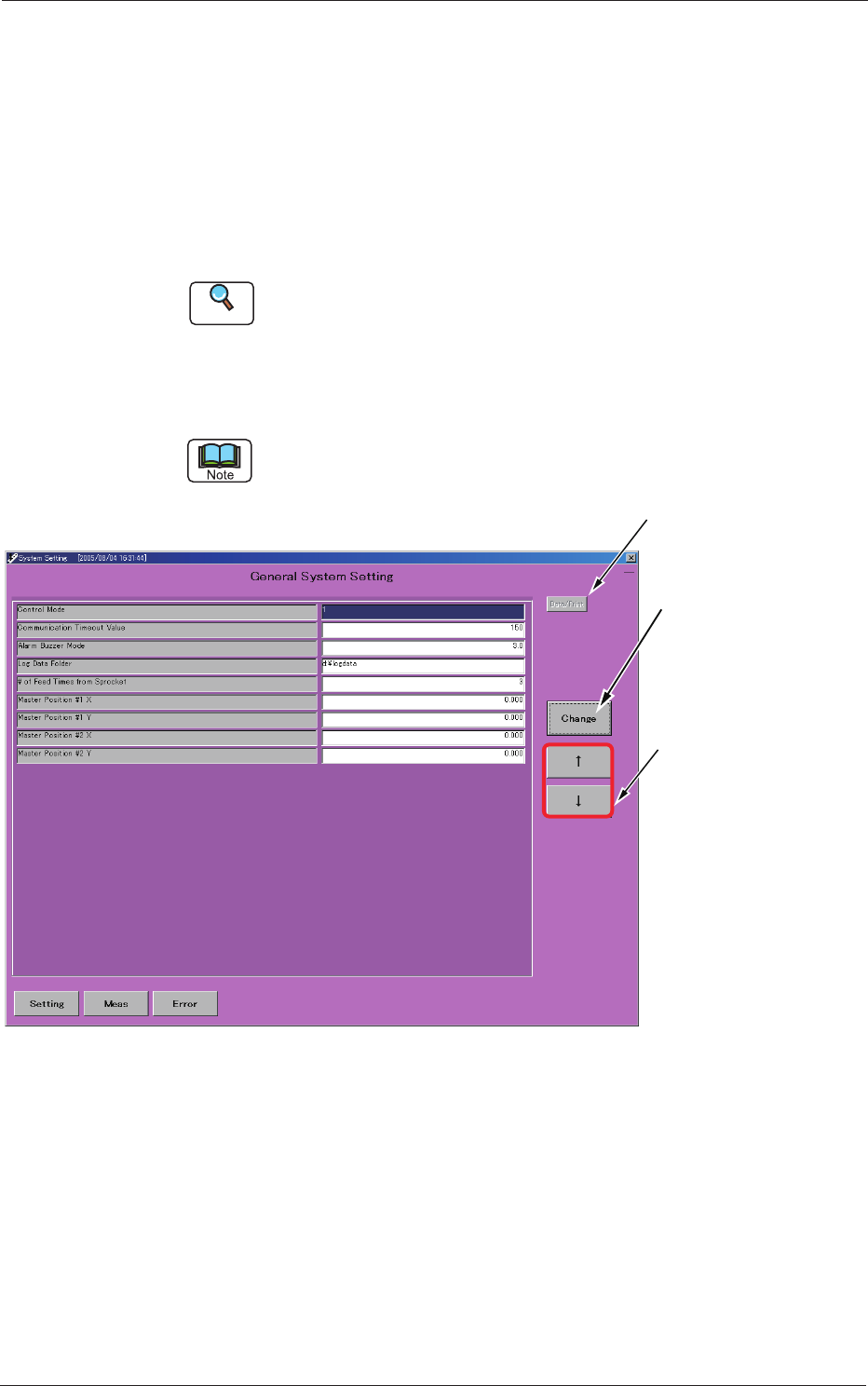
Used to print the
system data.
Used to move
the cursor.
The entry window
for the pertinent set
value opens,
enabling you to change
the set value.
Fig. C14 "System Setting" Window
5. "System Setting" Window

3-17
AKBEG-ID
0508-001
(2) Outline of Each System Data
Control Mode
The set data is used to change the control mode.
"0" or "1" can be set.
0:
Through Mode
(Operator Conrmation Omitted at Accuracy Inspection)
1:
Step Mode
(Operator Conrmation Displayed)
Communication Timeout Value
Specify the time at which the "Communication Impossible" mode should
be detected in the RS232C serial communication.
Unit: seconds
Alarm Buzzer Mode
Specify the period of time during which the buzzer should sound when an
error has occurred.
When "0" is set, the buzzer keeps on sounding until it is stopped with the
buzzer button.
"0" or "0.1 to 600.0 seconds (10 minutes) can be set.
Log Data Folder
Specify the folder in which the inspection data log le should be saved.
Up to 62 characters can be used for the registration.
# of Feed T
imes from Sprocket
Specify the number of master tape idle feeding times required at the start
of the inspection.
A value "0 to 10" can be set.
Master Position #1 X and
Y/Master Position #2 X and Y
The set parameters represent the inspection positions of the master feeder.
5. "System Setting" Window