00197469-02_SM_Twin_Kunde_EN.pdf - 第21页
3 Return unit 3.2 Replacing the Z axis return unit Service Manual SIPLACE TwinStar (Twin, Twin HF, Twin VHF) 07/2020 21 3.2.2 Return unit on the Twin/Twin HF Parts Head type Spare part Twin HF module R2 [03097486‑xx] Z a…
3 Return unit
3.2 Replacing the Z axis return unit
20 Service Manual SIPLACE TwinStar (Twin, Twin HF, Twin VHF) 07/2020
Removal
► Dismantle the head main board.
5.1 "Replacing the head main board" [}65]
► Dismantle the buffer on the return unit.
3.1 "Replacing the return unit buffer" [}17]
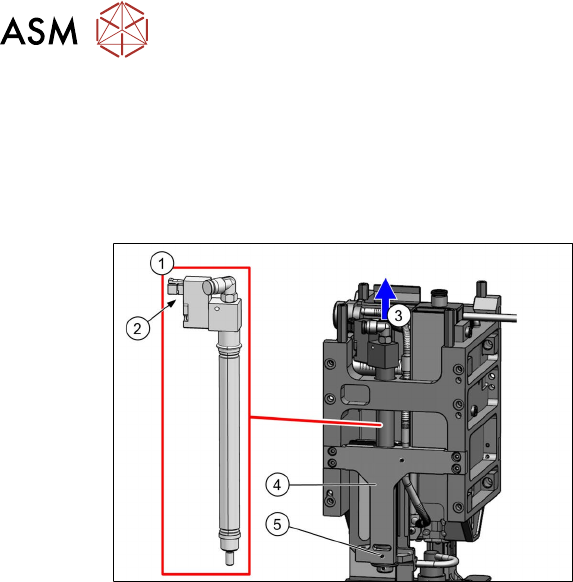
Fig.17: Dismantling the return unit (example of Twin HF
shown)
► Loosen the grub screw (5) on the
mount (4)
.
► Disconnect the plug (2) from the coup-
ling.
► Disconnect the hose from the vacuum
distributor.
► Pull the return unit(1) up(3) and out of
the head.
Installation
► Insert the return unit through the opening in the mount.
► Reconnect the hose and plug.
► Fit the buffer on the return unit.
3.1 "Replacing the return unit buffer" [}17]
► Turn the return unit in the mount so that the cables and plugs do not touch the housing. This
prevents the cables from being damaged during movement.
► Fix the return unit with the grub screw to the mount.
Follow the removal instructions in reverse order for further installation.
Also observe the installation instructions in the following section:
5.1 "Replacing the head main board" [}65]
3 Return unit
3.2 Replacing the Z axis return unit
Service Manual SIPLACE TwinStar (Twin, Twin HF, Twin VHF) 07/2020 21
3.2.2 Return unit on the Twin/Twin HF
Parts
Head type Spare part
Twin HF module R2 [03097486‑xx] Z axis return unit [03001361-xx]
Twin module THK R2 [03097485‑xx]
Overview
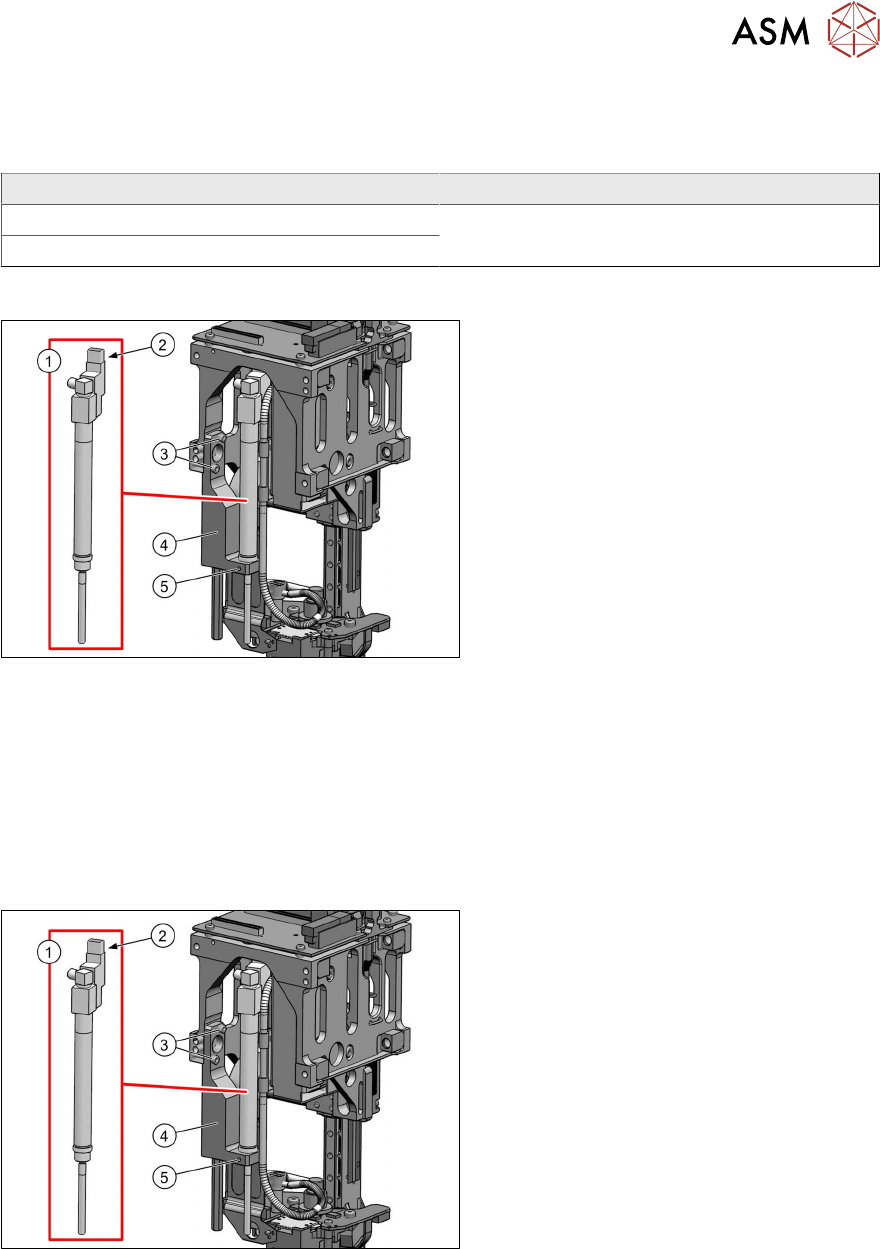
Fig.18: Overview of return unit (example of Twin HF shown)
1. Return unit
2. Connector/coupling
3. Screws fastening the mount
4. Mount
5. Grub screw on the mount for fixing the
return unit
Preparation
► Remove the head from the machine. For details about removing and fitting the placement
head, refer to the service manual for your machine.
Removal
► Dismantle the buffer on the return unit.
3.1 "Replacing the return unit buffer" [}17]
Fig.19: Dismantling the return unit (example of Twin HF
shown)
► Disconnect the plug (2) from the coup-
ling.
► Remove the two screws (3) fastening
the mount(4)
.
► Take the return unit(1) out of the head,
together with the mount.
► Loosen the grub screw (5) on the
mount.
► Pull the return unit(1) out of the mount.
3 Return unit
3.2 Replacing the Z axis return unit
22 Service Manual SIPLACE TwinStar (Twin, Twin HF, Twin VHF) 07/2020
Installation
► Insert the return unit through the opening in the mount.
► Reconnect the hose and plug.
► Fit the buffer on the return unit.
3.1 "Replacing the return unit buffer" [}17]
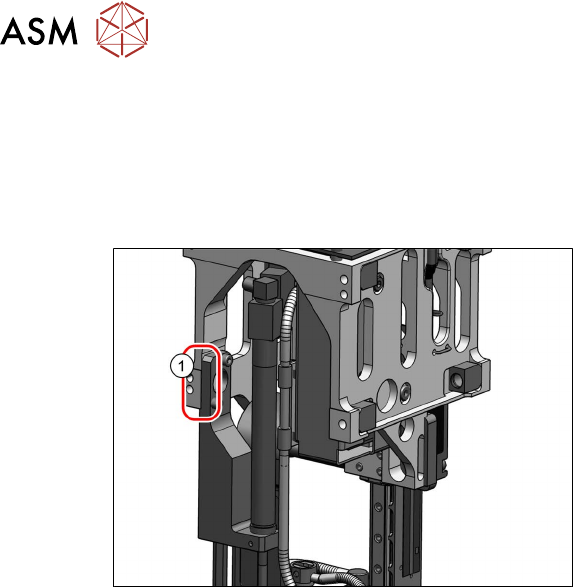
Fig.20: Fitting the return unit and mount (example of Twin
HF shown)
► Screw the mount back into place.
Make sure that the mount edge (1)
is
parallel to the TwinHead housing (must
lie flat against it).
► Turn the return unit in the mount so that the cables and plugs do not touch the housing. This
prevents the cables from being damaged during movement.
► Fix the return unit with the grub screw to the mount.
Follow the removal instructions in reverse order for further installation.