00198051-01_IM_SetupCenter_8.0_EN.pdf - 第101页
Settings Installation Manual SIPLACE Setup Center 8.0 101 9 9 S e t t in g s Settings Settings in the Station Software In order to use Setup Center you s hould make settings in the st ation software. For d etailed inform…
FillingStation Installation
Connection Examples
100 Installation Manual SIPLACE Setup Center 8.0
8.2
8.2 Connection Examples
Connection Examples
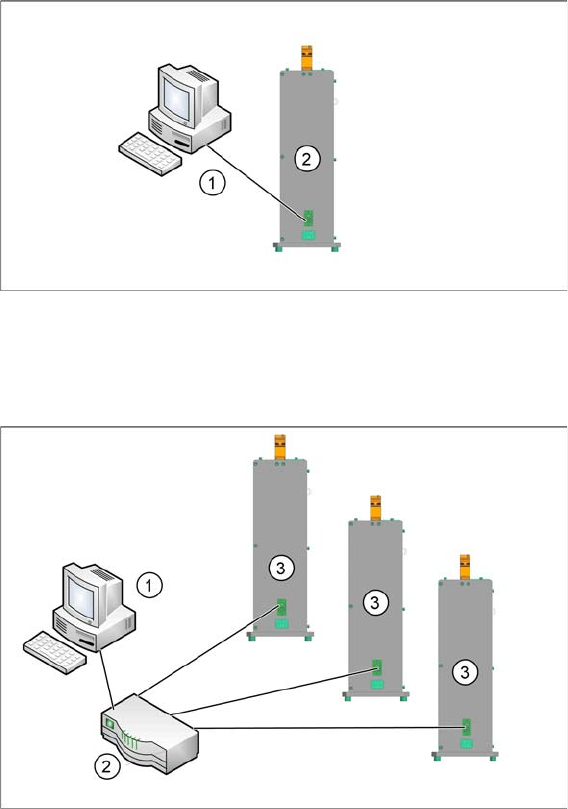
Example with one FillingStation on a Setup Center Application PC
1. Setup Center Application PC connection to FillingStation
2. FillingStation
Example with more than one FillingStations on a Setup Center Application PC
1. Setup Center Application PC connection to Router
2. Router
3. FillingStations
8.3
7.5 Firmware Download for Feeder Control Unit
Firmware Download for FillingStations
► Setup Center can update the firmware of your FillingStation.
To learn how to update the firmware of your FillingStation, please refer to the chapter "Firmware
Download" in the Online Help Setup Center.
Settings
Installation Manual SIPLACE Setup Center 8.0 101
9
9 Settings
Settings
Settings in the Station Software
In order to use Setup Center you should make settings in the station software. For detailed information,
please refer to SIPLACE Setup Center User Guide.
SIPLACE Setup Center Configuration
Setup Center GUI requires to be configured before it can be used. The configuration can be found via
the main menu Extras → Settings. For detailed information, please refer to SIPLACE Setup Center User
Guide.
Settings on the SIPLACE Pro
In order to use Setup Center you should make settings on the programming system SIPLACE Pro. For
detailed information, please refer to SIPLACE Setup Center User Guide.
Barcode Label Wizard
The Barcode Label Wizard enables you to print out barcodes needed for the operation of the SIPLACE
Setup Center. For detailed information, please refer to SIPLACE Setup Center User Guide.
Settings
102 Installation Manual SIPLACE Setup Center 8.0