00198051-01_IM_SetupCenter_8.0_EN.pdf - 第57页
Barcode-Scanner Installation 6.2.2 Datalogic Scanner`s Cradl e BC-9030 (Narr owband) Datalogic Scanner Installation Manual SIPLACE Setup Center 8.0 57 6.2.2.1 6 . 2 . 2 . 1 C o n n e c t c r a d le v ia R S - 2 3 2 Conne…
Barcode-Scanner Installation
Datalogic Scanner 6.2.2 Datalogic Scanner`s Cradle BC-9030 (Narrowband)
56 Installation Manual SIPLACE Setup Center 8.0
The cradle is now ready for use with Setup Center.
The communication over the USB-COM interface requires at least the firmware version 610001601 for
the scanner cradle.
6.2.2
6.2.2 Datalogic Scanner`s Cradle BC-9030 (Narrowband)
Datalogic Scanner`s Cradle BC-9030 (Narrowband)
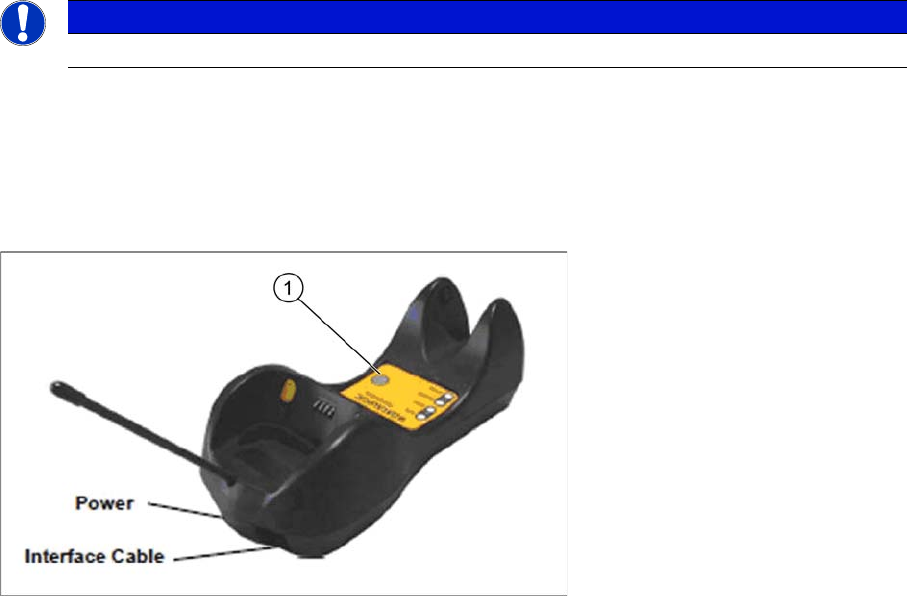
The Datalogic scanner’s cradle BC-9030 needs to be connected to the Setup Center PC. The cradle in
-
corporates a multi-standard interface, which can be connected via USB or RS-232 to a PC.
The label on the cradle contains LED indicators and a multi-function button (1). When the multi-function
button is pressed for less than 5 seconds, the cradle will transmit a “broadcast” message. When the
broadcast is sent, all properly configured and online scanners that are linked to that cradle and within
radio range will emit a beep and blink within 5 seconds. This functionality is useful to:
▪ Verity which scanners are linked to a certain cradle
▪ Detect a scanner forgotten somewhere
When the multi-function button is pressed for longer than 5 seconds, all paired scanners will be unpaired.
NOTICE
USB-COM interface
Barcode-Scanner Installation
6.2.2 Datalogic Scanner`s Cradle BC-9030 (Narrowband) Datalogic Scanner
Installation Manual SIPLACE Setup Center 8.0 57
6.2.2.1
6.2.2.1 Connect cradle via RS-232
Connect cradle via RS-232
Connecting
Before configuring the interface it is necessary to link the barcode scanner to the cradle.
To link the barcode scanner to the cradle, press the trigger to wake up the barcode scanner and mount
it into the cradle. To confirm that the scanner has been successfully connected to the cradle, it will beep
several times and the LED will flash
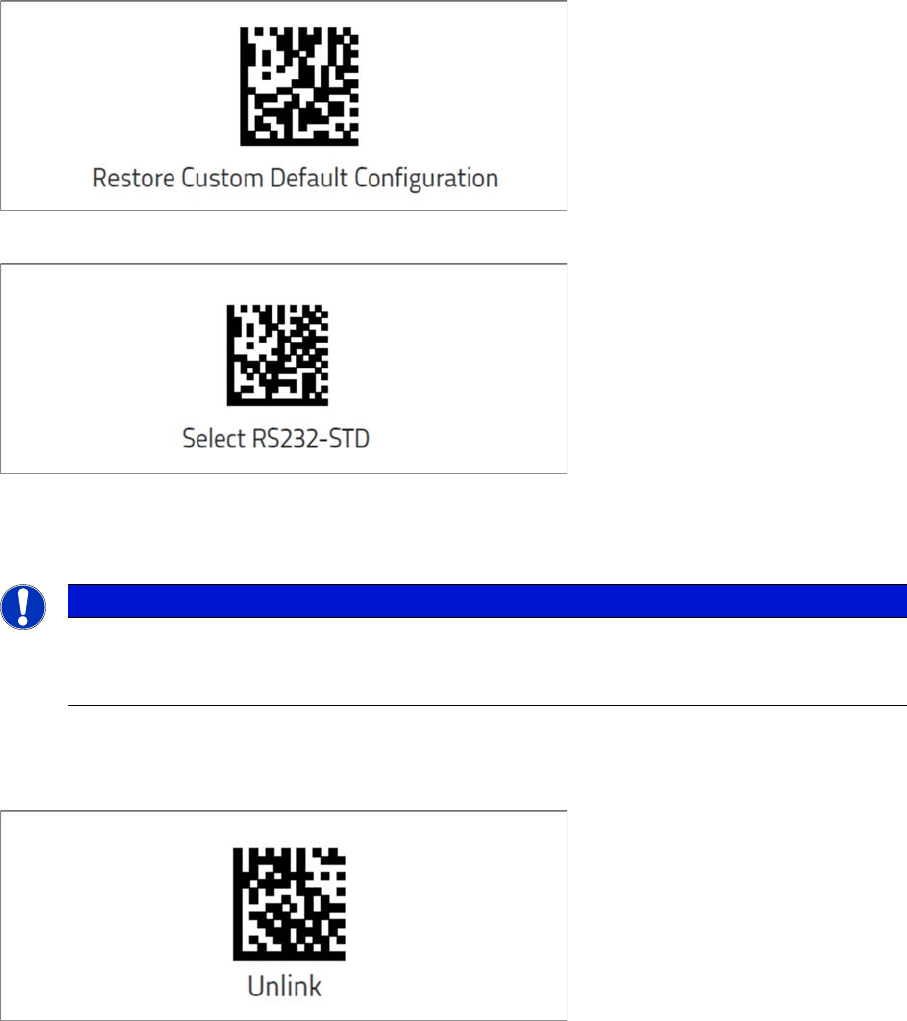
► Scan the Restore Custom Default Configuration barcode.
► Scan the Select RS232-STD barcode.
⇨ The cradle is now ready for use with Setup Center.
Unlink the barcode scanner
If the barcode scanner was previously linked to another cradle, you must first press and hold the button
on the cradle (> 5 sec.).
► Scan the Unlink barcode before re-linking to the new cradle.
NOTICE
Unlink the barcode scanner
To confirm that the scanner has been successfully connected to the cradle, it will beep several
times and the LED will flash. If this is not the case, you will need to perform an Unlink.
Barcode-Scanner Installation
Datalogic Scanner 6.2.2 Datalogic Scanner`s Cradle BC-9030 (Narrowband)
58 Installation Manual SIPLACE Setup Center 8.0
6.2.2.2
6.2.2.2 Connect cradle via USB
Connect cradle via USB
Installation of the USB-COM driver
For connection via USB, you must install the USB-COM driver first.
The installation packages for 32 bit and 64 bit operating systems are located in the “\3rdparty install
-
er\Datalogic\USB-COM Driver” directory of the Setup Center installation CD. For installation please refer
to "6.2.6 Installation of the USB-COM driver" [ ➙ 67].
Steps to configure the cradle to the USB-COM interface
Connecting
Before configuring the interface it is necessary to link the barcode scanner to the cradle.
To link the barcode scanner to the cradle, press the trigger to wake up the barcode scanner and mount
it into the cradle. To confirm that the scanner has been successfully connected to the cradle, it will beep
several times and the LED will flash.
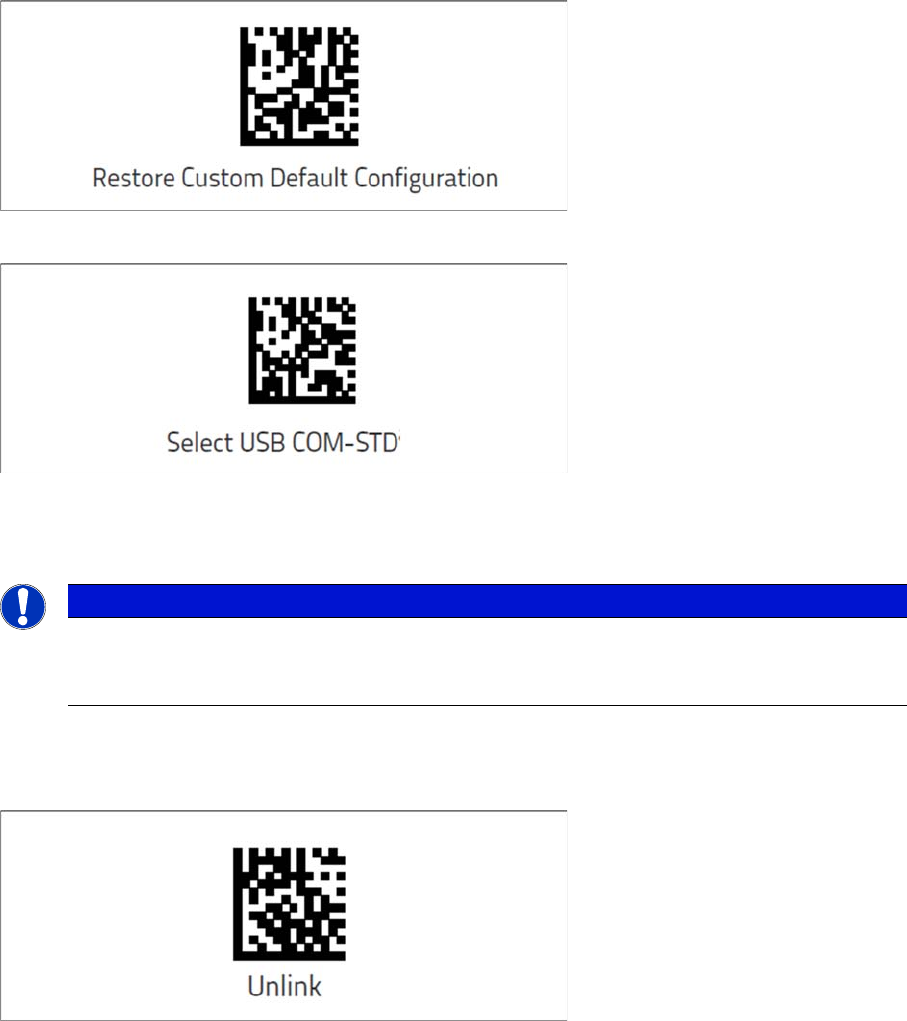
► Scan the Restore Custom Default Configuration barcode.
► Scan the Select USB-COM-STD barcode.
⇨ The cradle is now ready for use with Setup Center.
Unlink the barcode scanner
If the barcode scanner was previously linked to another cradle, you must first press and hold the button
on the cradle (> 5 sec.).
► Scan the Unlink barcode before re-linking to the new cradle.
NOTICE
Unlink the barcode scanner
To confirm that the scanner has been successfully connected to the cradle, it will beep several
times and the LED will flash. If this is not the case, you will need to perform an Unlink.