ThermoFlex-Manual.pdf - 第75页
Section 5 ThermoFlex 5-5 Thermo Scientific Flow Control with Flow Readout P 1 P 2 T 0 T 1 Pump Pressure Relief with Flow Readout Figure 5-8 Flow Control Figure 5-9 Flow Control Handle (T ypical) Figure 5-10 Pressure Relie…
Section 5
5-4 ThermoFlex
Thermo Scientific
Figure 5-7 Main Loop
P 1 P 2 T 0 T 1 Pump
Pressure Relief
Valve (External
Configuration)
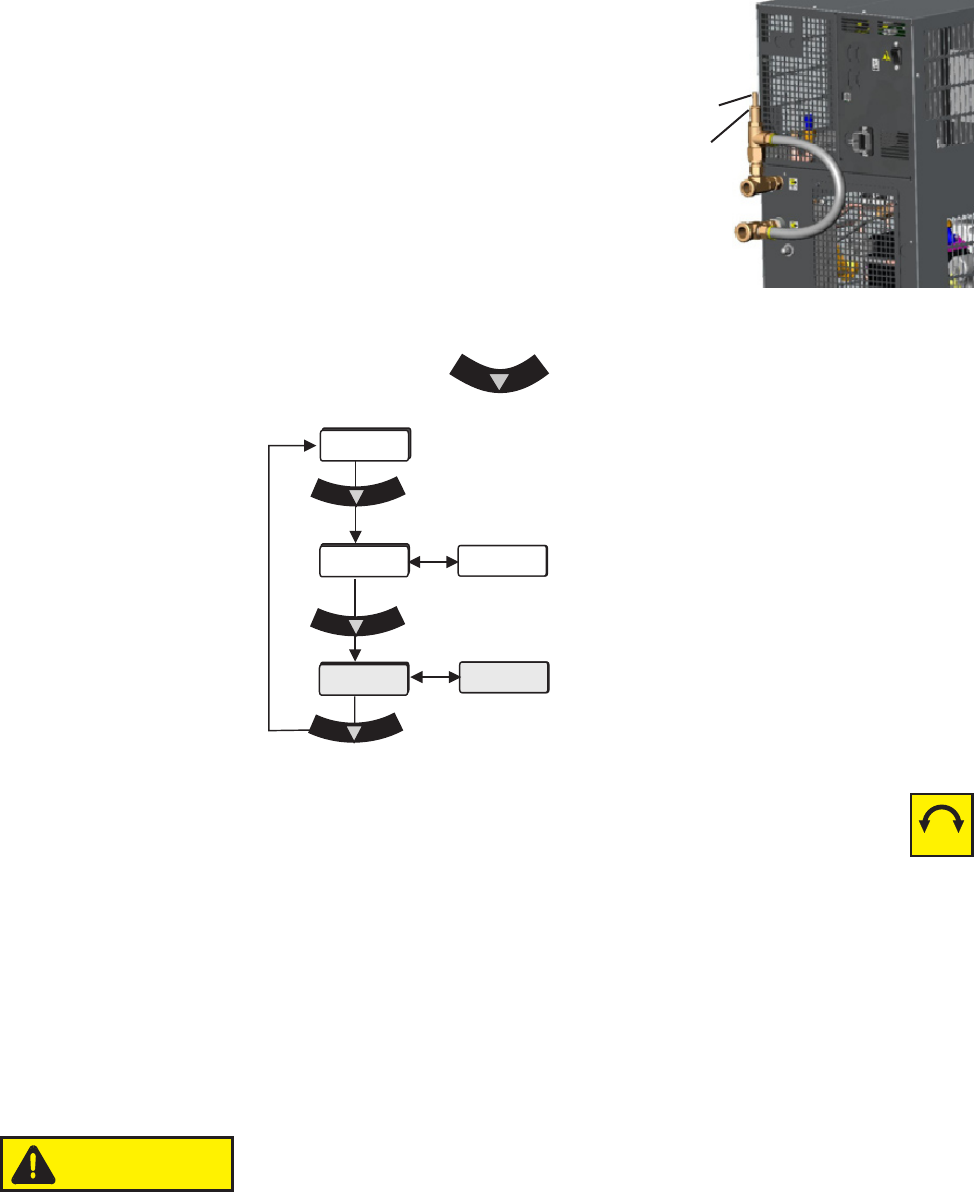
Use the pressure relief valve to set the desired
system back pressure (P1) to your application. The
valve is factory preset to 80 ± 5 psi (5.5 ± 0.4 bar).
The valve's inlet/outlet
connections are ½"FNPT.
If the chiller is not plumbed to an application, set the
pressure by installing a loop of hose equipped
with a shut-off valve between the supply and
return ttings. Start the chiller and allow it to
prime, then close the valve.
Use the controller's to display P 1, it should display 80 ± 5 psi.
Packing Nut
Adjusting Screw
Figure 5-6 Nut and Screw
Use a screwdriver to turn the adjusting screw (counterclockwise to
reduce pressure) until the controller displays the desired setting.
Note Due to internal back pressure, the minimum pressure setting for a
deadheaded P 2 pump is 40 psi (2.8 bar), and 22 psi (1.5 bar) for a P 1 (these
settings prohibit external ow from the chiller).
If the chiller is plumbed to an application, ensure the chiller is off. Then back out
the adjusting screw counterclockwise to reduce pressure. Turn the chiller
on. Ensure that there is back pressure in the system. Turn the adjusting
screw until the controller displays the desired setting.
Do not exceed 100 psi (6.9 bar).
When complete, inspect the area around the
5
/
8
" packing nut for uid leaks.
If uid is present, slightly tighten the nut and reinspect.
P1
FLo
xx.x C
80
xx
-+
PSI/KPa
CAUTION
Section 5
ThermoFlex 5-5
Thermo Scientific
Flow Control with
Flow Readout
P 1 P 2 T 0 T 1 Pump
Pressure Relief with
Flow Readout
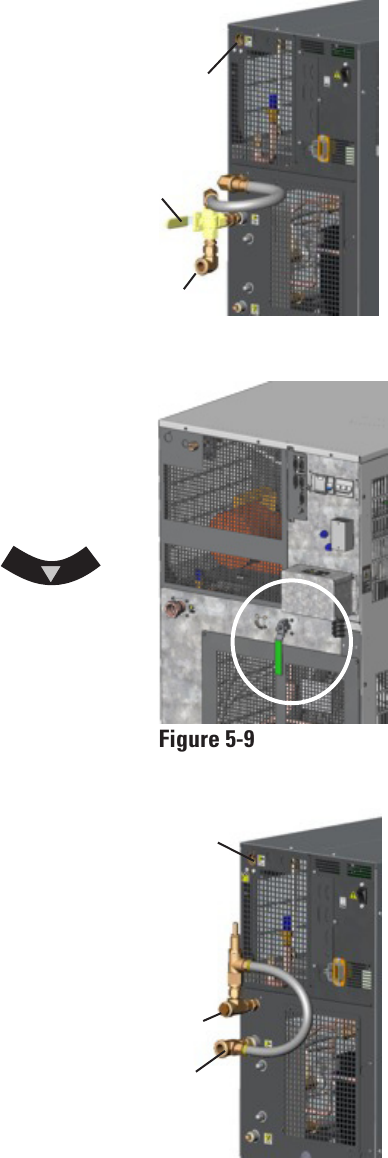
Figure 5-8 Flow Control
Figure 5-9 Flow Control
Handle (Typical)
Figure 5-10 Pressure Relief
Auxillary
Process
Outlet
Drain
Plug
Valve
Handle
Flow control for P 1, P 2, T0 and T 1 pumps on
ThermoFlex900 - 5000s is achieved using a 3-way
valve plumbed between the standard process
outlet and the process inlet on the rear of the
chiller. Use the auxiliary process outlet at the
top left of the rear of the chiller as a
connection point. The connections are ½"
FNPT. See Figure 5-8.
ThermoFlex3500 and 5000s with P 3 and P 4
pumps use a 2-way valve located on the rear
of the chiller. The connections are 3/4" FNPT.
See Figure 5-9.
ThermoFlex7500 and 24000s with P 2 - P 5 and
T 5 pumps (see next page) use a valve located
on the rear of the chiller. The connections are
1/2" FNPT for P 2, 1" FNPT for P 3 and P 5.
See Figure 5-9.
Press the controller's down arrow
twice to display the controller's FLo display, see
previous page. Turn the valve handle until the
desired rate is displayed.
Note The valve is sensitive to slight
adjustments.
Auxiliary
Process
Outlet
Process
Inlet
Process
Inlet
The Pressure Relief with Flow Readout
works just like the Pressure Relief Valve
discussed on the previous page. It allows
you to control the pressure going to your
application.
This valve is plumbed between the standard
process outlet and the process inlet on
the rear of the chiller. Use the auxiliary
process outlet at the top left of the rear of
the chiller as a connection point, allowing
you to also monitor the ow rate to your
application using the controller's FLo
display, see previous page.
The valve's outlet connection is ½" FNPT.
See Figure 5-10.
Section 5
5-6 ThermoFlex
Thermo Scientific
Compliance
SEMI chillers are compliant with:
SEMI S2-0703 Product Safety Assessment
SEMI S8-0705 Ergonomic Assessment
SEMI S14-0704 Fire Risk Assessment
SEMI F47-0706
Emergency Off (EMO)
A guarded red mushroom shaped push-button switch with twist-to-reset is
provided on the chiller's front to turn it off in case of an emergency. The
button head is engraved with “EMO” in large white lled letters.
Note The EMO is controlled by a safety circuit and is not inuenced by
the chiller's rmware/software.
Activation of the EMO button will remove power from the main contactor
coil stopping operation of the chiller. The controller will display Er 48.
Resetting the EMO button will not restart the chiller. After all hazards have
been removed reset the chiller by pushing the enter key on the controller.
In the local mode, the chiller will restart by pressing the START STOP
button again. In the serial communications mode, send the appropriate
start command. In the analog I/O mode, the chiller starts when the error is
cleared.
Chiller Circuit Breaker Interrupt Rating
The main power circuit breaker located on the rear of the chiller has an
Interrupting Capacity (AIC) of 10,000 amps.
Semiconductor
Equipment and
Materials
International
(SEMI)
Chillers
(ThermoFlex900-10000
only)
Chillers installed below the end-user application may allow system uid to
drain back into the chiller and cause spillage. The anti-drainback valve is
designed to prevent any such spillage.
The valve opens just before the pump is turned on and it closes just after
the pump shuts off.
This option is required if your chiller is more than 24 feet below your
application, or if there is a possibility of drain back due to the opening of
the process lines for either application swaps or chiller servicing.
Anti-Drainback
T 5 Pump Flow
Control
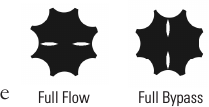
T 5 Flow Control valve is designed with slots to
quickly identify its position. When the slots are in the
horizontal position (in line with the discharge line)
the application is receiving full ow. With the slots are
vertical the valve is in full bypass.
Full Flow Full Bypass