YSM40 Mainte_E.pdf - 第61页
2-3 2 Daily maintenance items How to use the nozzle lubrication tool Usingthenozzlelubricationtool(hereaftercalledthe“tool”)allowsy outoeasilyapplytheturbineoiltothe nozzlebuffingarea. T histoolis…
2-2
2
Daily maintenance items
1
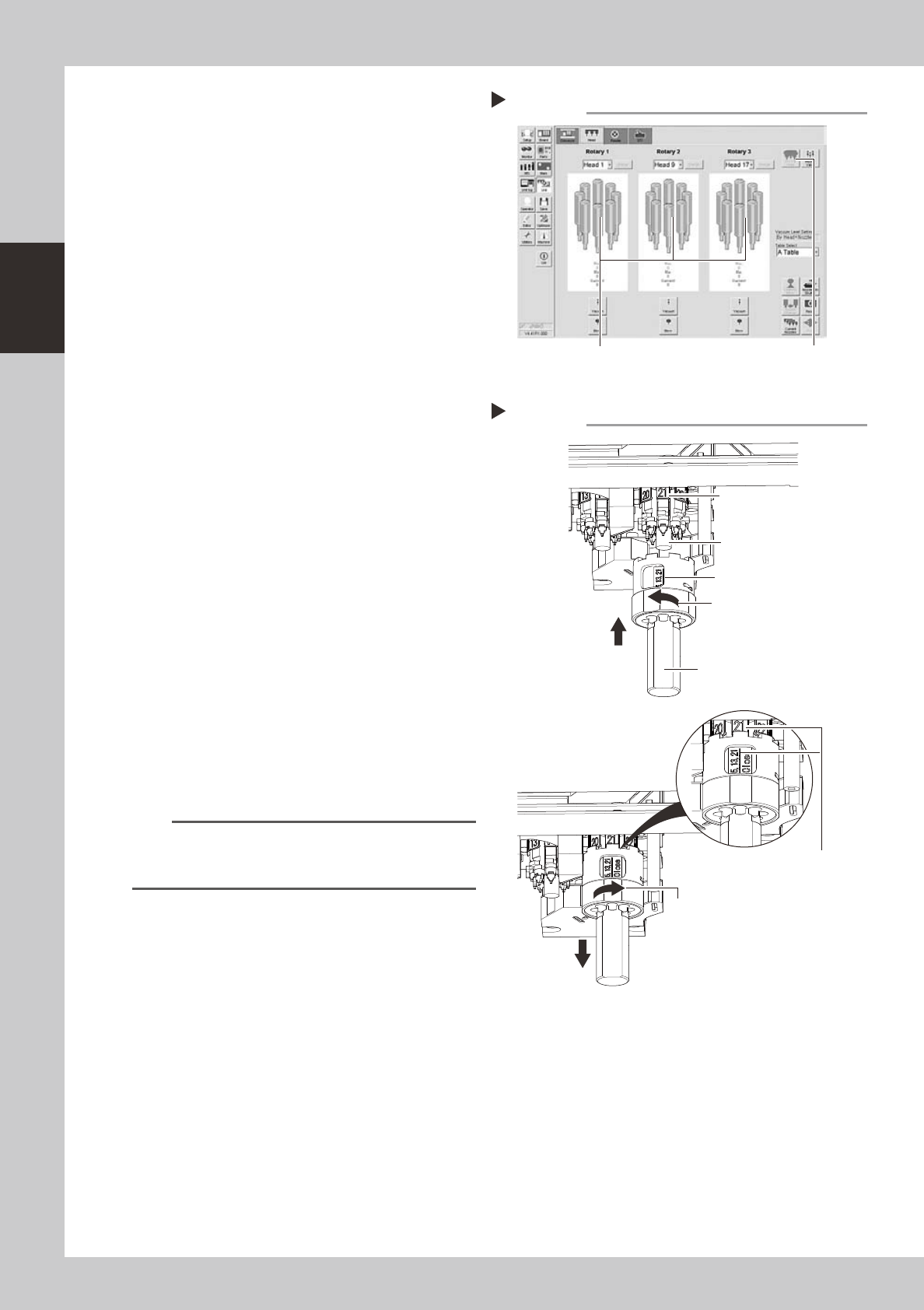
Move the heat to the nozzle attach/
detach position.
Open the [Unit]-[Head] tab and press the [All
First Head] button on the upper right of the
screen to change the first head.
54205-N5-00
e
2
Remove the feeder exchange
carriage.
Press the emergency stop button and then
remove the feeder exchange carriage from
the machine.
3
Remove the nozzles.
1. Move the head to a position where the
nozzles can be removed easily.
2. Open the clamp of the tool.
3. Holding the tool so that the marking
shown in the tool faces the front side,
align the tool with the spring holder and
raise it up against the heads.
4. Make sure the front head matches the
marking No. shown in the tool, close the
clamp of the tool, and pull the tool
down.
53206-N5-00
4
Perform the necessary work.
Perform maintenance of the nozzles and
shafts.
5
Reattach the nozzles.
1. Return the nozzles into the tool by
referring to the table showing the nozzle
set position vs. head No.
2. Reattach the nozzles by reversing the
removal procedure.
n
NOTE
If you are not sure of the nozzle set position, open the
Unit screen, press the [Required Nozzle] button in the
Utility group box, and check the nozzle list.
Removing the nozzles
Step 3
Marking “5, 13, 21”
Nozzle attach/detach tool
Open the clamp.
Close the clamp.
Make sure the front head
matches the marking No.
shown in the tool.
Front head facing you
Spring holder
Changing the first head of each rotary
Step 1
[All First Head] button
Heads H5, H13 and H21 are positioned toward you
(front side of machine).
2-3
2
Daily maintenance items
How to use the nozzle lubrication tool
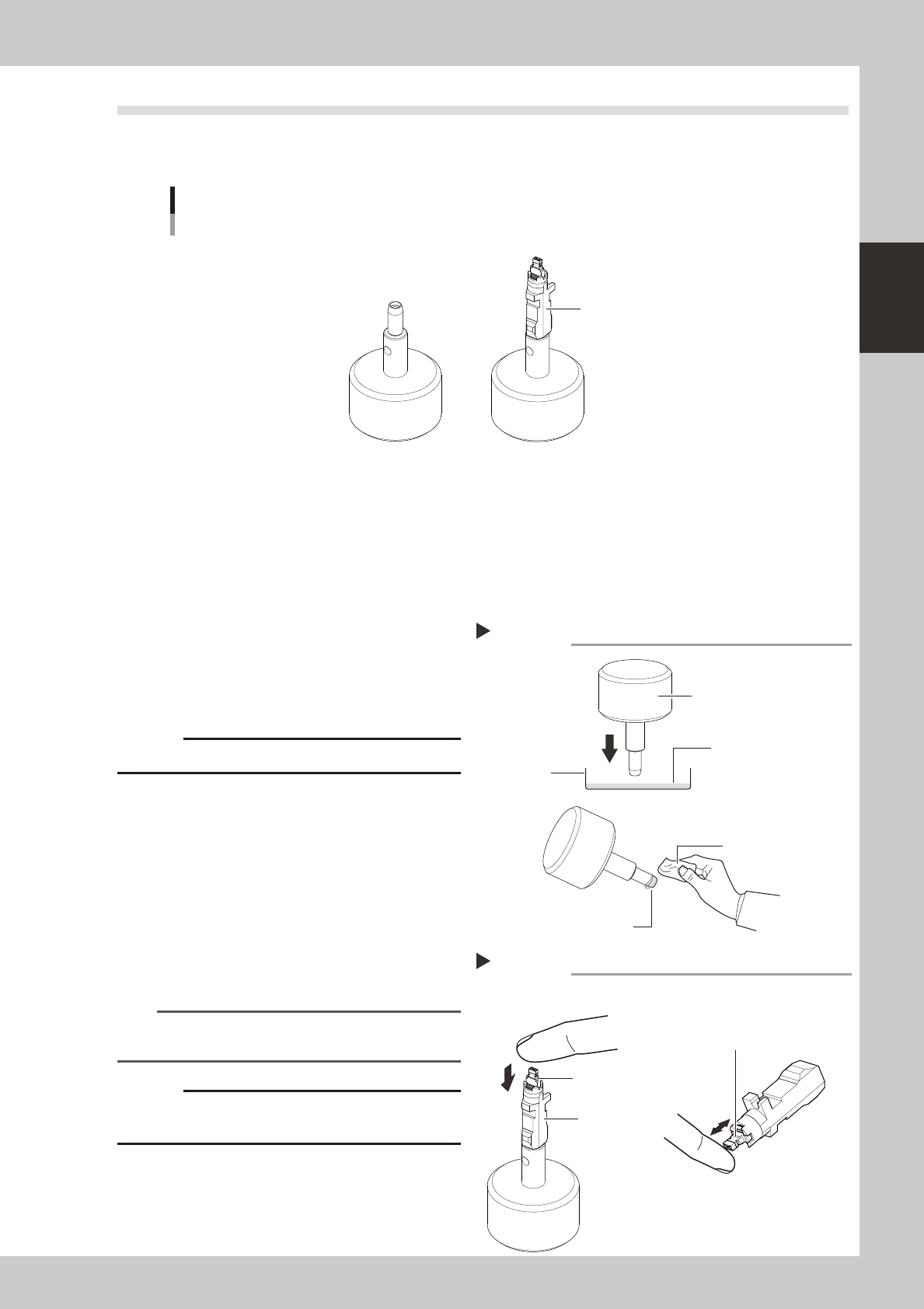
Usingthenozzlelubricationtool(hereaftercalledthe“tool”)allowsyoutoeasilyapplytheturbineoiltothe
nozzlebuffingarea.Thistoolisusefultolubricatethebuffingareaaftercleaningthenozzle.
Nozzle detached status
Nozzle
Nozzle attached status
Nozzle lubrication tool
53208-N5-00
n
relevant nozzles
Usablenozzles: 501A,502A,510A/500A,511A,512A,513A
Unusablenozzles: 503A/514A,506A/517A,30X-and31X-systemnozzlesforYSseries,etc.
1
Put the turbine oil in a tray.
Put the turbine oil (VG32) in an appropriate
tray so that its depth becomes approx. 1mm.
2
Soak the tool tip in the turbine oil.
Soak the tool tip in the turbine oil and wipe
off the excess oil around the tip with a cloth.
c
53209-N5-00
3
Apply the oil to the nozzle.
1. Set the nozzle into the tool and perform
the buffing operation (spring action) of
the nozzle tip only once.
2. Remove the nozzle from the tool and
perform the buffing operation (spring
action) 4 to 5 times to spread the oil.
53210-N5-00
n
NOTE
The oil can be applied to the nozzle buffing area up to
8 times continuously.
c
Perform this work by clean hand so that any oil or dust
does not stick to the nozzle tip.
Tray
Applying the oil to the tool
Step 2
Turbine oil (depth, 1mm)
Wipe off the excess oil.
Nozzle lubrication tool
Lint-free cloth
Applying the oil to the nozzle
Step 3
Nozzle
Nozzle buffing area
(Tip)
Perform the buffing operation
(spring action) 4 to 5 times.
2-4
2
Daily maintenance items
1. Checking the nozzle
Solder sticking to the nozzle tip or a clogged nozzle hole can cause component pickup errors and
recognition errors. Poor nozzle spring action can also cause pickup and mounting errors. To prevent such
problems periodically inspect and clean each nozzle.
1.1 Check with software
n
How to check for a dirty nozzle (with the [Check Nozzle] button)
Theterm"dirtynozzle"asusedhereindicatesshinymaterialsuchassolderadheringtothenozzletip.This
shinyportionmightbemistakenforacomponentandcauserecognitionerrors.Tocheckforthisproblem,
pressthe[CheckNozzles]buttononthe[Setup]screenwhilethenozzletippicksupnocomponents.The
camerafindstheextentofgrimeordirtonthenozzletip.
e
1
Move the head.
Press the emergency stop button and move
the head so the nozzle is at a position where
it can be easily replaced.
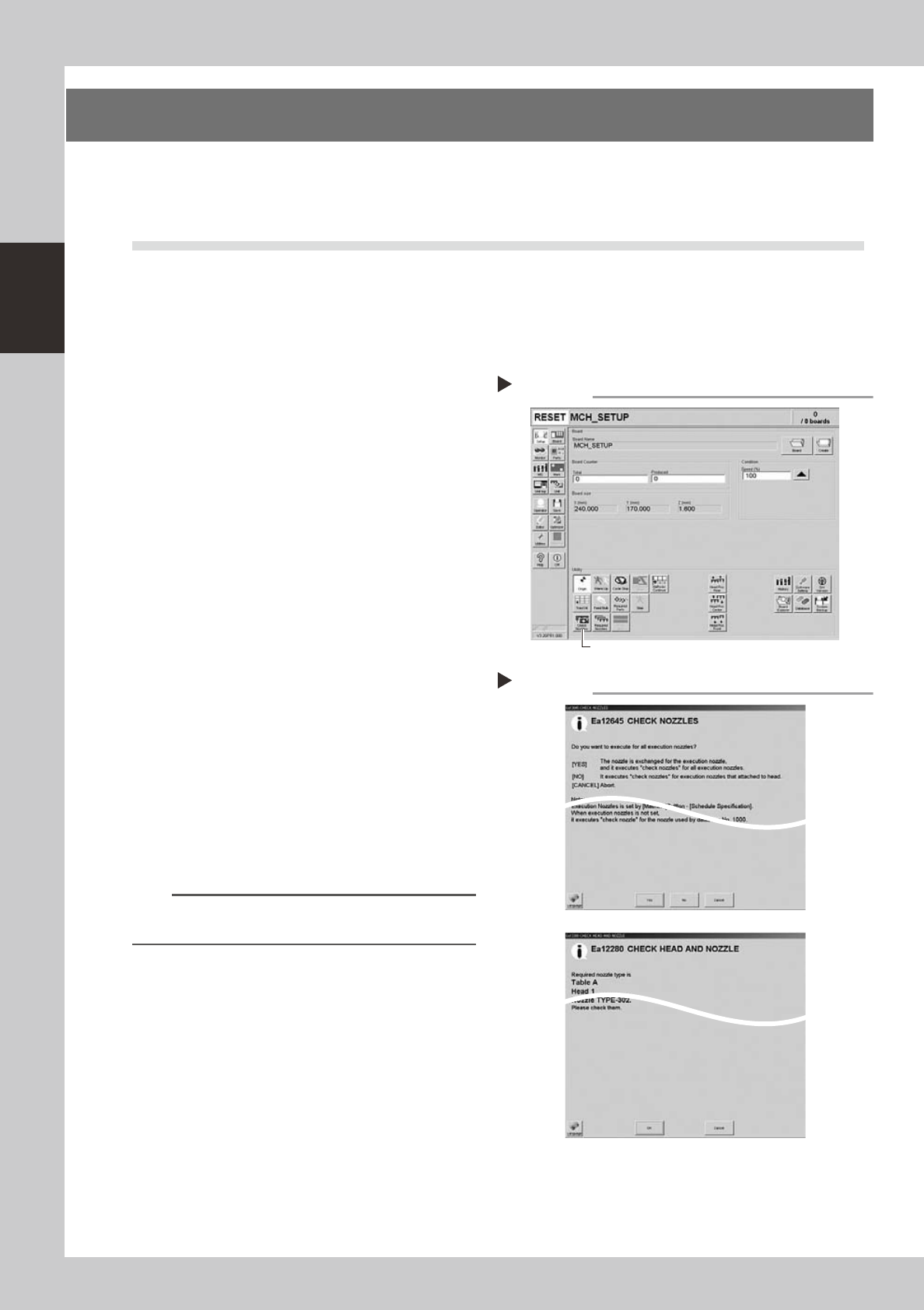
2
Press the [Check Nozzles] button as
follows.
1. Cancel emergency stop.
2. Open the [Setup] screen and press the
[Check Nozzles] button in "Utilities".
54200-N5-00
3
Select the item to be executed.
After checking the displayed message,
select the desired button.
n
When [Yes] was selected
Performsautonozzlechangeandchecksallrelevant
nozzles.
n
When [No] was selected
Checksrelevantnozzlesofallnozzlescurrently
attachedtothehead.
54201-N5-00
4
Check the message.
Clean the nozzle if the check shows it is dirty.
n
NOTE
The "Check Nozzles" function is usually set for "Type 502A
nozzles" before shipment.
Pressing the [Check Nozzles] button
Step 2
[Check Nozzles] button
Selecting the item to be executed
Step 3
When [No] was selected