YSM40 Mainte_E.pdf - 第79页
3-1 1 3 Periodic maintenance items 1.3 Cleaning the multi-camera lighting's protective cover Adhereddust,etc.,onthemulti-cameralighting'sprotecti vecov ercancausecomponentrecognitionerrors. T o p…
3-10
3
Periodic maintenance items
1.2.3 Cleaning the nozzle tip
Tocleanthetipofanozzle,usethe“nozzletipcleaningtape(hereaftercalled“cleaningtape”)thatcomes
suppliedwiththemachine.
n
NOTE
The cleaning tape helps remove dirt or grime from a nozzle, which was not removed with an ultrasonic cleaner (option).
n
How to use
Usetheadhesivesurfaceofthecleaningtapetoremovedirtorgrimeonthetipofeachnozzle.
n
HS head
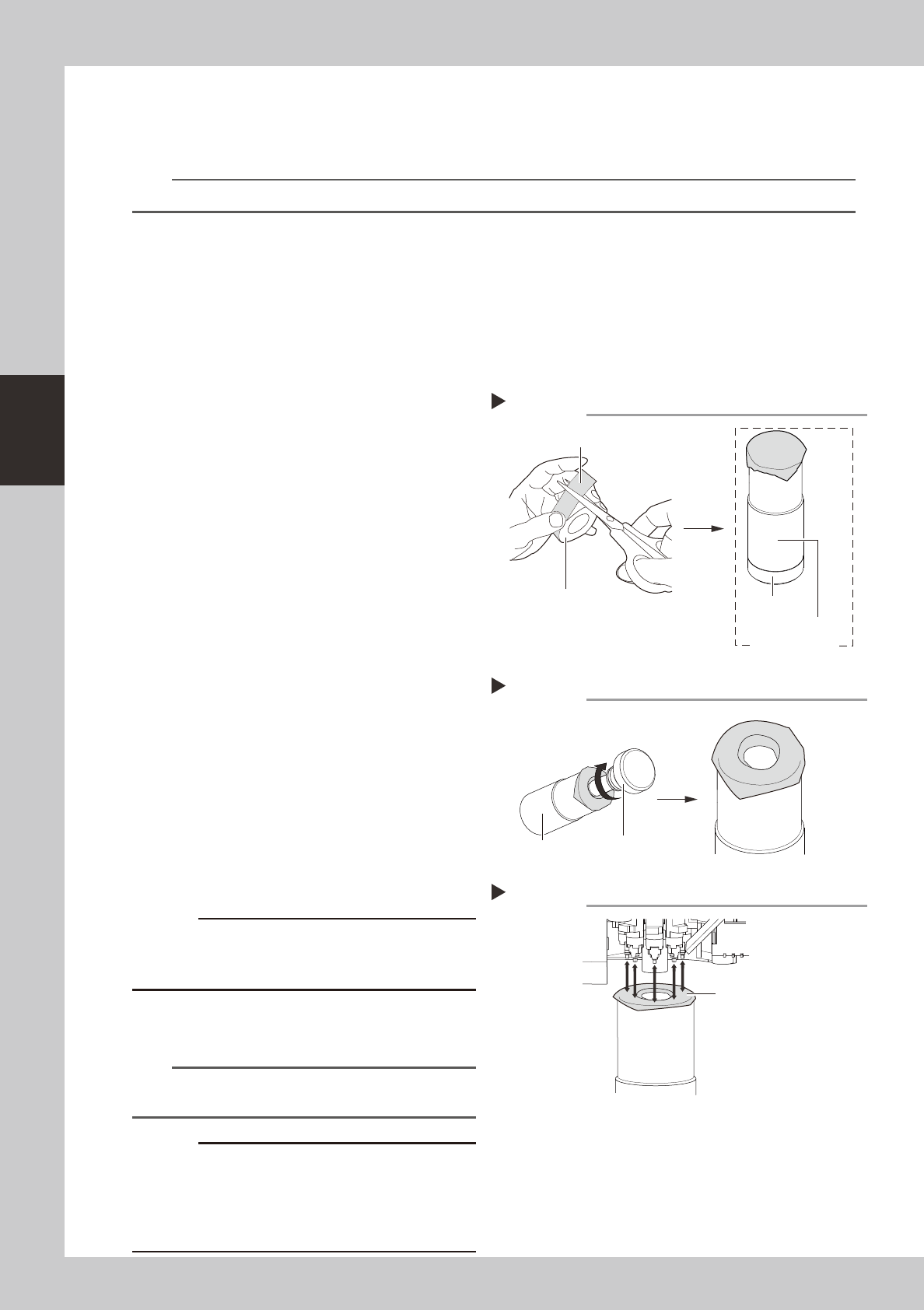
TheoptionalnozzlecleanerforHShead(hereaftercalled“nozzlecleaner”)allowscleaningthetipsof8nozzlesata
timewithoutdetachingthenozzlesfromthemachine.
1
Attach a cleaning tape to the
nozzle cleaner.
1. Cut the cleaning tape into a square.
2. Attach the cleaning tape to the tip of
the nozzle cleaner.
533D1-N5-00
2
Make a hole in the cleaning tape.
1. Pull out the cleaner 2 and make a hole in
the center of the cleaning tape.
2. After making a hole, widen the hole by
pressing the tape against the inner wall
of cleaner 1.
533D2-N5-00
e
3
Remove the feeder exchange carriage.
Press the emergency stop button and then
remove the feeder exchange carriage from
the machine.
4
Move the head to a position where
the nozzles can be cleaned easily.
5
Clean the nozzle tips.
Clean the nozzle tips by pressing the nozzle
cleaner up against the nozzle tips a few
times from below the HS head rotary.
533D3-N5-00
c
cleaning tape to adhere to the nozzle tips.
6
Peel the cleaning tape off the
nozzle tips.
n
NOTE
We recommend replacing the cleaning tape for every
4 tables.
c
cleaner if the cleaning tape is left attached to the
nozzle cleaner. When storing the nozzle cleaner after
tape off the nozzle cleaner.
Attaching a cleaning tape
Cleaning tape
Step 1
Cut into a square.
Nozzle cleaner
Cleaner 2
Cleaner 1
Making a hole in the cleaning tape
Step 2
Cleaner 2
Cleaner 1
Cleaning the nozzle tips
Step 5
Tape surface
3-11
3
Periodic maintenance items
1.3 Cleaning the multi-camera lighting's protective cover
Adhereddust,etc.,onthemulti-cameralighting'sprotectivecovercancausecomponentrecognitionerrors.To
preventthis,inspectandcleanthecoverinaperiodicmanner.
e
Toensuresafety,makesurethatthemachinepowerswitchisoffortheemergencystopbuttonispressed
beforestartingwork.
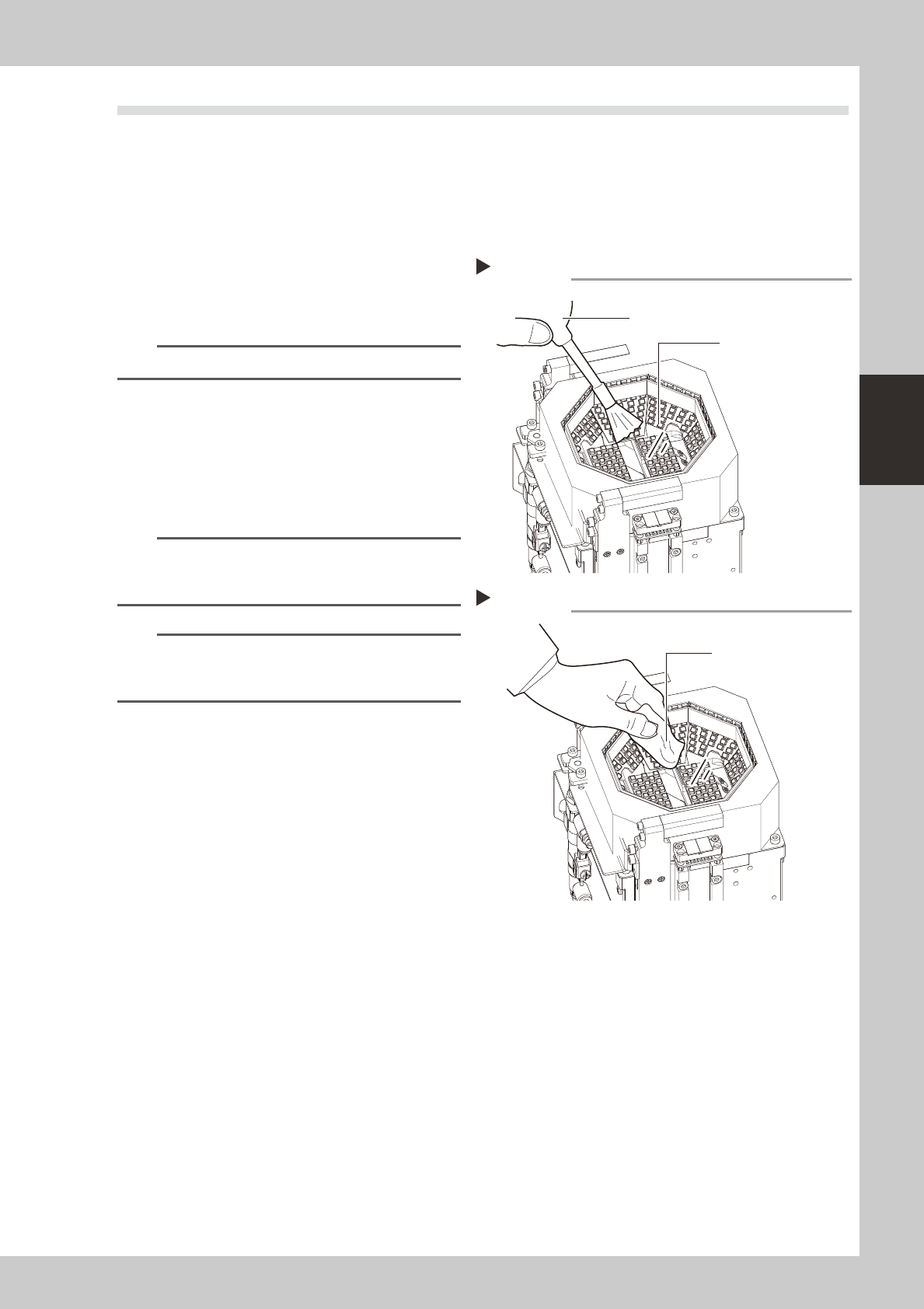
1
Use an optical brush to remove any
dust from the lighting's protective
cover.
53205-N5-00
TIP
A lens blower brush is available as an option.
2
Wipe the lighting's protective cover
with a cloth.
Wipe the lighting's protective cover with a
cloth which has been dampened with a
small amount of lens cleaner.
53206-N5-00
n
NOTE
Use a lint-free cleaning cloth or paper wiper.
A lens cleaner is supplied with the machine. Do not use
other type of cleaner.
n
NOTE
If the above actions fail to properly clean the
protective cover, perform the procedure described in
section 4.1 "Cleaning the camera lighting unit".
Blowing off dust with blower brush
Step 1
Protective cover (glass)
Lens blower brush
Wiping the transparent cover
Step 2
Lent-free cleaning cloth
or paper wiper
3-12
3
Periodic maintenance items
2. Monthly inspection
This section describes the procedures for inspecting, cleaning, and lubricating the X-axis ball screw, guide,
and linear scale, and the Y-axis guide and linear scale. The inspection items and cautions are given below.
n
Inspection items
1. Any foreign matter adhering to the ball screws and linear guides?
CheckifanyfallenchipshaveadheredtotheXandYaxisballscrewsand/orX,YandWaxislinearguides.
2. Do the ball screws and linear guides have the correct amount of grease?
Checkifgreasehasflowedofforsplatteredintheairfailingtoadhere.Alsocheckifgreasehasdiscoloredorhardened.
e
3. Any abnormal sounds from the ball screws?
Presstheemergencystopbutton.ThencheckforanyabnormalsoundswhilepressingtheX-axisbyhand.
Countermeasures
1.Ballscrewsandlinearguidesmaybedamagedwhenchipsandothermaterialbiteintothem.Ifchipsareadhering,
wipethemoffalongwiththegreaseorremovewithtweezers,etc.
2.Applygreasewhilereferring“Cleaningandlubrication”describedlateron.
3.ConsultyourYAMAHAsalesofficeorrepresentativewhenabnormalsoundsoccurevenaftertryingthe
countermeasuresintheabovesteps1and2.
n
Cautions
w
WARNING
c
the warranty.
c
c
grease" in Chapter 1.