Nordson_EFD_OptiSure_Operating_Manual.pdf - 第20页
OptiSure Automated Optical Inspection 20 www.nordsonefd.com info@nordsonefd.com +1-401-431-7000 Sales and service of Nordson EFD dispensing systems are available worldwide. # Click Step Reference Image 8 • Select the ALL…
OptiSure Automated Optical Inspection
19www.nordsonefd.com info@nordsonefd.com +1-401-431-7000 Sales and service of Nordson EFD dispensing systems are available worldwide.
# Click Step Reference Image
4
> >
>
>
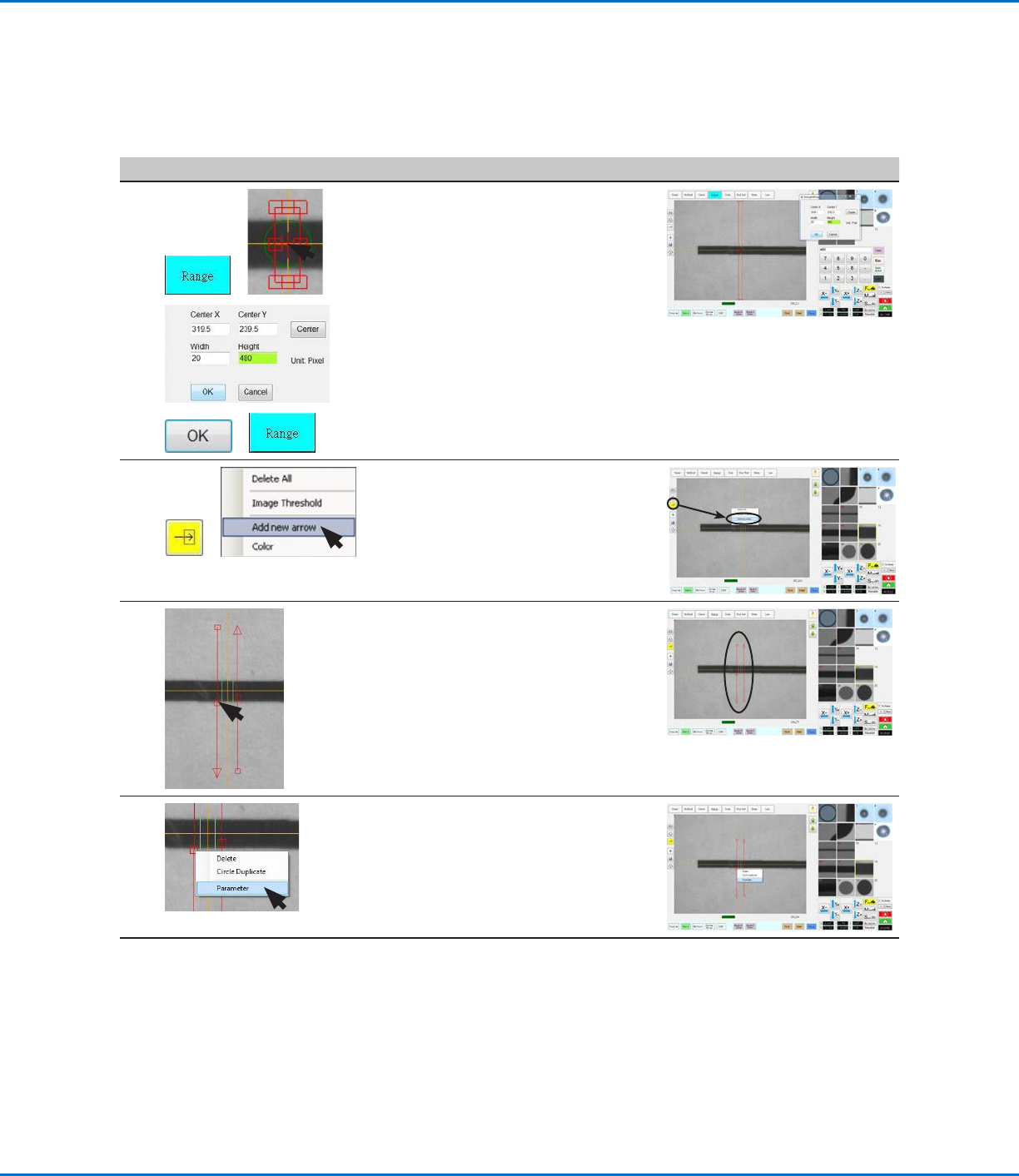
• Click RANGE to set where the
system searches for the mark.
• Double-click on the crosshairs in the
center of the mark and enter Width
and Height values (20 and 480 in this
example).
NOTE: The Width value must be
the same as the Width specified in
step2 on page18.
• Click OK.
• Click RANGE again to save.
5
>
• Click the ARROW icon.
• In the Primary View screen, right-
click and select ADD NEW ARROW.
The system adds an arrow to the
screen.
6
3.
4.
5.
• Repeat step 5 to add another
arrow, and then use the mouse to
manipulate the arrows so they form
an array, as shown.
- To move the entire arrow, click
and drag the middle box (item4).
- To elongate or shorten the arrow,
click and drag the arrow (item5)
or the end box (item3).
7 • Right-click on the middle box of an
arrow and then select PARAMETER.
The AOI Arrow window opens.
Continued on next page
Gravity Point Example (continued)
To Create a Gravity Point Mark Image (continued)
Using the Arrow Types (continued)
OptiSure Automated Optical Inspection
20 www.nordsonefd.com info@nordsonefd.com +1-401-431-7000 Sales and service of Nordson EFD dispensing systems are available worldwide.
# Click Step Reference Image
8
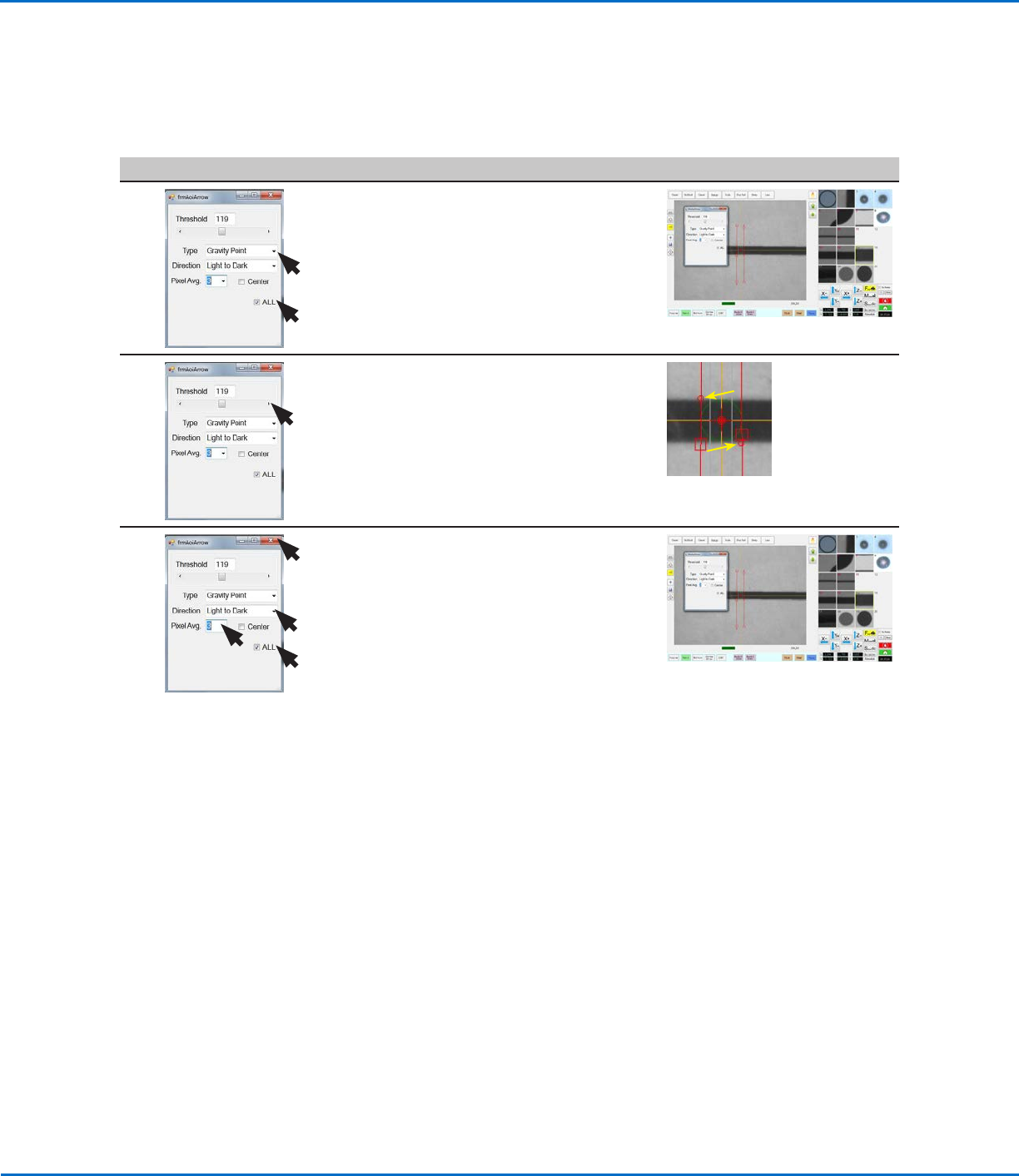
• Select the ALL checkbox (because
two arrows are used).
• For Type, select GRAVITY POINT.
9 • Adjust THRESHOLD until the
two small red circles (item 6) are
positioned on the top and bottom
edges of the line.
6.
6.
10 • Select LIGHT TO DARK.
• Adjust PIXEL AVG to make the mark
image easier for the system to find.
NOTE: Select CENTER if you want
to center the image based on the
image in the mark library.
• Close the dialog box to save the
settings.
The saved mark image now contains
additional data that will allow the
system to accurately find it upon
reaching its corresponding Fiducial
Mark command in a program.
• Continue to “To Use a Gravity
Point Mark Image in a Program” on
page21 to use the Gravity Point
mark image.
Using the Arrow Types (continued)
Gravity Point Example (continued)
To Create a Gravity Point Mark Image (continued)
OptiSure Automated Optical Inspection
21www.nordsonefd.com info@nordsonefd.com +1-401-431-7000 Sales and service of Nordson EFD dispensing systems are available worldwide.
To Use a Gravity Point Mark Image in a Program
# Click Step Reference Image
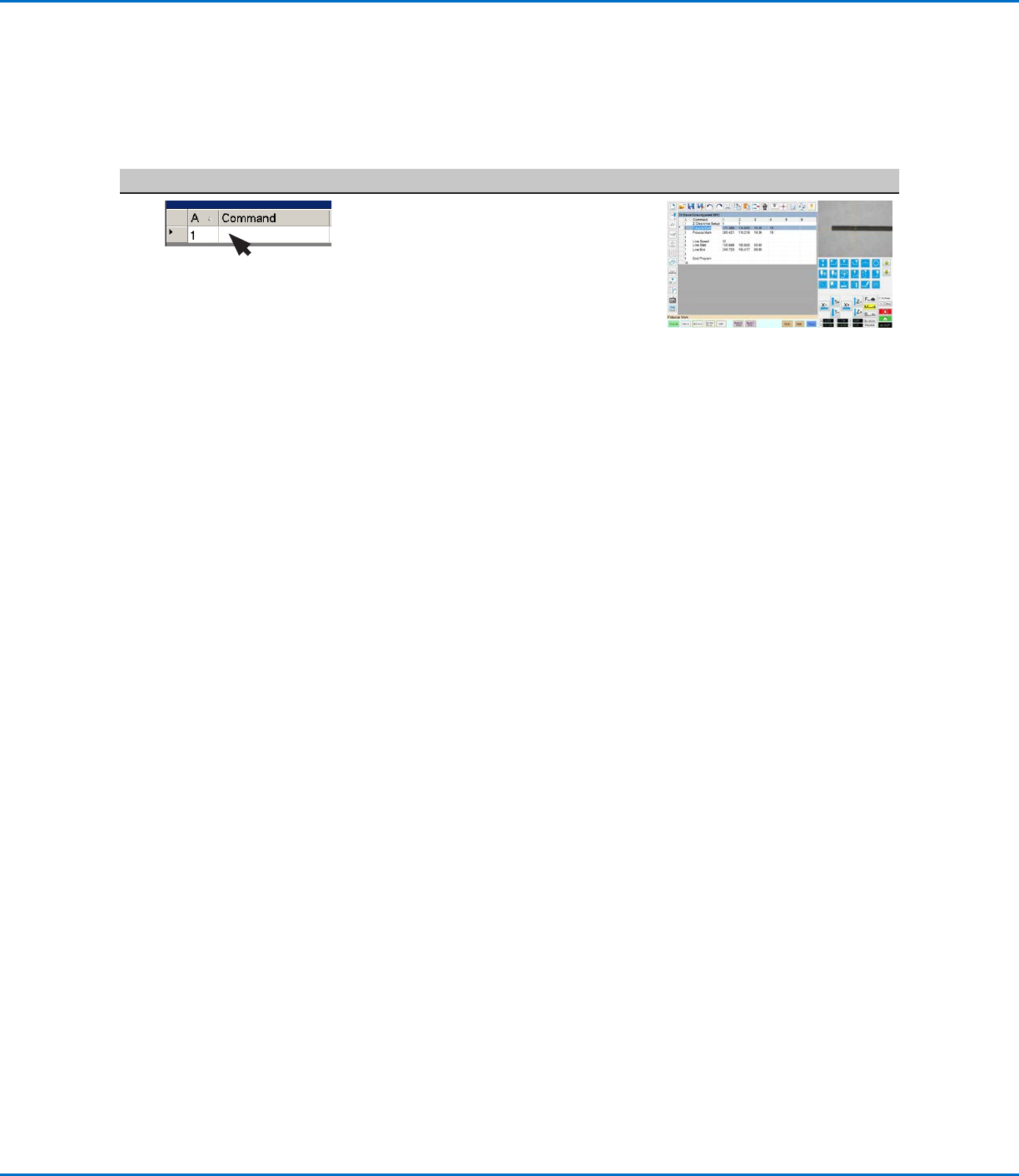
• In the dispense program, insert one
Fiducial Mark command near the
beginning of the thicker line and one
Fiducial Mark command near the
end of the thicker line, specifying
in each the Mark No. of the Gravity
Point mark you created in the
previous procedure.
• Insert a Line Speed command and set the value at 30.
NOTE: This setting might need to be adjusted depending on thickness
of the line.
• Enter Line Start and Line End commands for the thicker line.
• Insert one Fiducial Mark command near the beginning of the thinner
line and one Fiducial Mark command near the end of the thinner line,
specifying Mark No. of the Gravity Point Mark you created in the
previous procedure.
NOTE: These Fiducial Mark commands can specify the same Mark No.
because both lines are similar in composition.
• Insert a Line Speed command that is double the previous line speed, so
that less fluid is dispensed.
NOTE: This setting might need to be adjusted depending on the
thickness of the line.
• Insert Line Start and Line End commands for the thinner line.
When the system dispenses on any line with fiducial offsets, it will align
the dispense in the middle of the line, regardless of the thickness or
thinness of the line.
NOTE: The complete example program is provided on the next page.
Using the Arrow Types (continued)
Gravity Point Example (continued)