Nordson_EFD_OptiSure_Operating_Manual.pdf - 第76页
For Nordson EFD sales and service in over 40 countries, contact Nordson EFD or go to www.nordsonefd.com. Global 800-556-3484; +1-401-431-7000 info@nordsonefd.com Europe 00800 7001 7001 infoefd.europe@nordsonefd.com Asia …
OptiSure Automated Optical Inspection
74 www.nordsonefd.com info@nordsonefd.com +1-401-431-7000 Sales and service of Nordson EFD dispensing systems are available worldwide.
AppendixA, Command Function Reference
(continued)
Laser Program
Click Function
Double-click
address and
select from drop-
down menu
Specifies the laser measurement settings program to use when the laser is measuring and recording a fluid
or workpiece profile. Laser programs are edited in the CL-NavigatorN software. Program numbers 1–3
contain the following default, pre-programmed laser programs:
• 1. Displacement (Non-Transparent)
• 2. Displacement (Transparent)
• 3. Thickness (Transparent)
Program numbers 0 and 4–7 are programmed by the user.
NOTES:
• This command applies to PROPlus/L and PRO/L systems only.
• Laser programs 1–3 can be user-edited via the CL-NavigatorN software.
• Refer to “To Measure and Record the Profile of a Fluid or a Workpiece” on page63 for an example of
how to use this command in a program.
• The Laser Profile command starts and stops laser measurement. Refer to “Laser Profile” on page73 for
details.
Parameter Description
0-7 Sets the CL-NavigatorN laser program to use when laser measurement and recording is
turned on.
Measure Width
Click Function
Double-click
address and
select from drop-
down menu
Used in tandem with the Mea. Width option of the OptiSureAOI feature, this command causes the system
to measure the width of a dispensed line, as identified by its Side number, against the Max Width and Min
Width values specified in the Auto Speed Setup command.
NOTE: This command is present in the drop-down menu only when the main.bas file has been added to the
D:\ever_sr directory. The main.bas file is required for the dispense width adjustment feature.
Parameter Description
Side A number assigned to the dispensed line to measure (refer to “Auto Speed” on page72
for a diagram that explains this parameter).
Pattern No The mark image number that defines the maximum and minimum allowable widths for a
line.
Move To
Click Function
Double-click
address and
select from drop-
down menu
Moves the tip to the specified XYZ coordinates.
NOTE: This command is present in the drop-down menu only when the main.bas file has been added to the
D:\ever_sr directory. The main.bas file is required for the dispense width adjustment feature.
Parameter Description
x The X coordinate you want to move the tip to.
y The Y coordinate you want to move the tip to.
z The Z coordinate you want to move the tip to.
OptiSure Automated Optical Inspection
75www.nordsonefd.com info@nordsonefd.com +1-401-431-7000 Sales and service of Nordson EFD dispensing systems are available worldwide.
Positional Checking
Click Function
Double-click
address and
select from drop-
down menu
Used in tandem with the Step & Repeat Block command to cause the camera to evaluate the dispensed
dots on an array against user-specified X and Y offsets: If a dispensed dot fits within the specified offsets, it
passes; if not, it fails. If Save Image under System Setup > Other is checked, the system also takes screen
captures of all dispensed dots and saves the image files in the D:\ AOIIMAGE directory. Each image file
includes details about the dispensed dot, including diameter and XY offset values.
Refer to “Positional Checking Example” on page27 for an example of how to use this command in a
program.
Parameter Description
0 Off, 1 On Turns Positional Checking OFF or ON.
Offset X In the X direction, the maximum allowable deviation of an inner dot from the larger
circle.
Offset Y In the Y direction, the maximum allowable deviation of an inner dot from the larger
circle.
Step & Repeat Block
Click Function
Double-click
address and
select from drop-
down menu
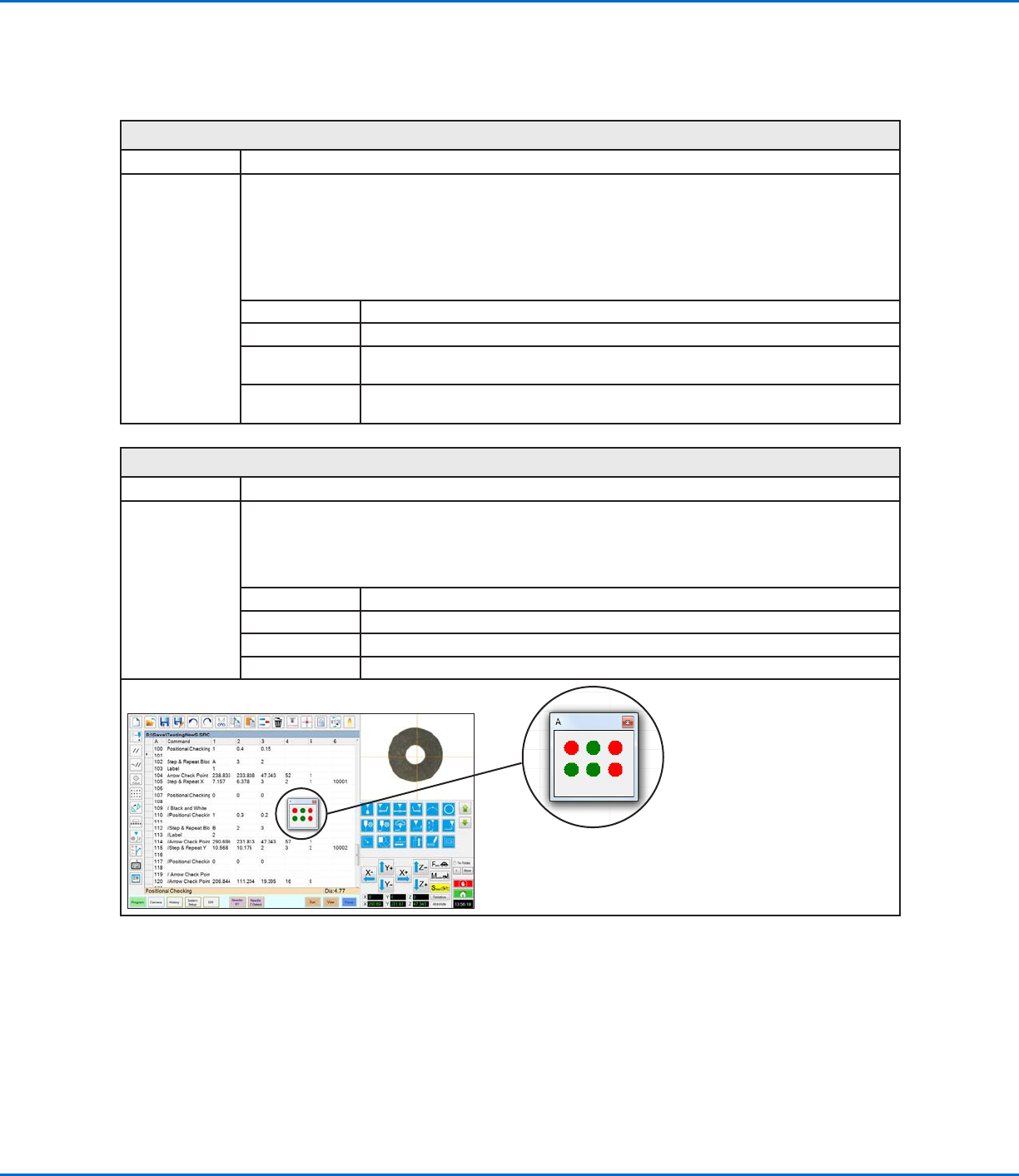
Used in tandem with the Positional Checking command to allow the camera to evaluate the dispensed dots
on an array against user-specified X and Y offsets. When a Positional Checking program runs, the Step &
Repeat Block command causes a window to open to show the status of each dot as a green (pass) or red
(fail) dot. Refer to “Positional Checking Example” on page27 for an example of how to use this command
in a program.
Parameter Description
Title A user-specified title for the window, with a maximum of 42 characters visible.
Columns (x) The number of columns in the X direction.
Rows (y) The number of rows in the Y direction.
Status window that opens during a
Positional Checking program; the
window title is user-specified (it is
titled “A” in this example)
AppendixA, Command Function Reference
(continued)
For Nordson EFD sales and service in over
40 countries, contact Nordson EFD or go to
www.nordsonefd.com.
Global
800-556-3484; +1-401-431-7000
info@nordsonefd.com
Europe
00800 7001 7001
infoefd.europe@nordsonefd.com
Asia
China: +86 (21) 3866 9006; china@nordsonefd.com
India: +91 80 4021 3600; india@nordsonefd.com
Japan: +81 03 5762 2760; japan@nordsonefd.com
Korea: +82-31-736-8321; korea@nordsonefd.com
SEAsia: +65 6796 9522; sin-mal@nordsonefd.com
The Wave Design is a trademark of Nordson Corporation.
©2021 Nordson Corporation 7365071 v051121
NORDSON EFD ONE YEAR LIMITED WARRANTY
This NordsonEFD product is warranted for one year from the date of purchase to be free
from defects in material and workmanship (but not against damage caused by misuse,
abrasion, corrosion, negligence, accident, faulty installation, or by dispensing material
incompatible with equipment) when the equipment is installed and operated in accordance
with factory recommendations and instructions.
NordsonEFD will repair or replace free of charge any defective part upon authorized return
of the part prepaid to our factory during the warranty period. The only exceptions are those
parts which normally wear and must be replaced routinely, such as, but not limited to, valve
diaphragms, seals, valve heads, needles, and nozzles.
In no event shall any liability or obligation of NordsonEFD arising from this warranty exceed
the purchase price of the equipment.
Before operation, the user shall determine the suitability of this product for its intended use,
and the user assumes all risk and liability whatsoever in connection therewith. NordsonEFD
makes no warranty of merchantability or fitness for a particular purpose. In no event shall
NordsonEFD be liable for incidental or consequential damages.
This warranty is valid only when oil-free, clean, dry, filtered air is used, where applicable.