00193872_Install_WinXP_manual.pdf - 第20页
Installation Manual for Windows XP (manual setup) Edition 04/2006 2.2.4 Information regarding the installation process • It is not necessary to install the SP 1 beforeh and because it is already included in the SP 2. • T…

Installation Manual for Windows XP (manual setup) Edition 04/2006
2.2.3 Requirements for the installation
The following aspects are to be ensured prior to the subsequent installation of Service Pack 2 and/or
must be clarified in advance.
• If Siemens SMD Service installs Service Pack 2, this must be coordinated with the customer’s
administrator, who is responsible for the SIPLACE Pro computer and the customer network. You
require administrative rights for the integration and the specifications of the administrator for the
subsequent configuration.
• You need the original Microsoft download version Windows XP Professional Service Pack 2
for IT Professionals and Developers on SIPLACE Pro computer in the domain.
Warning:
If Service Pack 2 has to be installed on a SIPLACE computer in a workgroup, please
use the Update CD from the retrofit kit
Update (unattended) WIN XP SP2, Item no.: 00376942-0x.
The installation routine on this CD is adapted for the SIPLACE software systems in the
workgroup.
• No SW / HW products that are not compatible with Service Pack 2 are to be installed on the
computer. For pertinent information, go to Microsoft
http://support.microsoft.com/default.aspx?kbid=884130
and consult relevant manufacturer information.
• 1 GB of space must be available on the hard disk.
19 / 37

Installation Manual for Windows XP (manual setup) Edition 04/2006
2.2.4 Information regarding the installation process
• It is not necessary to install the SP 1 beforehand because it is already included in the SP 2.
• The pure installation of Service Pack 2 takes approximately 45 minutes per SIPLACE computer.
• The firewall is active once the SP 2 has been installed manually.
• After the installation the settings are to be made on the basis of the following current manual:
”Integration to the customer domain”, Item no. 00193761.xx
• The time required to make the settings (see above named document) may vary, depending on
the SIPLACE applications that are installed.
Note:
For information regarding compatibility of SIPLACE applications (DCOM
applications) consult the current Technical Information “Compatibility to Windows
XP SP2" that you can find in the SIPLACE Document Management System (DMS).
2.2.5 Preparatory steps
→ Make certain that all requirements (see Requirements for the installation) are kept.
→ Back up all the data (databases, user data) via the network to another computer (on which no
Service Pack 2 is being installed) or to a USB hard disk.
20 / 37
Installation Manual for Windows XP (manual setup) Edition 04/2006
2.2.6 Installation process for Service Pack 2
→ Log yourself in as the administrator.
→ Download "Service Pack 2 for IT Professionals and Developers" or insert a preparatory CD with the
download.
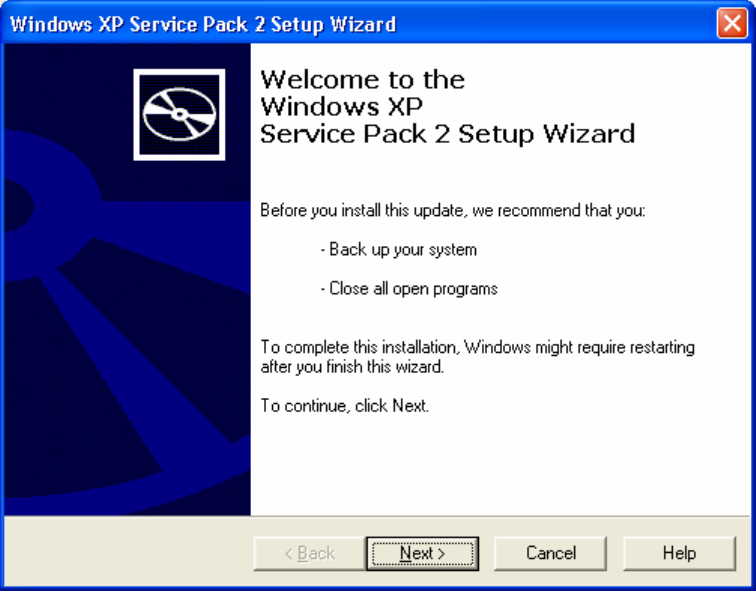
The “Welcome“ screen will appear.
Fig. 2-22: “Welcome” screen
→ Press the Next> button. The following dialog appears:
21 / 37