00193872_Install_WinXP_manual.pdf - 第37页
Siemens AG 2006 All ri g hts reserved Sub j ect to chan g e without p rior notice Item-No.: 00193872-05 To be ordered from: Siemens AG Siemens AG, Automation and Drives Electronic Assembly Systems Rupert-Mayer-Strasse 44…
Installation Manual for Windows XP (manual setup) Edition 04/2006
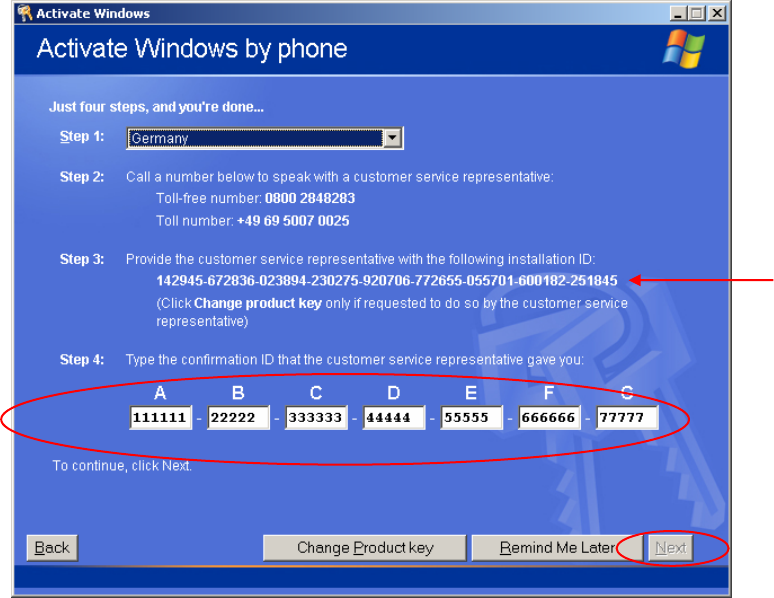
The program will generate a new installation ID. This will be displayed in step 3.
Fig. 2-41: Windows XP: Activate Windows by phone
→ Now you have to call Microsoft and give the operator the installation ID.
→ Enter the Confirmation ID into the text field under step 4.
When you have entered all necessary information and the program could validate the information, the
NEXT button will be enabled.
→ Select the button Next.
35 / 37
Installation Manual for Windows XP (manual setup) Edition 04/2006
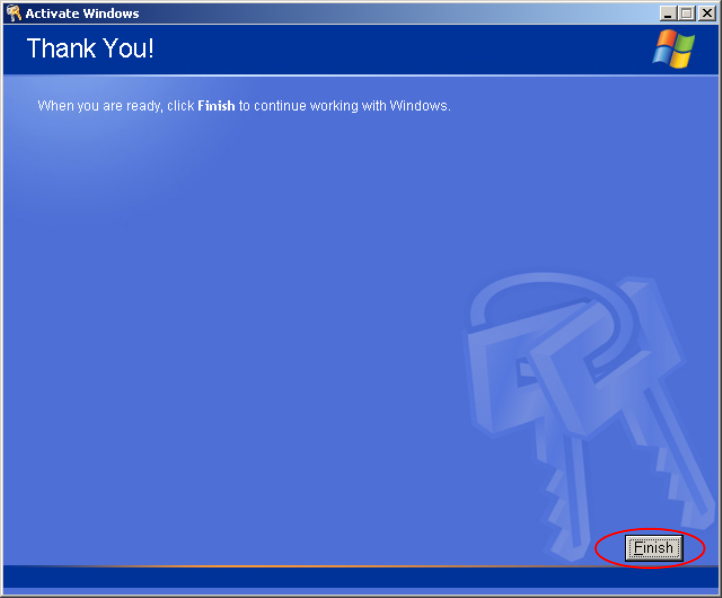
After a successful activation the following dialog appears.
Fig. 2-42: Windows XP: Activate Windows by phone
→ Select the button Finish
36 / 37

Siemens AG 2006 All ri
g
hts reserved Sub
j
ect to chan
g
e without
p
rior notice
Item-No.: 00193872-05
To be ordered from: Siemens AG
Siemens AG, Automation and Drives
Electronic Assembly Systems
Rupert-Mayer-Strasse 44
D-81359 Munich / Germany
Printed in the Federal Re
p
ublic of German
y