YG100R_Mainte_E.pdf - 第31页
2-1 2 Daily maintenance items 1 . C h e c k i n g t h e n o z z l e S o l d e r s t i c k i n g t o t h e n o z z l e t i p o r a c l o g g e d n o z z l e h o l e c a n c a u s e c o m p o n e n t p i c k u p e r r o r …

2-1
2
Daily maintenance items
1. Checking the nozzle
Solder sticking to the nozzle tip or a clogged nozzle hole can cause component pickup errors and
recognition errors. Poor nozzle spring action can also cause pickup and mounting errors. To prevent such
problems periodically inspect and clean each nozzle.
1.1 Check with software
n
How to check for a dirty nozzle (with the [Check Nozzle] button)
The term "dirty nozzle" as used here indicates shiny material such as solder adhering to the nozzle tip. This
shiny portion might be mistaken for a component and cause recognition errors. To check for this problem, press
the [Check Nozzles] button on the [Setup] screen while the nozzle tip picks up no components. The multi-
vision camera finds the extent of grime or dirt on the nozzle tip.
e
1
Move the head.
Press the emergency stop button and move
the head so the nozzle is at a position where
it can be easily replaced.
2
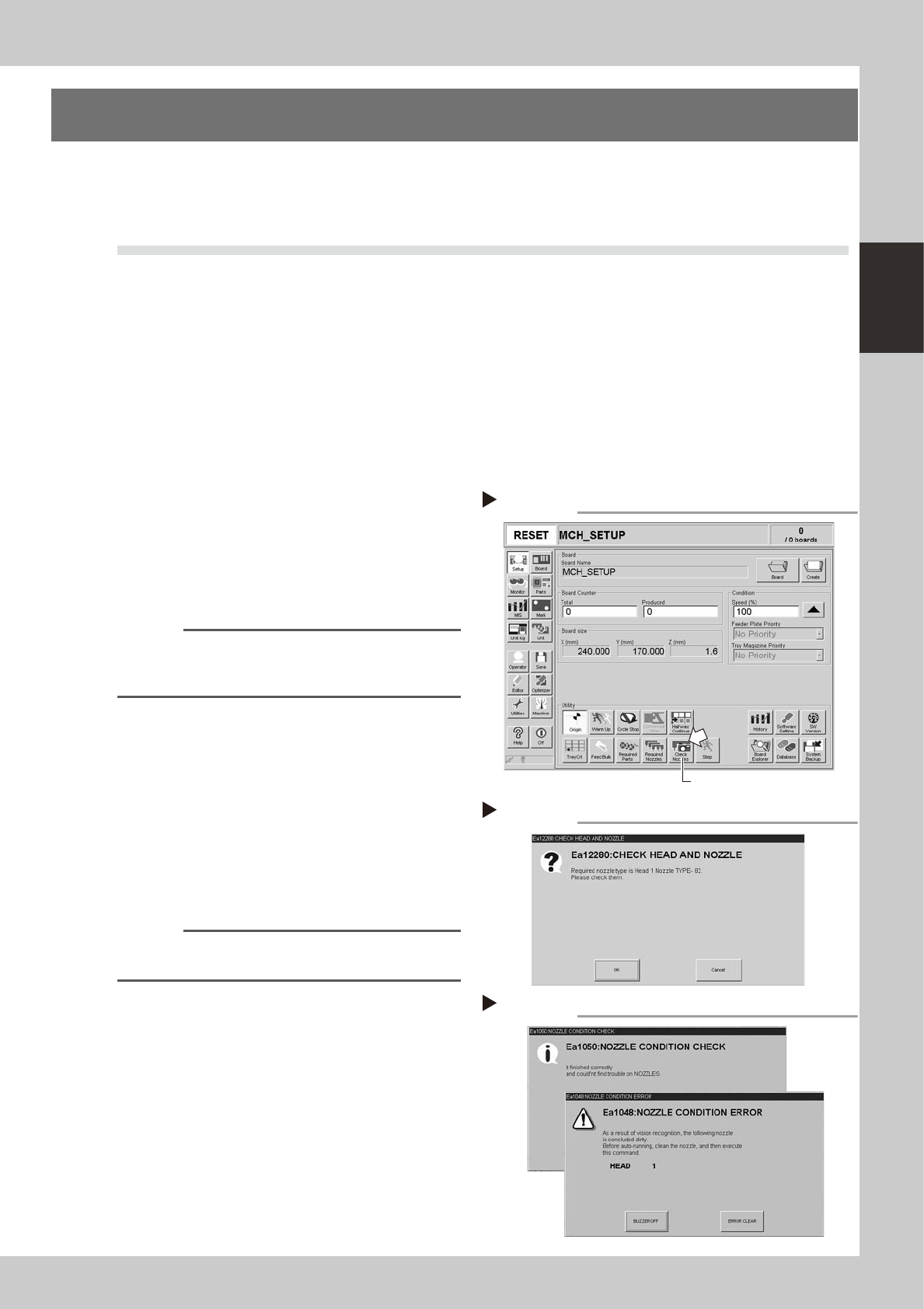
Press the [Check Nozzles] button as
follows.
1. Cancel emergency stop.
2. Open the [Setup] screen and press the
[Check Nozzles] button in "Utilities".
54201-F9-00
n
NOTE
The machine equipped with a the nozzle station will
automatically change the nozzle and run a check, so
step 3 listed next is not required.
3
Change the nozzle.
Press the [OK] button for nozzle change
while following the message on the screen.
Nozzle change begins after pressing the last
[OK] button.
54202-F9-00
4
Check the message.
Clean the nozzle if the check shows it is dirty.
54203-F9-00
n
NOTE
The "Check Nozzles" function is usually set for "Type 212A
nozzles" before shipment.
Pressing[Check nozzles] button
Step 2
[Check nozzles] button
Message for checking head and nozzle
Step 3
Nozzle check results
Step 4
OK
NG
2-2
2
Daily maintenance items
n
How to check for clogged nozzles (on the [Unit]-[Head] tab screen)
The term "clogged nozzle" used here indicates that material such as solder is adhering to the nozzle hole,
causing a rise in negative pressure even if no component is being picked up by the nozzle. This state might
cause problems such as component mounting errors. Check for clogged nozzles using the following procedure.
e
1
Attach the nozzle.
Press the emergency stop button and attach
Type 212A and 212F nozzles to all heads.
When the machine has a nozzle station,
press the [Nozzle Change] button to change
the nozzles.
54204-F9-00
2
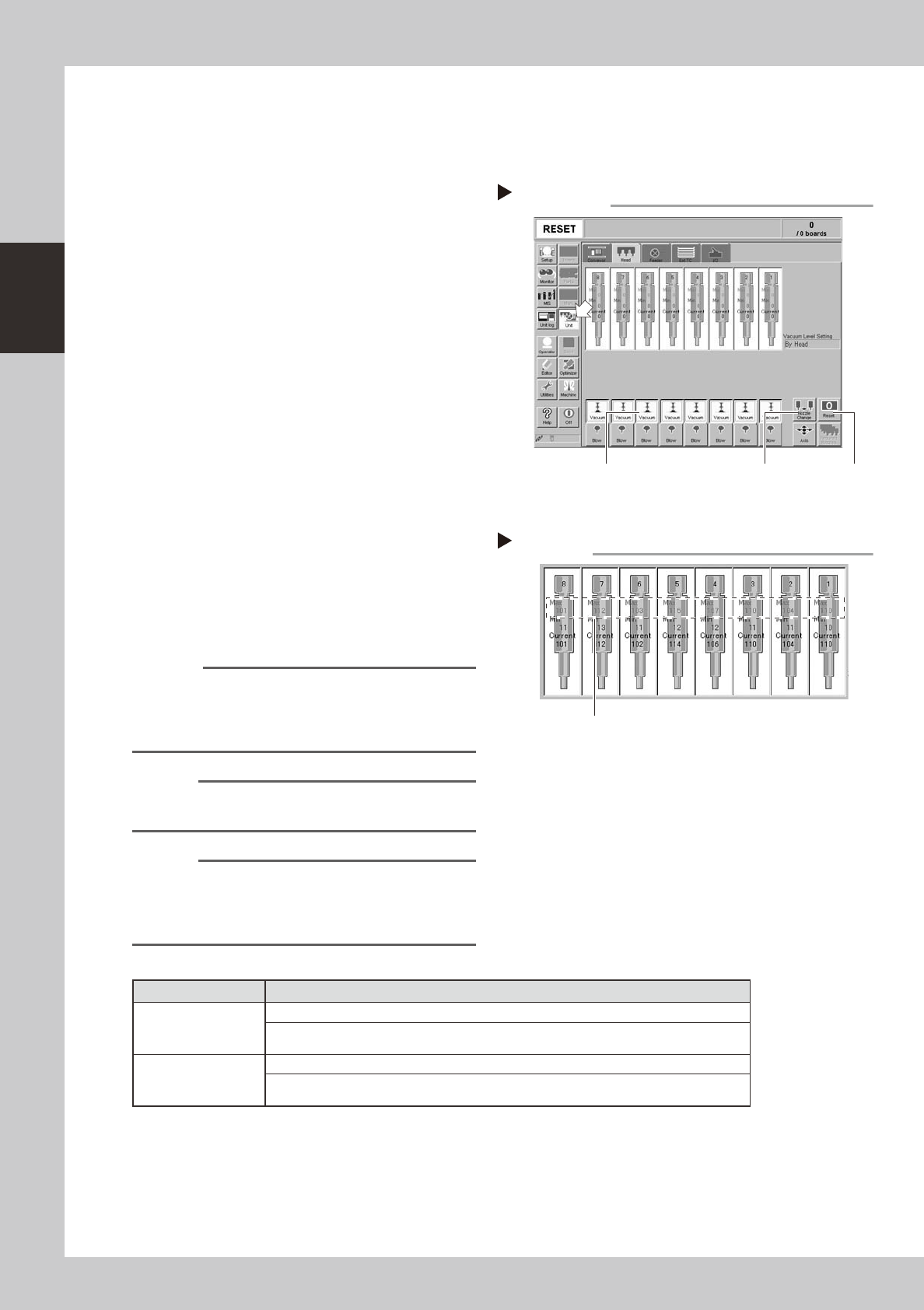
Reset the numerical figure.
Open the [Unit] - [Head] tab screen. Then
press the [Reset] button on the lower right of
the screen to reset the pickup level values.
3
Generate negative pressure.
On the [Unit] - [Head] tab screen, and set
the [Vacuum] buttons for all heads to ON.
When this value starts rising, wait 5 to 10
seconds and set to OFF.
4
Check the vacuum levels.
Read the "Max" value shown in red on the
[Head] tab screen. If this value is 130 or less
then it is in normal range. If higher than 130,
then the nozzle hole might be dirty and
probably needs cleaning.
54205-F9-00
Reference
The above-mentioned value "130" is a general guide for
nozzle maintenance and the actual value to use may
differ slightly depending on operating conditions. Use
this "130" value for reference.
n
NOTE
The above example is for Type 212A, 212F nozzles so the
values shown will be different for other types of nozzles.
n
NOTE
If a correct value cannot be obtained after cleaning
even after performing steps 1 to 4, then the interior of
the spline shaft might be dirty. To check it, refer to the
table on the right.
n
Vacuum level in spline shaft air path
Nozzle Typical criteria
Type 213F nozzle
If the "Max" value is less than 100 while the nozzle is open, the vacuum level is normal.
If the "Max" value is more than 190 while the nozzle is sealed, the vacuum level is
normal.
Precision head
without nozzle
If the "Max" value is less than 80 while the nozzle is open, the vacuum level is normal.
If the "Max" value is more than 200 while the nozzle is sealed, the vacuum level is
normal.
* The vacuum level in the spline shaft air path might sometimes differ slightly depending on the air source and
operating conditions. Use the above criteria values for reference during maintenance.
Negative pressure generation
Step 1 to 3
[Nozzle Change] button[Vacuum] button [Reset] button
Negative pressure check
Step 4
Read "Max" values.