754_____cmeng0000.pdf - 第30页
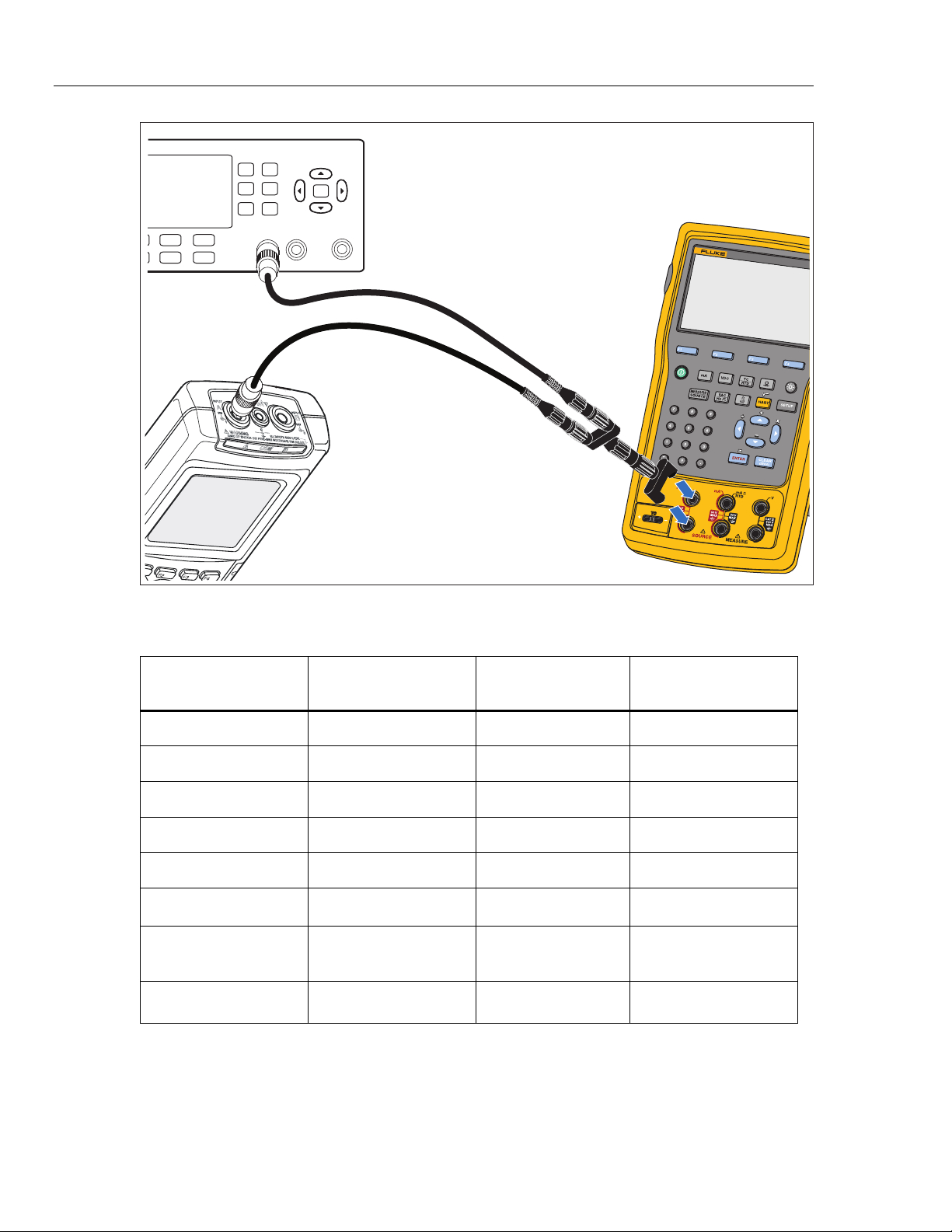
753/754 Calibration Manual 22 TEKTRONIX FCA3000 Counter Fluke 75x Fluke 123 Use Channel A BNC Input gso11.eps Figure 9. Frequency Source Verification Connec tions Table 12. Frequency Source Verification P oints UUT Range…
Documenting Process Calibrator
Performance Verification Tests
21
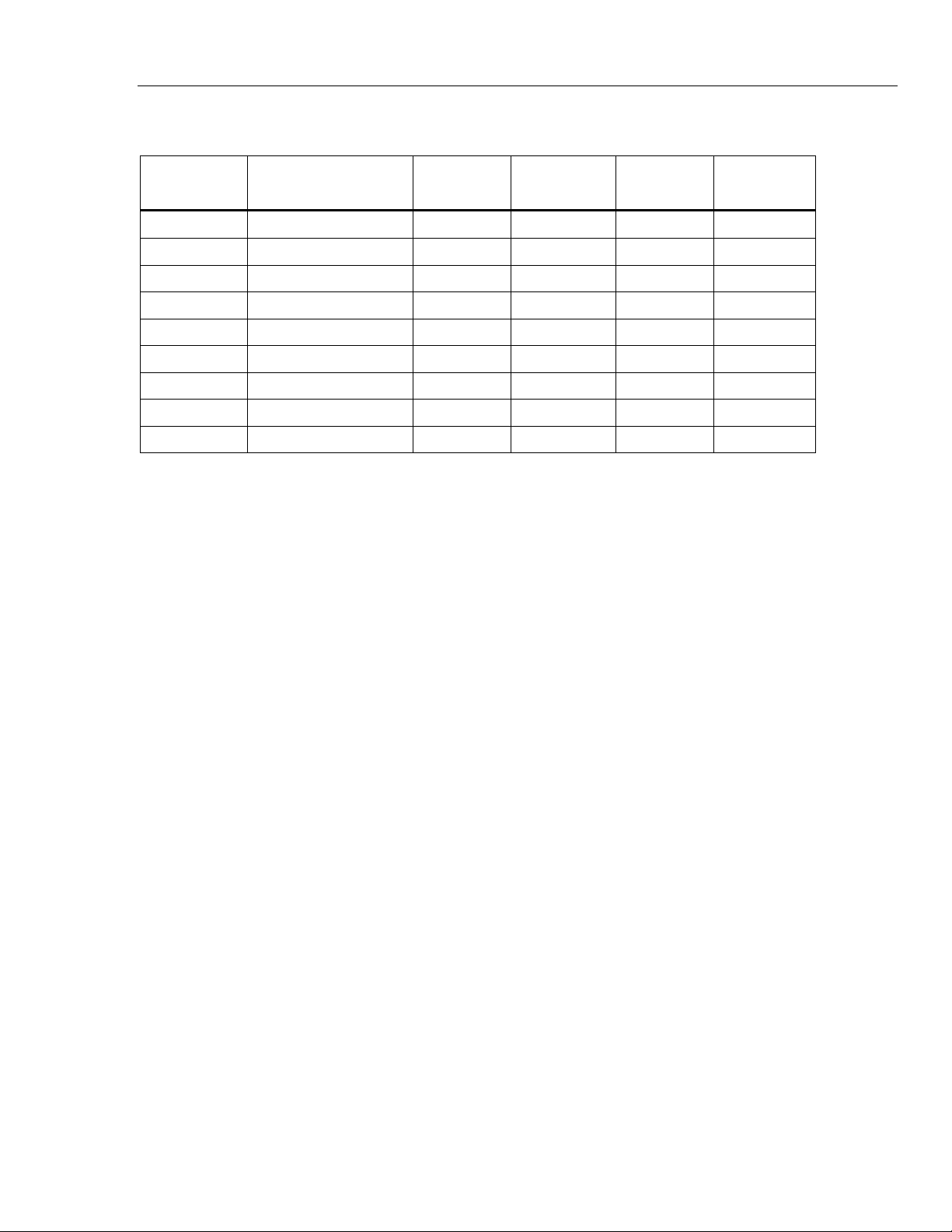
Table 11. Resistance Source Verification Points
UUT Range UUT Output
Minimum
1-Yea
r
Maximum
1-Yea
r
Minimum
2-Yea
r
Maximum
2-Yea
r
10.000 Ω 0.1 Ω 0.0900 0.1100 0.0850 0.1150
10.000 Ω 1 Ω 0.9899 1.0101 0.9849 1.0152
10.000 Ω 10 Ω 9.9890 10.0110 9.9835 10.0165
100.00 Ω 20 Ω 19.978 20.022 19.967 20.033
100.00 Ω 100 Ω 99.970 100.030 99.955 100.045
1000.0 Ω 200 Ω 199.76 200.24 199.64 200.36
1000.0 Ω 1000 Ω 999.60 1000.40 999.40 1000.60
10.000 kΩ 2 kΩ 1.9966 2.0034 1.9944 2.0056
10.000 kΩ 10 kΩ 9.9950 10.0050 9.9920 10.0080
Frequency Source
To verify the frequency source function:
1. Connect the UUT to the Tektronix FCA3000 Counter as shown in Figure 9.
2. Set the UUT to source, frequency, 1.000 Vpp, square wave, at 5 Hz.
3. See if the value shown on the Tektronix FCA3000 is in the range shown in the
applicable column in Table 11
4. Use the Fluke 123 to examine the wave forms. For the square wave, a positive
square wave, with a 50 % duty-cycle (±5 %), and 1.0 V peak amplitude. See that
the amplitude is correct for the applied signal. For the sine wave, make sure you
have the correct frequency, waveform, and amplitude.
5. Continue through the test points. See if the value shown on the UUT is in the
range shown in the applicable column of Table 12.
6. When you complete the test, push on the UUT two times to turn off the
source function. This conserves battery life.
753/754
Calibration Manual
22
TEKTRONIX FCA3000 Counter
Fluke 75x
Fluke 123
Use Channel A
BNC Input
gso11.eps
Figure 9. Frequency Source Verification Connections
Table 12. Frequency Source Verification Points
UUT Range Frequency @ 1 Vpp
Minimum
Fre
q
uenc
y
Maximum
Fre
q
uenc
y
10.99 Hz 5 Hz Sine 4.99 Hz 5.01 Hz
1099.9 Hz 1 kHz Sine 999.9 Hz 1000.1 Hz
21.999 kHz 10 kHz Sine 9.998 kHz 10.002 kHz
50 kHz 49 kHz Sine 48.995 kHz 49.005 kHz
10.99 Hz 5 Hz Square 4.99 Hz 5.01 Hz
1099.9 Hz 1 kHz Square 999.9 Hz 1000.1 Hz
UUT Range Frequency @ 7.5 Vpp Minimum Frequency Maximum Frequency
109.99 Hz 50 Hz Square 49.9 Hz 50.1 Hz

Documenting Process Calibrator
Performance Verification Tests
23
Thermocouple Measure
To verify the thermocouple measure function.
1. Use Type-K thermocouple wire and copper wire to connect the 5522A output to
the UUT-TC jack as shown in Figure 10. The Type K-to-Copper junctions must
be welded or made with tight screw terminals and submersed in the lag bath
(room temperature). Use the standard thermometer (0.1 °C accuracy) to measure
the temperature of the lag bath.
2. Set the 5522A to source dc millivolts and the UUT to the thermocouple measure
function, TC Type K; ITS-90 scale, internal reference, and °C.
3. Stop for a minimum of 1 minute for thermal “emfs” (caused by insertion of the
connectors) to dissipate, and let the lag bath become stable for a minimum of
15 minutes.
4. Use the 5522A to source the millivolt equivalents of the temperatures in
Table 13. At each point, correct the 5522A output voltage. To do this, subtract
the millivolt equivalent of the temperature at the lag bath junction (use reference
chart below).
5. Continue through the test points. See if the value shown on the UUT is in the
range shown in the applicable column of Table 13.
6. When you complete the test, set the 5522A to STANDBY.