754_____cmeng0000.pdf - 第45页
Documenting Process Calibrator Maintenance 35 Maintenance XW Warning To prevent possible electrical shock, fire, or personal injury: • Have an approved technician repair the Product. • Do not operate the Product with cov…
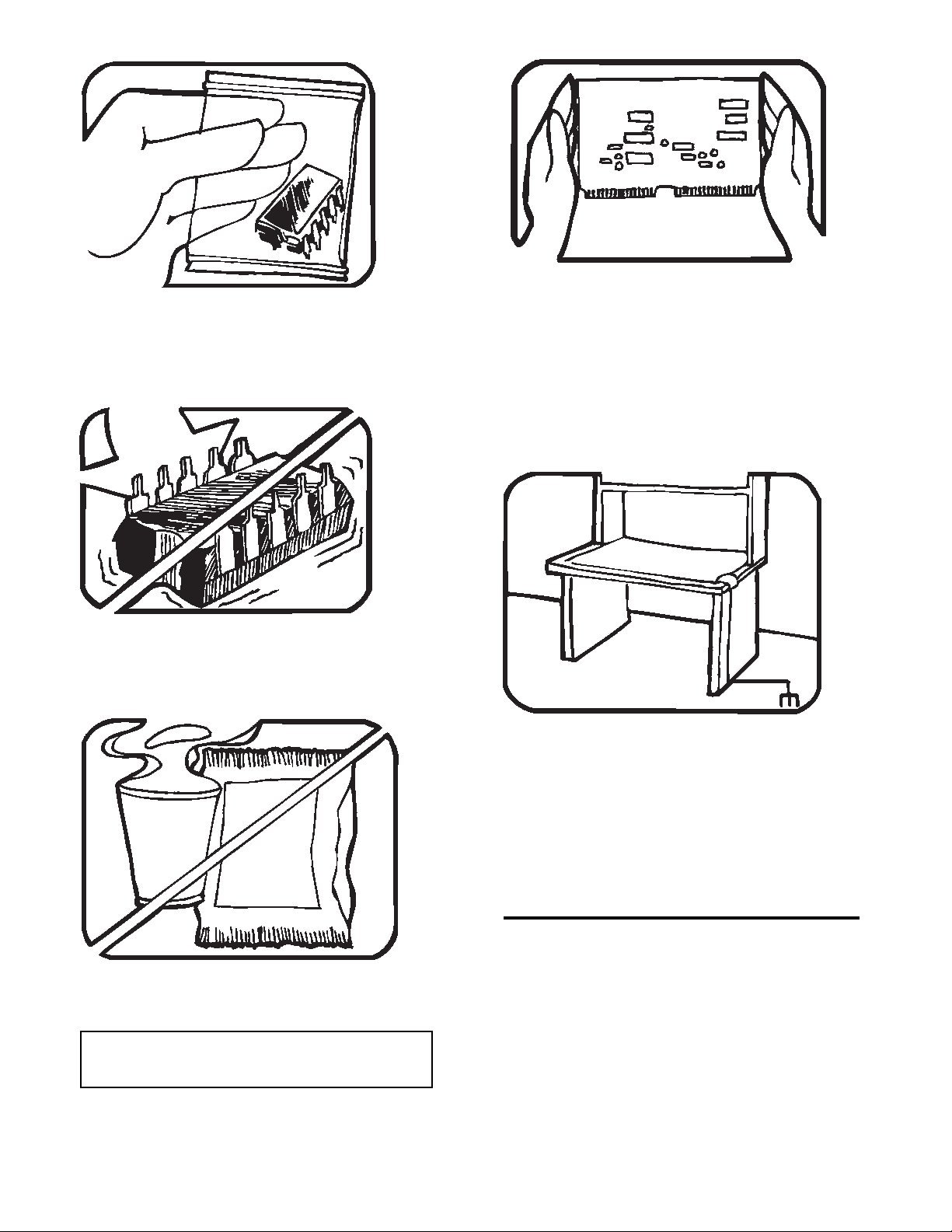
5. USE STATIC SHIELDING CONTAINERS FOR
HANDLING AND TRANSPORT.
6. DO NOT SLIDE S.S. DEVICES OVER
ANY SURFACE.
7. AVOID PLASTIC,VINYL AND STYROFOAM
IN WORK AREA.
8. WHEN REMOVING PLUG-IN ASSEMBLIES
HANDLE ONLY BY NON-CONDUCTIVE
EDGES AND NEVER TOUCH OPEN EDGE
CONNECTOR EXCEPT AT STATIC-FREE
WORK STATION. PLACING SHORTING
STRIPS ON EDGE CONNECTOR HELPS
PROTECT INSTALLED S.S. DEVICES.
9. HANDLE S.S. DEVICES ONLY AT A
STATIC-FREE WORK STATION.
10. ONLY ANTI-STATIC TYPE SOLDER-
SUCKERS SHOULD BE USED.
11. ONLY GROUNDED-TIP SOLDERING
IRONS SHOULD BE USED.
PORTIONS REPRINTED
WITH PERMISSION FROM TEKTRONIX INC.
AND GERNER DYNAMICS, POMONA DIV.
Dow Chemical

Documenting Process Calibrator
Maintenance
35
Maintenance
XWWarning
To prevent possible electrical shock, fire, or personal injury:
• Have an approved technician repair the Product.
• Do not operate the Product with covers removed or the case open.
Hazardous voltage exposure is possible.
• Remove the input signals before you clean the Product.
• Use only specified replacement parts.
Battery Replacement
Replace the battery when it no longer holds a charge for the rated interval. The battery
normally lasts for up to 300 charge/discharge cycles. To order a replacement battery, see
“Contacting Fluke” and “Replaceable Parts”.
Note
Spent batteries should be disposed of by a qualified recycler or hazardous
materials handler. Contact an authorized Fluke Service Center for
recycling information.
How to Clean the Product
Clean the Product and pressure modules with a soft cloth dampened with water or water
and mild soap.
WCaution
To prevent possible damage to the Product, do not use
solvents or abrasive cleansers.

753/754
Calibration Manual
36
Calibration Data
The date of the last calibration and verification shows on the calibration sticker and on
the calibration screen in Setup mode. The CAL. STATUS number on the sticker should
always match the Calibration Status number in the calibration screen. Calibration of the
Product is to be done by qualified personnel.
In Case of Difficulty
XWWarning
To avoid possible electric shock or personal injury, do not use
the Product if it operates abnormally. Protection may be
impaired. When in doubt, have the Product serviced.
If the display is blank or unreadable, but the beeper works when the Product is turned on,
make sure the brightness is correctly adjusted. To adjust the Intensity, see “Display
Intensity” in the Users Manual.
If the Product will not turn on, make sure the battery is not dead or disconnected from the
battery charger. If the Product receives power, the power button should be lit. If the
button is lit, but the Product does not power up, have the Product serviced. See “How to
Contact Fluke”.
Service Center Calibration or Repair
Calibration, repairs, or servicing not included in this manual must be done only by
qualified service personnel. If the Product fails, examine the battery pack first, and
replace it if necessary.
Make sure that you operate the Product in accordance with the instructions in this
manual. If the Product is faulty, send a description of the failure with the Product.
Pressure modules do not need to accompany the Product unless the module is faulty also.
Be sure to pack the Product securely, using the original shipping container if it is
available. See “How to Contact Fluke” and the Warranty Statement.