754_____cmeng0000.pdf - 第42页
753/754 Calibration Manual 34 of 90.0 ≤ 100.000 m V ≤ 110.0., apply the requested input, or apply an input in the allowed range. Use the numeric keys to add the value. Push the Continue softkey. 7. Apply the subsequent r…

Documenting Process Calibrator
Calibration
33
On the calibration screen, the step that has bolded text is the selected step.
Set Calibration Date sets the date that the Product shows for calibration at start-up. In
most instances this is the date that the Product last passed the Performance Verification.
There are four adjustment procedures:
• Adjust Source
• Adjust Loop
• Adjust Measure
• Adjust Thermocouple
Each of these items shows the last time this step was competed.
• When you push the Exit softkey, the Product goes out of Calibration mode and
starts.
• When you push the Change Calibration Password softkey the screen
changes to the password screen.
• When you push the Continue softkey, the Product continues with the selected
step.
Calibration Constant Out of Bounds
If one or more of the calibration stimuli (or measurements) is out of range during a
calibration routine, or the cabling is incorrect, the message [Error - Calibration Constant
Out of Bounds] shows at the end of the routine. A general fault with the UUT can also be
indicated by this error. The fault has to be corrected before you do the full sub-routine.
How to Calibrate
Follow these general instructions for all calibrations:
• Operate the UUT on battery power. Make sure the battery is fully charged.
• Let each piece of calibration equipment meet its specified warm up period.
• Let the UUT warm up a minimum of 10 minutes.
• Source is only powered when it is used. A separate warm up for 10 minutes is
necessary when you adjust source vdc, source ohms, source TC, source RTD, or
source Hz. When you do a full adjust, a 10-minute warm up pause at the start of
the volts dc source warms up the Product for all source steps.
• For each calibration, make sure the calibration equipment is stable and that the
“unsettled” annunciator on the UUT is not shown.
Continue:
1. Turn on the UUT.
2. Push s and then the Prev. Page softkey.
3. Push the Calibrate softkey to open the password screen
4. Input the password (the default password is 1234) and then push the Continue
softkey.
5. Use and D to move the black text to the step to run. Push the Continue
softkey to start a procedure
Each adjustment procedure will give connection instructions and signal levels
needed for the step.
6. When the display prompts you for an input of 100.000 mV dc but shows an range

753/754
Calibration Manual
34
of 90.0 ≤ 100.000 mV ≤ 110.0., apply the requested input, or apply an input in
the allowed range. Use the numeric keys to add the value. Push the Continue
softkey.
7. Apply the subsequent requested value as in step 5. Push the Continue softkey.
When you record a negative value, always start with ‘-’.
XWWarning
Some of the voltages required for calibration are dangerous. To
avoid injury or death from electric shock, do not touch live
conductors during high-voltage calibration. Put the source
device into Standby mode after each calibration step.
8. Continue to apply voltages as necessary. Make sure you follow the connection
instructions each time. Remember that the input jack configuration changes.
9. When you complete the last point in the subroutine, you are asked if you to keep
the new constants. If you keep the new constants, the calibration constants are
saved and the Calibration Status counter is incremented and the date is updated.
If you discard the constants at this point, the calibration has no effect, the
Calibration Status counter is not incremented, and the date does not change.
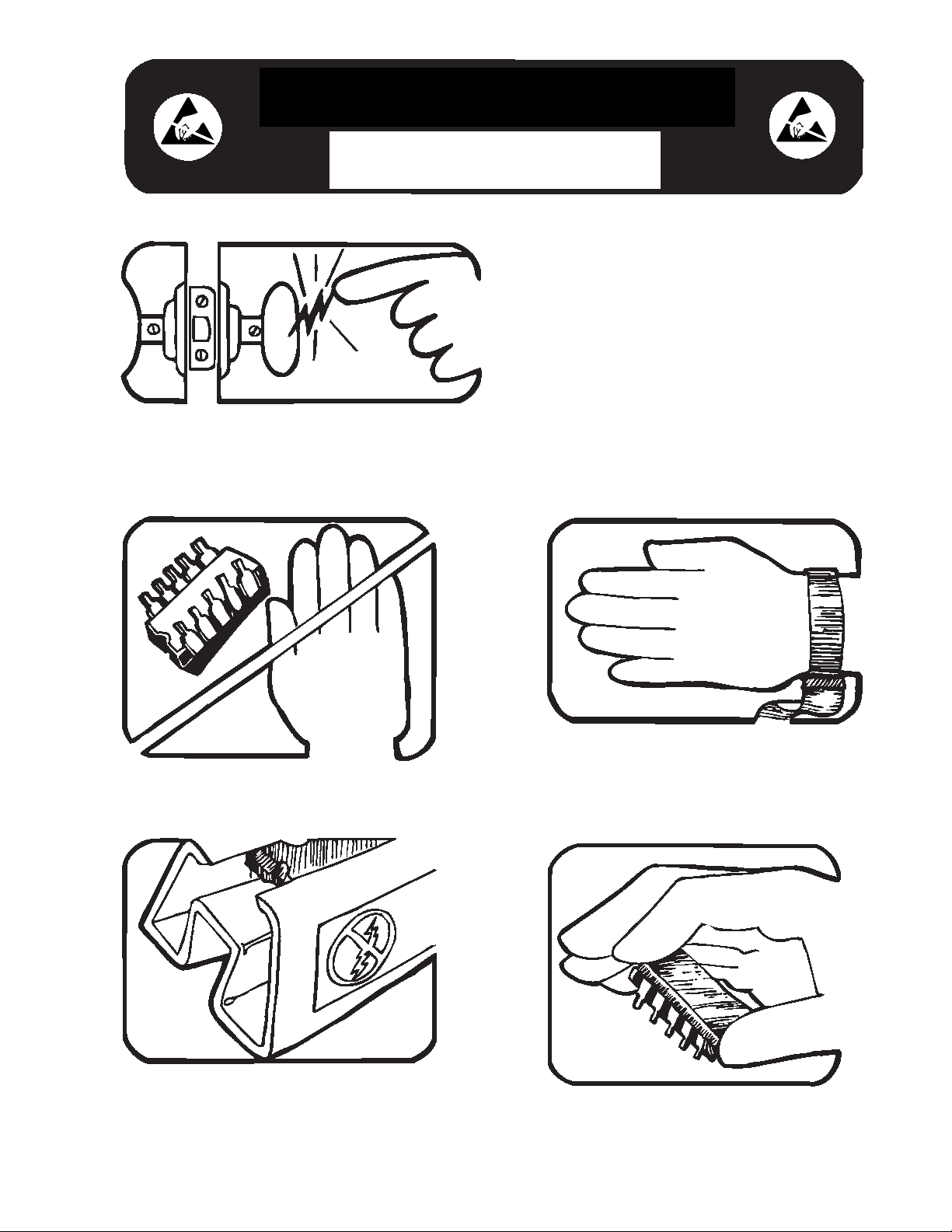
Some semiconductors and custom IC's can be
damaged by electrostatic discharge during
handling. This notice explains how you can
minimize the chances of destroying such devices
by:
1. Knowing that there is a problem.
2. Learning the guidelines for handling them.
3. Using the procedures, packaging, and
bench techniques that are recommended.
The following practices should be followed to minimize damage to S.S. (static sensitive) devices.
1. MINIMIZE HANDLING
2. KEEP PARTS IN ORIGINAL CONTAINERS
UNTIL READY FOR USE.
3. DISCHARGE PERSONAL STATIC BEFORE
HANDLING DEVICES. USE A HIGH RESIS-
TANCE GROUNDING WRIST STRAP.
4. HANDLE S.S. DEVICES BY THE BODY.
static awareness
A Message From
Fluke Corporation