265ProFlow.pdf - 第41页
TECHNI CAL REFEREN CE POSITIONING Chapter Issue 8 Dec 02 ProFlow Manual 1.37 POSITIONING ProFlo w has four vertical ly positi oned configurati ons: • Home Position • Zero Height • Contact Height • Print Height Home Posit…

TECHNICAL REFERENCE
SEQUENCES
1.36 ProFlow Manual Chapter Issue 8 Dec 02
a. Knead off image
b. Knead over a board
Knead Off Image This operation is carried out off the stencil image. If the ProFlow unit is not in
a shake-off envelope the paste knead is deferred until it is.
The preconditions for a knead off image to be initiated are:
• The stencil protection parameter in the board file is set to OFF.
• The ProFlow unit is on the stencil at contact height.
• The ProFlow unit is in a shake-off envelope.
• The pressure on the transfer material is at Idle Paste Pressure or else it is
released.
• The machine cover is closed.
The following sequence occurs when a knead off image is initiated:
1. The machine cover is secured while the knead off image is carried out.
2. The board clamps are closed.
3. The camera is driven home and the rising table is raised to print height.
4. ProFlow is lowered to ProFlow print height, as set by System Pressure and
Knead Paste Pressure is applied to the system.
5. The ProFlow unit moves away from the stencil image, at the appropriate
print speed, to the edge of the shake-off envelope.
6. The ProFlow unit traverses the full extent of the shake-off envelope, the
number of times set by the current value of the knead deposits parameter,
before it is returned to the position from which it started.
7. Upon completion Knead Paste Pressure (piston pressure) is changed to Idle
Paste Pressure and ProFlow raises to the contact height position.
Knead Over a Board This operation is carried out over the stencil image, with a board in place.
The preconditions for a knead over a board to be initiated are:
• The stencil protection parameter in the board file is set to OFF.
• The ProFlow unit is on the stencil at contact height.
• The pressure on the transfer material is at Idle Paste Pressure or else it is
released.
• The machine cover is closed.
The following sequence occurs when a knead over a board is initiated:
1. ProFlow is lowered to ProFlow print height, as set by System Pressure and
Knead Paste Pressure is applied to the system.
2. The ProFlow unit is driven backwards and forwards over the loaded board
the number of times set by the current value of the knead deposits param-
eter.
3. Upon completion Knead Paste Pressure (piston pressure) is changed to Idle
Paste Pressure and ProFlow raises to the contact height position.
TECHNICAL REFERENCE
POSITIONING
Chapter Issue 8 Dec 02 ProFlow Manual 1.37
POSITIONING ProFlow has four vertically positioned configurations:
• Home Position
• Zero Height
• Contact Height
• Print Height
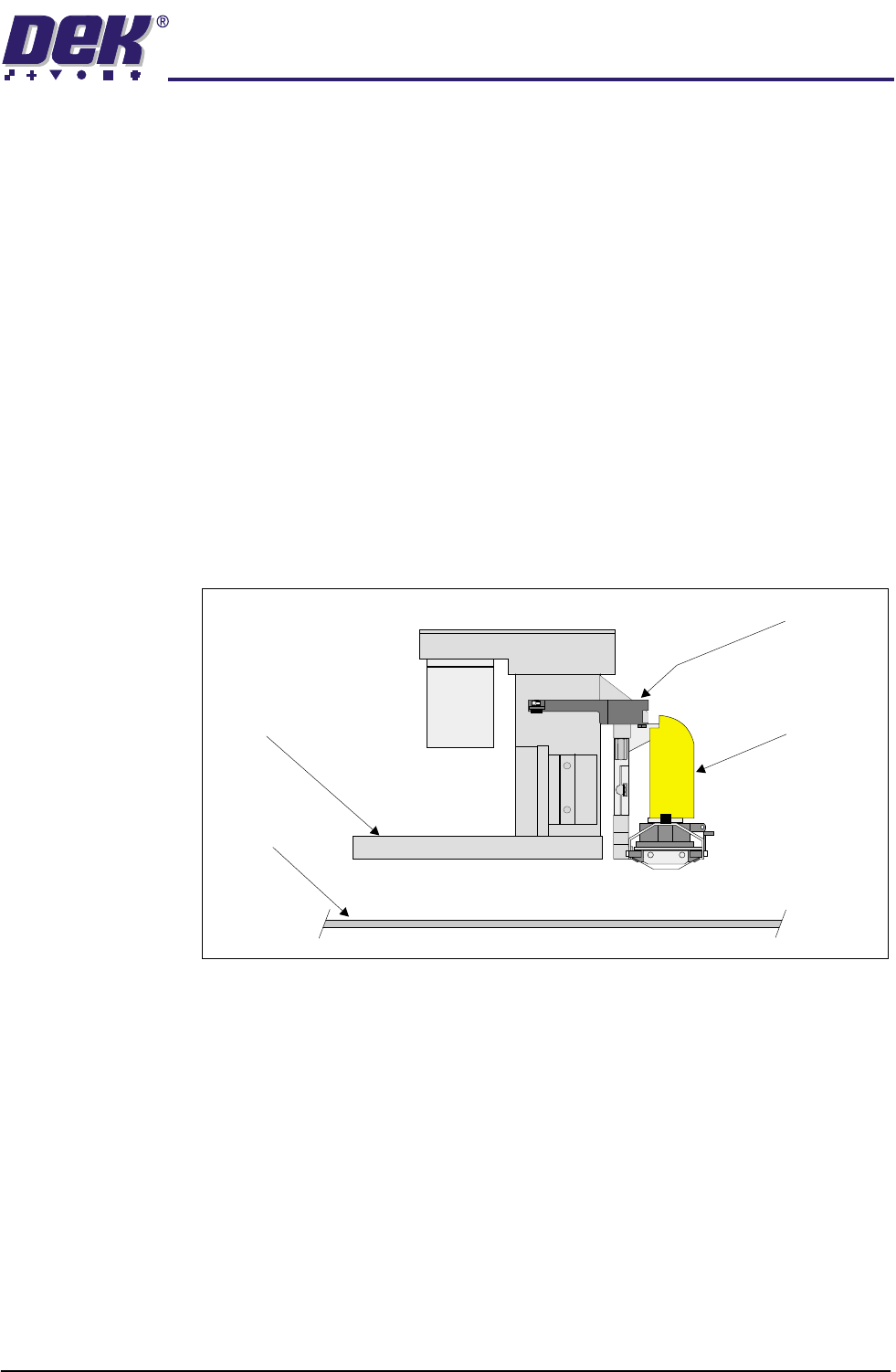
Home Position The home position is when the ProFlow unit is fully raised. The ProFlow unit is
homed on the following occasions:
• Initialization
• Power up
• Exiting diagnostics
• When power is restored following system power down.
NOTE
A downstop is not fitted to fixed head machines.
Figure 1-25 ProFlow in the Home Position
Zero Height The zero height position is when the ProFlow Unit is raised to the number of
steps on it’s internal counting system to move to the home position. The
ProFlow unit is moved to zero on the following occasions:
• Selecting Change ProFlow
• Selecting Change Screen
• Selecting Change Tooling
• Selecting Raise ProFlow
Stencil
ProFlow Unit
Downstop
Print Carriage
TECHNICAL REFERENCE
POSITIONING
1.38 ProFlow Manual Chapter Issue 8 Dec 02
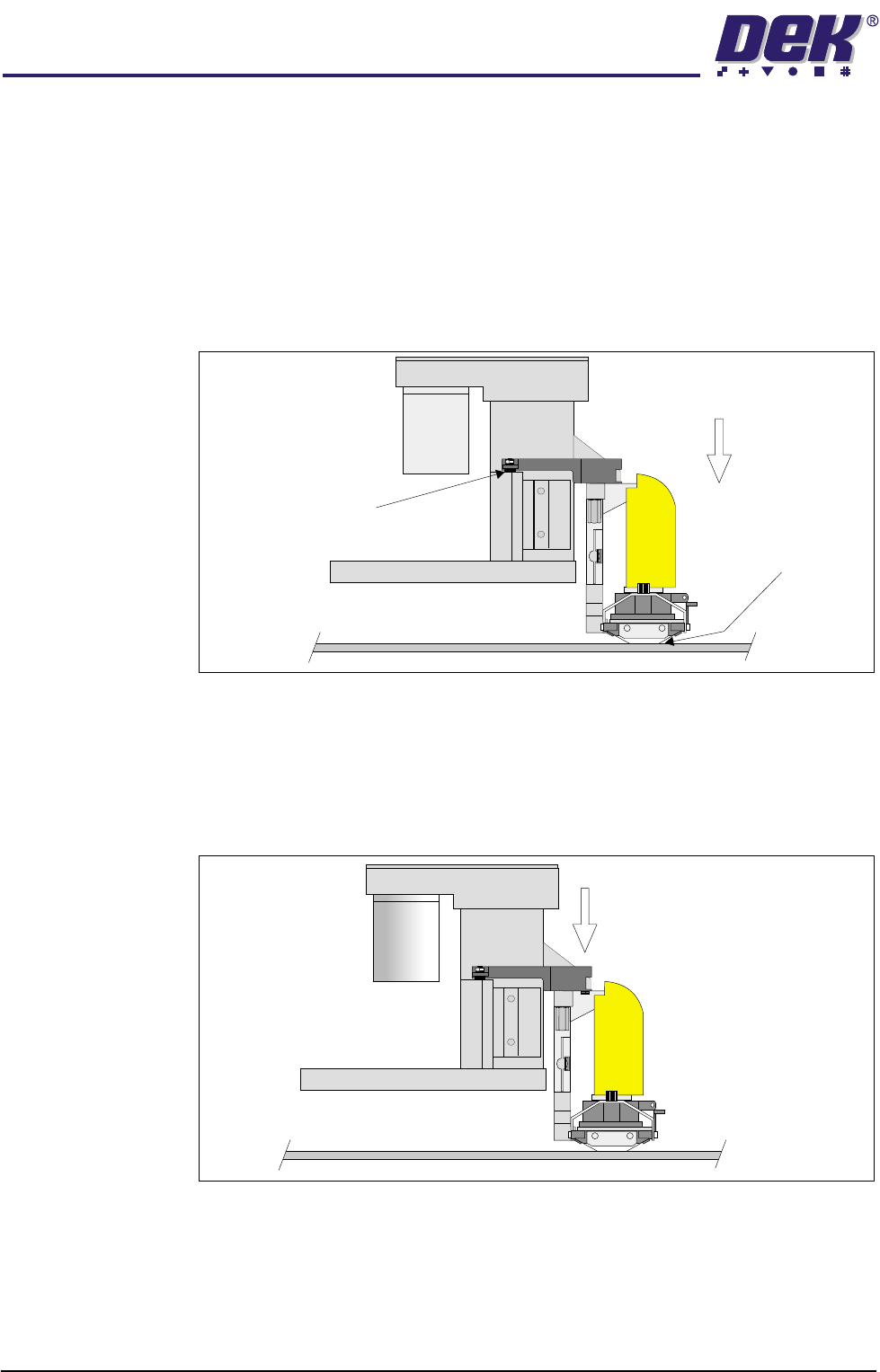
Contact Height Contact height is when the ProFlow wipers are just in contact with the stencil,
but with no force exerted (zero pressure).
NOTE
For setting up information refer to Contact Height Position Set Up in Calibrations
section of this chapter.
ProFlow should normally be left in this position when the unit is not in use, this
prevents material leakage, contact with the air/drying out and also prevents
material contamination.
Figure 1-26 ProFlow in the Contact Height Position
Print Height Print height is when the system pressure is being applied to ProFlow whilst
positioned on the stencil, (system pressure is dependent upon the board file
programmed). Piston pressure is also applied (during the print stroke) at this
position.
Figure 1-27 ProFlow in the Print Height Position
ProFlow Lowered
in Contact with Screen
Downstop in Contact
with Print Carriage
Zero Pressure
on Screen
ProFlow Lowered to
Print Height (System Pressure)
NOTE
Piston Pressure is applied
during the print cycle,
ie when the unit moves across
the stencil apertures.