SC_450 PreciseCoat Conformal Coating Jet_Rev_04.pdf - 第20页
SC-450 PreciseCoat C onformal C oating J et Installation an d Configuration 14 © 2024 Nordson Corporation 5. Select th e SC-450 tool. > The Pressure Outpu ts window opens . 6. Slide the pressur e bars to achieve the s…
SC-450 PreciseCoat Conformal Coating Jet Installation and Configuration
© 2024 Nordson Corporation 13
3.7 SC-450 EasyCoat Configuration
To configure EasyCoat for the SC-450:
1. Configure the EasyCoat software for the SC-450. Refer to the EasyCoat User Guide or
EasyCoat Help for software configuration.
2. Position the SC-450 at the purge cup by running the appropriate macro or moving the
SC-450 to the front of the machine.
3. Click on Edit > Edit Mode from the EasyCoat Operator Screen to open the Edit Screen.
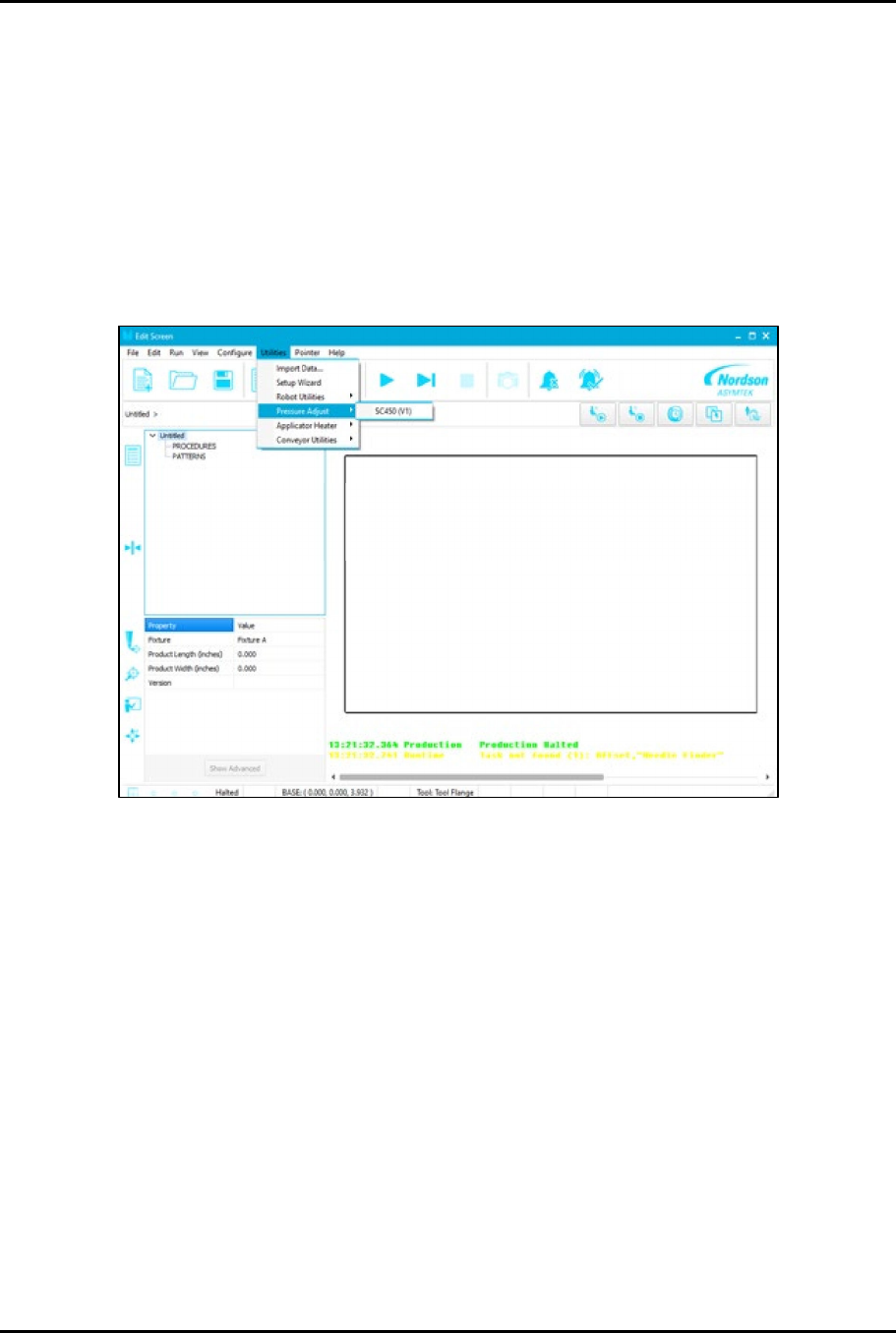
4. From the EasyCoat Edit Screen, select Utilities > Pressure Adjust > SC450 (Figure 3-7).
Figure 3-6 Utilities - Pressure Adjust
SC-450 PreciseCoat Conformal Coating Jet Installation and Configuration
14 © 2024 Nordson Corporation
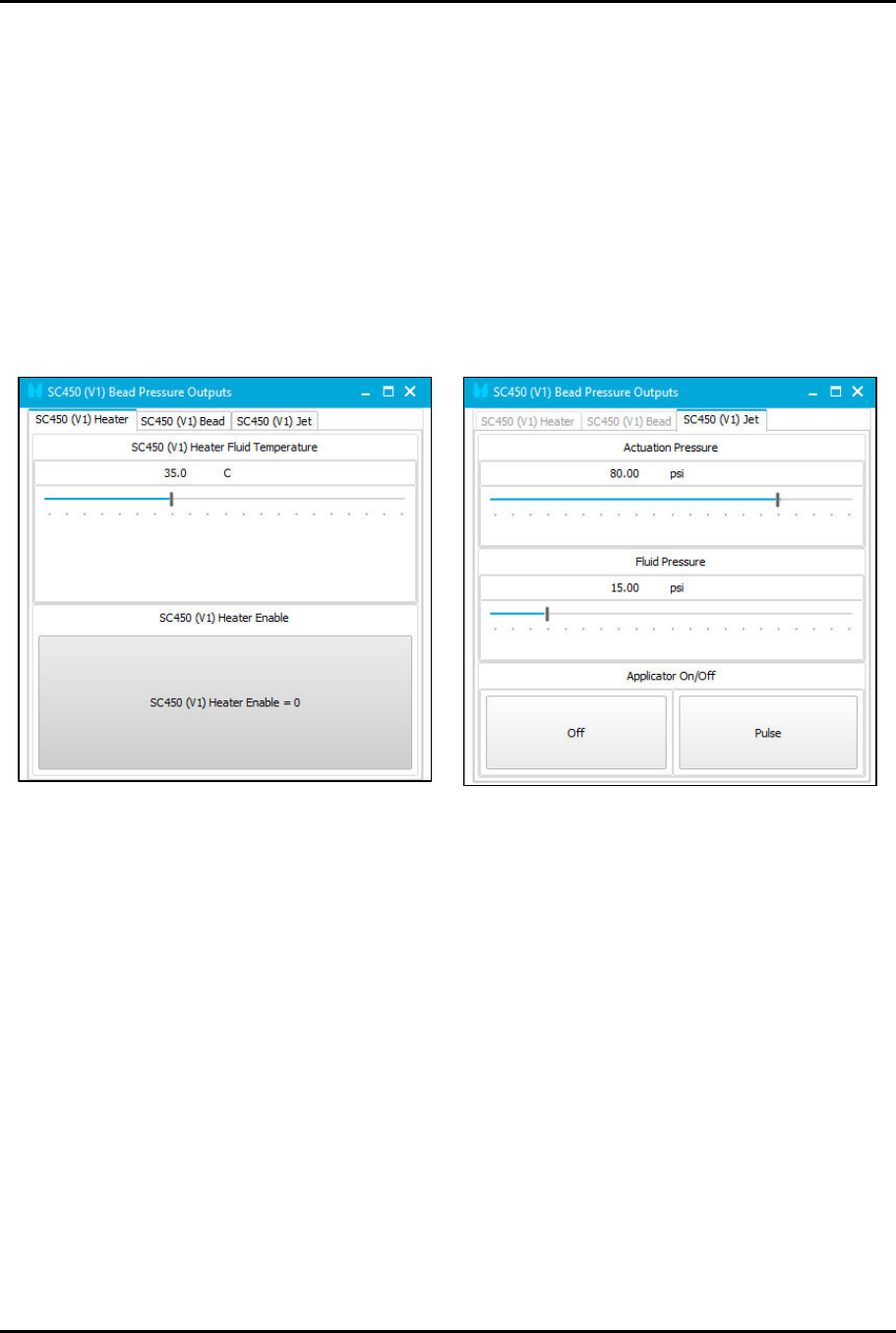
5. Select the SC-450 tool.
> The Pressure Outputs window opens.
6. Slide the pressure bars to achieve the suggested starting pressures (Figure 3-8):
a. Set Heater Fluid Temperature to 35 °C.
b. Choose one of the two (2) operating modes SC450 Bead or SC450 Jet.
1) Set Actuation Pressure to 551 kPa (80 psi).
2) Set Fluid Pressure to 103 kPa (15 psi).
c. Set stroke to 25 clicks open.
7. Perform a priming routine. Refer to the applicable coating system Installation, Operations,
and Maintenance Manual.
Figure 3-7 Pressure Outputs
© 2024 Nordson Corporation 15
4 Operation
4.1 Overview
This SC-450 PreciseCoat Jet is designed for use on Nordson Select Coat Series Coating Systems. For
complete system operating procedures, refer to the applicable coating system Installation, Operations,
and Maintenance Manual. This section covers the following topics:
•
Theory of Operation
•
Application Settings
•
Control
Components
•
Hardware Selection
4.2 Safety First
Operation of the SC-450 PreciseCoat Jet involves air pressure, electrical power, mechanical devices, and
the use of hazardous materials, and sometimes may involve heat. It is essential that every person
servicing or operating the PreciseCoat Jet fully understands all hazards, risks, and safety precautions.
See Section 2 - Safety for additional information.
WARNING!
Allow only qualified personnel to perform the following tasks. Follow the safety
instructions in this document and all other related documentation.
4.3 Theory of Operation
The SC-450 PreciseCoat Jet is a normally closed, air-actuated, spring-return mechanism, which uses
momentum transfer principles to expel precise volumes of material. Pressurized air is regulated by a high-
speed solenoid to retract the needle assembly from the seat. Fluid, fed into the fluid chamber, flows over
the seat. When the air is exhausted, the needle travels rapidly to the closed position, displacing fluid
through the seat and nozzle in the form of a droplet. Multiple droplets fired in succession can be used to
form larger dispense volumes and lines when combined with the motion of a dispenser robot.
4.4 Control Components
The following features affect performance of the SC-450 and are typically adjusted to fit your application.
Contact Technical Support for additional information.
4.4.1 Dot and Line Parameters
In addition to the SC-450 hardware configuration and settings, valve timing and coating instructions are
set in the EasyCoat software program to control the frequency and speed of dots and lines dispensed.
For information on dispense parameters, refer to the EasyCoat User Guide or EasyCoat Help.
4.4.2 Fluid Pressure
Fluid pressure should be set so that fluid fills to the seat, but should not be influential in pushing the fluid
through the seat and nozzle. In general, fluid pressure should be set according to the viscosity of the fluid
dispensed, see Table 4-1.
4.4.3 Drive Needle and Fluid Needle
Drive needle and fluid needle geometries are typically the main factors controlling volume. Size is
determined based on fluid properties. Other parameters, like stroke and fluid pressure fine tune the
application. Sizes are listed in Item 20 through Item 22.