OM-1273-004_w.pdf - 第90页
2-24 AJK-ML T-ID [Servo ON] Button : When pressed, this button turns on the power to the servomotor . [Servo OFF] Button : When pressed, this button turns of f the power to the servomotor . [Zero] Button : W hen pressed,…
2-23
AJK-MLT-ID
[3] "Information" Group Box
Displayed is the data of the multi-layer tray feeder that was used for the
previous adjustment.
The
following items are displayed.
Elev No.
Draw Step No.
Cmp Hgt
Mag Type
Time
Reference
The data being edited will not be displayed as information.
[4] Operational Object Selection Buttons
Select the object for the operation.
When pressed, this button moves the specied step to the traverse
drawout
position.
[5] Operation Selection Buttons
[Pallet Chng Pos] Button :
When pressed, this button moves the
elevator to the component supply
position.
[Mag
Chng Pos] Button :
When pressed, this button moves
the elevator to the magazine change
position.
[Pallet Draw Position] Button :
When pressed, this button moves
the elevator to the traverse drawout
position.
[Up (Step)] Button :
When pressed, this button moves the
elevator upward by 1 pitch of the
pallet.
[Down
(Step)] Button :
When pressed, this button moves the
elevator downward by 1 pitch of the
pallet.
[Pallet Draw] Button :
When pressed, this button activates
the traverse to draw out the pallet.
[Pallet Storage] Button :
When pressed, this button stores the
pallet drawn out on the traverse.
[Rack Shtr Opn/Cls] Button :
When pressed, this button opens or
closes the rack shutter.
[Chuck Opn/Cls] Button :
When pressed, this button opens or
closes the chuck.
3.3 Unit Adjustment
0706-002

2-24
AJK-MLT-ID
[Servo ON] Button :
When pressed, this button turns on
the power to the servomotor.
[Servo OFF] Button :
When pressed, this button turns off
the power to the servomotor.
[Zero] Button : W
hen pressed, this button zeros the
elevator.
3.3 Unit Adjustment
0706-002
2-25
AJK-MLT-ID
3.4 Teaching Operation
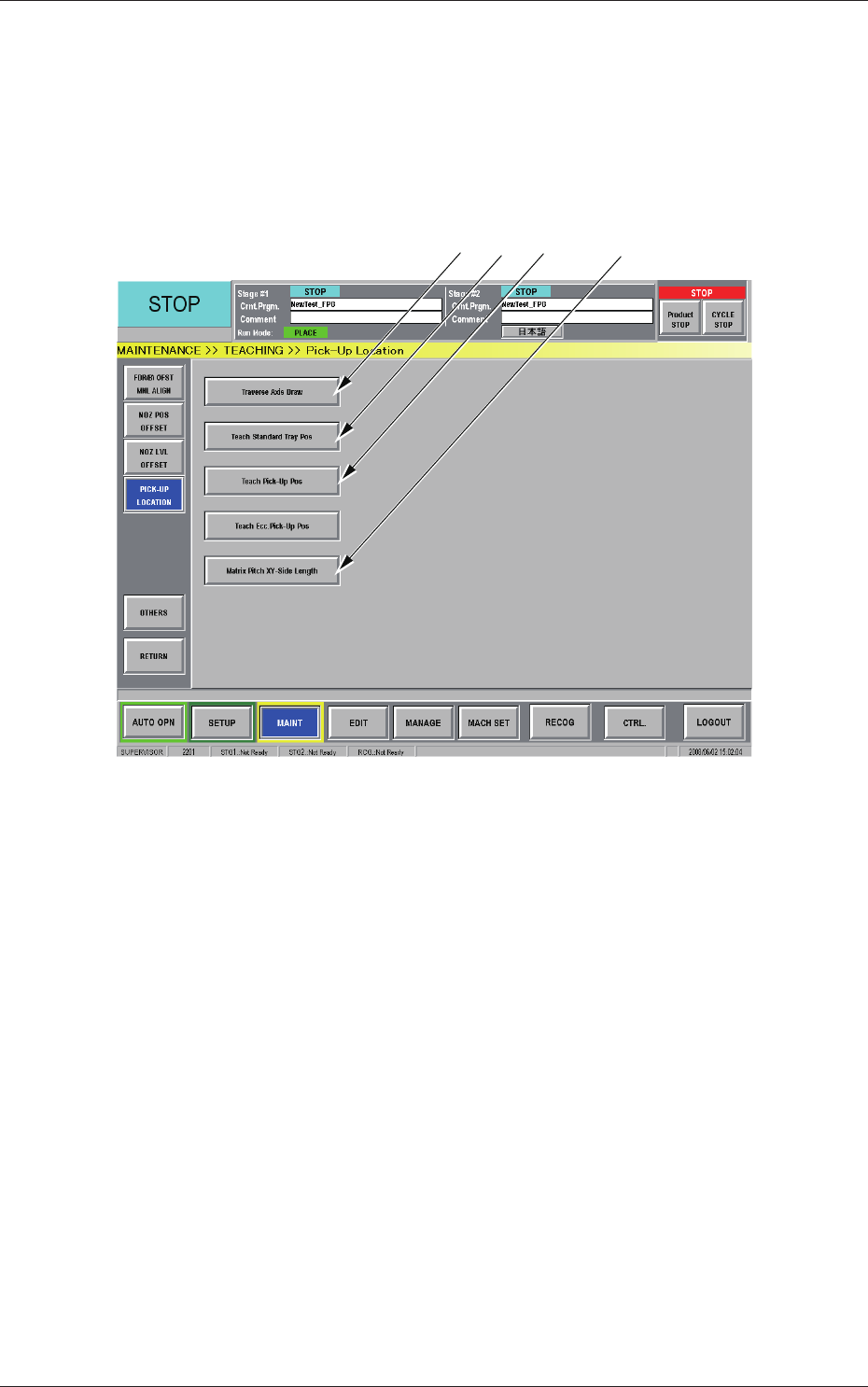
When the [TEACHING] button is pressed in the "MAINT" window, the
"TEACHING" submenu bar appears. Pressing the [PICK-UP LOCATION]
button on the submenu bar after that opens the "PICK-UP LOCATION"
window.
[1] [2] [3] [4]
Fig. B17 "PICK-UP LOCATON" Window
[1] [Traverse Axis Draw] Button
When pressed, this button opens the "Traverse Axis Draw" window.
[2]
[Teach Standard Tray Pos] Button
When pressed, this button opens the "Teach Standard Tray Pos"
window.
[3]
[Teach Pick-Up Pos] Button
When pressed, this button opens the "Teach Pick-Up Pos" window.
[4]
[Matrix Pitch XY-Side Length] Button
When pressed, this button opens the "Matrix Pitch XY-Side Length"
window.
0806-002
3.4 Teaching Operation