00196378-0102_UM X-Feeder_EN.pdf - 第55页
Operating Tape Feeder Modules Inserting the Tape Setting Up th e Feeder Module User Manual X Feeder M odules SIPLACE Family 55 ► (5) Direct the exces s cover foil pa st the side of t he pickup win do w. ► (6) Direct the …
Operating Tape Feeder Modules
Setting Up the Feeder Module Inserting the Tape
54 User Manual X Feeder Modules SIPLACE Family
Opening the pickup window
►Press the front part of the pickup window from above. The back part of the pickup window will move
up. The pickup window is now in the top position.
►Flip the toggle forwards.
►Release the front part of the pickup window. The pickup window will remain in the top position. You
can now easily insert or remove the component tape.
Closing the pickup window
►Press the front part of the pickup window from above. The back part of the pickup window will move
up.
►Flip the toggle backwards.
►Slowly release the front part of the pickup window. The pickup window will move down to the bottom
position. This fixes the component tape in the sprocket wheel.
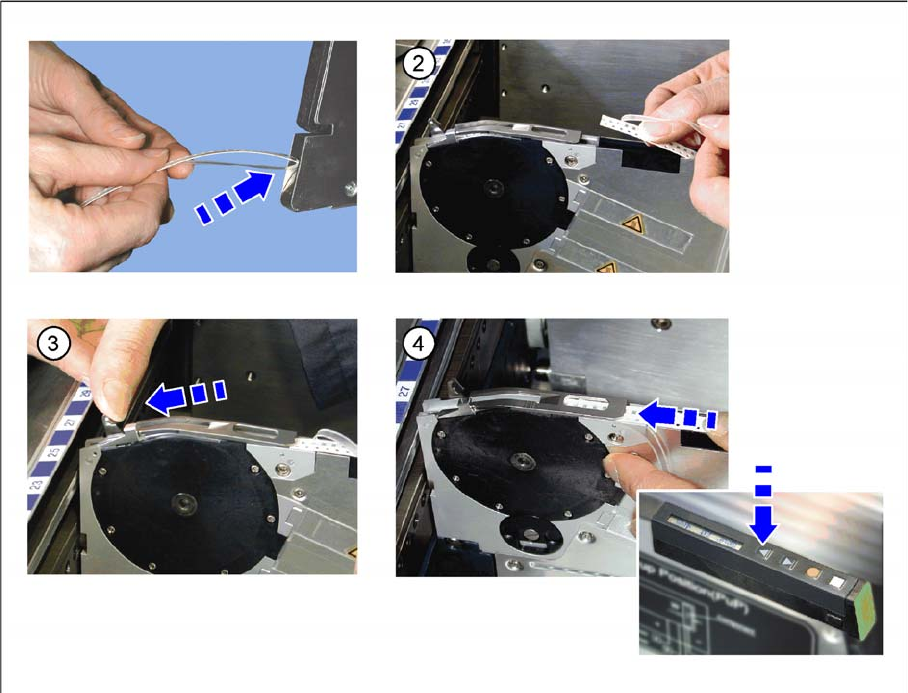
4.2.4.2 Inserting the Tape on 8 - 88 mm Feeder Modules
►(1) Insert the tape at the rear end of the feeder module into the empty tape duct and push it forwards.
►(2) Fold the protruding cover foil backwards.
►(3) Press the lever forwards.
►(4) Push the tape under the pickup window until the stop. Press and re-press the Forwards button
until the tape and the foil are under the pickup window.
Operating Tape Feeder Modules
Inserting the Tape Setting Up the Feeder Module
User Manual X Feeder Modules SIPLACE Family 55
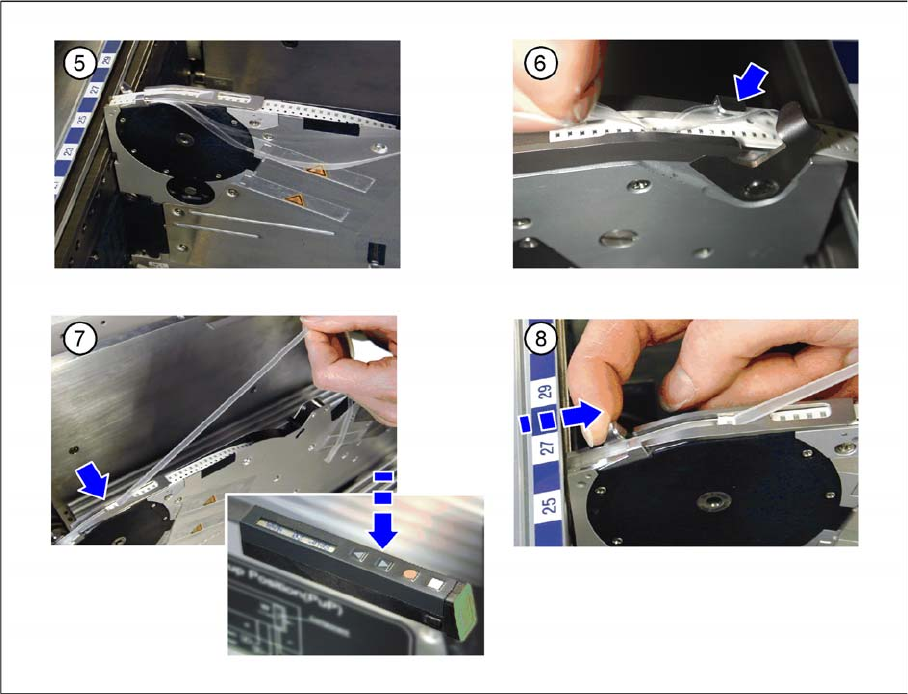
►(5) Direct the excess cover foil past the side of the pickup window.
►(6) Direct the excess cover foil past the tape lift and around the pickup window.
►(7) Press and re-press the Backwards button until the cover foil reaches the foil removal edge and
the first component is at the correct pickup position.
►(8) Press the lever backwards.
Operating Tape Feeder Modules
Setting Up the Feeder Module Inserting the Cover Foil
56 User Manual X Feeder Modules SIPLACE Family
4.2.5 Inserting the Cover Foil
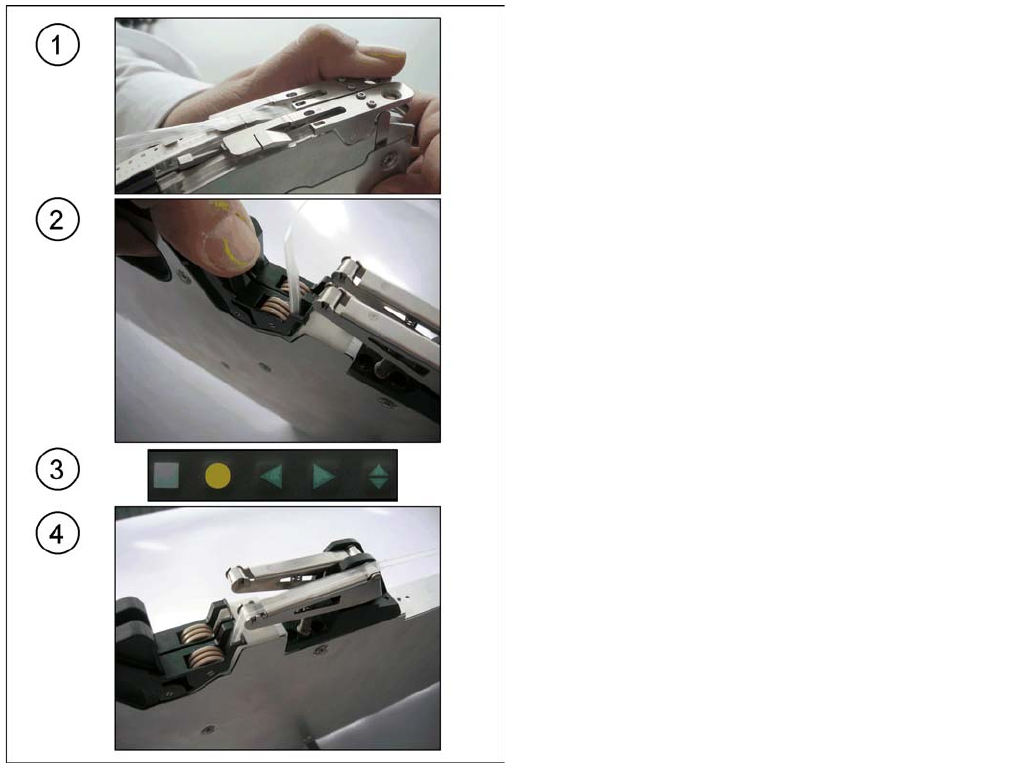
4.2.5.1 Inserting the Cover Foil on 2x8 mm Feeder Modules
► (1) Press the pickup window up and pull the cover foil
out through the middle of the pickup window.
Fold the cover foil at the removal edge over back-
wards.
Release the rocker again. This fixes the tape in the
sprocket wheel.
►(2) Press the foil removal rocker open and thread the
cover foil between the wheels. Release the rocker
again.
►(3) Press the Foil button for the active track. The foil
removal will begin once the foil rocker has reached
the top end position.
►(4) The foil is inserted as long as the Foil button is
pressed. Make sure that the foil is run accurately over
the foil rocker. The insertion will be automatically
stopped once the foil rocker has reached the switch-
off position. Always press the Foil button until the
feeder module stops the foil removal on its own.