00191017-01.pdf - 第102页
4 Data Management User’s Manual Line Computer UNIX 4.3 User Interface of t he Data Manager Software Version 403.xx Edition 06/97 4 - 10 4.3.3 Main Windo w of Data Manager Fig. 4.3.1 Main window of "Data Manager"…

User’s Manual Line Computer UNIX 4 Data Management
Software Version 403.xx Edition 06/97 4.3 User Interface of the Data Manager
4 - 9
4.3 User Interface of the Data Manager
4.3.1 General Description
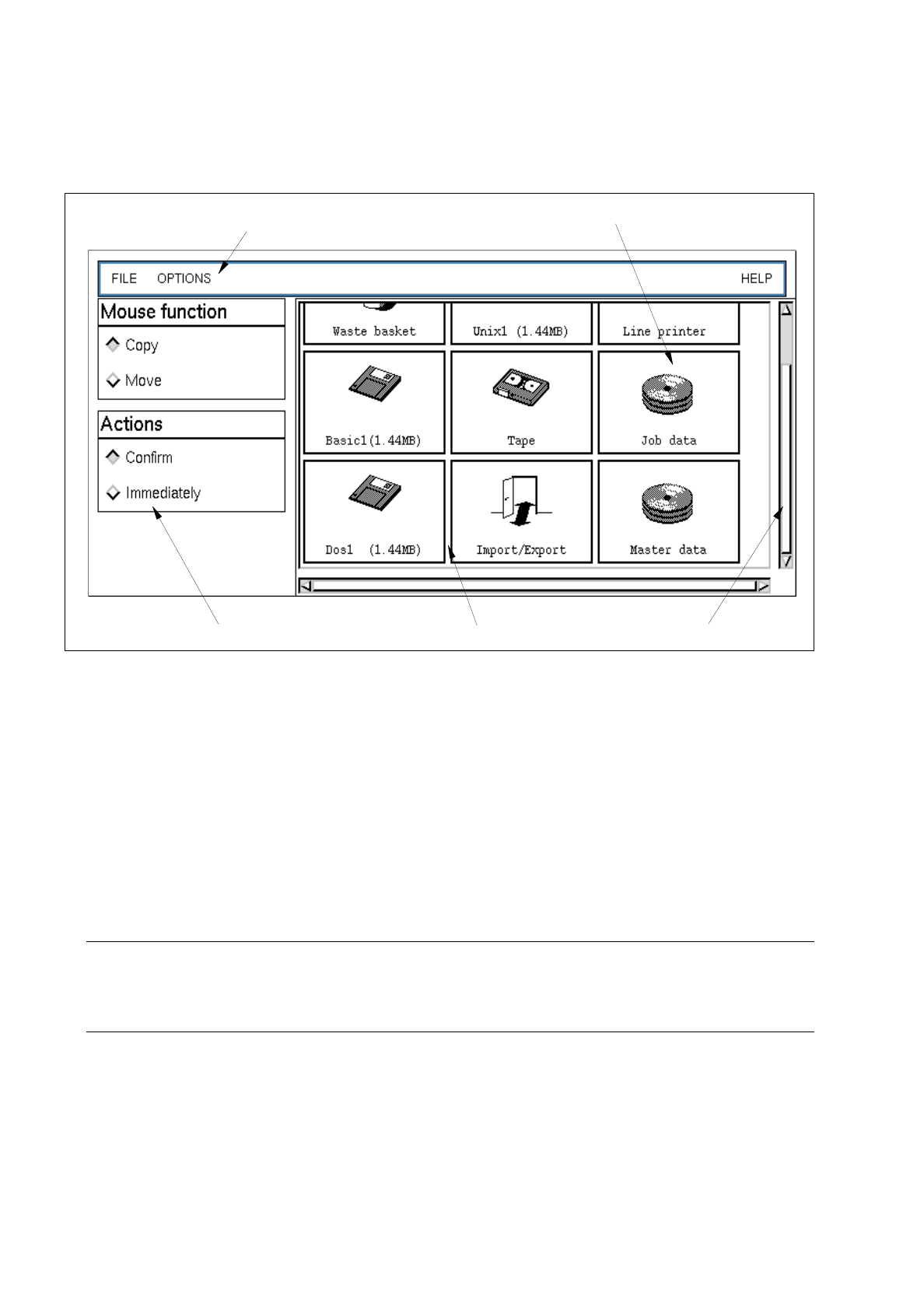
The window-oriented user interface which is capable of handling several data partners (see Fig. 4.3.1)
is used for manipulating the files and file structures within the line computer system.
The data partners must have been logged on in the Data Manager.
4.3.2 Starting the Data Manager
●
Click on FILE -> Data Manager on the desktop menu bar.
The main window of the Data Manager with all data partners logged into the Data Manager is
opened (see Fig. 4.3.1).
NOTE
If the user selects menu option OPTIONS --> Save default values
(see page 4 - 13) in the main window, the main window and all open file windows (incl. paths, posi-
tions, display mode) are saved to a configuration file, ensuring that all thus stored windows will be
automatically opened the next time the line computer is started up again, provided the respective
data partners can be addressed.
4 Data Management User’s Manual Line Computer UNIX
4.3 User Interface of the Data Manager Software Version 403.xx Edition 06/97
4 - 10
4.3.3 Main Window of Data Manager
Fig. 4.3.1 Main window of "Data Manager"
The main window is subdivided into the following areas:
-
Menu bar
-
Display area
-
Command area
Menu Bar
The menu bar contains the menus "FILE", "OPTIONS" and "HELP".
The menu functions are described in the section 4.3.3.1 and section 4.3.4.3.
NOTE
Since the functions and operation of the "FILE" menu are identical to those in other application programs
of the line computer, they are described comprehensively in chapt. 2 of this manual.
Display Area
In the display area the data partners are shown which have been logged on in the Data Manager and can thus
be called up.
The data partners can be opened by double-clicking or via the menu. Upon opening a data partner a new
window (see Fig. 4.3.2) is created on the screen showing the contents of the data partner.
In the following, a brief explanation of the meaning of the data partners "DP" is contained:
data partner
menu bar
scroll bardisplay areacommand area

User’s Manual Line Computer UNIX 4 Data Management
Software Version 403.xx Edition 06/97 4.3 User Interface of the Data Manager
4 - 11
Icon Designation Meaning
Master data
= contains all product, set-up and machine data required or the
assembly of PCBs
Job data
= contains job-specific data that are required, in addition to the
master data, for the production of PCB types
Import/Export
= This DP, with the aid of the "Copy" action, permits files and directories
to be imported from other DPs (e.g. "Master Data", "Unix1 (1.44MB)",
etc.) in any hierarchy desired, and from there to be exported again to
other DPs.
NOTE
In the "Import/Export" data partner it is only
possible to copy data to and from it.
Other actions such as "Delete" or "Move" cannot be executed.
If this is attempted nevertheless, a corresponding error message is displayed.
If data are to be deleted from the DP or moved, this must be carried out at the UNIX level.
Basic2 (1.2MB)
= DOS (HP-UX) formatted 5
1
/
4
" floppy disk
Dos2 (1.2MB)
= DOS formatted 5
1
/
4
" floppy disk
Unix2 (1.2MB)
= UNIX formatted 5
1
/
4
" floppy disk
NOTE
With Pentium-based computers, the data partners "Basic2 (1.2MB)", "Dos2 (1.2MB)" and "Unix2
(1.2MB)" cannot be used, as these types of computers are not equipped with a 5.25-inch disk drive
(see chapt. 1).
Basic1 (1.44MB)
= DOS (HP-UX) formatted 3
1
/
2
" floppy disk
Dos1 (1.44MB)
= DOS formatted 3
1
/
2
" floppy disk
Unix1 (1.44MB)
= UNIX formatted 3
1
/
2
" floppy disk
Tape
= streamer tape (250 MB)
Line printer
=line printer