00191017-01.pdf - 第220页
8 Product / PCB User’s Manual Line Computer UNIX 8.1 PCB Editor Software Version 403.xx Edition 06/97 8 - 8 Menu bar The menu bar con tains the "FILE" , "SERVIC ES" a nd "HELP " menus. The f…
User’s Manual Line Computer UNIX 8 Product / PCB
Software Version 403.xx Edition 06/97 8.1 PCB Editor
8 - 7
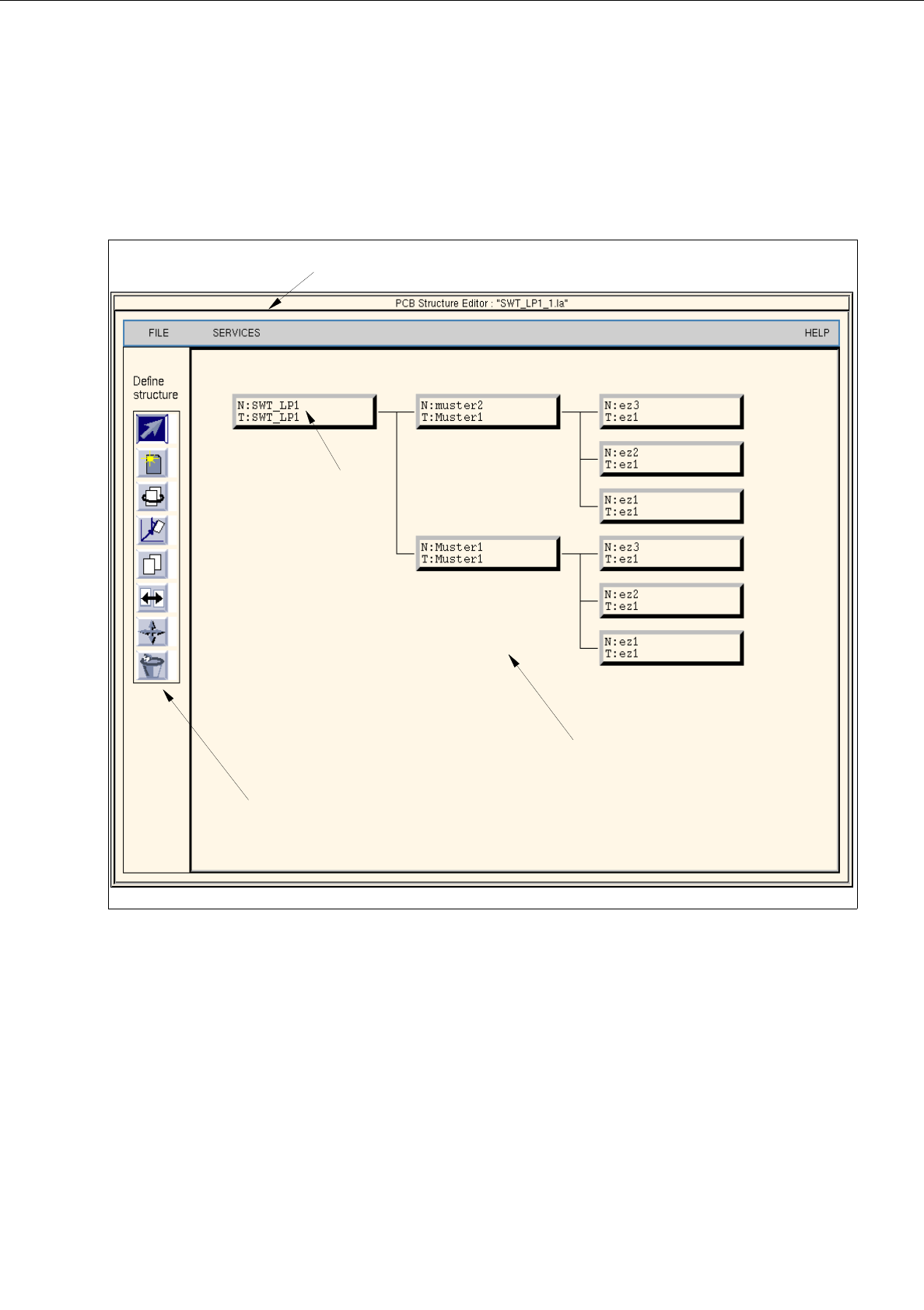
8.1.3 Main Display Window of Structure Editor
In the following, the sections of the main display window and their functions are described.
Fig. 8.1.4 Main window "PCB Structure Editor" (Display Structure Mode)
The main display window is subdivided as follows:
-
Menu
-
Display Area
-
Command Area (only available in the structure mode)
-
Setting Area (only available in the graphic mode, Fig. 8.1.6)
menu bar
display area
command area
uppermost partial
PCB structure

8 Product / PCB User’s Manual Line Computer UNIX
8.1 PCB Editor Software Version 403.xx Edition 06/97
8 - 8
Menu bar
The menu bar contains the "FILE", "SERVICES" and "HELP" menus.
The function of the "Copy PCB" menu option of the "FILE" menu is explained in more detail in section 8.1.3.1.
A complete description of the "SERVICES" menu is contained in section 8.1.3.2.
NOTE
Since the functions and operation of the "FILE" and "HELP" menus are similar to those in other application
programs of the line computer, they are described comprehensively in chapt. 2.
Display area
In the display area the selected PCB can be displayed in two different ways, depending on the currently active
"mode":
-
Upon opening, the editor is initially in the
"Structure Mode"
(see Fig. 8.1.4). In this mode, the name and the
structure of the loaded PCB are displayed. To be able to manipulate the PCB´s structure, the individual
partial PCB structures must be selected by clicking with the mouse.
-
If the editor is in the
"Graphic Mode"
(see Fig. 8.1.6) the entire PCB (depending on the selection of the ele-
ments, see section 8.1.3.4) is displayed graphically, including all placement positions, fiducials, ink spots,
coordinate systems, etc. If the offset values of at least one substructure are not completely defined, a
"structure graphic" is displayed in addition to the display of the PCB (see Fig. 8.1.7).
Command Area
Every command in this area is symbolized by an icon. If a partial PCB structure has been selected in the display
area, it can be manipulated by means of the activated command (see section 8.1.3.3).
Setting area
If the Structure Editor is in the Graphic Mode (see Fig. 8.1.6), different display options can be set using the
selection possibilities offered in this area (see section 8.1.3.4).
User’s Manual Line Computer UNIX 8 Product / PCB
Software Version 403.xx Edition 06/97 8.1 PCB Editor
8 - 9
8.1.3.1 FILE Menu
NOTE
Only the first menu option of the menu is described in the following. The functions of the remaining options of
this menu are described in chapt. 2.
-
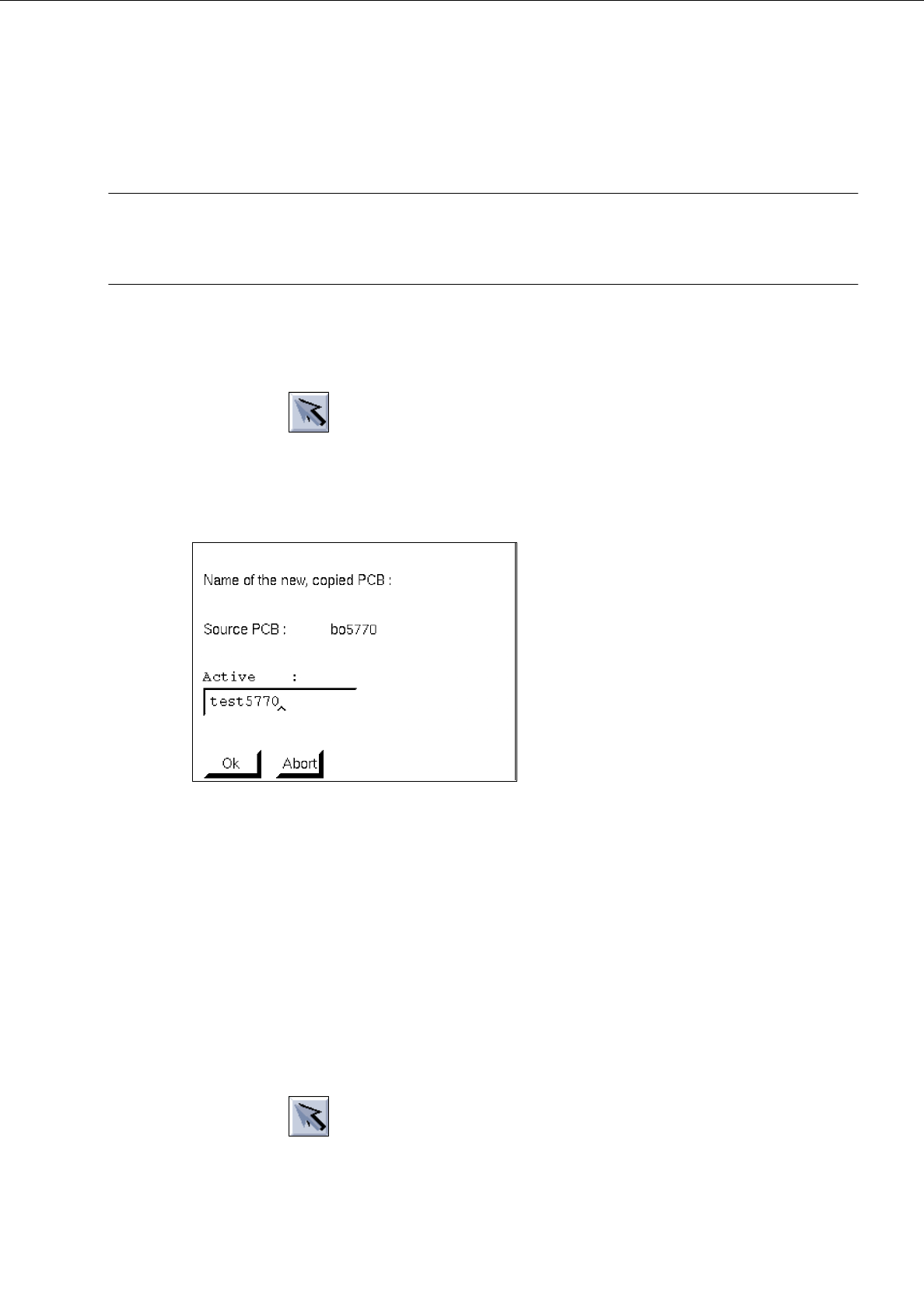
Copying PCB
This function makes it possible to duplicate a currently loaded PCB. All predefined data (placement
positions, cluster, fiducials) will also be copied.
●
Activate icon in the command area.
(The arrow in the icon points from the bottom left to the top right).
●
Click on the uppermost partial PCB structure of the PCB structure (see Fig. 8.1.4).
●
Select menu option FILE --> Copy PCB.
The following dialog box appears:
●
Enter the name and confirm with OK.
A second window of the Structure Editor containing the name of the new PCB and the copied
structure are displayed on the screen.
8.1.3.2 SERVICES Menu
The menu functions of this menu allow you to open the sub-editors for defining the cluster data and placement
positions, or the Structure Editor for a selected or a new PCB. Moreover, it is possible to toggle between the
Structure Mode and Graphic Mode display types.
-
Call up the Placement Position Editor for the definition of placement positions (only possible in the
Structure Mode)
●
Activate icon in the command area
●
In the display area select partial PCB structure with a mouse-click.
●
Select SERVICES --> Placement Position Editor.
The window of the Placement Position Editor (see Fig. 8.1.11) is opened.