Horizon UserManualV6.pdf - 第29页
Squeegee Pressure Height To complete this calibration, machines with non-feedback pressure system carry out steps 1-13. For machines with pressure feedback option fitted carry out steps 14 - 17. Non Feedback 1. Press Cal…
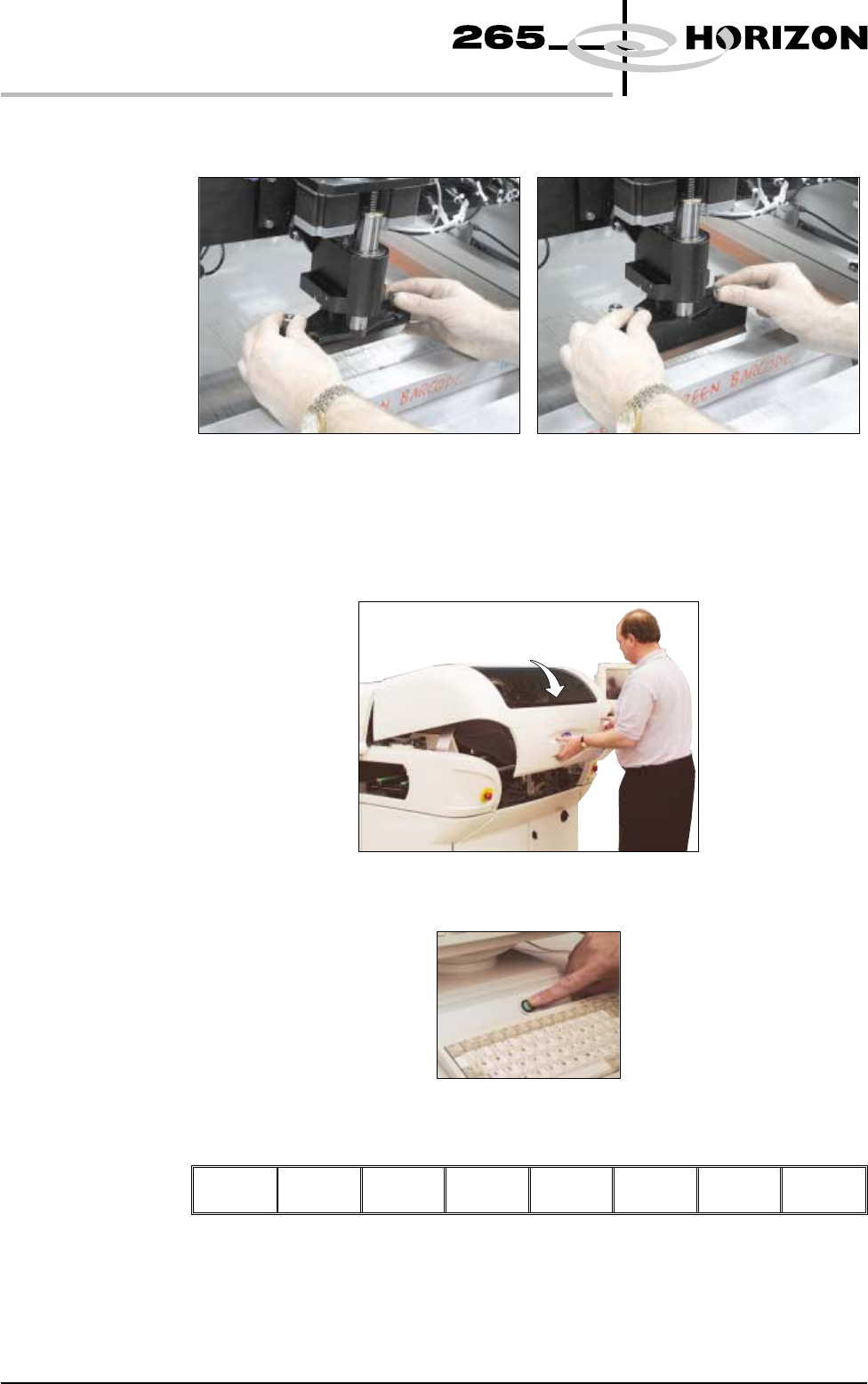
6. Fit the rear squeegee onto the rear squeegee mount, tightening the
thumbscrews until they are finger tight.
7. Fit the front squeegee onto the front squeegee mount, ensuring that the
thumbscrews are only finger tight.
8. Lower the front printhead cover.
9. Press the System button.
10. Select Continue (F1).
Continue
11. If fitted, remove stencil.
1.12 User Manual Software Version 6
MACHINE PROGRAMMING
STAGE 4A
Squeegee Pressure
Height
To complete this calibration, machines with non-feedback pressure system carry
out steps 1-13. For machines with pressure feedback option fitted carry out steps
14 - 17.
Non Feedback 1. Press Calibrat Heights (F2).
Change
Squeegee
Calibrat
Heights
Exit
The message ‘Ensure correct squeegees are fitted!’ is displayed.
2. Press Continue (F1).
Continue
Restore
Defaults
Exit
The message ‘Set Squeegee Pressure Height’ is displayed.
Either:
3. Press Adjust (F2).
Adjust
Save Front
Squeegee
Rear
Squeegee
Step
Up
Step
Down
Exit
The following window is displayed:
4. Using Next, Previous, Incr. and Decr. (F4, F5, F6 and F7) enter the
squeegee heights parameters as necessary.
Next Previous Incr. Decr.
Exit
Software Version 6 User Manual 1.13
MACHINE PROGRAMMING
STAGE 4A
Squeegee Heights Parameters
Front Zero Ref
Rear Zero Ref
4000
4040
5. Press Exit (F8).
Next Previous Incr. Decr.
Exit
6. Press Save (F3).
Adjust
Save
Front
Squeegee
Rear
Squeegee
Step
Up
Step
Down
Exit
Or:
7. Using Step Up and Step Down (F6 and F7) as necessary to raise or lower
the front squeegee until it just touches the front rail.
Adjust Save Front
Squeegee
Rear
Squeegee
Step
Up
Step
Down
Exit
8. Press Rear Squeegee (F5).
Adjust Save Front
Squeegee
Rear
Squeegee
Step
Up
Step
Down
Exit
9. Using Step Up and Step Down (F6 and F7) as necessary to raise or lower
the rear squeegee until it just touches the front rail.
Adjust Save Front
Squeegee
Rear
Squeegee
Step
Up
Step
Down
Exit
10. Press Save (F3).
Adjust
Save
Front
Squeegee
Rear
Squeegee
Step
Up
Step
Down
Exit
11. Press Exit (F8).
Adjust Save Front
Squeegee
Rear
Squeegee
Step
Up
Step
Down
Exit
12. Press Exit (F8).
Change
Squeegee
Calibrat
Heights
Exit
1.14 User Manual Software Version 6
MACHINE PROGRAMMING
STAGE 4A