User Manual SIPLACE Head Care Station -.pdf - 第67页
5 Working with the HCS 5.2 Head verification process User Manual SIPLACE Head Care Station 10/2017 67 5.2.6.2 Selection of measurements The Selection of measurements tab shows all tests available for the selected head ty…
5 Working with the HCS
5.2 Head verification process
66 User Manual SIPLACE Head Care Station 10/2017
5.2.6 Verifying a head
DANGER
EMERGENCY OFF button
The EMERGENCY OFF button immediately aborts all movements and stops the power
supply of 150V to the head unit.
► Press the EMERGENCY OFF button in case of an emergency.
► Click the Test bench inspection icon to start the head verification workflow.
5.2.6.1 Check / enter meta data
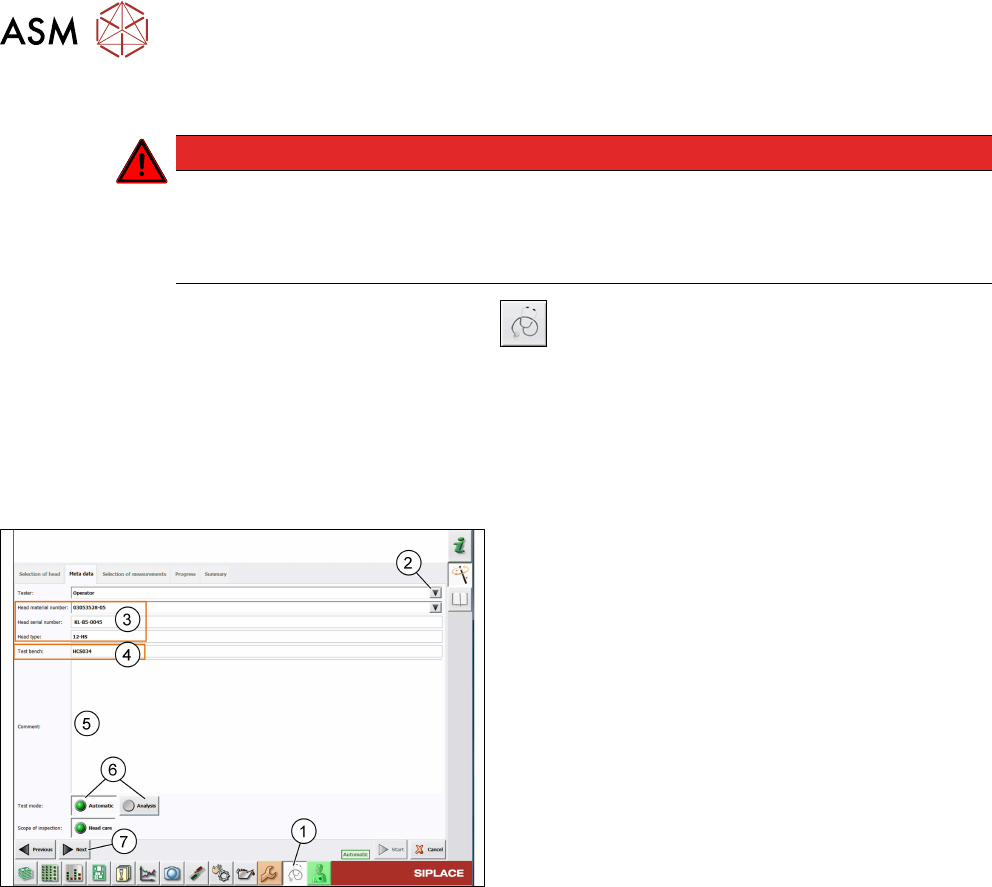
► Click the Test bench inspection icon(1).
ð The Meta data tab page is displayed.
Meta data are required to identify the verified head and the person who performed the verification.
All entered data are shown in the protocol that is generated when the head verification is finished.
Fig.74: Meta data tab
► The default Tester is set to operator. To change
this, you can overwrite it manually or click the ar-
row(2) to select another tester from a pick list.
For information on how to modify the pick list, see
5.4.1 "Adding users" [}71].
► All head information(3) is read out from the head
EPROM. Verify if the Head material number
corresponds to the information written on the
head label and modify it if applicable.
► The Test bench ID(4) is entered during the in-
stallation of the HCS software. For information on
how to modify this entry, see 5.4.3 "Setting up the
test bench ID" [}72].
► In the Comment field(5), enter a comment if ne-
cessary.
► Select the Test mode(6) to be used:
- Automatic: All tests must be performed.
- Analyze: Individual tests to be performed can be
configured.
► Click Next(7).
See also
2 1.1.2 "Serial number" [}8]
5 Working with the HCS
5.2 Head verification process
User Manual SIPLACE Head Care Station 10/2017 67
5.2.6.2 Selection of measurements
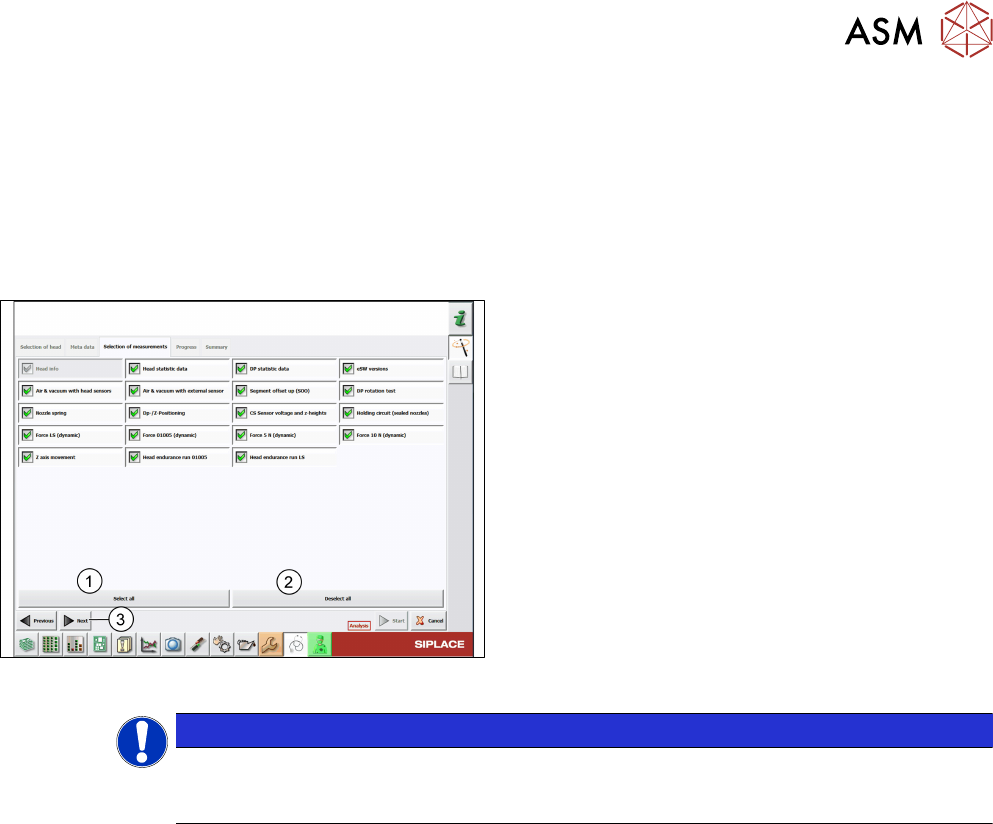
The Selection of measurements tab shows all tests available for the selected head type. The
number of tests depends on the head to be verified.
Whether the tests are selectable depends on the Test mode used:
●
In the Automatic mode, all tests are preselected without further options.
●
In the Analysis mode, all tests are preselected with the option to manually configure the test
setup.
Fig.75: Selection of measurements tab – Analysis mode
► Manually select and/or deselect tests. You can
also click the Select all(1) button to select all
tests at once or click the Deselect all(2) button
to deselect all tests at once.
► Click Next(3).
NOTICE
To gain a reliable overview about the head condition it is recommended to run a full
head verification including all tests available. The order in which the tests will be per-
formed is line-wise starting from the top left test to the bottom right test.
5 Working with the HCS
5.2 Head verification process
68 User Manual SIPLACE Head Care Station 10/2017
5.2.6.3 Starting the head verification
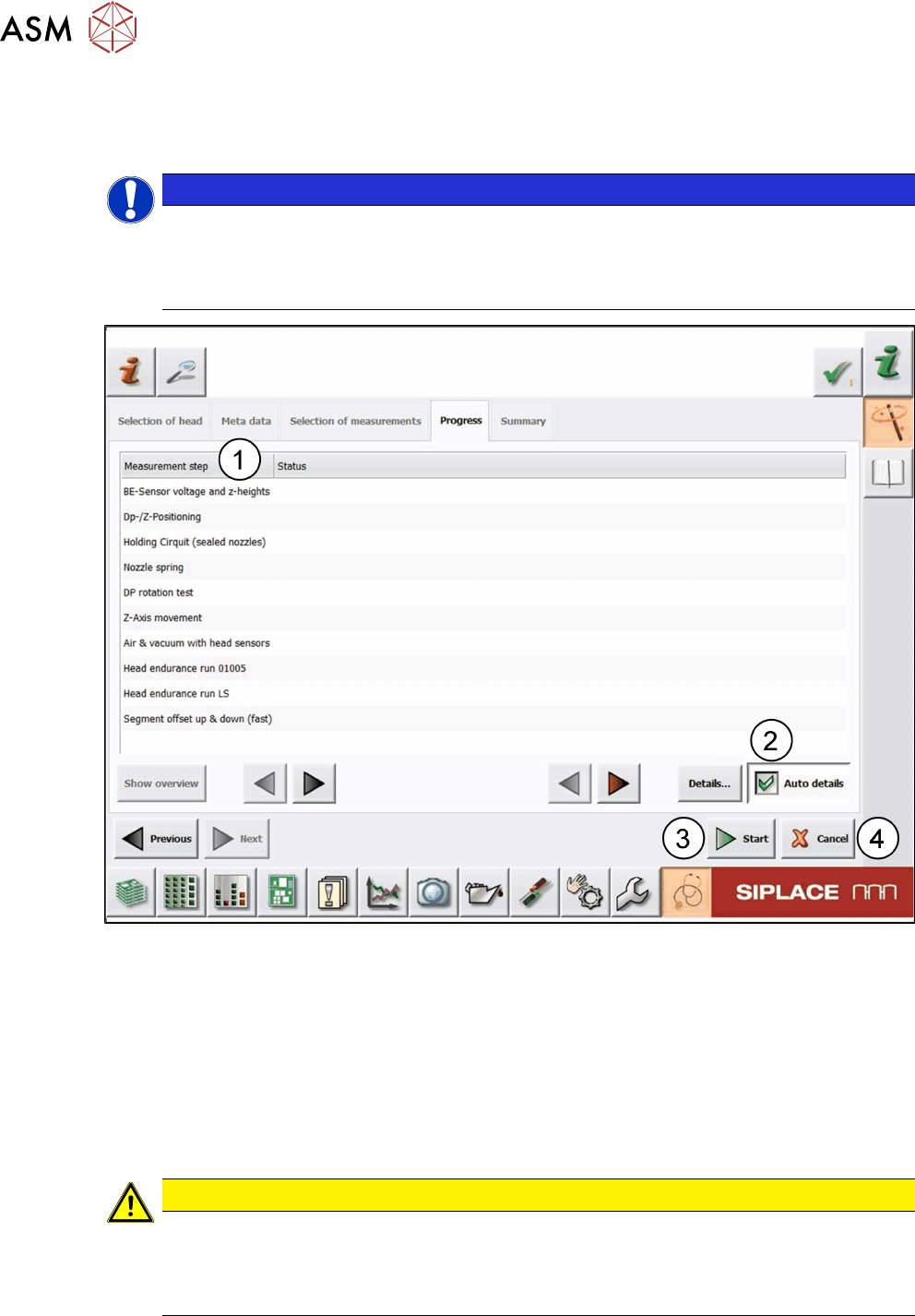
The Progress tab shows the previously selected measurements and the status of the individual
tests and the overall test sequence.
NOTICE
Previous settings still available
All previous settings are still available and can be changed any time before the head verific-
ation has been started.
► Click the Previous button to return to the previous page.
Fig.76: Progress tab
► Before you start the verification process, it is recommended to enable the Auto details op-
tion(2) so that the detailed test result is automatically displayed whenever new measurement
values are available.
► Click the Start button(3).
ð The head verification process is started.
ð The test status of the ongoing verification is displayed in the Status column for each test
from top to bottom. See 5.2.6.5 "Measurement progress" [}70].
ð When all tests are finished, the Summary tab is displayed.
CAUTION
Loss of verification data
Clicking the Cancel button(4) aborts the whole test and looses all previous settings. The
verification process then needs to be started from the beginning.
► Only click Cancel if you are sure to discard all results.