User Manual SIPLACE Head Care Station -.pdf - 第74页
5 Working with the HCS 5.4 Helpful HCS functions 74 User Manual SIPLACE Head Care Station 10/2017
5 Working with the HCS
5.4 Helpful HCS functions
User Manual SIPLACE Head Care Station 10/2017 73
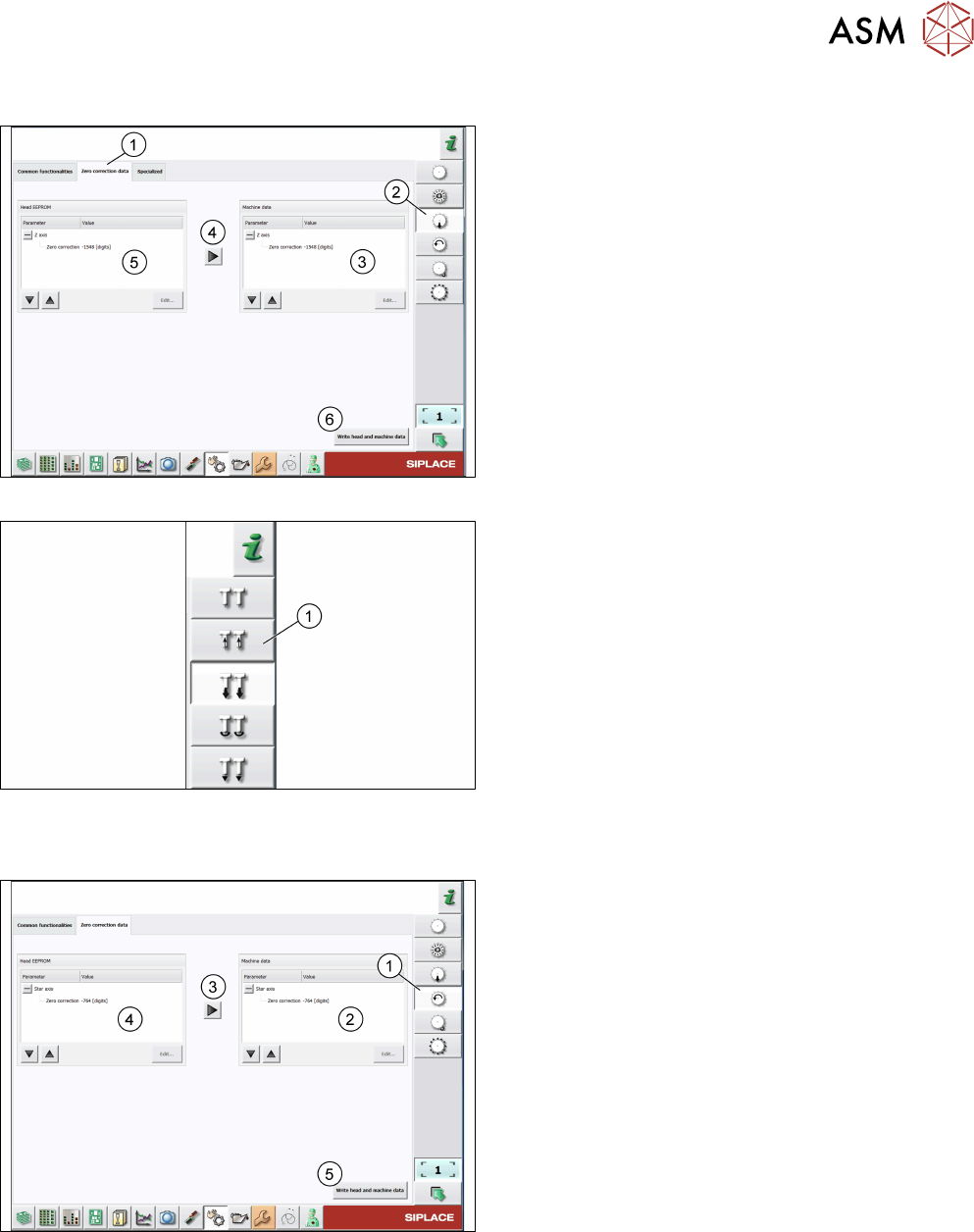
Checking the zero correction data of the z-axis
Fig.81: Zero correction data of z-axis of C&P heads
For C&P heads, proceed as follows:
► Log on as machine service. 5.2.4 "Changing the
user role" [}64]
► Click the Check sensors and functions of z-
axis icon(2).
► Click the Zero correction data tab(1).
► Compare the machine data(3) to the head
EPROM data(5).
► If the head EPROM data(5) is to be used, click
the arrow(4) to overwrite the machine data(3) or
click Edit… and enter the zero correction data.
► To save your settings, click the Write head and
machine data button(6).
Fig.82: Zero correction data of z-axis of P&P modules
For P&P modules, proceed as for C&P heads, but
note that the Check sensors and functions of z-axis
icon(1) is different.
Checking the zero correction data of the star axis
Fig.83: Zero correction data of star axis of C&P heads
► Click the Check sensors and functions of star
axis icon(1).
► Click the Zero correction data tab.
► Compare the machine data(2) to the HCS
data(4).
► If the head EPROM data(2) is to be used, click
the arrow(3) to overwrite the machine data or
click Edit… and enter the zero correction data.
► To save your settings, click the Write head and
machine data button(5).

5 Working with the HCS
5.4 Helpful HCS functions
74 User Manual SIPLACE Head Care Station 10/2017