User Manual SIPLACE Head Care Station -.pdf - 第73页
5 Working with the HCS 5.4 Helpful HCS functions User Manual SIPLACE Head Care Station 10/2017 73 Checking the zero correction data of the z-axis Fig.81: Zero correction data of z-axis of C&P heads For C&P heads…
5 Working with the HCS
5.4 Helpful HCS functions
72 User Manual SIPLACE Head Care Station 10/2017
5.4.2 Removing a user
To remove a user, select the Remove user function and proceed as described in 5.4.1 "Adding
users" [}71].
5.4.3 Setting up the test bench ID
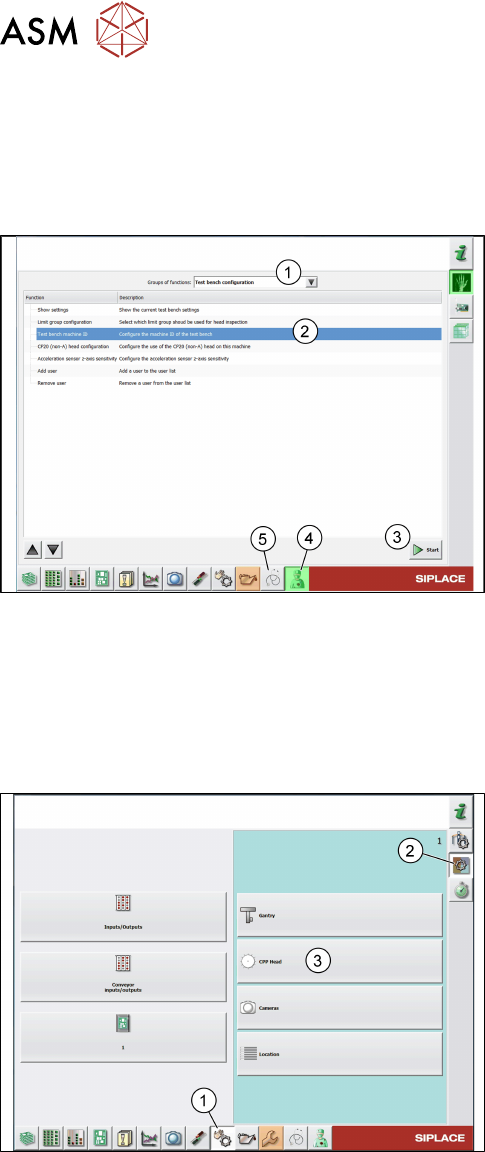
Fig.79: Test bench machine ID function
► Click the Test bench service icon(4).
► From the list, select Test bench configura-
tion(1).
► Select the Test bench machine ID function(2).
► Click the Start button(3).
► Enter the HCS ID written on the type plate or on
the label below the pneumatic unit and click OK.
► Click the Test bench inspection icon(1) to re-
turn to the Meta data tab.
5.4.4 Checking / modifying the zero point correction
The individual measurements of a head verification process are performed using the data that is
stored in the SIPLACEmachine configuration. In some cases, the data readout from the machine
does not match the machine data of the HCS. Therefore, it is recommended to check / modify the
data before running the head verification.
Fig.80: Check sensors and functions
► Click the Check sensors and functions icon(1).
► Click the Check sensors and functions of spe-
cific components icon(2).
► Open the head functions for the installed
head(3), for example, the CPP head.
5 Working with the HCS
5.4 Helpful HCS functions
User Manual SIPLACE Head Care Station 10/2017 73
Checking the zero correction data of the z-axis
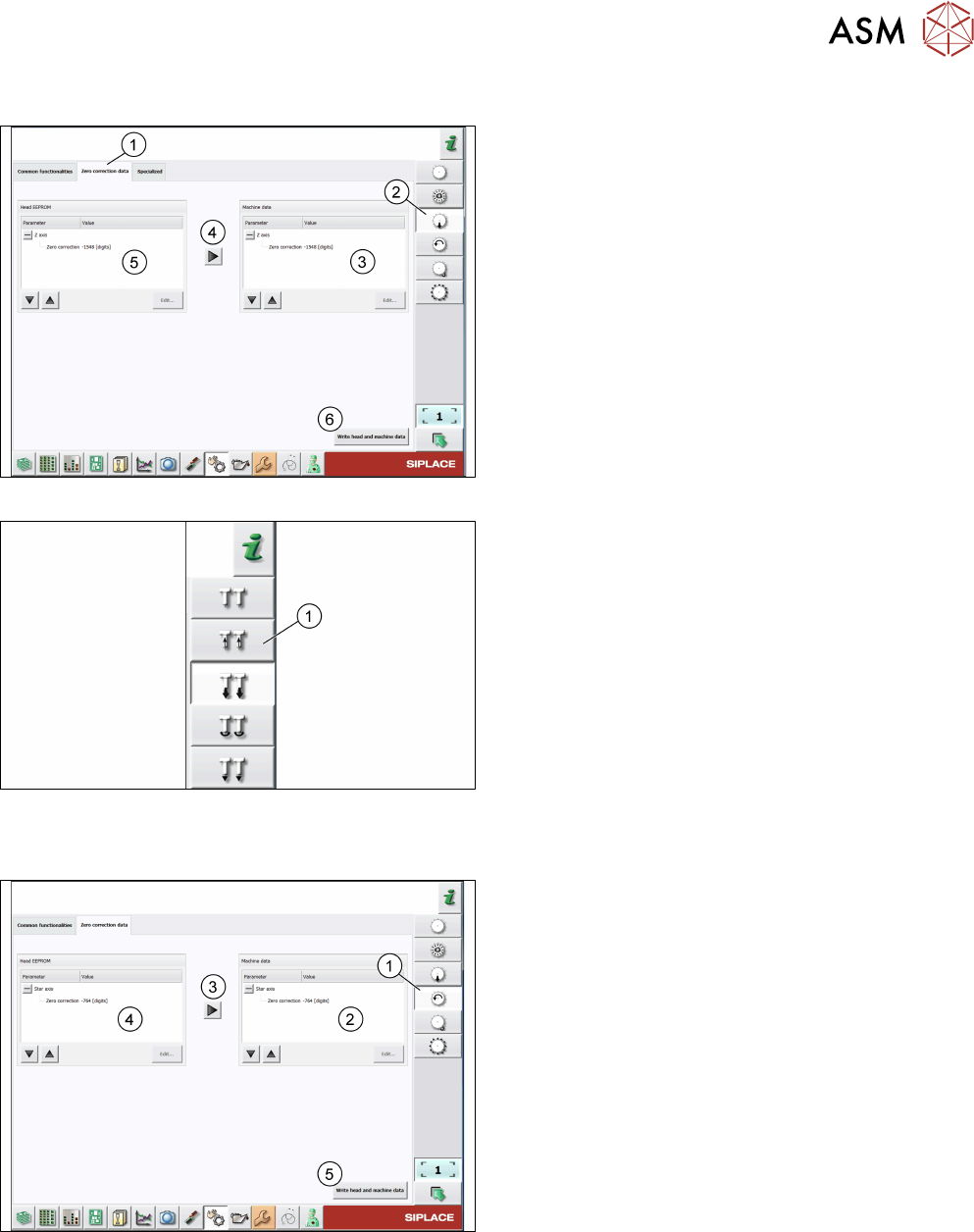
Fig.81: Zero correction data of z-axis of C&P heads
For C&P heads, proceed as follows:
► Log on as machine service. 5.2.4 "Changing the
user role" [}64]
► Click the Check sensors and functions of z-
axis icon(2).
► Click the Zero correction data tab(1).
► Compare the machine data(3) to the head
EPROM data(5).
► If the head EPROM data(5) is to be used, click
the arrow(4) to overwrite the machine data(3) or
click Edit… and enter the zero correction data.
► To save your settings, click the Write head and
machine data button(6).
Fig.82: Zero correction data of z-axis of P&P modules
For P&P modules, proceed as for C&P heads, but
note that the Check sensors and functions of z-axis
icon(1) is different.
Checking the zero correction data of the star axis
Fig.83: Zero correction data of star axis of C&P heads
► Click the Check sensors and functions of star
axis icon(1).
► Click the Zero correction data tab.
► Compare the machine data(2) to the HCS
data(4).
► If the head EPROM data(2) is to be used, click
the arrow(3) to overwrite the machine data or
click Edit… and enter the zero correction data.
► To save your settings, click the Write head and
machine data button(5).

5 Working with the HCS
5.4 Helpful HCS functions
74 User Manual SIPLACE Head Care Station 10/2017