multifunction-rio-user-manual.pdf - 第59页
© National Instruments Corporation B-1 Mult ifunction Reconfigurable I/O User Manual B Using the SCB-68 Shielded Connector Block This appendix describes how to connect input and output signals to the NI 78 xx with the SC…
Appendix A Connecting I/O Signals
Multifunction Reconfigurable I/O User Manual A-8 ni.com
You can plug each of these 50-pin headers directly into an 8-, 16-, 24-,
or 32-channel SSR backplane for digital signal conditioning. One of the
50-pin headers contains DIO<0..23> from the NI 78xx RDIO connector.
These lines correspond to Slots <0..23> on an SSR backplane in sequential
order. The other 50-pin header contains DIO<24..39> from the NI 78xx
RDIO connector. These lines correspond to Slots <0..15> on an SSR
backplane in sequential order. You can connect to an SSR backplane
containing a number of channels unequal to the number of lines on the
NSC68-5050 cable header. In this case, you have access only to the
channels that exist on both the SSR backplane and the NSC68-5050 cable
header you are using.
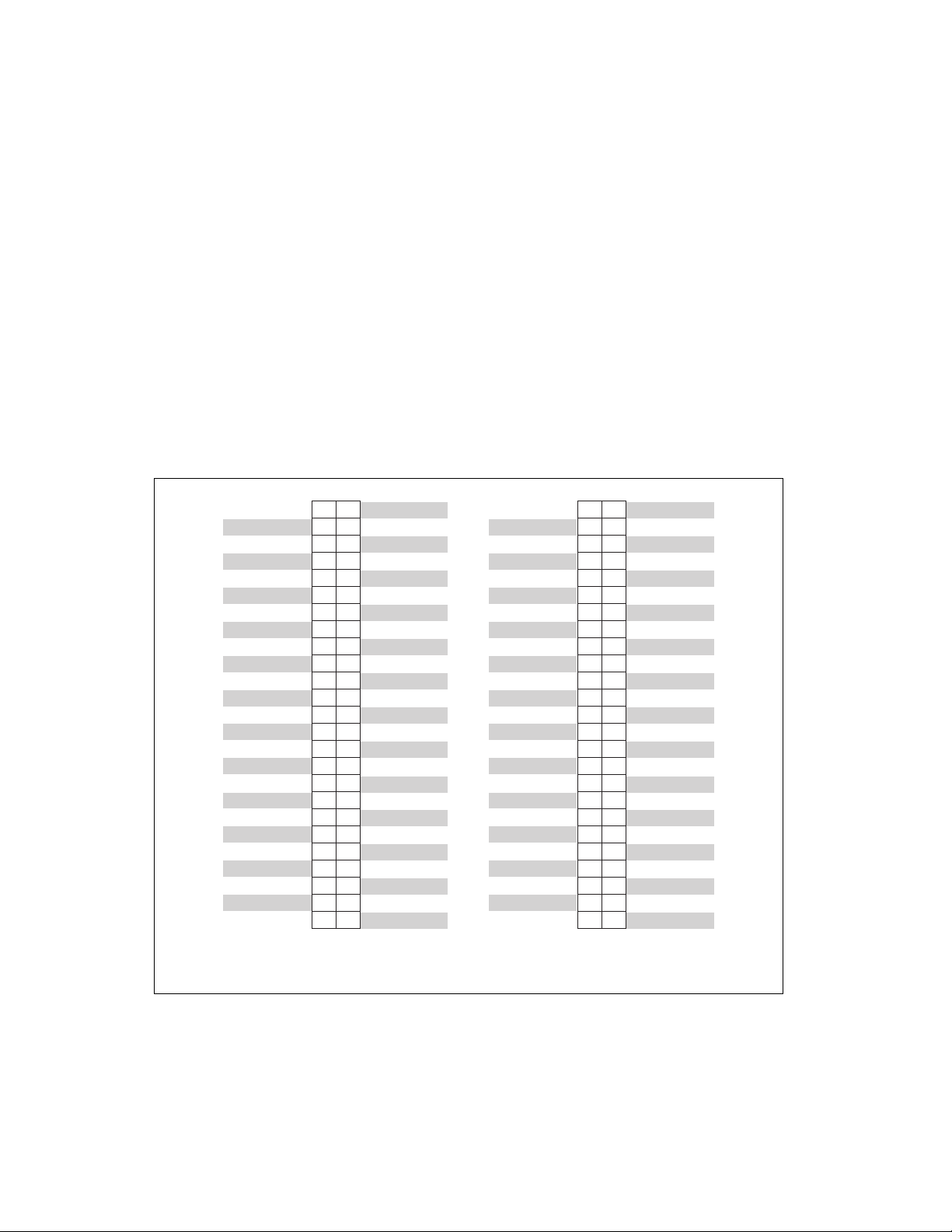
Figure A-4 shows the connector pinouts when using the NSC68-5050
cable.
Figure A-4. Connector Pinouts when Using the NSC68-5050 Cable
2
4
6
8
10
12
14
16
18
20
22
24
26
28
30
32
34
36
38
40
42
44
46
48
50
1
3
5
7
9
11
13
15
17
19
21
23
25
27
29
31
33
35
37
39
41
43
45
47
49
DIO23
DIO22
DIO21
DIO20
DIO19
DIO18
DIO17
DIO16
DIO15
DIO14
DIO13
DIO12
DIO11
DIO10
DIO9
DIO8
DIO7
DIO6
DIO5
DIO4
DIO3
DIO2
DIO1
DIO0
+5V
No Connect
No Connect
No Connect
No Connect
No Connect
No Connect
No Connect
No Connect
No Connect
DGND
DGND
DGND
DGND
DGND
DGND
DGND
DGND
DGND
DGND
DGND
DGND
DGND
DGND
DGND
DGND
2
4
6
8
10
12
14
16
18
20
22
24
26
28
30
32
34
36
38
40
42
44
46
48
50
1
3
5
7
9
11
13
15
17
19
21
23
25
27
29
31
33
35
37
39
41
43
45
47
49
No Connect
No Connect
No Connect
No Connect
No Connect
No Connect
No Connect
No Connect
DIO39
DIO38
DIO37
DIO36
DIO35
DIO34
DIO33
DIO32
DIO31
DIO30
DIO29
DIO28
DIO27
DIO26
DIO25
DIO24
+5V
No Connect
No Connect
No Connect
No Connect
No Connect
No Connect
No Connect
No Connect
No Connect
No Connect
No Connect
No Connect
No Connect
No Connect
No Connect
DGND
DGND
DGND
DGND
DGND
DGND
DGND
DGND
DGND
DGND
DIO 0–23 Connector
Pin Assignment
DIO 24–39 Connector
Pin Assignment
© National Instruments Corporation B-1 Multifunction Reconfigurable I/O User Manual
B
Using the SCB-68
Shielded Connector Block
This appendix describes how to connect input and output signals to the
NI 78xx with the SCB-68 shielded connector block.
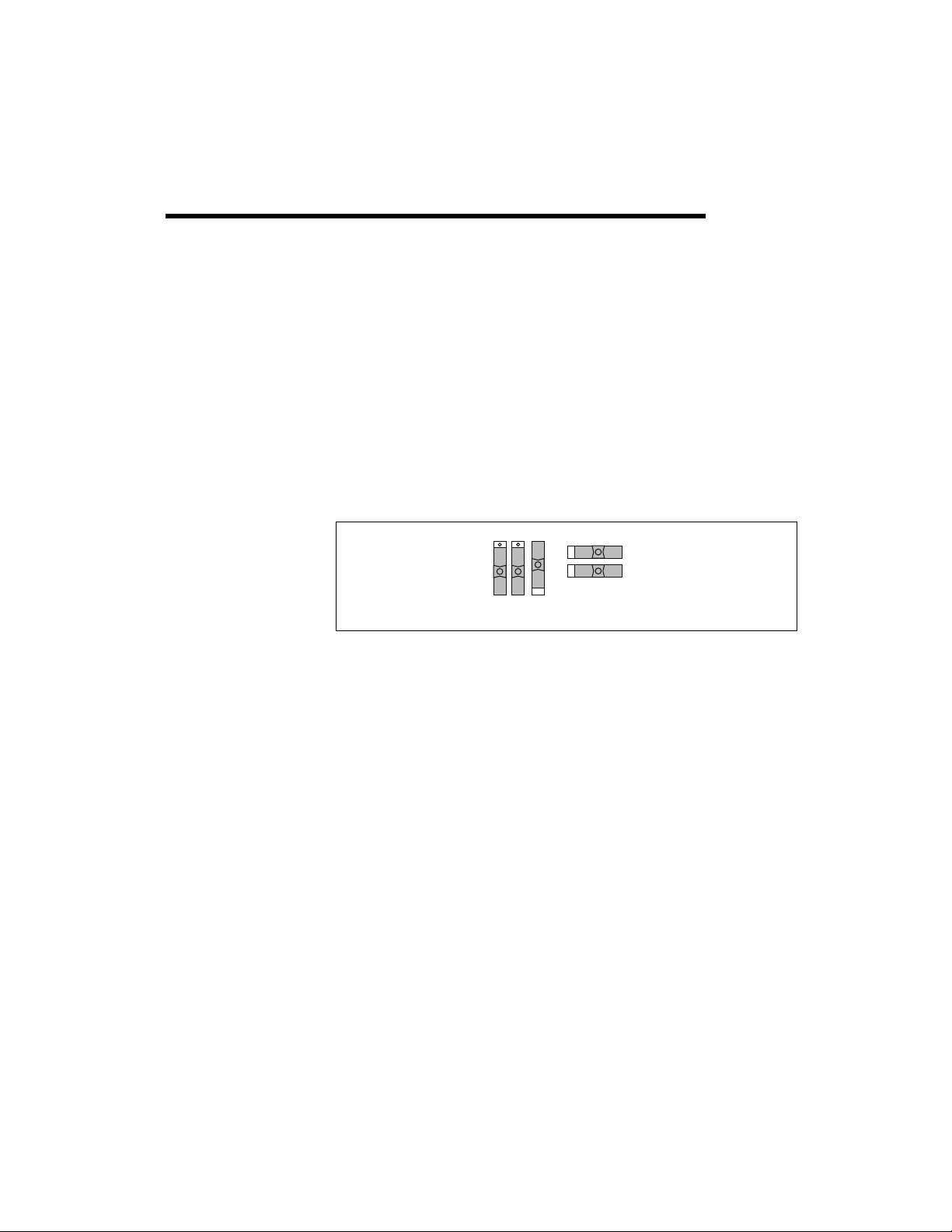
The SCB-68 has 68 screw terminals for I/O signal connections. To use
the SCB-68 with the NI 78xx, you must configure the SCB-68 as a
general-purpose connector block. Refer to Figure B-1 for the
general-purpose switch configuration.
Figure B-1. General-Purpose Switch Configuration for the SCB-68 Terminal Block
After configuring the SCB-68 switches, you can connect the I/O signals to
the SCB-68 screw terminals. Refer to Appendix A, Connecting I/O Signals,
for the connector pin assignments for the NI 78xx. After connecting
I/O signals to the SCB-68 screw terminals, you can connect the
SCB-68 to the with the SHC68-68-RMIO (for Connector 0 on the
NI 783x/784x/785x) or SHC68-68-RDIO (Connector <0..3> on the
NI 781x and Connector <1..2> on the NI 783x/784x/785x) shielded cables.
S5 S4 S3
S1
S2

© National Instruments Corporation C-1 Multifunction Reconfigurable I/O User Manual
C
Technical Support and
Professional Services
Visit the following sections of the award-winning NI website at ni.com for
technical support and professional services:
• Support—Technical support at
ni.com/support includes the
following resources:
– Self-Help Technical Resources—For answers and solutions,
visit
ni.com/support for software drivers and updates,
a searchable KnowledgeBase, product manuals, step-by-step
troubleshooting wizards, thousands of example programs,
tutorials, application notes, instrument drivers, and so on.
Registered users also receive access to the NI Discussion Forums
at
ni.com/forums. NI Applications Engineers make sure every
question submitted online receives an answer.
– Standard Service Program Membership—This program
entitles members to direct access to NI Applications Engineers
via phone and email for one-to-one technical support as well as
exclusive access to on demand training modules via the Services
Resource Center. NI offers complementary membership for a full
year after purchase, after which you may renew to continue your
benefits.
For information about other technical support options in your
area, visit
ni.com/services, or contact your local office at
ni.com/contact.
• Training and Certification—Visit
ni.com/training for
self-paced training, eLearning virtual classrooms, interactive CDs,
and Certification program information. You also can register for
instructor-led, hands-on courses at locations around the world.
• System Integration—If you have time constraints, limited in-house
technical resources, or other project challenges, National Instruments
Alliance Partner members can help. To learn more, call your local
NI office or visit
ni.com/alliance.