Workcell-Installation-Guidelines-Troubleshooting-Maintenance-REV-F.pdf - 第27页
Workcell Installation and General Guidelines Revision F / Janu ary 2021 Page 27 of 59 Manual Locati on Your manual is saved to your workcell’s PC (if you have one). 1. To find your manu al, start the workcell co mputer a…
Workcell Installation and General Guidelines
Revision F / January 2021
Page 26 of 59
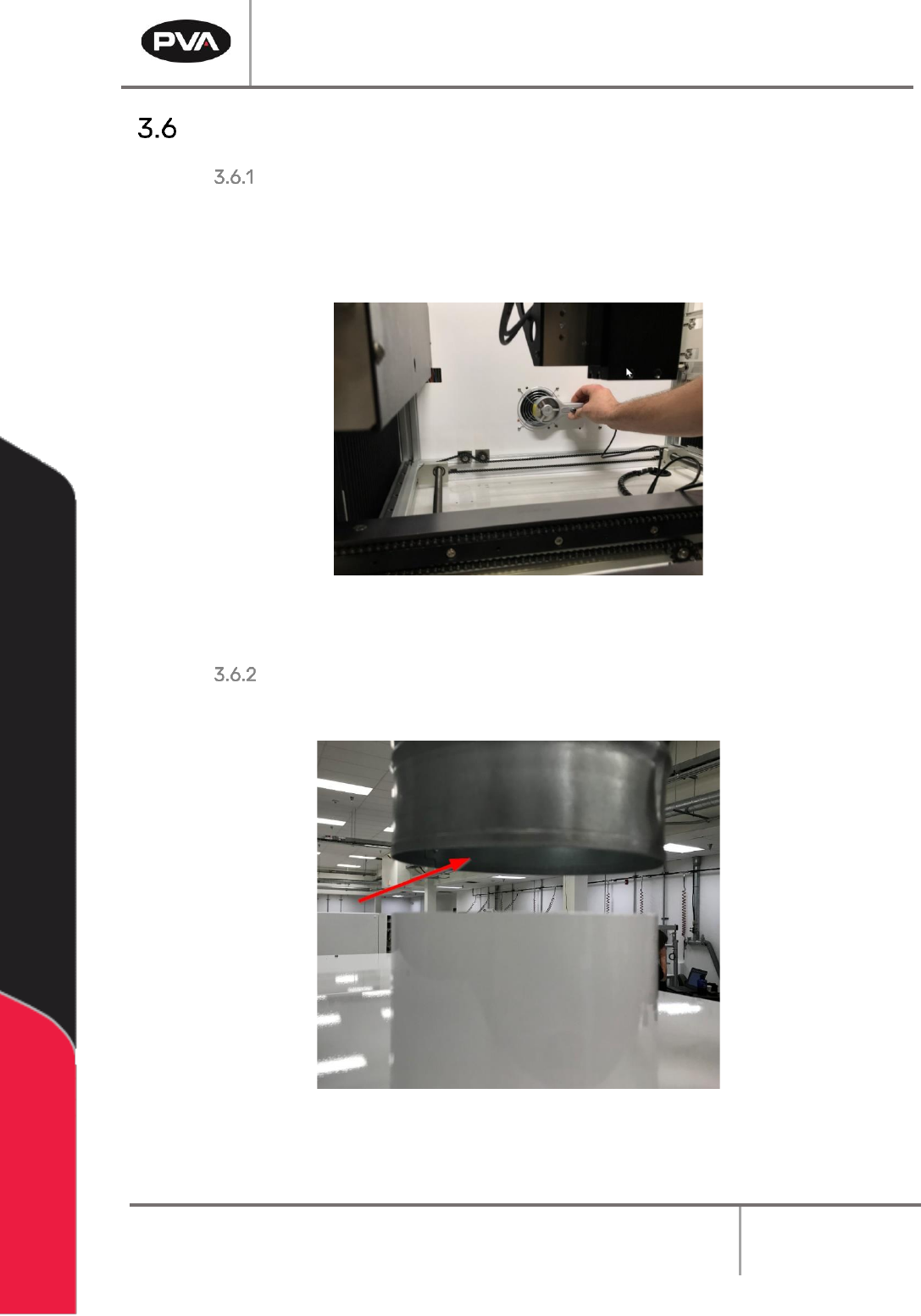
Air Velocity Test Points
Delta 6, Delta 8, and Flex Cells
If there is no optional exhaust blower, measure the velocity at the port located inside the
workcell. The port is typically on the back wall or the horizontal deck pan inside the
machine. If an optional blower is present, measure the velocity at the inlet to the factory
supplied duct.
Figure 14: Measure Velocity at Port
DeltaTherm, Spectra, and Queue/Inspect Station
Measure the velocity at the inlet to the factory supplied duct.
Figure 15: Measure Velocity at Duct Inlet
Workcell Installation and General Guidelines
Revision F / January 2021
Page 27 of 59
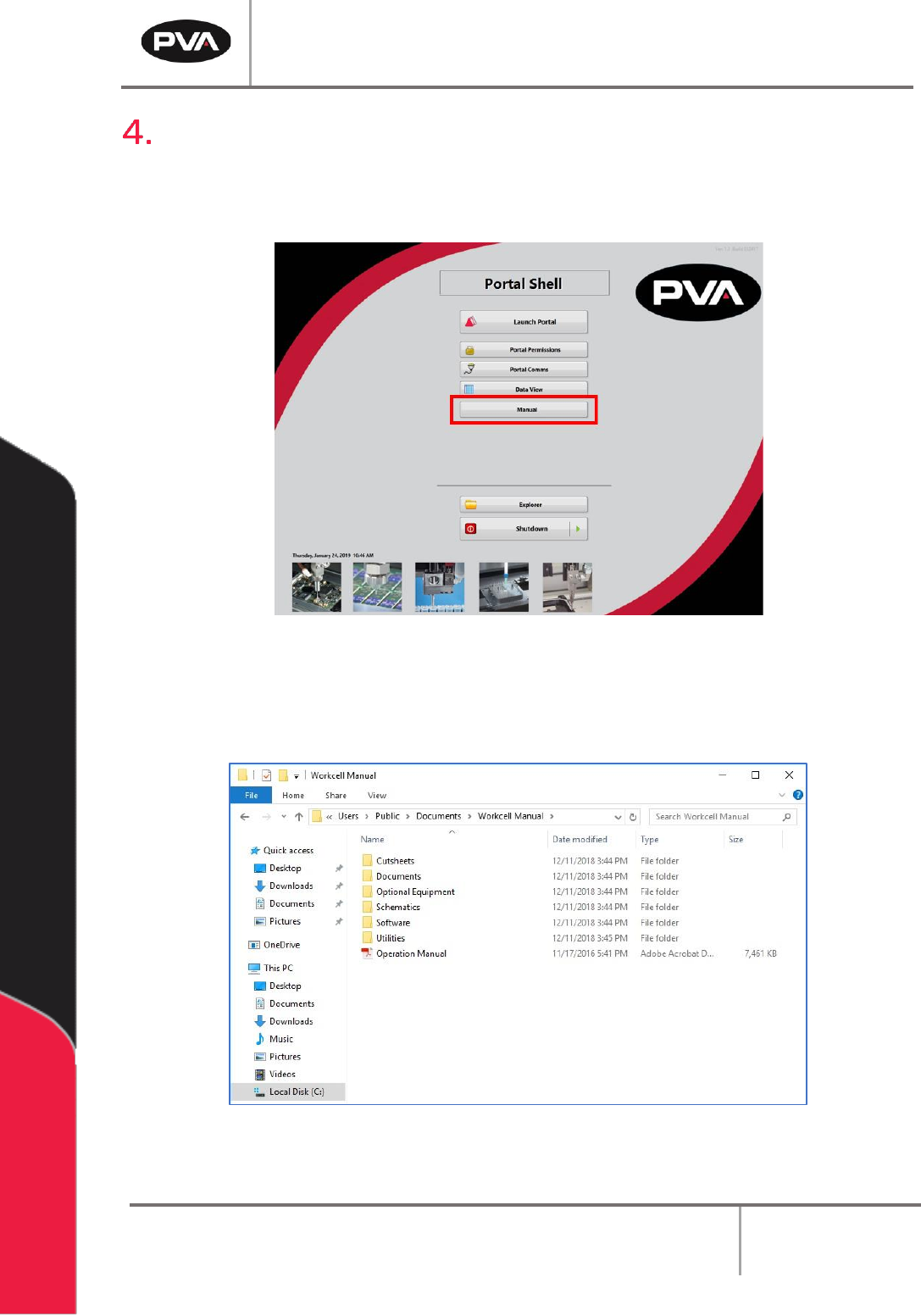
Manual Location
Your manual is saved to your workcell’s PC (if you have one).
1. To find your manual, start the workcell computer and open Portal Shell.
Figure 16: Portal Shell
2. Select the “Manual” button.
3. The file location will display all of the documentation for your workcell.
Figure 17: Workcell Manual Location
Workcell Installation and General Guidelines
Revision F / January 2021
Page 28 of 59
Troubleshooting
The troubleshooting section is designed to solve problems before you call PVA for help. Use
this section if a mechanical or electrical problem occurs. If you have problems that are not
listed in this section, or continue to have problems after you have done different
procedures, please contact PVA Technical Support.
Note: If a problem occurs while running a particular path program, consult the
separate PathMaster® Manual for information on debugging code problems.
Calling Technical Support
The technical support staff is available to help solve any problems. The phone number is
+1-518-371-2684. Before you call for help, make sure you have information or
documentation for the following items:
1. Please have the serial number of the machine(s) available.
2. Record all the information from the Portal screen when the error occurred.
3. Record the operation that was in progress when the machine had the problem
(when did it have problems, what was it doing, etc.).
4. If the error was not dangerous or damaging, try to cause the error again. If the error
does not occur again, the problem may have been operator generated.
5. Use a terminal screen to communicate with the motion controller. It is necessary to
give commands directly to the motion controller for most troubleshooting.
6. If the problem is programming related, a hard copy or email of the program in
question may be requested by PVA, please be prepared to send one. The PVA fax
number is (518) 371-2688, or the technical support representative will provide an
email address.
Records
Any service or replaced components should be recorded in maintenance records with any
other pertinent data for future reference.