Workcell-Installation-Guidelines-Troubleshooting-Maintenance-REV-F.pdf - 第48页
Workcell Installation and General Guidelines Revision F / Janu ary 2021 Page 48 of 59 DMC Pr ogramming Basi cs • All commands must b e in uppercas e letters. • Positions are given in counts. In most cases there are 5080 …
Workcell Installation and General Guidelines
Revision F / January 2021
Page 47 of 59
Part Replacement
Ordering Parts
To order parts, contact Inside Sales (kdurante@pva.net). When you order parts, be prepared
to supply the following information:
• Your company name
• Billing address
• Shipping address
• Serial number of the workcell (found on the back of the workcell)
• Part number or description
• Quantity
• Purchase order or credit card information
• Shipping instructions
Note: An extra set of frequently used spare parts can reduce down time.
Return Material Authorization (RMA)
Contact PVA Inside Sales to get a Return Material Authorization (RMA) from Precision Valve
& Automation.
Training
Precision Valve & Automation offers Training Certificate programs to customer technicians
to increase safety and familiarity with the equipment. Contact PVA for more information.
Warranty
Contact PVA Technical Support for any warranty issue related to spare parts.
Shipping
When you order parts, specify which carrier you prefer to use. Precision Valve & Automation
will determine the best shipping if no instructions are received.
Workcell Installation and General Guidelines
Revision F / January 2021
Page 48 of 59
DMC Programming Basics
• All commands must be in uppercase letters.
• Positions are given in counts. In most cases there are 5080 counts per inch, 200
counts per millimeter.
• No line of code may contain more than 80 characters.
• A semicolon (;) is used as a carriage return. This allows for multiple commands on the
same line and can be used to save space in the program.
Labels
Sections of a program (subroutines) are defined by labels. PathMaster® generates its own
labels for programs. These labels do not appear in the edit window, so the operator cannot
alter them.
• Labels start with the pound (#) sign followed by a maximum of seven characters.
• The first character must be a letter, after there can be numbers.
• There can be no spaces.
• There can be no duplicate labels anywhere in memory. The Main program and
PathMaster® are written without any duplicate labels.
• If the operator must put special labels into programs it can cause duplicate labels. If
any duplicate labels occur, the operator must find the duplication and fix it.
This usually happens when a section of code has been copied and pasted. There can be no
duplicates anywhere within a project, which includes all 30 programs in that project.
• Labels must be at the start of a line. When code is entered manually, make sure there
are no labels in the middle of a line. This causes an error when the program is run.
Important Commands
The DMC programming language contains over 135 commands. The program for the workcell
does not use most of these commands, and even fewer are used to create a dispense path.
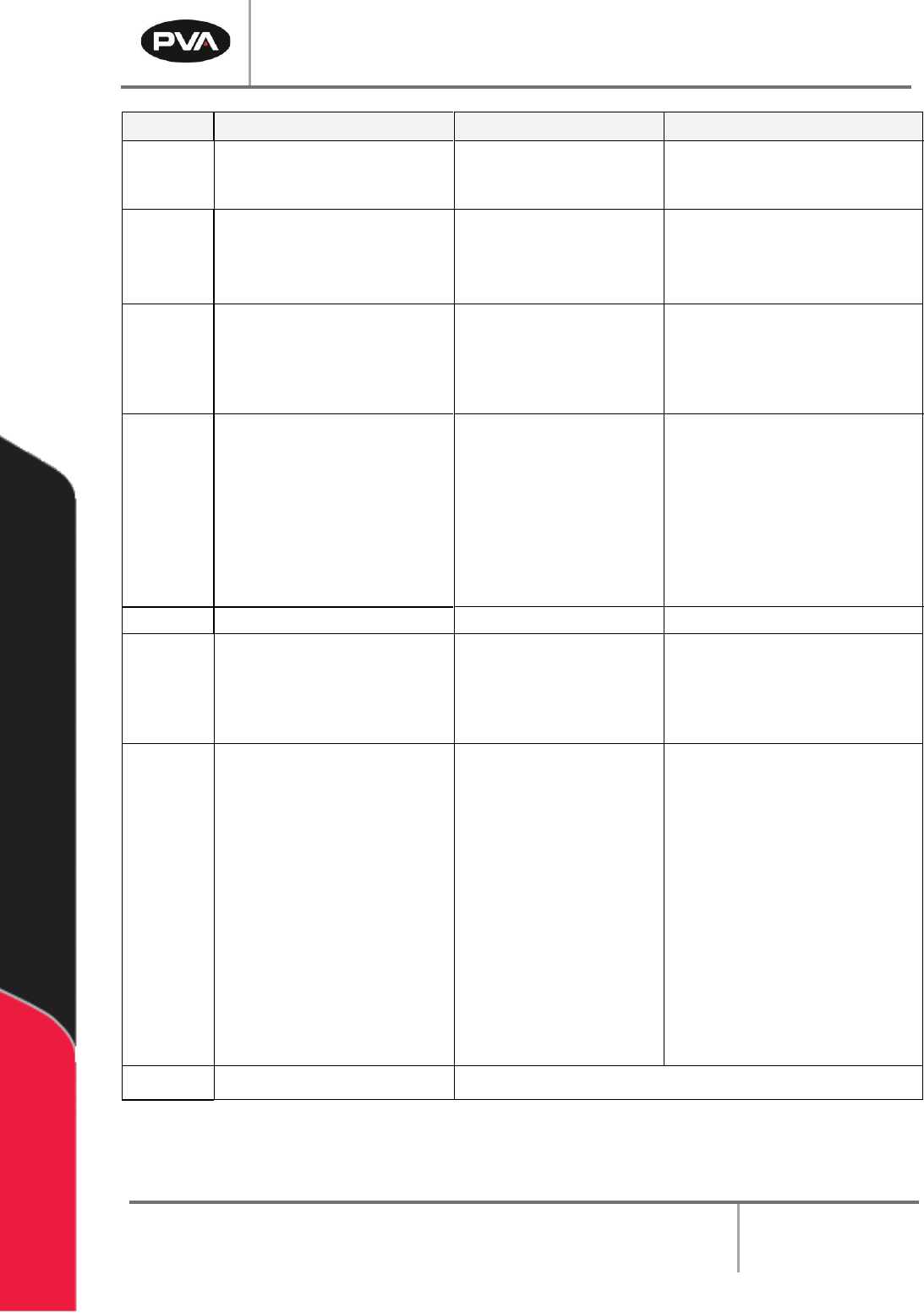
The commands in the table below are the most important for an advanced operator to know.
A complete list of commands can be found in the separate DMC-1500 or 2200 manual that
came with the machine. Any reference to manually changing or querying in the examples
below requires the use of the terminal option in PathMaster® to communicate directly with
the controller.
Workcell Installation and General Guidelines
Revision F / January 2021
Page 49 of 59
Cmd
Description
Example
Tips
AC
Acceleration for independent
moves are in counts per second²
AC*=100000 (sets all axes)
ACX=100000 (only sets the
X axis acceleration)
Make sure the acceleration is large
enough to get the motion to speed
in a reasonable amount of time
AM
After move. This command holds
the program until the movement
on the specified axes is
completed
AM (wait for all axes to finish
its motion)
AMS (wait for coordinate
sequence to finish motion)
The AM command tests for profile
completion. Use the AM command
to separate multiple movements
AV
After vector distance. This
command holds the program
until a specified distance has
been traveled with a coordinated
move, the units are in counts
AV1000 (wait until the axes
have moved 1000 counts)
The AV command resets to zero
after every use. It can be calculated
by summing the distances between
each point on the coordinated
move
BG
Begin. BG starts a motion on an
axis or a sequence
BGX (begin motion on the X
axis), BGS (begin motion
sequence), BG (begin motion
on all axes)
A second BG command cannot be
given until the first BG motion is
finished. The AM command can
hold the program until the first
motion is done. The exact axes to
put in motion must be given. The
BG command starts all the axes
according to the last specified
motions
BL
Reverse Software Limit
CB
Clear bit. Clears a bit on the
output port
CB40 (clears the bit for the
buzzer)
Clearing a bit in DMC terminology
turns the bit on. The opposite of CB
is SB (set bit). A complete list of the
outputs can be found in the
Operating Guide
CR
Circle. Select a radius, a start
angle and the angle to be
traversed. Movement is
counterclockwise in the
Cartesian coordinate system.
This is either clockwise or
counterclockwise, as viewed
from the front of the machine,
and depends on the setup of the
machine. A negative traverse
angle yields clockwise motion in
the Cartesian coordinate system
CR 5000,90,180
arc with length of 5000
counts, starting at 90° and
doing a half circle (180°)
The circle command is a
coordinated two dimensional move.
The structure is the same as all
other coordinated moves, using the
VM, VP and VE commands. A start
angle of 0° gives a circle, relative to
the start point, entirely negative in
the X direction and half positive,
half negative in the Y. Starting at
180° yields an entirely positive X
circle and a half positive, half
negative Y.
90° is an entirely negative Y circle
180° entirely positive Y, with both
having X half positive, half negative
CS
Clear Sequence
Clears Memory of prior coordinated sequences