Workcell-Installation-Guidelines-Troubleshooting-Maintenance-REV-F.pdf - 第31页
Workcell Installation and General Guidelines Revision F / Janu ary 2021 Page 31 of 59 Mainten ance Overvi ew Do the preventative maintenanc e as shown in the table below to increase the life of the workcell and make sure…
Workcell Installation and General Guidelines
Revision F / January 2021
Page 30 of 59
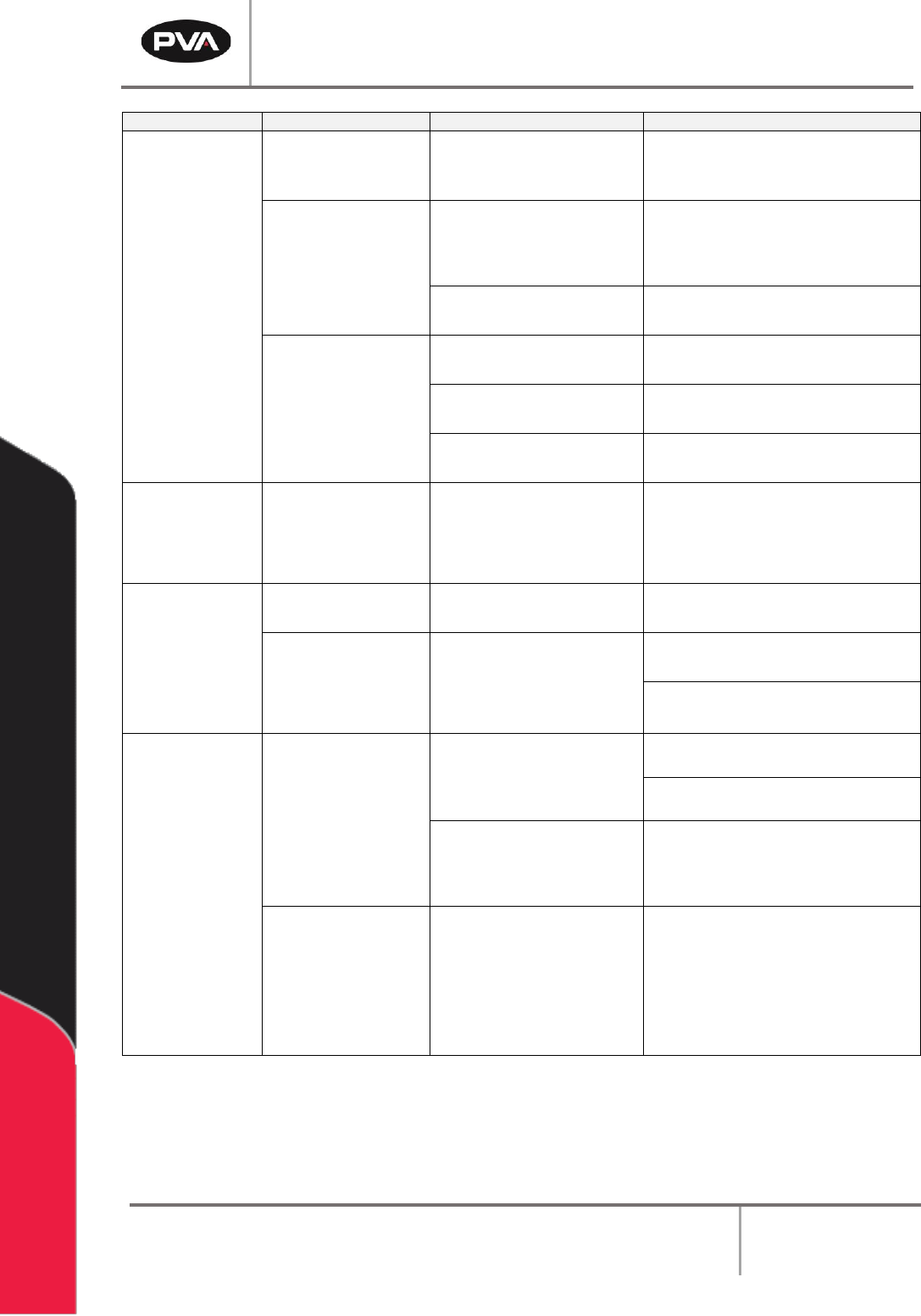
Problem
Other Symptoms
Possible Cause
Corrective Action
Pneumatic
actuator
failure
Pneumatics work
slowly
Air lockout valve on the
workcell is in the OFF
position
• Turn the air lockout valve to the ON
position
Not sufficient air pressure
• Examine and adjust the system
pressures to the correct values,
refer to the Machine Specific
Information for pressure settings
The air line is bent or
blocked
• Repair any tight bends or
restrictions in the air lines
A fitting or tube
connection is loose
• Tighten loose connections
• Examine flow control fitting
The air line is frayed or
damaged
• Replace the damaged air line(s)
Sensor is not positioned
correctly
• Adjust the sensor location
Part in place
sensor failure
Cable is loose or not
connected
Gain Adjustment
• Examine the cable connections,
and repair any loose connections
• Refer to sensor manual
Conveyor does
not run
Conveyor belt stuck to rails
• Clean or replace belt
No power to
conveyor motor
Control relay not energized
or Power On light not
illuminated (Certain
Models)
• Examine voltages and connections
• Examine conveyor power fuse
Exhaust fan
does not run
No air flow
The motor overload relay,
OL-1, is in the tripped state
• Reset the exhaust fan overload
relay
• Examine FU-5 in the electrical
enclosure
Insufficient air flow
capacity in the factory air
ducts
• Install larger air ducts to increase
air flow
• Reset the exhaust fan overload
relay
The filter and
ducting are fine and
the motor
temperature is
normal.
The overload relay current
setting has been changed
• Make sure the current setting on
the overload relay is correct. Refer
to exhaust fan setup for more
information
• Examine the overload relay for a
tripped flag. Push the reset button
to reset the relay
Figure 18: Systems Fault Diagnosis
Workcell Installation and General Guidelines
Revision F / January 2021
Page 31 of 59
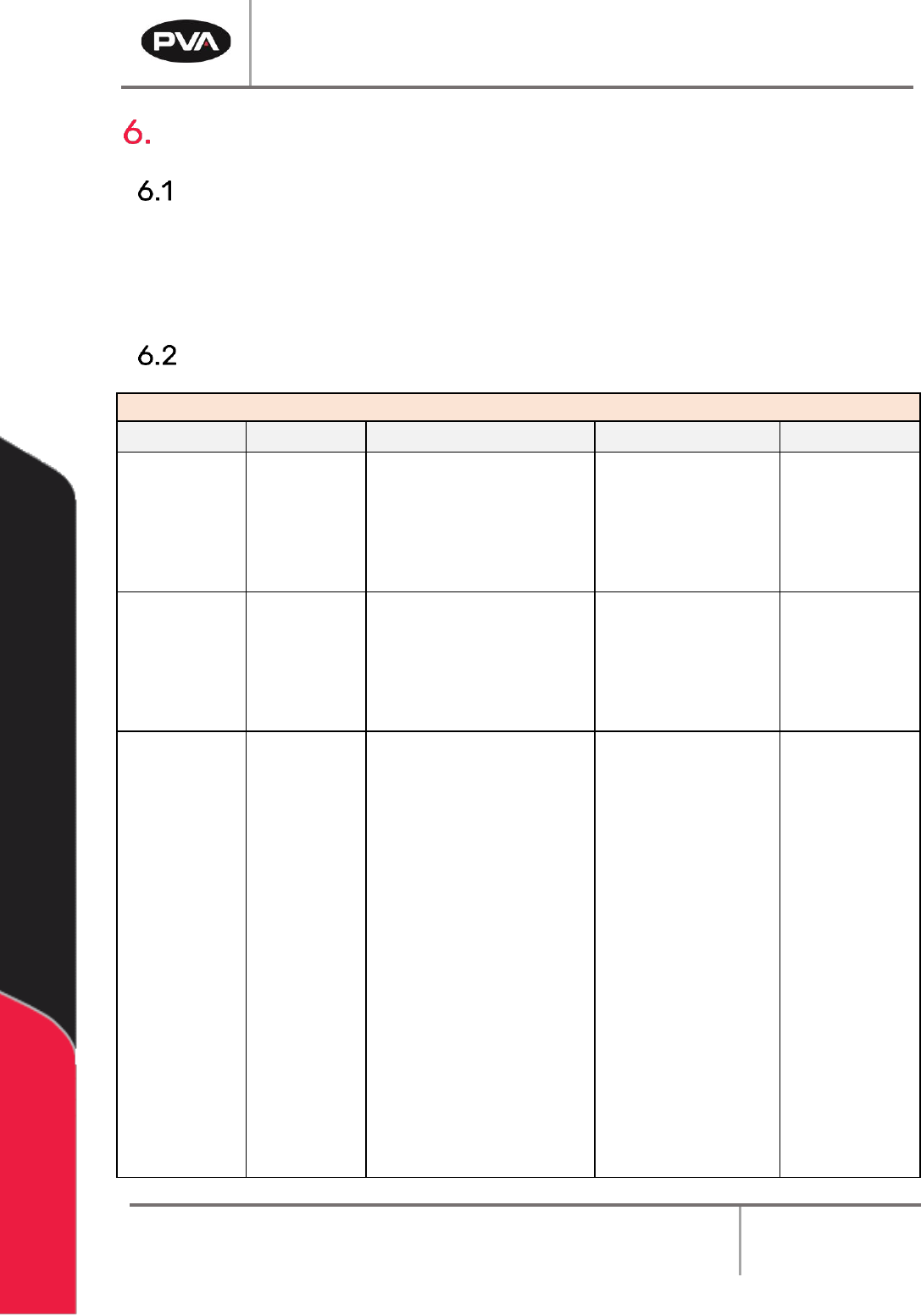
Maintenance
Overview
Do the preventative maintenance as shown in the table below to increase the life of the
workcell and make sure every run is high quality.
Note: Only qualified personnel should do workcell maintenance.
Schedule
Type Of Service
Service Area
Every Shift
Weekly
Monthly
Quarterly
Dispense
Equipment
Examine all
fluid
pressures and
dispense
weights
Clean material buildup on
fixtures and locating
surfaces
Examine for leaks around
compression fittings, tighten
or replace if necessary
Examine the fluid
delivery lines for
excessive wear
Examine the
inline material
filter for clogs
Electro-
mechanical
components
Examine the motors for
overheating and smooth
operation
Examine wires, pneumatic
lines, and material lines for
wear
Apply lithium grease
(JIS Type 2) to the ball
screw slides
Examine all
moving cables
for excessive
wear
Conveyor
System
Clean
conveyor
belts
Clean material and dust
buildup from the sensors
Examine the conveyor
belts for wear
Conveyor System
Chain: Lubricate chain
with Darmex 773ND or
equivalent
Conveyor System
Rails: Clean and
lubricate with Mobil
DTE-24 or equivalent.
You can also use a thin
film of the conveyor
grease, Darmex 773ND
or equivalent.
Workcell Installation and General Guidelines
Revision F / January 2021
Page 32 of 59
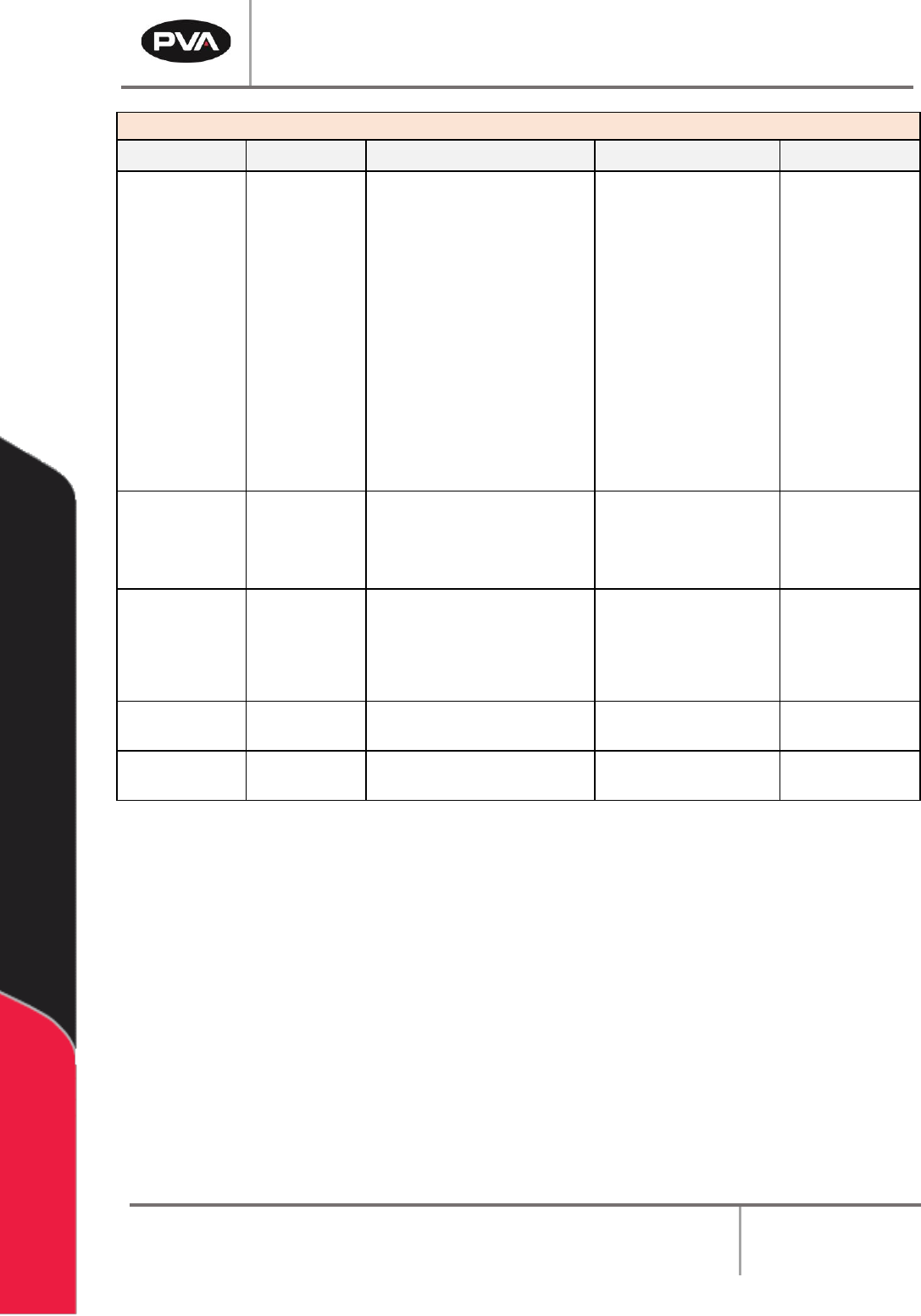
Type Of Service
Service Area
Every Shift
Weekly
Monthly
Quarterly
Part-in-Place
Sensors
Clean with
warm water, a
mild solvent
(like dish
soap), and a
soft cloth, do
not use
moderate or
harsh
solvents,
such as
Isopropyl
Alcohol,
Acetone,
OS120, etc.
Pneumatics
Examine for correct
operation
Drain any water from the
main filter/regulator
Examine the
slides for wear
and smooth
operation
Dispensing /
Spraying
Equipment
Do the manufacturers
procedure to lubricate the
packing. Refer to individual
component manuals for the
procedure.
Clean Purge
Cups
Daily
Clean Valve
Tips
Daily
Figure 19: Preventive Maintenance Schedule