SOM-1617-001.pdf - 第12页
5 . Cause of Feeder Check Event (due to component shortage) The machine is set ready to send the data (feeder No. and component ID) which caused a component shortage error . When the following is detected and the data (i…
(3) Check the bar code on the feeder where the required components
are mounted and install the feeder on the feeder carriage or set
ready for installation.
(4) After the bar code checking is completed, send the checked data
from the bar code reader to the machine.
Refer to “7. Handling of Bar Code Reader”.
(5) After the components have been checked and the feeder is installed
correctly, the automatic operation of the machine can be started
without checking the feeders when the pattern program data se-
lected as the next program is set as the current one.
4.2.3 Checking the feeder which caused a component shortage
error
Every 10 seconds, the bar code reader checks whether or not a com-
ponent shortage error has occurred on the machine side.
When a component shortage error occurs, the feeder carriage returns
to its origin and the [READY] button is turned OFF.
The bar code reader reads the feeder No. (slot No.) and the component
ID which caused the component shortage error and the machine is set
in the component check mode (component replenishment mode).
Operation Procedure
(1) Check the bar code on the feeder that caused the component short-
age error and install the feeder on the feeder carriage.
Refer to “7. Handling of Bar Code Reader”.
(2) After the bar code checking is completed, send the checked data
from the bar code reader to the machine.
Refer to “7. Handling of Bar Code Reader”.
(3) After the feeder has been checked, installed, and the data has been
sent out, press the [FEEDER READY] button. The feeder carriage
becomes operational again.
(a) The feeder carriage where a component shortage error
has occurred cannot be set ready for use as long as the
operation of the component check function is not com-
pleted.
(b) When a component shortage error occurs, the [FEEDER
READY] button become valid after the component check
function is implemented. In other words, the buttons are
invalid as long as the component check function is not
implemented.
021 1-001 1 0 AIH01EGP
4.2 Feeder Check Procedure

5. Cause of Feeder Check Event (due to component
shortage)
The machine is set ready to send the data (feeder No. and component
ID) which caused a component shortage error.
When the following is detected and the data (in which a component
shortage is caused) is requested from the bar code reader, the ma-
chine starts sending out the data.
The machine sends out the data when,
• a component shortage is detected.
• no component (sensor and recognition) is detected (including the time
when the alternate function is activated) with “DISABLE” set in the
“DETECTION MODE” text box in the “SHORTAGE OF COMP. DE-
TECTION MODE” tab sheet (operation mode data) or “DISABLE” in
the “TAPE END DETECTION” text box of the component library data.
When the parameter of the tape end detection function is
changed together with the carrier data, the above takes prece-
dence.
• “All Missing” is set in the “Output Data” group box in the “Opn. Mode”
tab sheet and the “ALL Components Missing” error is detected. (Not
related to the “ENABLE/DISABLE” setting for the tape end detection
function)
021 1-001 11 AIH01EGP
5. Cause of Feeder Check Event (due to component shortage)
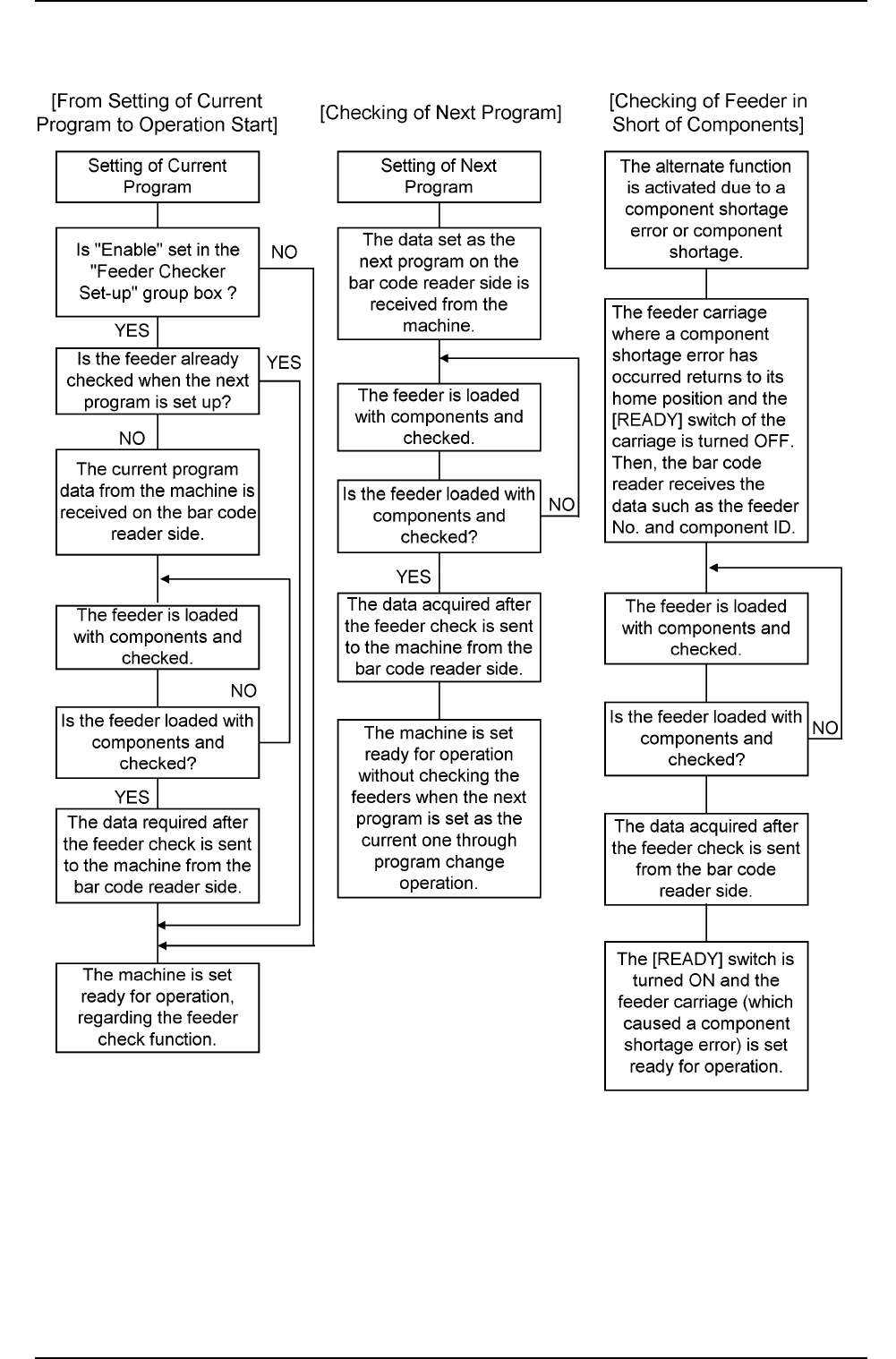
6. Operation Flow
Fig. 3
021 1-001 1 2
AIH01EGP
6. Operation Flow