SOM-1617-001.pdf - 第7页
3. Monitor on Machine Side 3 . 1 “Feeder Checker Set-up” Window When the [Next] key (*1) is pressed in the “Opn.Mode” tab sheet, the following sheet appears on the screen. “Enable” or “Disable” can be selected in the “Fe…

1. Scope
021 1-001 5 AIH01EGP
1. Scope
This specially specified function is used with the bar code reader and
determines whether or not the correct components are loaded onto the
machine when the tape feeders are installed on the feeder carriage or
the components are prepared beforehand, preventing wrong installation
of feeders.
2. Function
• Current Program Component Check Function
When the feeders loaded with components are installed on the feeder
carriage, this function checks whether the loaded components are
correctly selected in compliance with the current pattern program data
(pattern program data selected for the current production model).
The machine cannot be started unless the feeder check operation is
completed.
• Next Program Component Pre-Check Function
This function pre-checks the components scheduled to be used in the
pattern program data for the next program, making it possible to start
the operation of the machine without checking the components after
the next program is set up in the “PROGRAM CHANGE” tab sheet.
• Replenishment Component Check Function
This function checks whether or not the feeders are replenished with
correct components after a component shortage error has occurred.
(a) It is also possible to invalidate these functions.
(b) Types of Readable Bar Codes
· JAN Code
· NW7 Code
· CODE39 Code
· ITF Code
3. Monitor on Machine Side
3.1 “Feeder Checker Set-up” Window
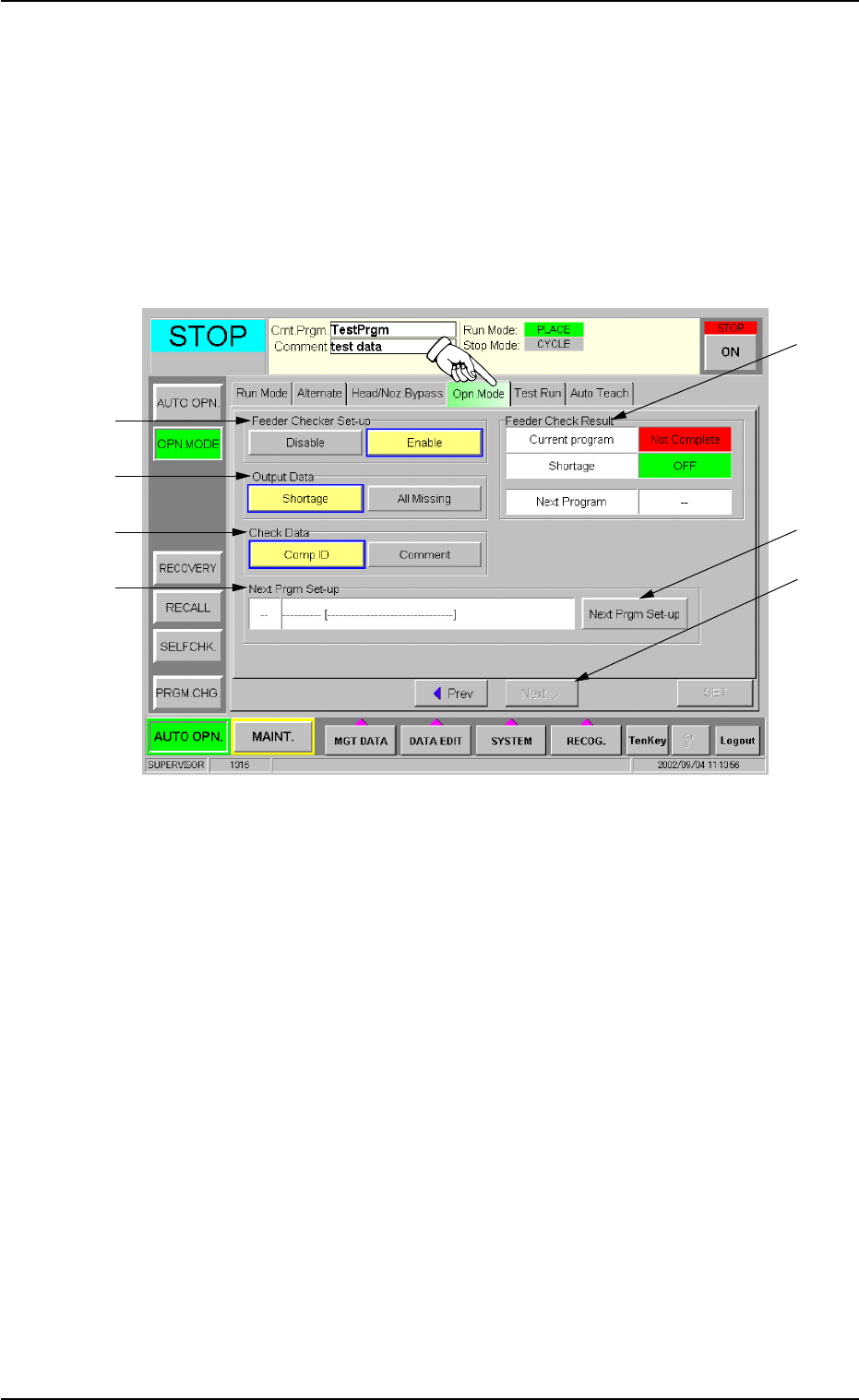
When the [Next] key (*1) is pressed in the “Opn.Mode” tab sheet, the
following sheet appears on the screen.
“Enable” or “Disable” can be selected in the “Feeder Checker Set-up”
group box.
Fig. 1 “Opn. Mode” Tab Sheet
*2 Feeder Checker Set-up
[Enable] Button : Automatic operation cannot be started unless
the feeder check operation is completed.
[Disable] Button : Automatic operation can be started regard-
less of the feeder check function.
*3 Output Data
[Shortage] Button : When a component shortage error is de-
tected, the check data is transmitted to the
bar code reader.
When components for which a component
shortage error cannot be detected are used
and a component missing error is detected
during pick-up sequence, the check data is
transmitted to the bar code reader.
[All Missing] Button : When no component is picked up (all com-
ponents missing), the data check is trans-
mitted to the bar code reader regardless of
whether or not the tape end detection is used.
021 1-001 6
AIH01EGP
*2
*3
*4
*5
*1
*7
*6
3. Monitor on Machine Side

*4 Check Data
[Comp ID] Button : Feeder Checker is checked using the com-
ponent ID data of the placement feeder loca-
tion data.
[Comment] Button : Feeder Checker is checked using the com-
ment data of the placement feeder location
data.
*5 Next Prgm Set-up
Pattern program data scheduled to be used for the next program is
displayed.
When the [Next Prgm Set-up] key (*7) is pressed in the tab sheet
(Fig. 1), the window (Fig. 2) appears on the screen.
*6 Feeder Check Result
The feeder check situation of current pattern program, shortage of
component, next pattern program are displayed.
• “Current Program” “Next Program”
Not Complete : The state in which the feeder check has not com-
pleted.
Complete : The state in which the feeder check has com-
pleted. Automatic operation can be started.
• “Shortage”
OFF : Feeder which needs the feeder check due to the shortage
of component does not exist.
ON : Feeder which needs the feeder check due to the shortage
of component exists.
(a) Parameters can be changed when the machine is in the
“STOP” or the “PAUSE” mode.
(b) The feeder checker set-up function is added to the pass-
word available areas as an item to be set.
(c) When the current program is changed to the next one,
“- - - -” appears in the “Next Program” text box.
(d) When the “Next Prgm Set-up” window is active and the
pattern program data delete command is issued from the
external device, the program names disappear from the
“Next Prgm Set-up” window.
(e) When the pattern program data is set as the current pro-
gram is deleted, “- - - -” appears in the “Current Program”
text box.
021 1-001 7 AIH01EGP
3.1 “Feeder Checker Set-up” Window