SOM-1617-001.pdf - 第13页
6. Operation Flow Fig. 3 021 1-001 1 2 AIH01EGP 6. Operation Flow

5. Cause of Feeder Check Event (due to component
shortage)
The machine is set ready to send the data (feeder No. and component
ID) which caused a component shortage error.
When the following is detected and the data (in which a component
shortage is caused) is requested from the bar code reader, the ma-
chine starts sending out the data.
The machine sends out the data when,
• a component shortage is detected.
• no component (sensor and recognition) is detected (including the time
when the alternate function is activated) with “DISABLE” set in the
“DETECTION MODE” text box in the “SHORTAGE OF COMP. DE-
TECTION MODE” tab sheet (operation mode data) or “DISABLE” in
the “TAPE END DETECTION” text box of the component library data.
When the parameter of the tape end detection function is
changed together with the carrier data, the above takes prece-
dence.
• “All Missing” is set in the “Output Data” group box in the “Opn. Mode”
tab sheet and the “ALL Components Missing” error is detected. (Not
related to the “ENABLE/DISABLE” setting for the tape end detection
function)
021 1-001 11 AIH01EGP
5. Cause of Feeder Check Event (due to component shortage)
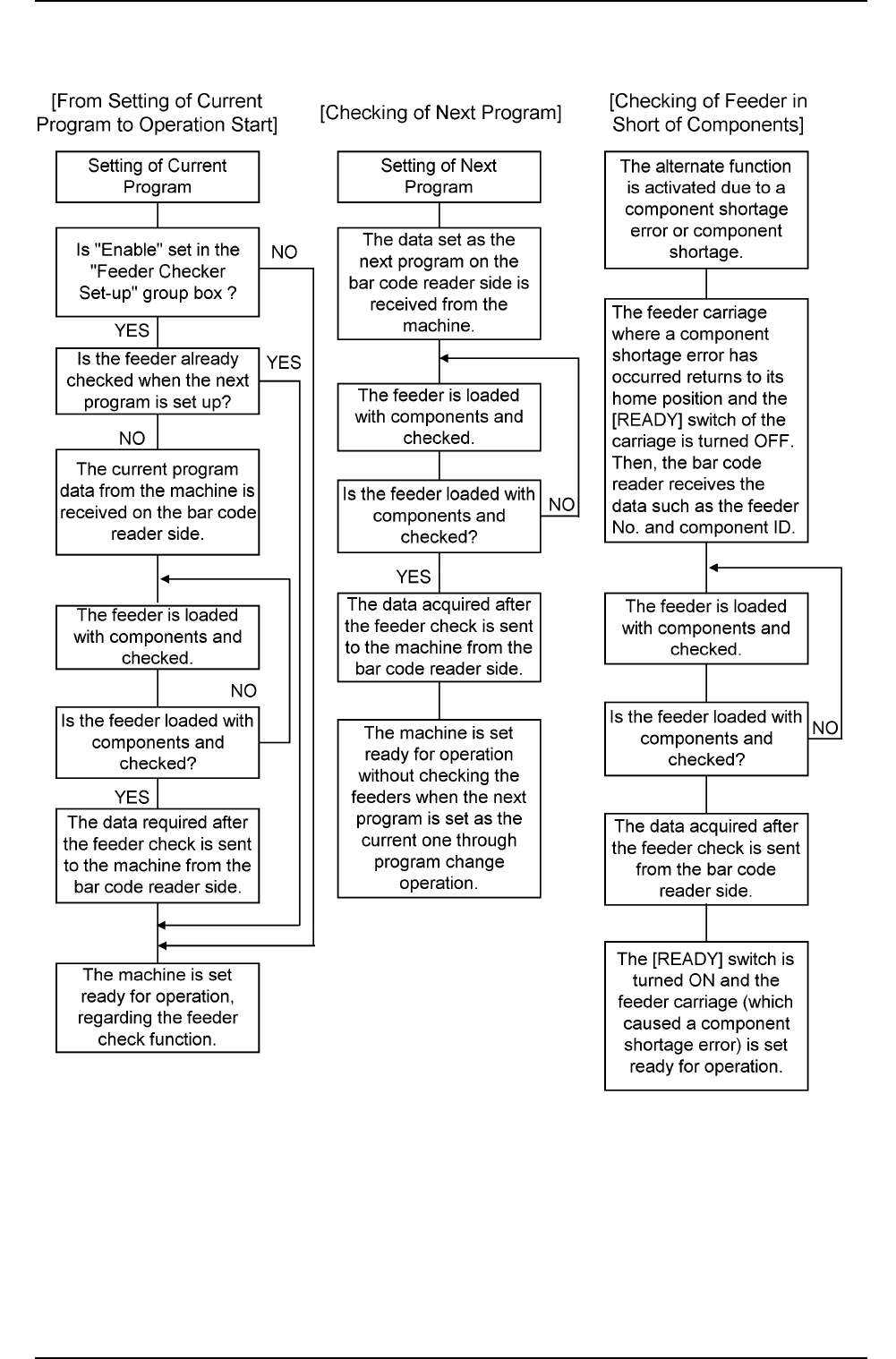
6. Operation Flow
Fig. 3
021 1-001 1 2
AIH01EGP
6. Operation Flow

7. Handling of Bar Code Reader
7.1 Startup
(1) Press the power switch (PW).
The “** MAIN MENU **” window (Fig. 4) appears on the screen.
(a) When the message “No execution program selected. Con-
tact your administrator.” is issued, perform the operation
described in “11. Program Setup” to load the program to
be executed.
(b) Refer to the instruction manual of the bar code reader for
the basic functions and operations of the bar code reader.
7.2 “** MAIN MENU **” Window
Fig. 4
[Displayed Contents]
1. PRODUCT : The components for the current program are
checked.
2. SETUP : The components for the next program are checked.
3. OPERATE : The data can be changed or cleared.
4. BC DATA : The bar code data can be set.
5. MASK : The masking operation can be set for the bar code
data.
“V. 03” on the top right represents the version No. of this program.
The version No. is subject to change.
(a) When the “** MAIN MENU **” window is active, the bar
code reader issues an inquiry command to the machine to
check whether or not component shortage is caused ev-
ery 10 seconds. Therefore, be sure to keep the bar code
reader connected to the communication adapter while this
window is active.
021 1-001 1 3 AIH01EGP
7. Handling of Bar Code Reader
** MAIN MENU ** V.03
1.PRODUCT 2.SETUP
3.OPERATE 4.BC DATA
5.MASK
SELECT NO