slau358q.pdf - 第43页
www.ti.com Programming MSP Flash Devices Using the MSP Gang Programmer 43 SLAU358Q – September 2011 – Revised October 2019 Submit Documentation Feedback Copyright © 2011–2019, Texas Instruments Incorporated Operation NOT…
Programming MSP Flash Devices Using the MSP Gang Programmer
www.ti.com
42
SLAU358Q–September 2011–Revised October 2019
Submit Documentation Feedback
Copyright © 2011–2019, Texas Instruments Incorporated
Operation
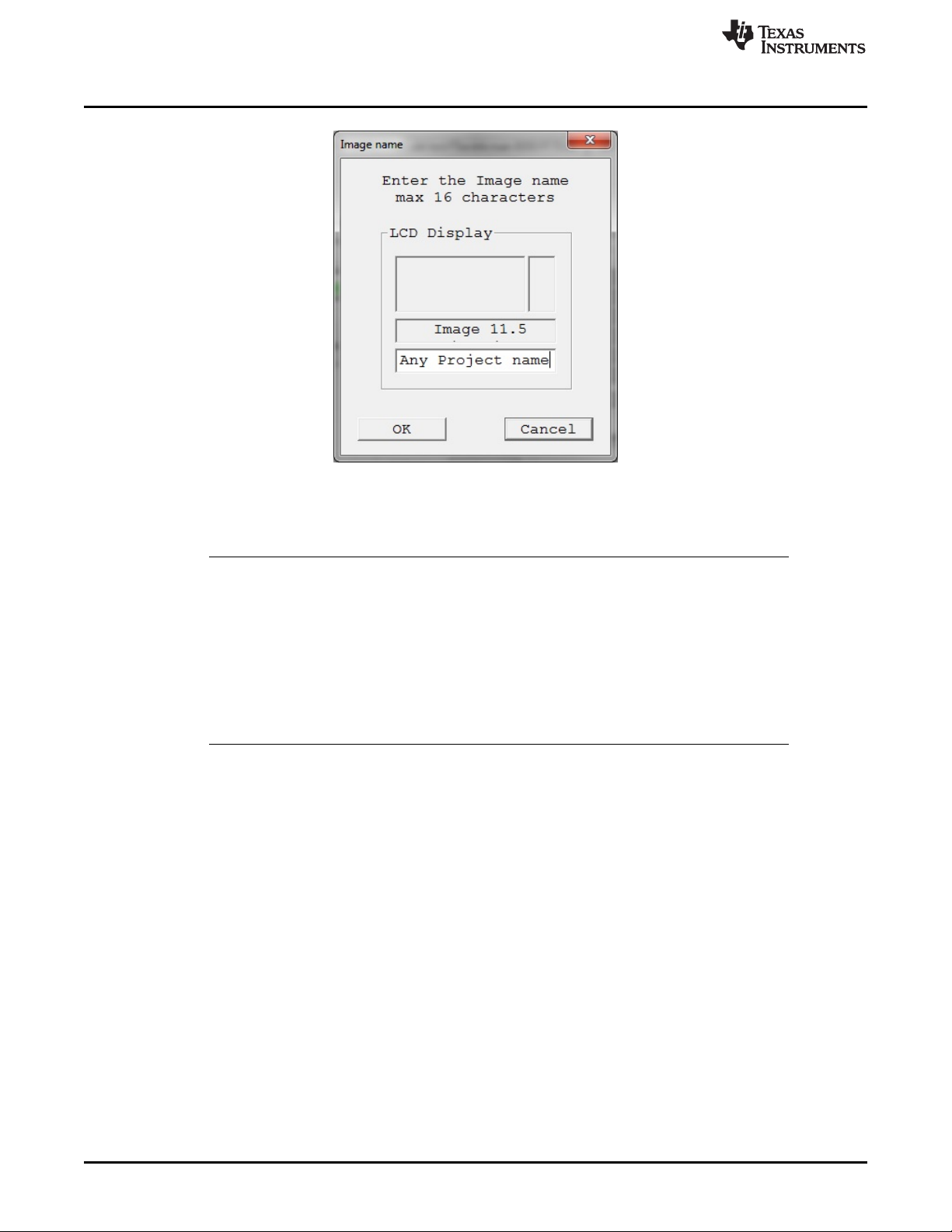
NOTE: The image name is limited to 16 characters. This name is shown on the LCD display of the MSP Gang
Programmer , and Image pulldown menu in the GUI.
Figure 2-18. Image Name Configuration Screen
NOTE: Since version 1.2.1.0, the number of images has increased from 16 (512KB each) to 96
(64KB each). Total image memory has decreased from 8MB to 6MB. For compatibility
purposes with older images, the numbering scheme for the new images uses an index and
subindex format (for example, 1.0, 1.1, 1.2... 1.7, 2.0, 2.1, 2.2... 12.7). The first index selects
the 512KB image memory block, and the subindex selects which 64KB portion of the 512KB
block is used. Old images that occupy 512KB always have the subindex as 0 (for example,
old Image 1 is now Image 1.0). Newly created images can occupy one 64KB block or more
(for example, a 128KB image stored in image number 2.1, will be saved to occupy blocks 2.1
and 2.2). Images 13 to 16 will be removed in future versions; however, during the transition
period, they can only be read or erased (that is, they are marked as read-only in the GUI).
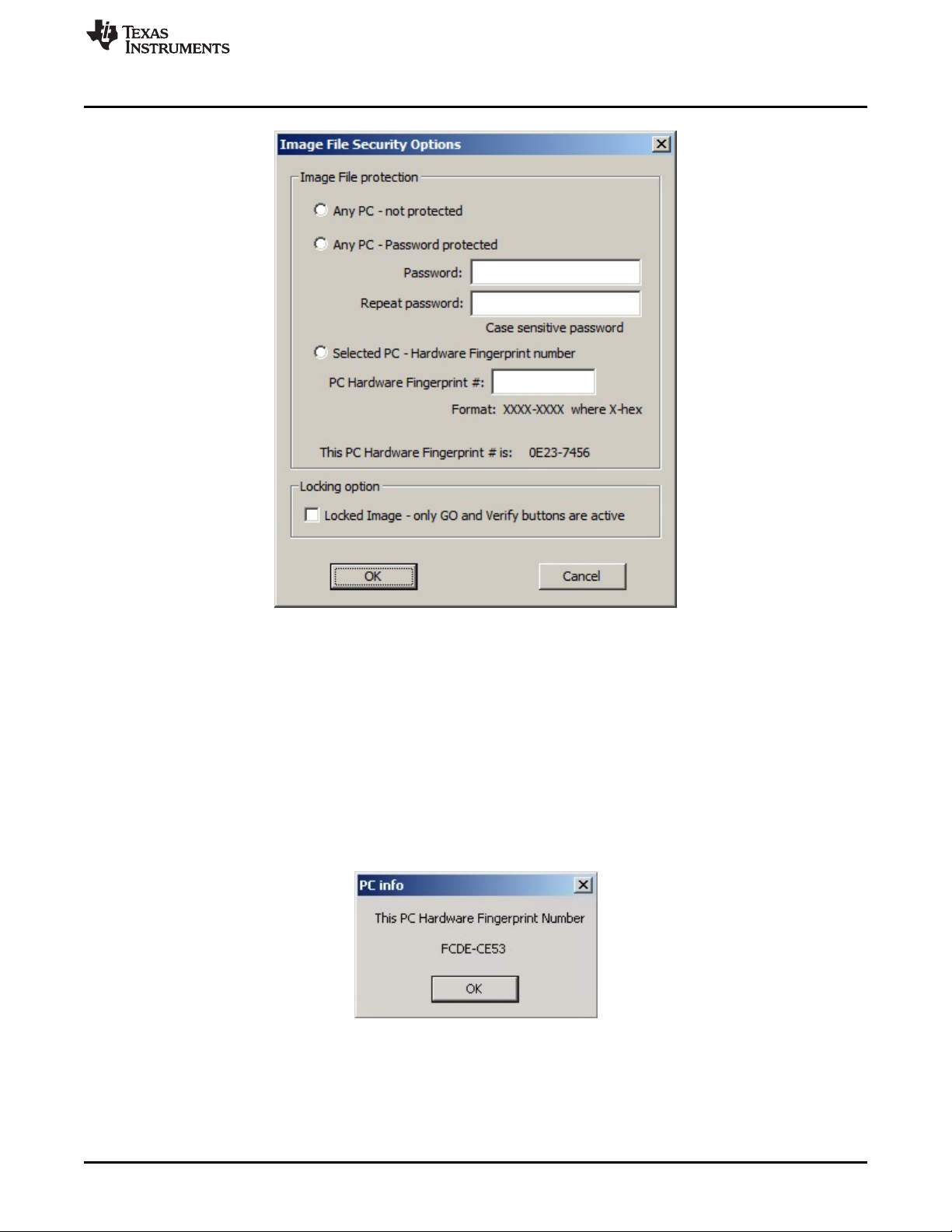
The screen shown in Figure 2-19 allows the user configure what type of security is used to protect the
image file. Three options are available; however, for all three options the contents of the code file are
always encrypted and cannot be read.
www.ti.com
Programming MSP Flash Devices Using the MSP Gang Programmer
43
SLAU358Q–September 2011–Revised October 2019
Submit Documentation Feedback
Copyright © 2011–2019, Texas Instruments Incorporated
Operation
NOTE: During project creation, the user can select to protect project information using various methods.
Figure 2-19. Image File Security Options
1. Any PC – Configuration can be opened on any computer using MSP Gang Programmer software. It
can be used for programming only.
2. Any PC – Password protected – Configuration can be opened on any computer using the MSP Gang
Programmer software, but only after the desired password has been entered.
3. Selected PC – Hardware Fingerprint number – Image can be opened only on the dedicated
computer with the same hardware fingerprint number as the number entered in the edited line above.
Figure 2-20 shows a window with the hardware fingerprint number. An example usage scenario would
involve calling an intended user to provide the hardware fingerprint number of their computer and
entering it within this configuration window. This restricts opening this image to only the dedicated
computer running MSP Gang Programmer software.
NOTE: The fingerprint can be used to secure the project where, for example, only a computer with a matching
hardware fingerprint can be used to view and edit the project.
Figure 2-20. Hardware Fingerprint of Computer in Use
Programming MSP Flash Devices Using the MSP Gang Programmer
www.ti.com
44
SLAU358Q–September 2011–Revised October 2019
Submit Documentation Feedback
Copyright © 2011–2019, Texas Instruments Incorporated
Operation
The image file can be copied to internal MSP Gang Programmer memory and used for programming
target devices. Select the desired image number in the GUI and press the Load Image from File button
(see Figure 2-1). This selected image is subsequently be used for programming target devices.
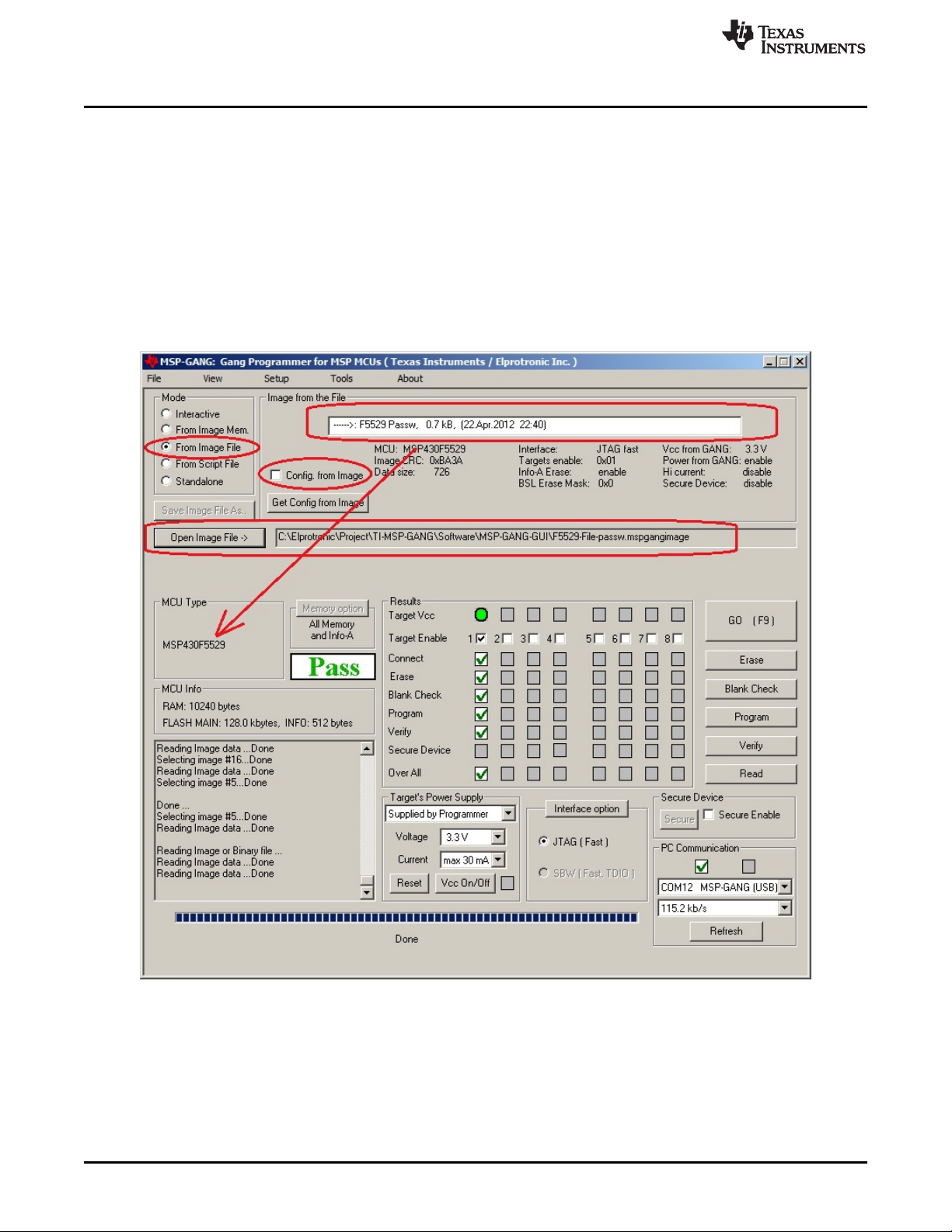
2.1.10 Programming From Image File
An image file can be used to program target devices from a self-contained read-only file that has all the
necessary configuration options and code files already included. By selecting the "From Image File" Mode
you can use an image file created using the steps described in Section 2.1.9. If the image is password
protected you are prompted to enter the password before you can use the image. Alternatively, if the
image is restricted to be used on a specific PC you are unable to use the image unless your PC matches
the hardware fingerprint (for instructions on how to use images from MSP Gang Programmer internal
memory see Section 2.1.2).
Figure 2-21. Programming From Image File