slau358q.pdf - 第48页
Data Viewers www.ti.com 48 SLAU358Q – September 2011 – Revised October 2019 Submit Documentation Feedback Copyright © 2011–2019, Texas Instruments Incorporated Operation Contents of flash memory data can be viewed by sel…
www.ti.com
Data Viewers
47
SLAU358Q–September 2011–Revised October 2019
Submit Documentation Feedback
Copyright © 2011–2019, Texas Instruments Incorporated
Operation
2.2 Data Viewers
Data from code files and from flash memory can be viewed and compared in data viewers. Contents of
the selected file can be viewed by selecting the View→Code File Data option from the drop-down menu.
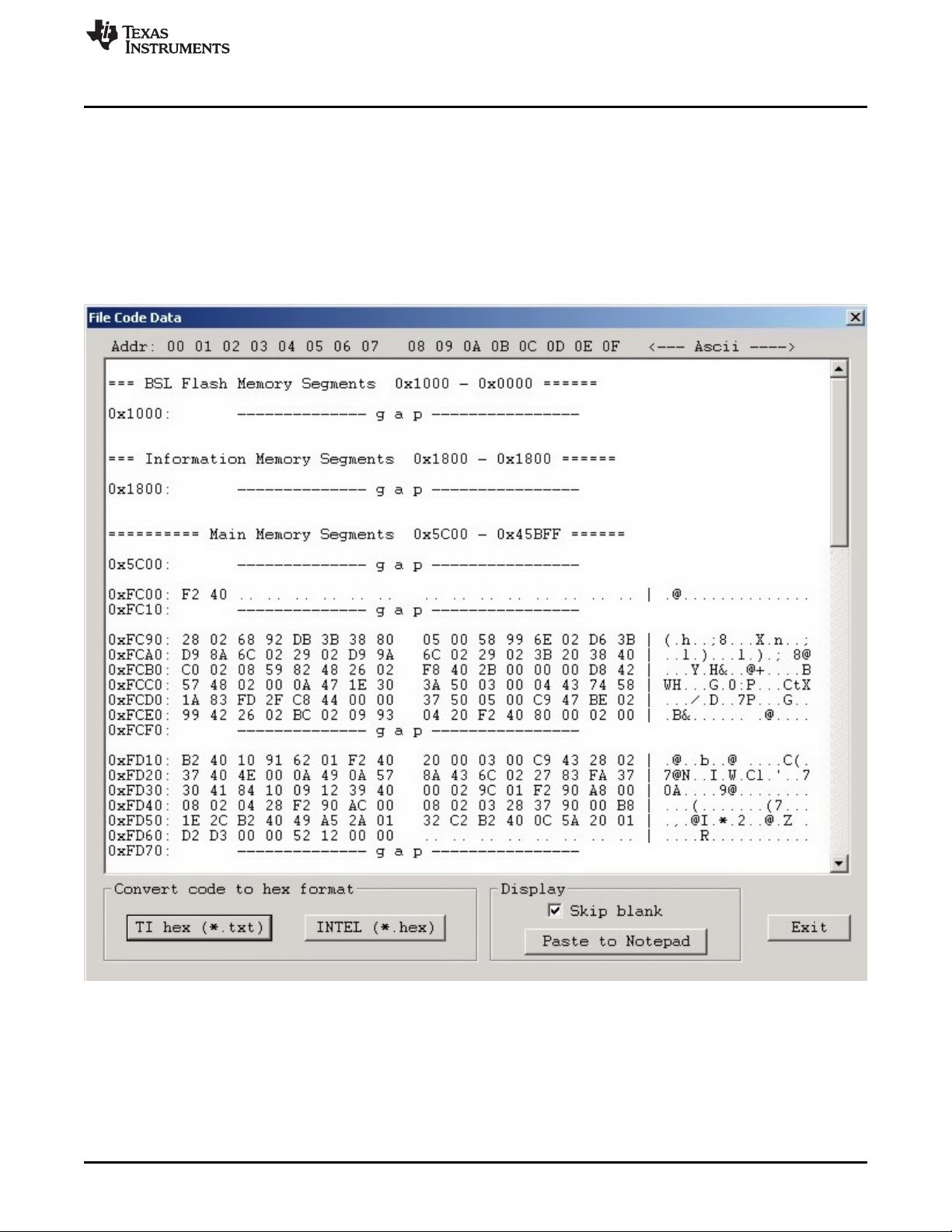
The Code data viewer, shown in Figure 2-23, displays the code address on the left side, data in hex
format in the central column, the same data in ASCII format in the right column. Data in hex format is
displayed from 0x00 to 0xFF for addresses corresponding to the code file. Data from other addresses is
displayed as double dots (..). If code size exceeds flash memory size in the selected microcontroller, this
warning message is displayed first.
Data out of the Flash Memory Space of the selected MSP.
NOTE: The selected option on the bottom ignores all bytes that have the value of 0xFF , which represents empty
bytes.
Figure 2-23. Code File Data
The contents of the code viewer can be converted to TI (*.txt) or Intel (*.hex) file format by clicking on the
TI hex or INTEL button.
Data Viewers
www.ti.com
48
SLAU358Q–September 2011–Revised October 2019
Submit Documentation Feedback
Copyright © 2011–2019, Texas Instruments Incorporated
Operation
Contents of flash memory data can be viewed by selecting the View→Flash Memory Data option from the
drop-down menu. To be able to see flash memory contents, the Read button must be used first (as
described in Section 2.1.1). The Flash Memory Data viewer displays the memory addresses, data in hex
and ASCII format in the same way as the Code data viewer shown in Figure 2-23.
Contents of the code file and flash memory can be compared and differences can be displayed in a the
viewer by selecting the View→Compare Code & Flash Data options from the drop-down menu. Only data
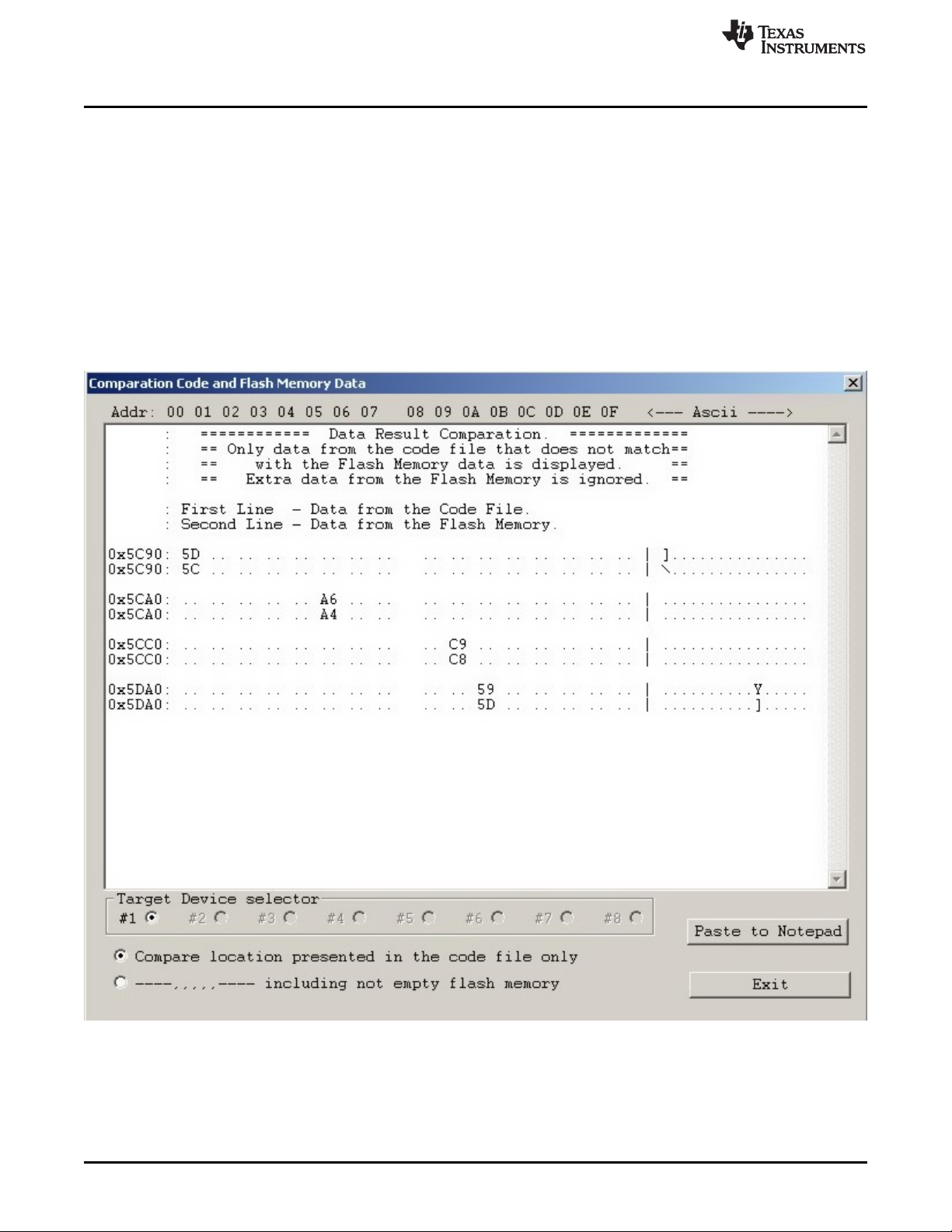
that are not the same in the code file and the flash memory are displayed. The first line displays code file
data, and the second line displays flash memory data as shown in Figure 2-24.
The Compare location presented in the code file only option is chosen by default. This option allows the
user to view differences between Code file data and corresponding flash contents (compared by address).
Additional data in the flash like DCO calibration and personal data is not compared but can be displayed if
desired. If all the aforementioned data are identical, then a "No difference found" message is displayed on
the screen.
NOTE: Only bytes that differ are shown. The selected option on the bottom of the figure specifies that only
memory segments corresponding to the code file should be compared. The second option, if selected,
performs the comparison and shows any remaining contents of flash memory that do not correspond to the
code file.
Figure 2-24. Comparison of Code and Flash Memory Data of the Target Microcontroller

www.ti.com
Status Messages
49
SLAU358Q–September 2011–Revised October 2019
Submit Documentation Feedback
Copyright © 2011–2019, Texas Instruments Incorporated
Operation
2.3 Status Messages
The current status is always displayed at the bottom of the progress bar, as shown in Figure 2-1, and
previous status and error messages are shown in the history window in the bottom left corner. are
displayed in the report window.
All procedures in the MSP Gang Programmer are divided into small tasks to be executed in series. When
first task is finished successfully, then the next task is started. Each task has is own consecutive number
assigned by the task manager when the image is created. The most commonly executed tasks are listed
below:
• Initialization
• Open Target Device
• Close Target Device
• Erase
– Segment
– Main memory
– Info memory
– BSL memory
• Blank check
• Program
• Gang Program (program unique data to each target)
• Write RAM
• Write GANG RAM (write unique data to each target)
• Verify
• Read memory
• Save Info-A
• DCO calibration
• Retain Info-A
• SetPC and run
• Capture PC and Stop
• Stop PC
• Secure device
• Finish
For example, the operations Erase, Program ,and Verify execute the following tasks:
• Initialization
• Open Target Device
• Erase
• Blank check
• Program
• Verify
• Close target and finish.
These tasks execute the easiest programming process in small MCU devices. The aforementioned tasks
can be divided into smaller tasks that only erase one segment, erase info segment, or erase one block of
the main memory. For that reason, many more tasks are displayed in the report window than are
described above. For example, when programming the MSP430F5438 the following information would be
displayed in the report window: