slau358q.pdf - 第58页
Label www.ti.com 58 SLAU358Q – September 2011 – Revised October 2019 Submit Documentation Feedback Copyright © 2011–2019, Texas Instruments Incorporated Operation 188: TEST Fuse keys (\#6 ON) 6.00 ( 0.80 to 3.00) Result:…

www.ti.com
Self Test
57
SLAU358Q–September 2011–Revised October 2019
Submit Documentation Feedback
Copyright © 2011–2019, Texas Instruments Incorporated
Operation
128: TDI bus (\#1 HIGH) 0x01 ( 0x01 to 0x01) Result: 0x01 ... >> OK <<
129: TDI bus (\#2 HIGH) 0x02 ( 0x02 to 0x02) Result: 0x02 ... >> OK <<
130: TDI bus (\#3 HIGH) 0x04 ( 0x04 to 0x04) Result: 0x04 ... >> OK <<
131: TDI bus (\#4 HIGH) 0x08 ( 0x08 to 0x08) Result: 0x08 ... >> OK <<
132: TDI bus (\#5 HIGH) 0x10 ( 0x10 to 0x10) Result: 0x10 ... >> OK <<
133: TDI bus (\#6 HIGH) 0x20 ( 0x20 to 0x20) Result: 0x20 ... >> OK <<
134: TDI bus (\#7 HIGH) 0x40 ( 0x40 to 0x40) Result: 0x40 ... >> OK <<
135: TDI bus (\#8 HIGH) 0x80 ( 0x80 to 0x80) Result: 0x80 ... >> OK <<
136: TDOI Tx-bus (\#1 HIGH) 0x01 ( 0x01 to 0x01) Result: 0x01 ... >> OK <<
137: TDOI Tx-bus (\#2 HIGH) 0x02 ( 0x02 to 0x02) Result: 0x02 ... >> OK <<
138: TDOI Tx-bus (\#3 HIGH) 0x04 ( 0x04 to 0x04) Result: 0x04 ... >> OK <<
139: TDOI Tx-bus (\#4 HIGH) 0x08 ( 0x08 to 0x08) Result: 0x08 ... >> OK <<
140: TDOI Tx-bus (\#5 HIGH) 0x10 ( 0x10 to 0x10) Result: 0x10 ... >> OK <<
141: TDOI Tx-bus (\#6 HIGH) 0x20 ( 0x20 to 0x20) Result: 0x20 ... >> OK <<
142: TDOI Tx-bus (\#7 HIGH) 0x40 ( 0x40 to 0x40) Result: 0x40 ... >> OK <<
143: TDOI Tx-bus (\#8 HIGH) 0x80 ( 0x80 to 0x80) Result: 0x80 ... >> OK <<
144: TDOI Tx-Rx (\#1 HIGH) 0x01 ( 0x01 to 0x01) Result: 0x01 ... >> OK <<
145: TDOI Tx-Rx (\#2 HIGH) 0x02 ( 0x02 to 0x02) Result: 0x02 ... >> OK <<
146: TDOI Tx-Rx (\#3 HIGH) 0x04 ( 0x04 to 0x04) Result: 0x04 ... >> OK <<
147: TDOI Tx-Rx (\#4 HIGH) 0x08 ( 0x08 to 0x08) Result: 0x08 ... >> OK <<
148: TDOI Tx-Rx (\#5 HIGH) 0x10 ( 0x10 to 0x10) Result: 0x10 ... >> OK <<
149: TDOI Tx-Rx (\#6 HIGH) 0x20 ( 0x20 to 0x20) Result: 0x20 ... >> OK <<
150: TDOI Tx-Rx (\#7 HIGH) 0x40 ( 0x40 to 0x40) Result: 0x40 ... >> OK <<
151: TDOI Tx-Rx (\#8 HIGH) 0x80 ( 0x80 to 0x80) Result: 0x80 ... >> OK <<
152: TDOI Rx-bus (\#1 HIGH) 0x01 ( 0x01 to 0x01) Result: 0x01 ... >> OK <<
153: TDOI Rx-bus (\#2 HIGH) 0x02 ( 0x02 to 0x02) Result: 0x02 ... >> OK <<
154: TDOI Rx-bus (\#3 HIGH) 0x04 ( 0x04 to 0x04) Result: 0x04 ... >> OK <<
155: TDOI Rx-bus (\#4 HIGH) 0x08 ( 0x08 to 0x08) Result: 0x08 ... >> OK <<
156: TDOI Rx-bus (\#5 HIGH) 0x10 ( 0x10 to 0x10) Result: 0x10 ... >> OK <<
157: TDOI Rx-bus (\#6 HIGH) 0x20 ( 0x20 to 0x20) Result: 0x20 ... >> OK <<
158: TDOI Rx-bus (\#7 HIGH) 0x40 ( 0x40 to 0x40) Result: 0x40 ... >> OK <<
159: TDOI Rx-bus (\#84 HIGH) 0x80 ( 0x80 to 0x80) Result: 0x80 ... >> OK <<
160: VEXT bus (\#1 HIGH) 0x01 ( 0x01 to 0x01) Result: 0x01 ... >> OK <<
161: VEXT bus (\#2 HIGH) 0x02 ( 0x02 to 0x02) Result: 0x02 ... >> OK <<
162: VEXT bus (\#3 HIGH) 0x04 ( 0x04 to 0x04) Result: 0x04 ... >> OK <<
163: VEXT bus (\#4 HIGH) 0x08 ( 0x08 to 0x08) Result: 0x08 ... >> OK <<
164: VEXT bus (\#5 HIGH) 0x10 ( 0x10 to 0x10) Result: 0x10 ... >> OK <<
165: VEXT bus (\#6 HIGH) 0x20 ( 0x20 to 0x20) Result: 0x20 ... >> OK <<
166: VEXT bus (\#7 HIGH) 0x40 ( 0x40 to 0x40) Result: 0x40 ... >> OK <<
167: VEXT bus (\#8 HIGH) 0x80 ( 0x80 to 0x80) Result: 0x80 ... >> OK <<
168: VEXT bus (All-ON delay 10us) 0xFF ( 0xFF to 0xFF) Result: 0xFF ... >> OK <<
169: VEXT bus (All-ON delay 5 ms) 0xFF ( 0x00 to 0x00) Result: 0x00 ... >> OK <<
170: Keys buffer (All pull-up) 0x1F ( 0x1F to 0x1F) Result: 0x1F ... >> OK <<
171: Access to LCD RAM (0xAA) 0xAA ( 0xAA to 0xAA) Result: 0xAA ... >> OK <<
172: Access to LCD RAM (0x99) 0x99 ( 0x99 to 0x99) Result: 0x99 ... >> OK <<
173: Image Flash Access (get ID) 0x02 ( 0x01 to 0x02) Result: 0x01 ... >> OK <<
174: TDI Fuse keys (\#1 ON) 0x01 ( 0x01 to 0x01) Result: 0x01 ... >> OK <<
175: TDI Fuse keys (\#2 ON) 0x02 ( 0x02 to 0x02) Result: 0x02 ... >> OK <<
176: TDI Fuse keys (\#3 ON) 0x04 ( 0x04 to 0x04) Result: 0x04 ... >> OK <<
177: TDI Fuse keys (\#4 ON) 0x08 ( 0x08 to 0x08) Result: 0x08 ... >> OK <<
178: TDI Fuse keys (\#5 ON) 0x10 ( 0x10 to 0x10) Result: 0x10 ... >> OK <<
179: TDI Fuse keys (\#6 ON) 0x20 ( 0x20 to 0x20) Result: 0x20 ... >> OK <<
180: TDI Fuse keys (\#7 ON) 0x40 ( 0x40 to 0x40) Result: 0x40 ... >> OK <<
181: TDI Fuse keys (\#8 ON) 0x80 ( 0x80 to 0x80) Result: 0x80 ... >> OK <<
182: TEST Fuse keys (All OFF ) 0.00 ( 0.00 to 0.30) Result: 0.00 ... >> OK <<
183: TEST Fuse keys (\#1 ON) 1.00 ( 0.80 to 3.00) Result: 1.47 ... >> OK <<
184: TEST Fuse keys (\#2 ON) 2.00 ( 0.80 to 3.00) Result: 1.46 ... >> OK <<
185: TEST Fuse keys (\#3 ON) 3.00 ( 0.80 to 3.00) Result: 1.54 ... >> OK <<
186: TEST Fuse keys (\#4 ON) 4.00 ( 0.80 to 3.00) Result: 1.62 ... >> OK <<
187: TEST Fuse keys (\#5 ON) 5.00 ( 0.80 to 3.00) Result: 1.78 ... >> OK <<
Label
www.ti.com
58
SLAU358Q–September 2011–Revised October 2019
Submit Documentation Feedback
Copyright © 2011–2019, Texas Instruments Incorporated
Operation
188: TEST Fuse keys (\#6 ON) 6.00 ( 0.80 to 3.00) Result: 1.91 ... >> OK <<
189: TEST Fuse keys (\#7 ON) 7.00 ( 0.80 to 3.00) Result: 2.01 ... >> OK <<
190: TEST Fuse keys (\#8 ON) 8.00 ( 0.80 to 3.00) Result: 2.04 ... >> OK <<
============== Finished =================================
* Test pass - no errors.
2.5 Label
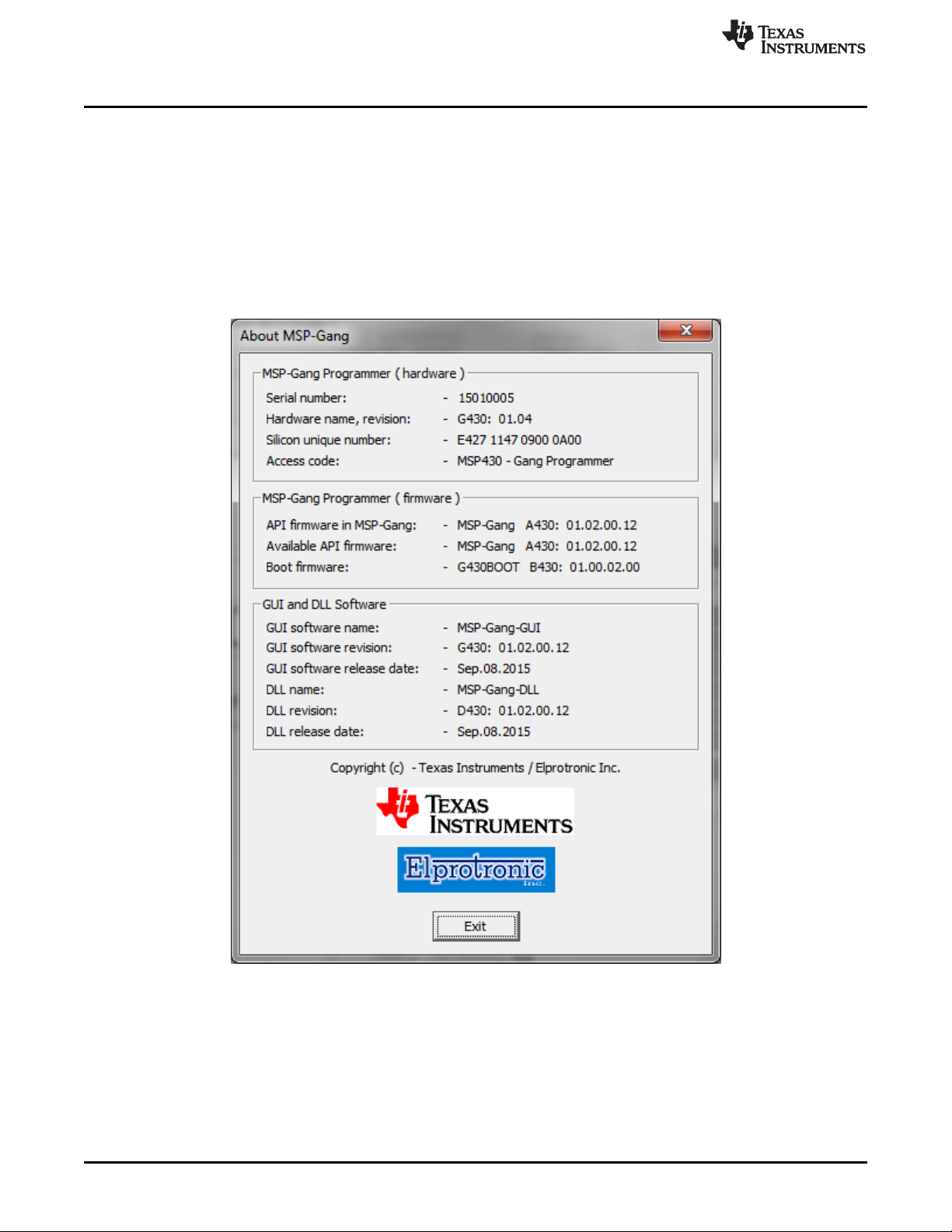
Information and MSP Gang Programmer software and hardware can be displayed by accessing the About
drop-down menu. Select the About→About option to display information similar to that shown in Figure 2-
26.
Figure 2-26. Information About the MSP Gang Programmer
www.ti.com
Preferences
59
SLAU358Q–September 2011–Revised October 2019
Submit Documentation Feedback
Copyright © 2011–2019, Texas Instruments Incorporated
Operation
2.6 Preferences
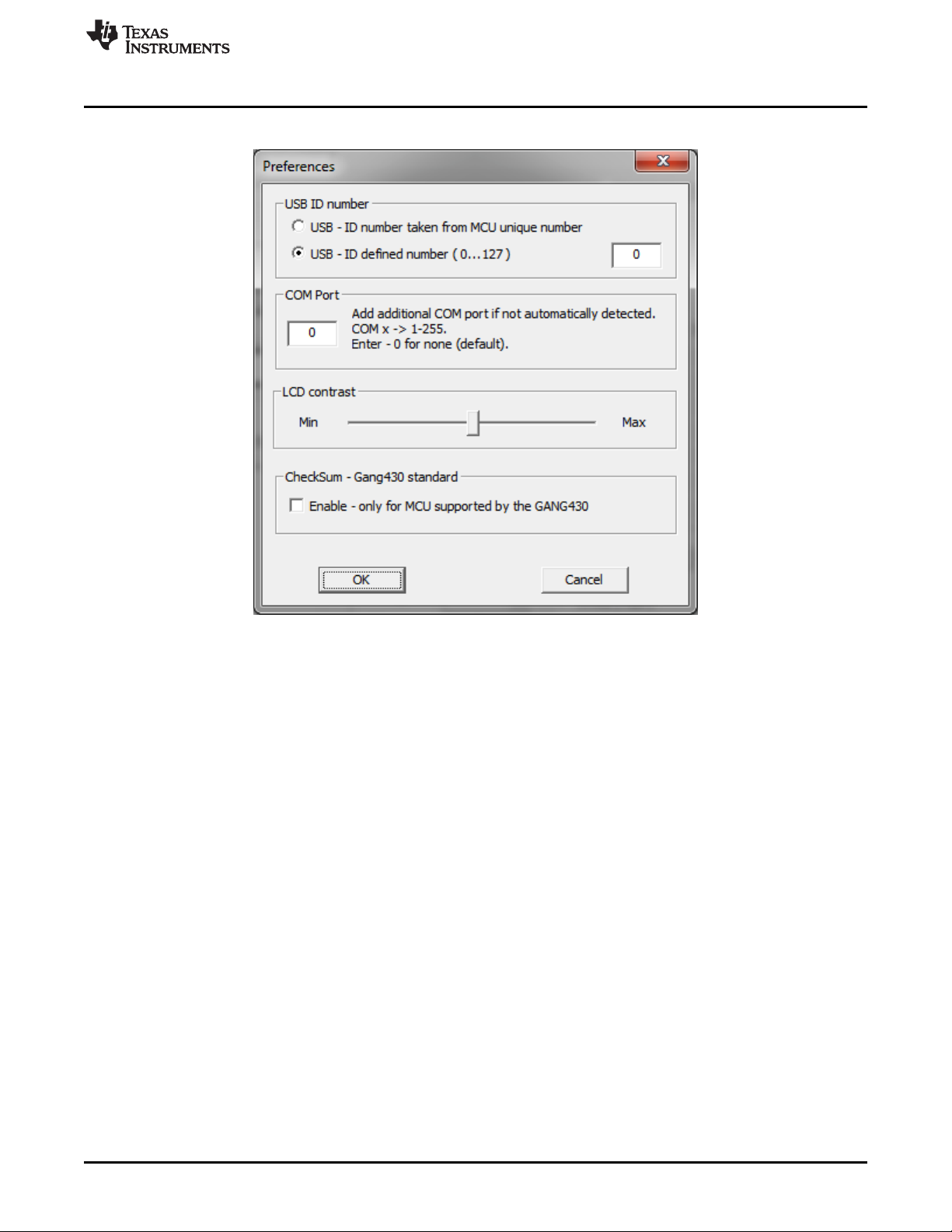
Figure 2-27. Preferences Selection Window
2.6.1 USB ID Number
This parameter specifies the ID number of the USB driver. A different number causes the MSP-GANG
programmer to use a different COM port.
• Driver ID is taken from MSP-GANG serial number.
• Driver ID is chosen by the user. Valid values are 0 to 127, inclusive (default is 0). Set different values
when connecting multiple programmers to the same PC.
2.6.2 COM Port
Manually add the specified COM port number to the list of selectable COM ports. Useful when a COM port
is not detected by software and is not added to the available COM port list, but the user knows that the
specific COM port is available. When set to 0, no extra COM port is added.
2.6.3 LCD Contrast
Contrast for the LCD display on the actual MSP-GANG Programmer. The saved value is stored internally
inside the MSP-GANG Programmer.
2.6.4 Checksum – Gang430 Standard
Old versions of the MSP-GANG Programmer (named MSP-GANG430) used a different algorithm to
calculate checksums. Enabling this option shows two checksums on the new MSP-GANG Programmer:
both the old MSP-GANG430 checksum and the new MSP-GANG checksum are shown. The old
checksum is shown only for MCUs supported by the old MSP-GANG430 Programmer.