slau358q.pdf - 第64页
Firmware Interface Protocol www.ti.com 64 SLAU358Q – September 2011 – Revised October 2019 Submit Documentation Feedback Copyright © 2011–2019, Texas Instruments Incorporated Firmware 3.2 Firmware Interface Protocol The …

63
SLAU358Q–September 2011–Revised October 2019
Submit Documentation Feedback
Copyright © 2011–2019, Texas Instruments Incorporated
Firmware
Chapter 3
SLAU358Q– September 2011 –Revised October 2019
Firmware
3.1 Commands
The MSP-GANG can be controlled by firmware commands received through USB or its RS-232 serial
port. The following firmware commands are supported:
== Commands supported by the BOOT loader ======
• "Hello"
• Boot Commands Disable
• Boot Commands Enable
• Transmit Diagnostics
• Select Baud Rate
• Erase Firmware
• Load Firmware
• Exit Firmware update
• Get Label
• Get Progress Status
== Commands supported by API firmware ======
• Main process
• Interactive process
• Erase Image
• Read Info memory from MSP-GANG
• Write Info memory to MSP-GANG
• Verify Access Key
• Load Image Block
• Verify Image Checksum
• Read Image Header
• Boot update
• Read from Gang Data buffer
• Write to Gang Data buffer
• Disable API Interrupts
• Select Image
• Display Message on the LCD display
• Set temporary configuration
• Get selected status
• Self-test

Firmware Interface Protocol
www.ti.com
64
SLAU358Q–September 2011–Revised October 2019
Submit Documentation Feedback
Copyright © 2011–2019, Texas Instruments Incorporated
Firmware
3.2 Firmware Interface Protocol
The MSP Gang Programmer supports a UART communication protocol at baud rates from 9.6 to 115.2
kbaud in half duplex mode. The default baud rate at startup is 9.6 kbaud. This allows for communication
between the MSP Gang Programmer and devices that have a lower communication speed than the
maximum 115.2 kbaud. It is recommended that after startup the communication speed be increased to the
common maximum for both devices to enable faster communication. If the control device has a USB
interface with a virtual COM port, then it is recommended to use USB for communication between the
control device and the MSP Gang Programmer, because USB is several times faster than RS-232.
Communication requires one start bit, eight data bits, even parity bit, and one stop bit. A software
handshake is performed by a (not) acknowledge character.
3.3 Synchronization Sequence
To synchronize with the MSP-GANG Programmer the host serial handler transmits a SYNC (CR)
character (0x0D) to the MSP-GANG Programmer. The MSP-GANG Programmer acknowledges successful
reception of the SYNC character by responding with a DATA ACK character (0x90). If the SYNC is not
received correctly, no data is sent back. This sequence is required to establish the communication
channel and to react immediately to line faults. The synchronization character is not part of the data frame
described in Section 3.4.1. When communication is established, the synchronization character is not
required any more, but it can be send at any time for checking the "alive" status if required.
The synchronization character is not part of the data frame described in Section 3.4.1.
3.4 Command Messages
The MSP-GANG has a few type of messages with mandatory responses for each received command.
• Short TX messages with one byte only
"Hello"
Tx -> 0x0d (CR)
Rx -> 0x90 (ACK)
Get Progress Status
Tx -> 0xA5
Rx -> 0x80 0x00 <...data...> (without Check Sum)
• Standard TX messages with data frame
Tx -> 0xA5
Rx -> 0x80 0x00 <...data...> (without Check Sum)
3.4.1 Frame Structure
The data frame format follows the TI MSP serial standard protocol (SSP) rules, extended with a preceding
synchronization sequence (SS), as described in Section 3.3. The MSP Gang Programmer is considered
the receiver in Table 3-1, which details the data frame for firmware commands. The redundancy of some
parameters results from the adaptation of the SSP or to save boot ROM space.
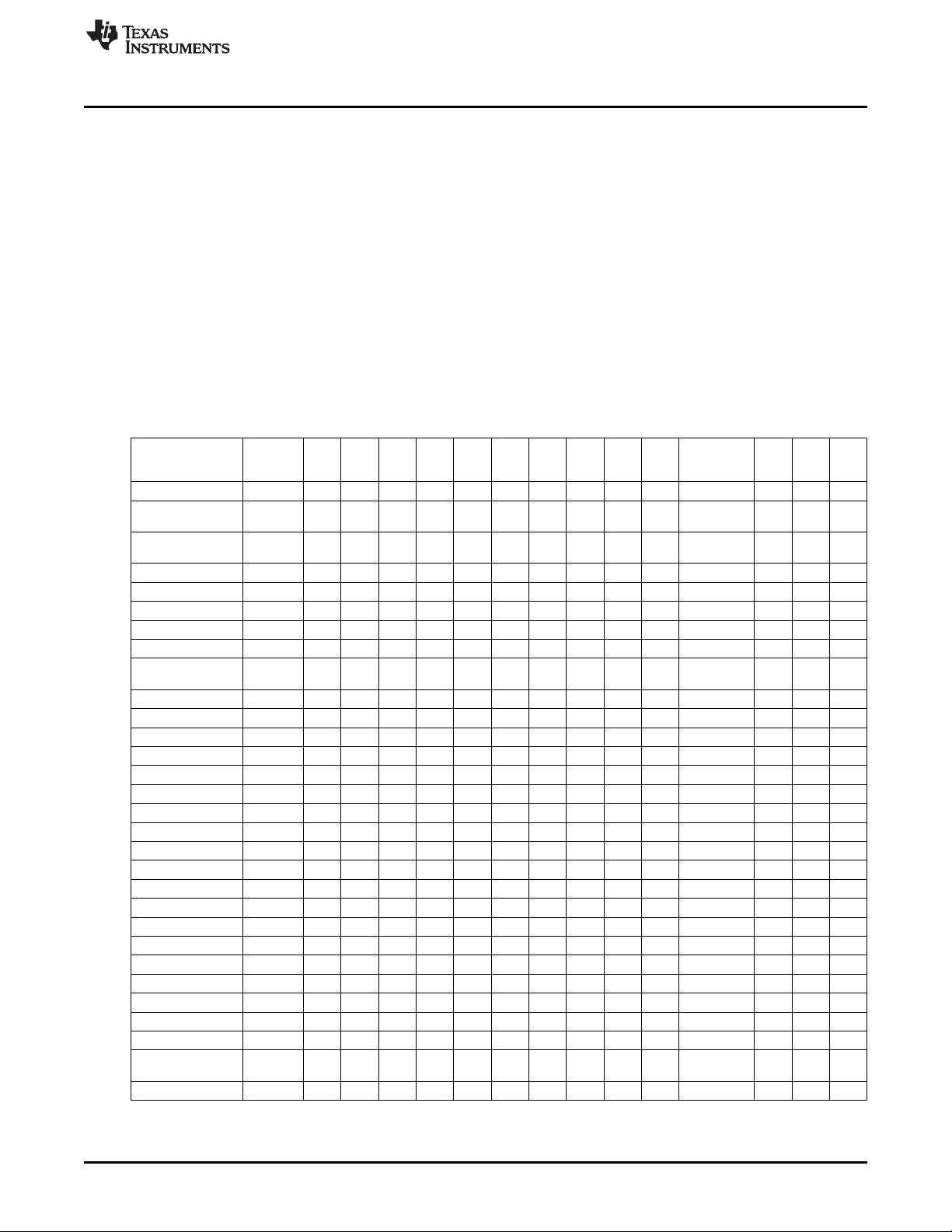
The data frame format of the firmware commands is shown in Table 3-1.
• The first eight bytes (HDR through LH) are mandatory (– represents dummy data).
• Data bytes D1 to Dn are optional.
• Two bytes (CKL and CKH) for checksum are mandatory
• Acknowledge done by the MSP Gang Programmer is mandatory.
www.ti.com
Command Messages
65
SLAU358Q–September 2011–Revised October 2019
Submit Documentation Feedback
Copyright © 2011–2019, Texas Instruments Incorporated
Firmware
The following abbreviations are used in Table 3-1.
CMD Command identification
R Do not use this command. Used for internal communication.
T Target number (1 to 8)
L1, L2 Number of bytes in AL through Dn. The valid values of these bytes are restricted as follows: L1 = L2, L1 < 255, L1 even.
A1, A2, A3 Block start address or erase (check) address or jump address LO or HI byte. The bytes are combined to generate a 24-bit word as follows: Address = A3 × 0x10000 + A2 × 0x100 + A1
LL, LH Number of pure data bytes (maximum 250) or erase information LO or HI byte or block length of erase check (max is 0xFFFF).
D1...Dn Data bytes
CKL, CKH 16-bit checksum LO or HI byte
xx Can be any data
– No character (data byte) received or transmitted
ACK The acknowledge character returned by the MSP-GANG can be either DATA_ACK = 0x90 (frame was received correctly, command was executed successfully) or DATA_NAK = 0xA0 (frame not valid (for example, wrong checksum, L, L2), command is
not defined, is not allowed.
PRS DATA_IN_PROGRESS = 0xB0 – Tasks in progress. Use Get Progress Status (0xA5) command to get the status and check when task is finished.
(1)
All numbers are bytes in hexadecimal notation. ACK is sent by the MSP-GANG.
(2)
PROMPT = 0x3E means data frame expected.
Table 3-1. Data Frame for Firmware Commands
(1) (2)
MSP-GANG
Firmware
Command
PROMPT CMD L1 L2 A1 A2 A3 A4 LL LH D1 D2...Dn CLK CLH ACK
"Hello" 0D – – ACK
Boot Commands
Disable
3E 2A R R R R R R R R R R CKL CKH ACK
Boot Commands
Enable
3E 2B R R R R R R R R R R CKL CKH ACK
Diagnostic 3E 32 04 04 00 00 – – 00 00 – – CKL CKH –
Diagnostic response 80 0 1E 1E D1 D2 D3 D4 D5 D6 D7 D08...D1E CKL CKH –
Set Baud Rate 3E 38 06 06 D1 00 – – 00 00 00 00 CKL CKH ACK
Erase Firmware 3E 39 R R R R R R R R R R CKL CKH ACK
Load Firmware 3E 3A R R R R R R R R R R CKL CKH ACK
Exit Firmware
Update
3E 3B R R R R R R R R R R CKL CKH ACK
Get Label 3E 40 04 04 00 00 – – 00 00 – – CKL CKH –
Response-Get Label 80 00 8C 8C D1 D2 D3 D4 D5 D6 D7 D8...D140 CKL CKH –
Get Progress Status A5 – –
Response----,,,,--- 80 A5 D1 D2 D3 D4 D5 D6 D7 D7 D8 D9...D48 – –
Main Process 3E 31 04 04 00 00 – – 00 00 – – CKL CKH PRS
Interactive Task 3E 46 n n D1 D2 – – D3 D4 D5 D6...Dn CKL CKH –
Response---,,--- 80 0 n n D1 D2 D3 D4 D5 D6 D7 D8...Dn CKL CKH –
Erase Image 3E 33 04 04 00 00 – – 00 00 – – CKL CKH PRS
Get Info C-D 3E 41 04 04 A1 00 – – 00 00 – – CKL CKH –
Response Get Info 80 0 80 80 D1 D2 D3 D4 D5 D6 D7 D8...D128 CKL CKH
Write Info C-D 3E 42 84 84 A1 00 80 0 D1 D2...D128 CKL CKH ACK
Get Access Key St 3E 44 04 04 00 00 – – 00 00 – – CKL CKH ACK
Load Image 3E 43 n n A1 A2 A3 00 –6 00 D1 D2...Dn-6 CKL CKH ACK
Verify Image CRC 3E 45 08 08 A1 A2 A3 A4 LL LH D1 D2 CKL CKH ACK
Get Image Header 3E 47 06 06 A1 A2 00 00 n 00 – – CKL CKH –
Response–,,,-- 80 0 n n D1 D2 – – D3 D4 D5 D6...Dn CKL CKH
Read Gang Buffer 3E 49 4 4 T 0 – – n 0 – – CKL CKH –
Response–,,,-- 80 0 n n D1 D2 D3 D4 D5 D6 D7 D8...Dn CKL CKH
Write Gang Buffer 3E 4A n+4 n+4 T 0 – – n 0 D1 D2...Dn CKL CKH ACK
Disable API
Interrupts
3E 4C 4 4 R R – – R R – – CKL CKH ACK
Select Image 3E 50 4 4 A1 0 – – 0 0 CKL CKH ACK