slau358q.pdf - 第45页
www.ti.com Programming MSP Flash Devices Using the MSP Gang Programmer 45 SLAU358Q – September 2011 – Revised October 2019 Submit Documentation Feedback Copyright © 2011–2019, Texas Instruments Incorporated Operation Fig…
Programming MSP Flash Devices Using the MSP Gang Programmer
www.ti.com
44
SLAU358Q–September 2011–Revised October 2019
Submit Documentation Feedback
Copyright © 2011–2019, Texas Instruments Incorporated
Operation
The image file can be copied to internal MSP Gang Programmer memory and used for programming
target devices. Select the desired image number in the GUI and press the Load Image from File button
(see Figure 2-1). This selected image is subsequently be used for programming target devices.
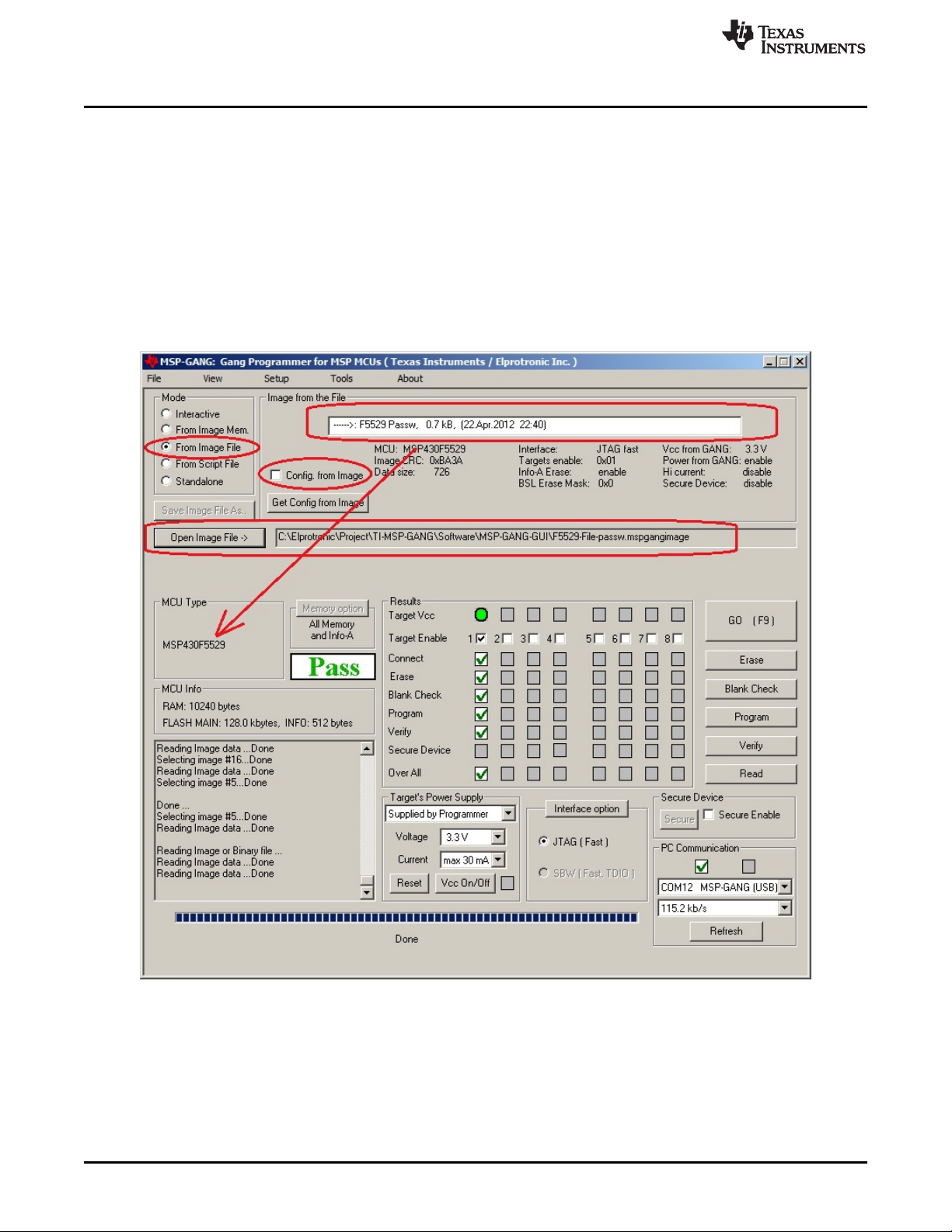
2.1.10 Programming From Image File
An image file can be used to program target devices from a self-contained read-only file that has all the
necessary configuration options and code files already included. By selecting the "From Image File" Mode
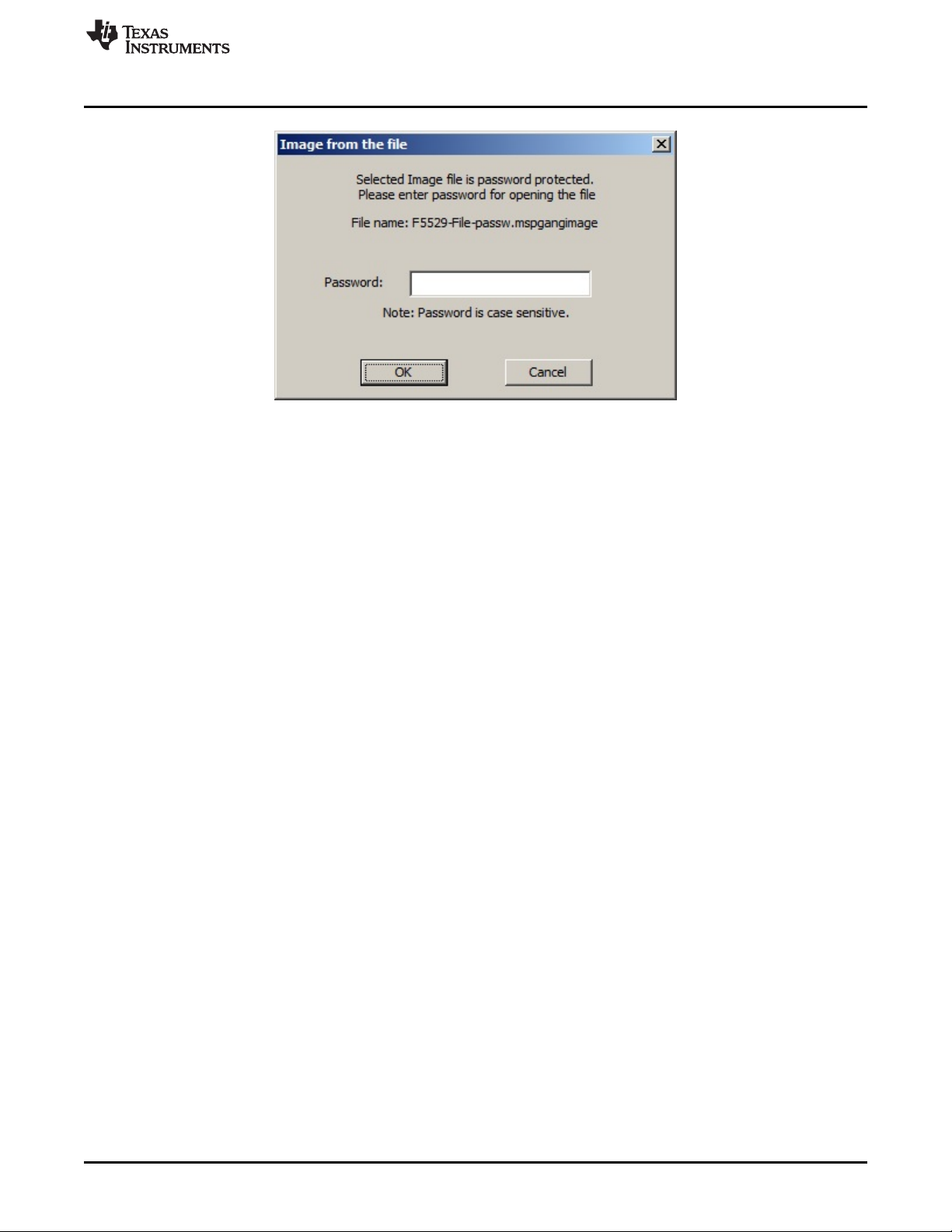
you can use an image file created using the steps described in Section 2.1.9. If the image is password
protected you are prompted to enter the password before you can use the image. Alternatively, if the
image is restricted to be used on a specific PC you are unable to use the image unless your PC matches
the hardware fingerprint (for instructions on how to use images from MSP Gang Programmer internal
memory see Section 2.1.2).
Figure 2-21. Programming From Image File
www.ti.com
Programming MSP Flash Devices Using the MSP Gang Programmer
45
SLAU358Q–September 2011–Revised October 2019
Submit Documentation Feedback
Copyright © 2011–2019, Texas Instruments Incorporated
Operation
Figure 2-22. Password for Image File
2.1.11 Programming From SD Card
The MSP Gang Programmer can program target devices with an image loaded from an external SD card.
To program from an external SD card, copy a binary file (".mspgangbin") created using steps described in
Section 2.1.9 to the root directory of the SD card (preserve the original extension of ".mspgangbin"). If
multiple binary files are present in the root directory of the SD card, the first one found is used (the first
one found is not necessarily the first one alphabetically). To ensure that the desired binary file is used,
verify that only one binary file with the proper extension .mspgangbin is present in the root directory. The
name of the selected file is displayed on the LCD screen of the MSP Gang Programmer.
When the SD card is connected to the MSP Gang Programmer, internal memory is disabled and an image
can only be read from the SD card. This mechanism has been deliberately implemented to aid in
production because inserting an SD card to the MSP Gang Programmer leaves users with only one option
for programming a target device and, therefore, less possibility for misconfiguration errors.
2.1.12 File Extensions
MSP Gang Programmer software accepts the following file extensions:
Code hex files
*.txt Texas Instruments
*.s19,*.s28,*.s37 Motorola
*.hex Intel
*.a43 Intel hex format with extensions specified by IAR
Image files
*.mspgangbin binary file, used for saving data in SD card
*.mspgangimage image file, can be password protected for distribution
Script files
*.mspgangsf script file
Project configuration files
*.mspgangproj keep all configuration, file names, and data for used project

Programming MSP Flash Devices Using the MSP Gang Programmer
www.ti.com
46
SLAU358Q–September 2011–Revised October 2019
Submit Documentation Feedback
Copyright © 2011–2019, Texas Instruments Incorporated
Operation
2.1.13 Checksum Calculation
The checksum (CS) that is displayed on the side of the code file name is used for internal verification. The
CS is calculated as the 32-bit arithmetic sum of the 16-bit unsigned words in the code file, without
considering the flash memory size or location. If any portion of the code file specifies only one byte
instead of a 16-bit word, the missing byte is defined as 0xFF for the CS calculation.
The following formula is used.
DWORD CS;
DWORD XL, XH;
CS = 0;
for( addr = 0; addr < ADDR_MAX; addr = addr + 2 )
{
if(( valid_code[ addr ] ) || ( valid_code[ addr+1 ]))
{
if( valid_code[ addr ] )
XL = (DWORD) code[ addr ];
else
XL = 0xFF;
if( valid_code[ addr+1 ] )
XH = ((DWORD) code[ addr+1 ])<<8;
else
XH = 0xFF00;
CS = CS + XH + XL;
}
}
As an example, refer to the code file below, which is in the TI hex file (*.txt format).
----------------------------------------
@FC00
F2 40
@FC90
28 02 68 92 DB 3B 38 80 05 00 58
@FFFC
4E F9 B6 FA
q
----------------------------------------
The CS is calculated as shown below:
CS = 0x40F2 + 0x0228 + 0x9268 + 0x3BDB + 0x8038 + 0x0005 + 0xFF58 = 0x000290F2
2.1.14 Commands Combined With the Executable File
Programming executable file can be opened with the following commands:
-prj project file with file name or full path and name.
-sf script file with file name or full path and name.
For example:
MSP-GANG.exe -sf test.mspgangsf
or
MSP-GANG.exe -prj test1.mspgangproj
or
MSP-GANG.exe -prj test1.mspgangproj -sf test.mspgangsf