slau358q.pdf - 第47页
www.ti.com Data Viewers 47 SLAU358Q – September 2011 – Revised October 2019 Submit Documentation Feedback Copyright © 2011–2019, Texas Instruments Incorporated Operation 2.2 Data Viewers Data from code files and from fla…

Programming MSP Flash Devices Using the MSP Gang Programmer
www.ti.com
46
SLAU358Q–September 2011–Revised October 2019
Submit Documentation Feedback
Copyright © 2011–2019, Texas Instruments Incorporated
Operation
2.1.13 Checksum Calculation
The checksum (CS) that is displayed on the side of the code file name is used for internal verification. The
CS is calculated as the 32-bit arithmetic sum of the 16-bit unsigned words in the code file, without
considering the flash memory size or location. If any portion of the code file specifies only one byte
instead of a 16-bit word, the missing byte is defined as 0xFF for the CS calculation.
The following formula is used.
DWORD CS;
DWORD XL, XH;
CS = 0;
for( addr = 0; addr < ADDR_MAX; addr = addr + 2 )
{
if(( valid_code[ addr ] ) || ( valid_code[ addr+1 ]))
{
if( valid_code[ addr ] )
XL = (DWORD) code[ addr ];
else
XL = 0xFF;
if( valid_code[ addr+1 ] )
XH = ((DWORD) code[ addr+1 ])<<8;
else
XH = 0xFF00;
CS = CS + XH + XL;
}
}
As an example, refer to the code file below, which is in the TI hex file (*.txt format).
----------------------------------------
@FC00
F2 40
@FC90
28 02 68 92 DB 3B 38 80 05 00 58
@FFFC
4E F9 B6 FA
q
----------------------------------------
The CS is calculated as shown below:
CS = 0x40F2 + 0x0228 + 0x9268 + 0x3BDB + 0x8038 + 0x0005 + 0xFF58 = 0x000290F2
2.1.14 Commands Combined With the Executable File
Programming executable file can be opened with the following commands:
-prj project file with file name or full path and name.
-sf script file with file name or full path and name.
For example:
MSP-GANG.exe -sf test.mspgangsf
or
MSP-GANG.exe -prj test1.mspgangproj
or
MSP-GANG.exe -prj test1.mspgangproj -sf test.mspgangsf
www.ti.com
Data Viewers
47
SLAU358Q–September 2011–Revised October 2019
Submit Documentation Feedback
Copyright © 2011–2019, Texas Instruments Incorporated
Operation
2.2 Data Viewers
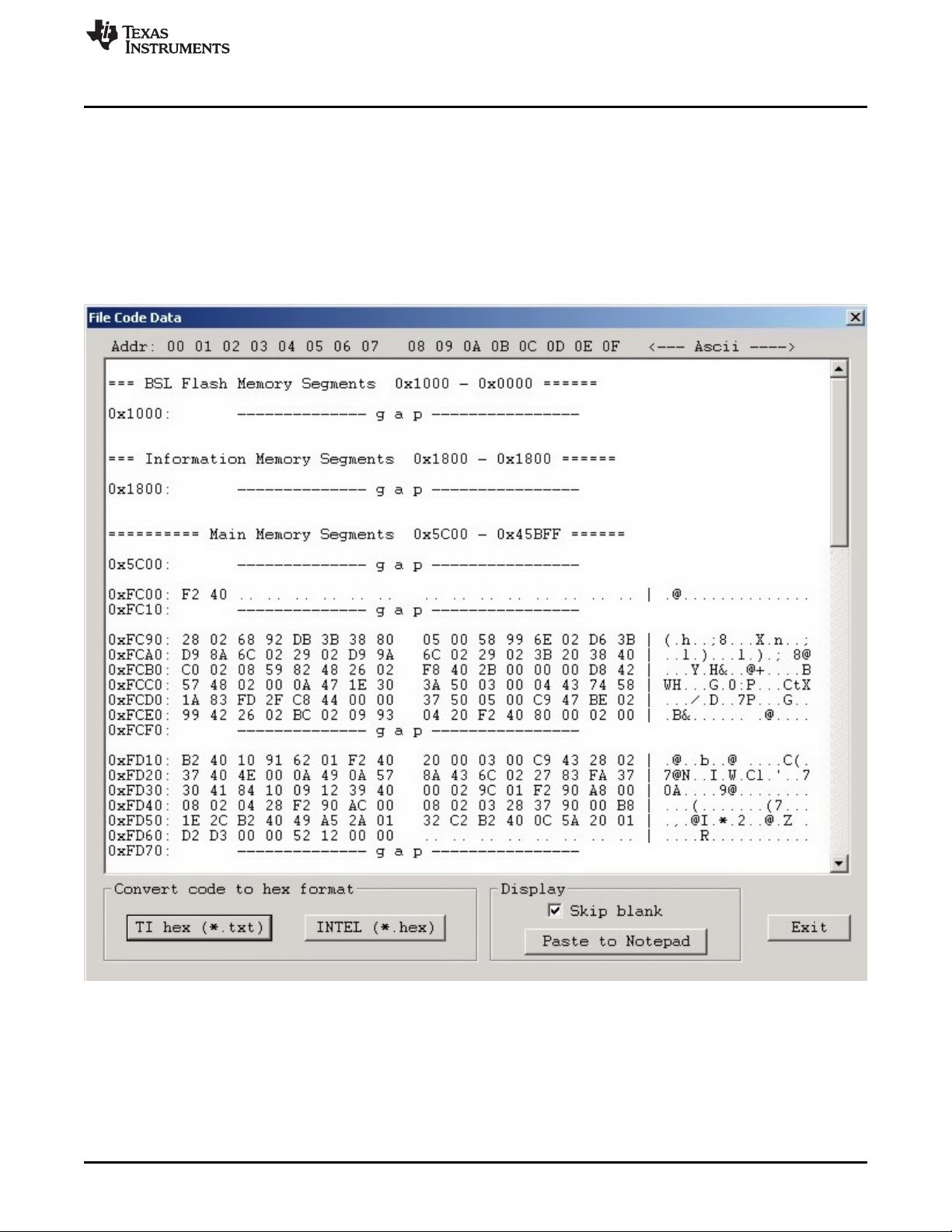
Data from code files and from flash memory can be viewed and compared in data viewers. Contents of
the selected file can be viewed by selecting the View→Code File Data option from the drop-down menu.
The Code data viewer, shown in Figure 2-23, displays the code address on the left side, data in hex
format in the central column, the same data in ASCII format in the right column. Data in hex format is
displayed from 0x00 to 0xFF for addresses corresponding to the code file. Data from other addresses is
displayed as double dots (..). If code size exceeds flash memory size in the selected microcontroller, this
warning message is displayed first.
Data out of the Flash Memory Space of the selected MSP.
NOTE: The selected option on the bottom ignores all bytes that have the value of 0xFF , which represents empty
bytes.
Figure 2-23. Code File Data
The contents of the code viewer can be converted to TI (*.txt) or Intel (*.hex) file format by clicking on the
TI hex or INTEL button.
Data Viewers
www.ti.com
48
SLAU358Q–September 2011–Revised October 2019
Submit Documentation Feedback
Copyright © 2011–2019, Texas Instruments Incorporated
Operation
Contents of flash memory data can be viewed by selecting the View→Flash Memory Data option from the
drop-down menu. To be able to see flash memory contents, the Read button must be used first (as
described in Section 2.1.1). The Flash Memory Data viewer displays the memory addresses, data in hex
and ASCII format in the same way as the Code data viewer shown in Figure 2-23.
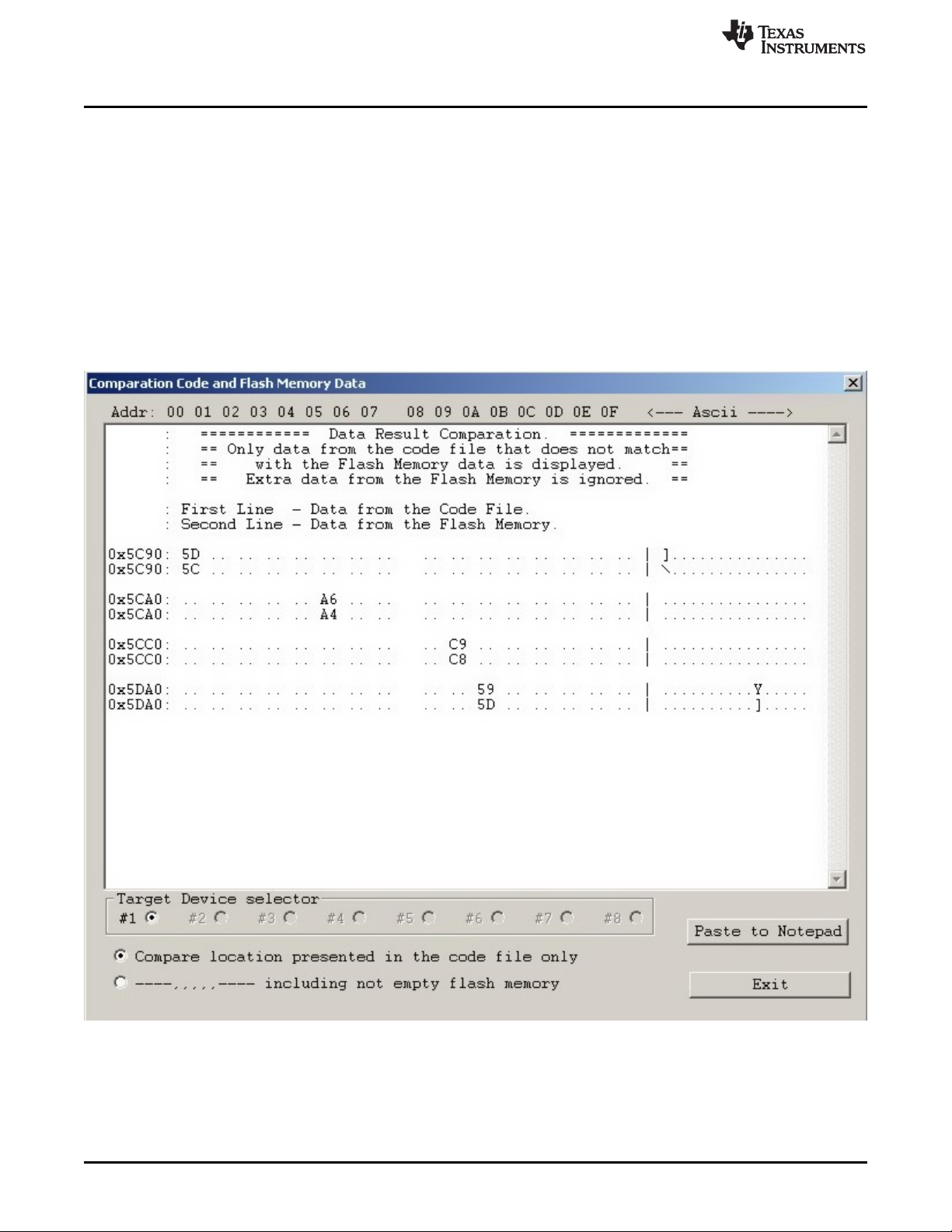
Contents of the code file and flash memory can be compared and differences can be displayed in a the
viewer by selecting the View→Compare Code & Flash Data options from the drop-down menu. Only data
that are not the same in the code file and the flash memory are displayed. The first line displays code file
data, and the second line displays flash memory data as shown in Figure 2-24.
The Compare location presented in the code file only option is chosen by default. This option allows the
user to view differences between Code file data and corresponding flash contents (compared by address).
Additional data in the flash like DCO calibration and personal data is not compared but can be displayed if
desired. If all the aforementioned data are identical, then a "No difference found" message is displayed on
the screen.
NOTE: Only bytes that differ are shown. The selected option on the bottom of the figure specifies that only
memory segments corresponding to the code file should be compared. The second option, if selected,
performs the comparison and shows any remaining contents of flash memory that do not correspond to the
code file.
Figure 2-24. Comparison of Code and Flash Memory Data of the Target Microcontroller