03238396-01-01 High Flow Vacuum (TQ).pdf - 第22页
5 TECHNICAL REFERENCE 5.3 TEST PROCEDURES 22 STANDALONE MANUAL HIGH FLOW VACUUM (TQ) 12/2020 1. Remove the lower rear panel. 2. Open the front cover to gain access to the flow controller valve. 3. Note or mark the positi…
5 TECHNICAL REFERENCE
5.3 TEST PROCEDURES
STANDALONE MANUAL HIGH FLOW VACUUM (TQ) 12/2020 21
5.3 TEST PROCEDURES
5.3.1 Diverter Valve Sensors Test
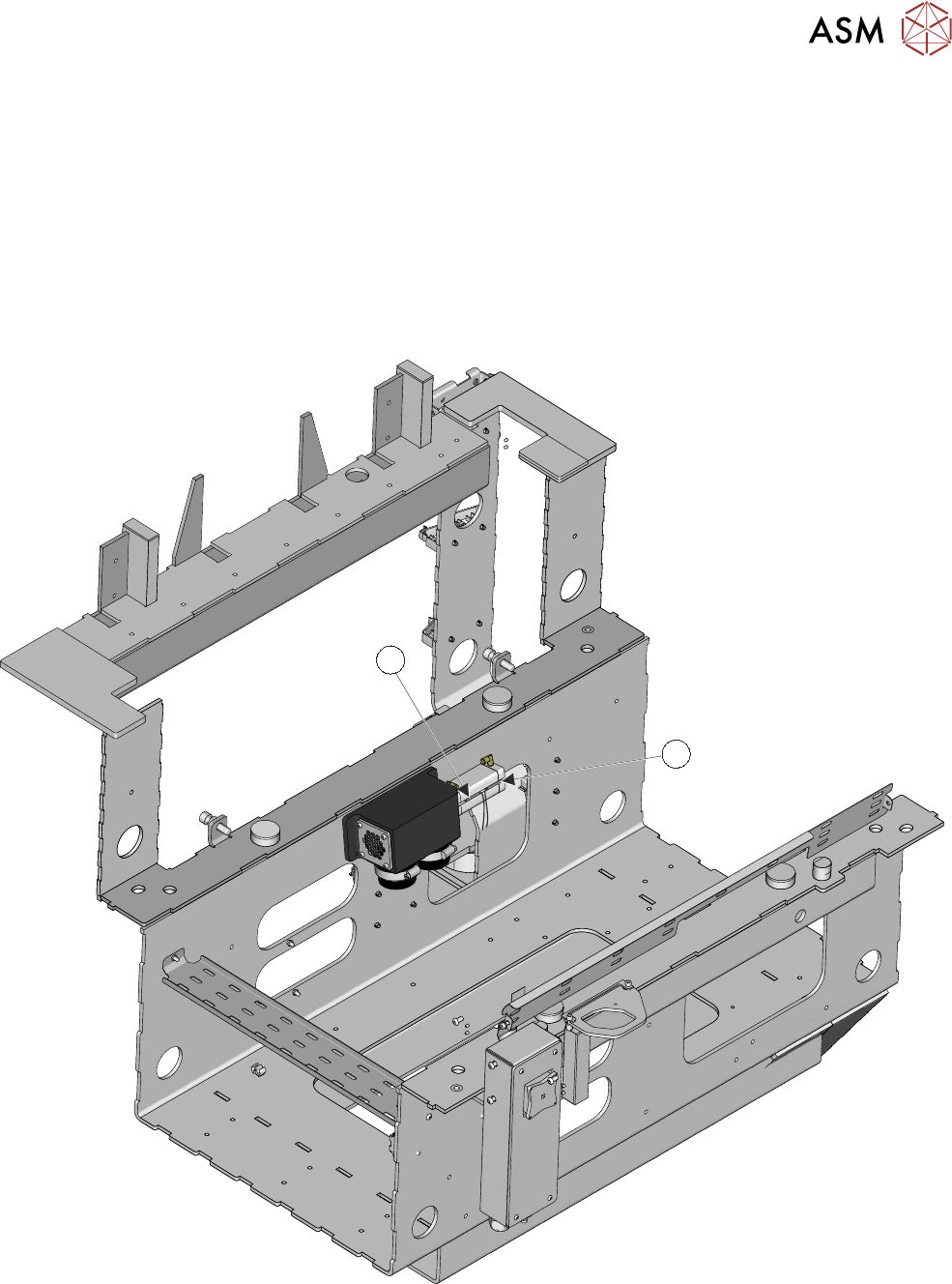
The diverter valve is mounted at the rear of the bulkhead. The pump assembly is located on the
front side of the bulkhead.
If viewed from the rear of the printer, a flexible hose from the pump connects to the left-hand port
on the diverter valve; the right-hand side hose connects to the riser pipe. Because of its physical
location, on the other side of the bulkhead, it is important to confirm that any fault lies with the di-
verter valve. To gain access to the sensors requires the removal of the pump, the hoses and the di-
verter valve.
1
2
Testing the sensors (this procedure requires two people):
5 TECHNICAL REFERENCE
5.3 TEST PROCEDURES
22 STANDALONE MANUAL HIGH FLOW VACUUM (TQ) 12/2020
1. Remove the lower rear panel.
2. Open the front cover to gain access to the flow controller valve.
3. Note or mark the position of the flow controller indexer.
4. Fully close the sliding baffle plate.
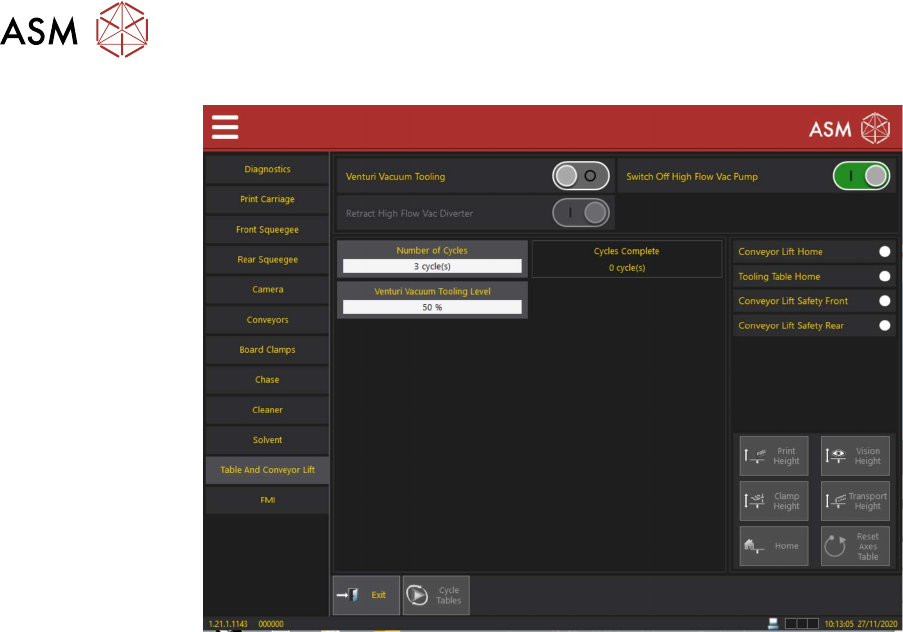
5. On the HMI Select Menu.
6. Navigate to Service\Diagnostics\Table and Conveyor Lift.
If ON, turn venturi vacuum tooling OFF.
7. Ensure that High Flow Vacuum Pump is set to ON.
8. Check that either the High Flow Vacuum Diverter Valve Actuator Sensor (1) or the High
Flow Vacuum Diverter Valve Retract Sensor (2) is ON.
9. Toggle the Retract High Flow Vacuum Diverter sensor ON/OFF.
10. Check that the high flow vacuum diverter valve actuator sensor and the high flow vacuum di-
verter valve retract sensor indicators toggle: ON/OFF.
11. At the rear of the printer, the vented air flow should be heard expelling from the diverter valve
vent as the retract sensor is activated and the diverter valve opens.
NOTE
If all the above are true, the fault may not be at the diverter valve. If exhaust air is constantly
heard, a leak may exist in the hoses or the tooling plate.
12. Exit Diagnostics.
13. Set the flow controller valve back to the setting, as noted, in step 3.
5 TECHNICAL REFERENCE
5.3 TEST PROCEDURES
STANDALONE MANUAL HIGH FLOW VACUUM (TQ) 12/2020 23
5.3.2 High Flow Vacuum System Present Sensor Test
The high flow vacuum system present sensor 1SE12 is a thru-beam opto sensor. It connects to
ESIO#1 Breakout A at 1ASK13.
2
1
3
4
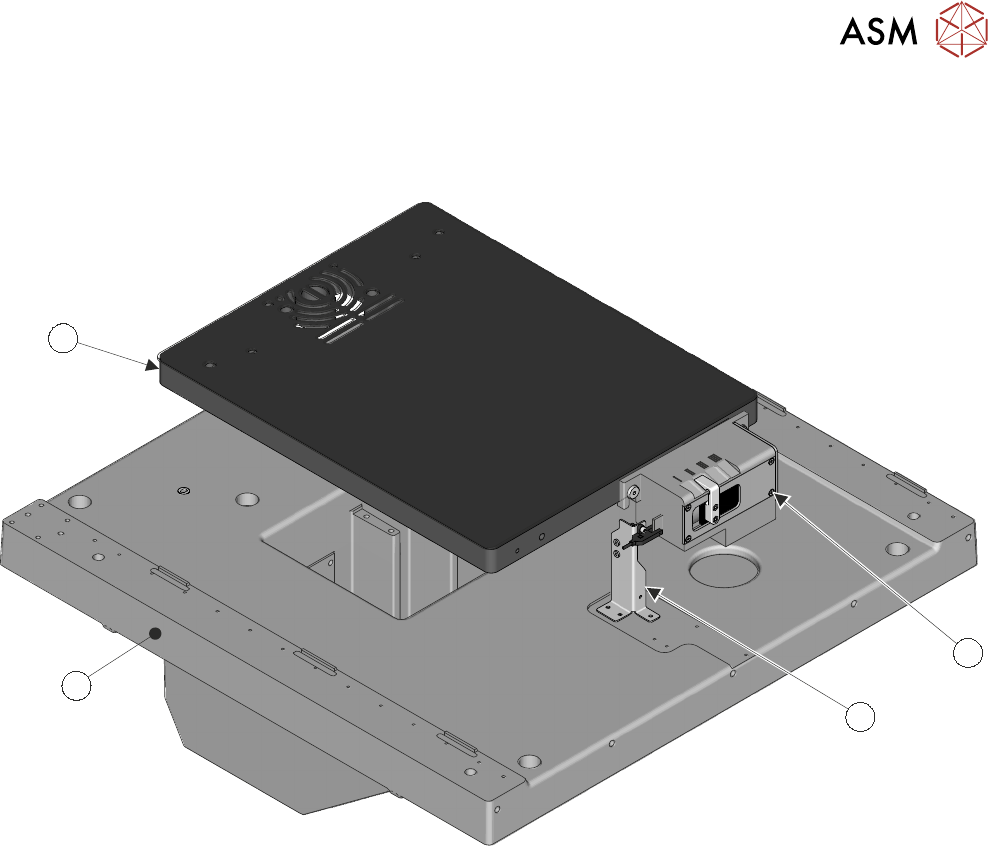
Relationship Drawing
In the relationship drawing above, several parts have been removed for clarity, its purpose is to
show the relationship of annotated parts.
The flow controller housing (1) houses the sensor vane (left hand side as viewed). The sensor is
mounted on the bracket (2) that in-turn is mounted on the Transport Base Casting (3). The casting
guides the printer table (not shown). The table lifts the tooling plate (4).
When the table is at home, the sensor is in the vane and it has switched from normally closed, to
open. This tells the software that the tooling table is in a safe position to move.
Testing the sensor:
1. On the HMI Navigate to Service\Diagnostics\Chase.
2. Select Unload Stencil.
3. Open the front cover.
4. Remove the stencil.
5. Close the cover.
6. Press the System button.
7. Select Table And Conveyor Lift.
8. Observe the High Flow Vac Table Present Sensor indicator.
9. Select Vision Height. The indicator should switch from ON to OFF.
10. Observe the warning and select Confirm.
11. Select Home. The indicator should switch ON.