03238396-01-01 High Flow Vacuum (TQ).pdf - 第26页
5 TECHNICAL REFERENCE 5.4 REPLACEMENT PROCEDURES 26 STANDALONE MANUAL HIGH FLOW VACUUM (TQ) 12/2020 5.4.1 Pump 1 2 4 5 3 1. Turn the mains isolator switch to OFF and lockout the switch. 2. Gain access to the assembly by …

5 TECHNICAL REFERENCE
5.4 REPLACEMENT PROCEDURES
STANDALONE MANUAL HIGH FLOW VACUUM (TQ) 12/2020 25
5.4 REPLACEMENT PROCEDURES
WARNING
BOARD CLAMPS. EXTREME CARE MUST BE EXERCISED WHEN WORKING IN
THE TOOLING AREA OF THE MACHINE TO AVOID INJURY. THE FOILS ON THE
FRONT AND REAR BOARD CLAMPS ARE VERY SHARP.
MANDATORY
TOXIC SUBSTANCES MAY BE PRESENT. SAFETY GLOVES MUST BE WORN.
MANDATORY
TOXIC SUBSTANCES MAY BE PRESENT. EYE PROTECTION MUST BE WORN.
5 TECHNICAL REFERENCE
5.4 REPLACEMENT PROCEDURES
26 STANDALONE MANUAL HIGH FLOW VACUUM (TQ) 12/2020
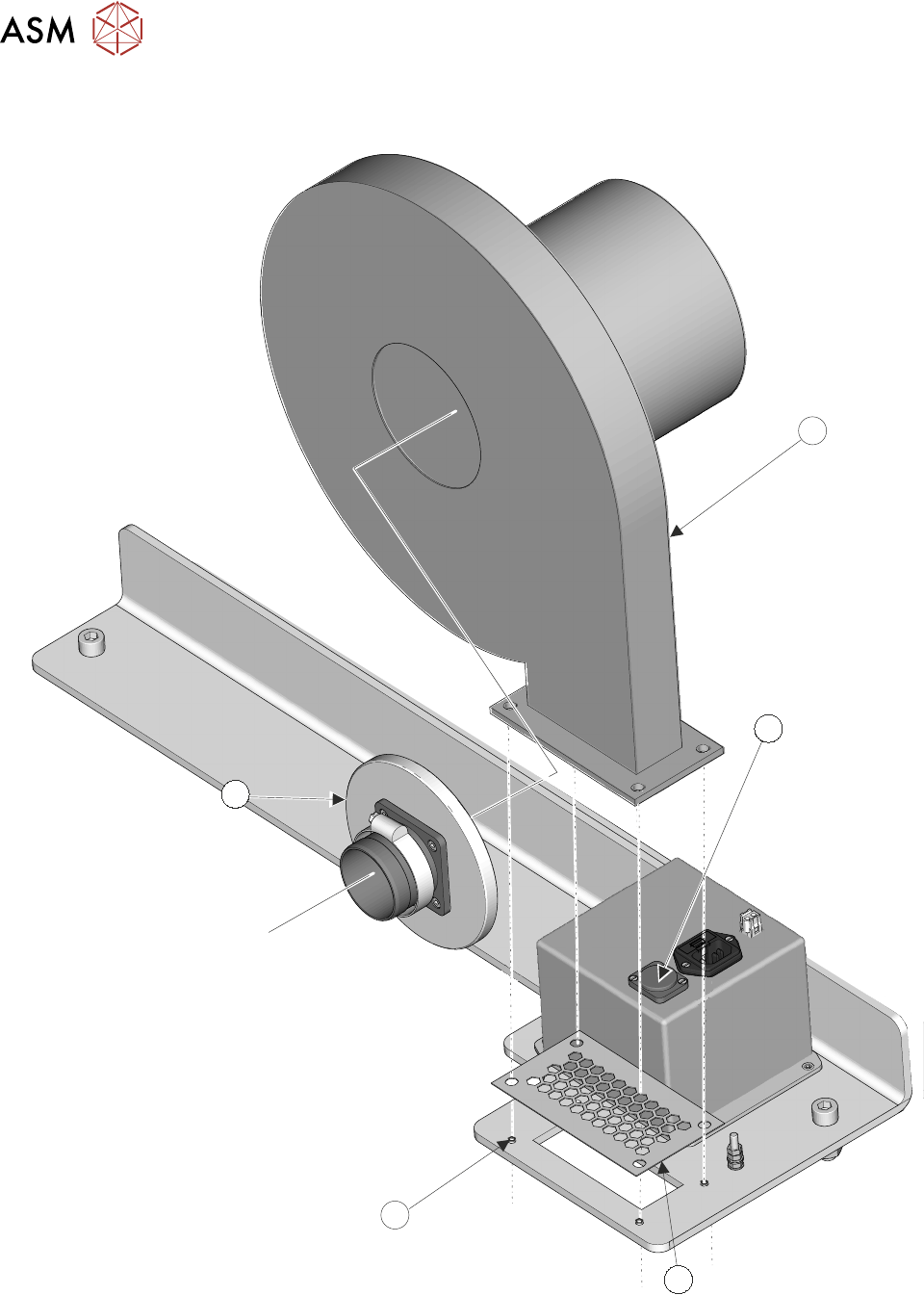
5.4.1 Pump
1
2
4
5
3
1. Turn the mains isolator switch to OFF and lockout the switch.
2. Gain access to the assembly by removing the lower rear panel.
3. Unplug the mains cable from the socket (2) on the control enclosure.
4. Using an 10mm spanner remove the four M6 nuts (4) from the studs.

5 TECHNICAL REFERENCE
5.4 REPLACEMENT PROCEDURES
STANDALONE MANUAL HIGH FLOW VACUUM (TQ) 12/2020 27
5. Lift the pump (1) clear of the support bracket that it is fixed to. At the same time carefully pull
the flexible hose through the access hole in the bulkhead.
6. Remove the magnetic Vacuum Manifold (5) from the rear of the pump.
NOTE
The flexible vacuum hose can remain attached to the manifold.
7. Remove the finger guard (3).
8. Remove the replacement pump from its packaging.
9. Clean and reuse the original finger guard.
10. Align the finger guard over the studs on the support bracket.
11. Pull the magnetic vacuum manifold and the attached flexible hose through the access hole on
the bulkhead (refer to the reference graphic above).
12. Clean the manifold and check the condition of the hose.
13. Attach the manifold to the pump.
14. Lower the pump assembly onto the finger guard.
15. Align the holes and fit and the four M6 nuts; tighten using a 10mm spanner.
16. Plug the mains connector into the socket on the control enclosure.
17. Remove the lockout from the printer’s mains isolator and switch the printer ON.
18. Check that the pump works.
19. Replace the lower rear panel.
5.4.2 Flexible Hoses
The flexible hoses are accessible behind the pump assembly. To gain access, the pump needs to
be removed. There is an access hole in the bulkhead that allows the engineer room to remove the
hose clips (see Diverter Valve graphic below). The hoses (items 3 and 5) and the riser pipe (6) are
attached using 45-60mm worm drive hose clips (2).