SA_3214_en.pdf - 第32页
32 32 9 Operation 9.1 T est Mode without Print Job ! W arning! The pad will be moved to the starting position immediately! Dangerofinjurytohandsandngersbythemovingpad! Do not reach into the zone of the movi…

31
8.4 Setting the Peel Position
To optimize the transfer of the labels from the printer to the pad there are two different parameters available for
adjusting the peel position.
!
Attention!
Firstadjusttheparameter"PeelPosition"intheprinterconguration.
Then adjust the additional peel-off offset in the software.
This course of action is particularly important when loading new material, restarting the device and error
treatment.
Parameter"PeelPosition"intheprinterconguration
Check the basic setting in the printer setup. Perform labelling cycles by alternately pressing the feed key and the
pre-dispense key 6.3 Test Mode without Print Job.
Adjust the "Peel Position" in such a way, that the blank labels are peeled off completely from the liner
4.3CongurationParametersoftheApplicator.
Peel-off offset in the software
Check the settings in the software. Perform labelling cycles by repeatedly pressing the Enter button .
6.4 Test Mode with Print Job.
Adjust the peel-off offset in such a way, that the printed labels are peeled off completely from the liner
Programming manual or software documentation.
8.5 Activation of Peel-off Mode
i
Note!
For labelling operation activate the peel-off mode in the software.
For direct programming use the P command Programming manual.
8 Conguration
32 32
9 Operation
9.1 Test Mode without Print Job
!
Warning!
The pad will be moved to the starting position immediately!
Dangerofinjurytohandsandngersbythemovingpad!
Do not reach into the zone of the moving pad and keep long hair, loose clothes, and jewelry away.
2
1
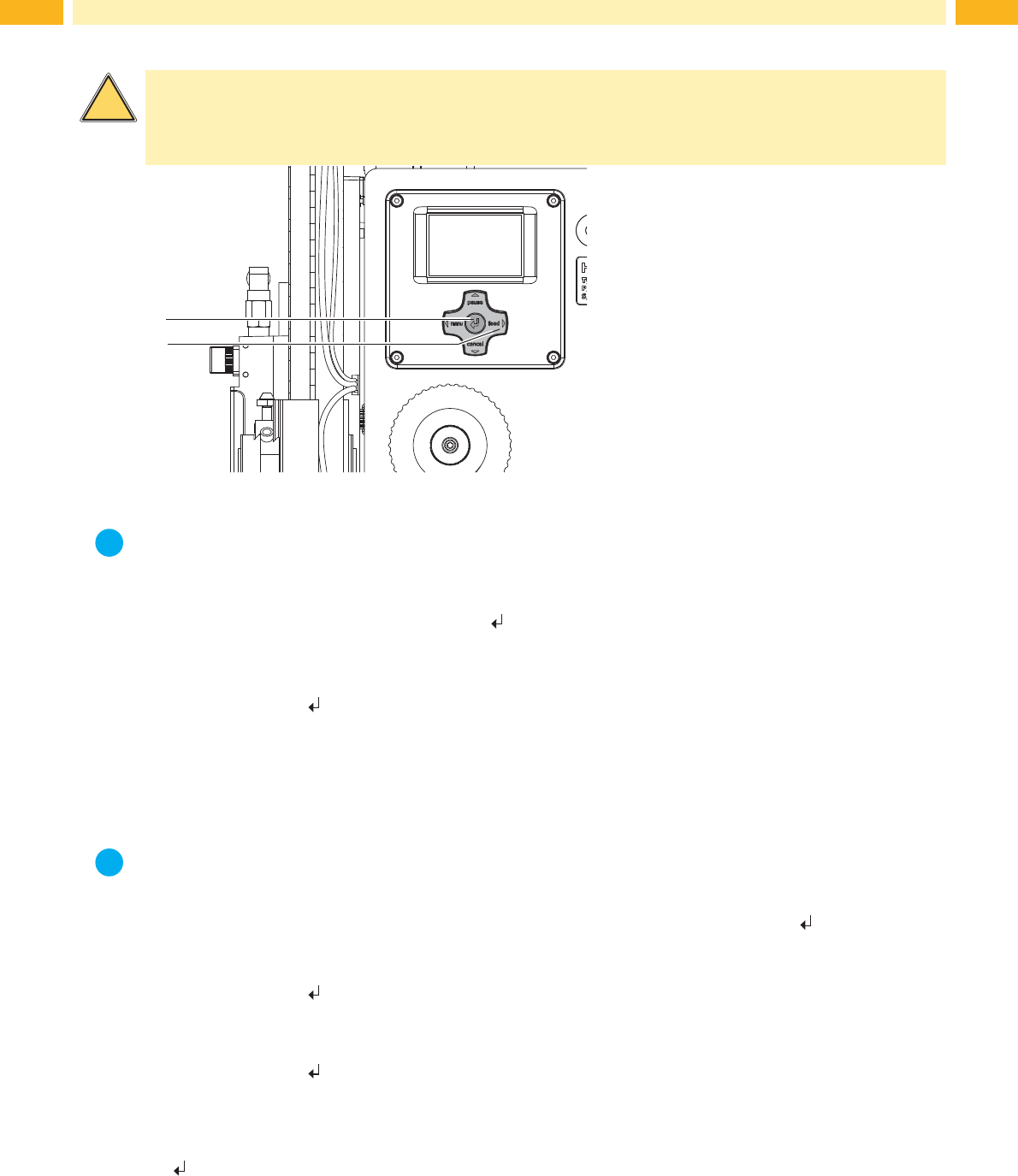
Fig. 28 Test mode via Enter key
i
Note!
Pleaseusethetestmodetoadjusttheparameter"Peelposition"intheprinterconguration.
The whole labelling process can be simulated without the need for a print job, or a connection to a computer, by alter-
nately pressing the feed (2) key and the Enter key
(1):
Press the feed key (2).
A blank label is fed. The vacuum of the pad as well as the supporting air (blow tube) are switched on. After the
label has been picked up by the pad, the supporting air is switched off.
Press the Enter key (1).
The pad is moved to the labelling position. A sensor signals when the labelling position is reached. The vacuum is
switched off and the label is placed onto the product. Then the pad is moved back into the starting position.
9.2 Test Mode with Print Job
i
Note!
Please use the test mode to adjust the peel-off offset in the software.
This method allows the checking of the labelling process with real print data using the Enter key
(1).
Send a print job.
The test mode is executed in two half cycles:
Press the Enter key (1).
Half cycle 1
A label is printed. The vacuum of the pad as well as the supporting air (blow tube) are switched on. After the label
has been picked up by the pad the supporting air is switched off.
Press the Enter key (1) again.
Half cycle 2
The pad is moved to the labelling position. A sensor signals when the labelling position is reached. The vacuum is
switched off and the label is placed onto the product. Then the pad is moved back into the starting position.
Ifthelabelismanuallyremovedfromthepadafterthersthalfcycle,thehalfcycle1willberepeatedwhentheEnter
key key is pressed again.
33
10 Spare Parts
10.1 Retainer Assembly
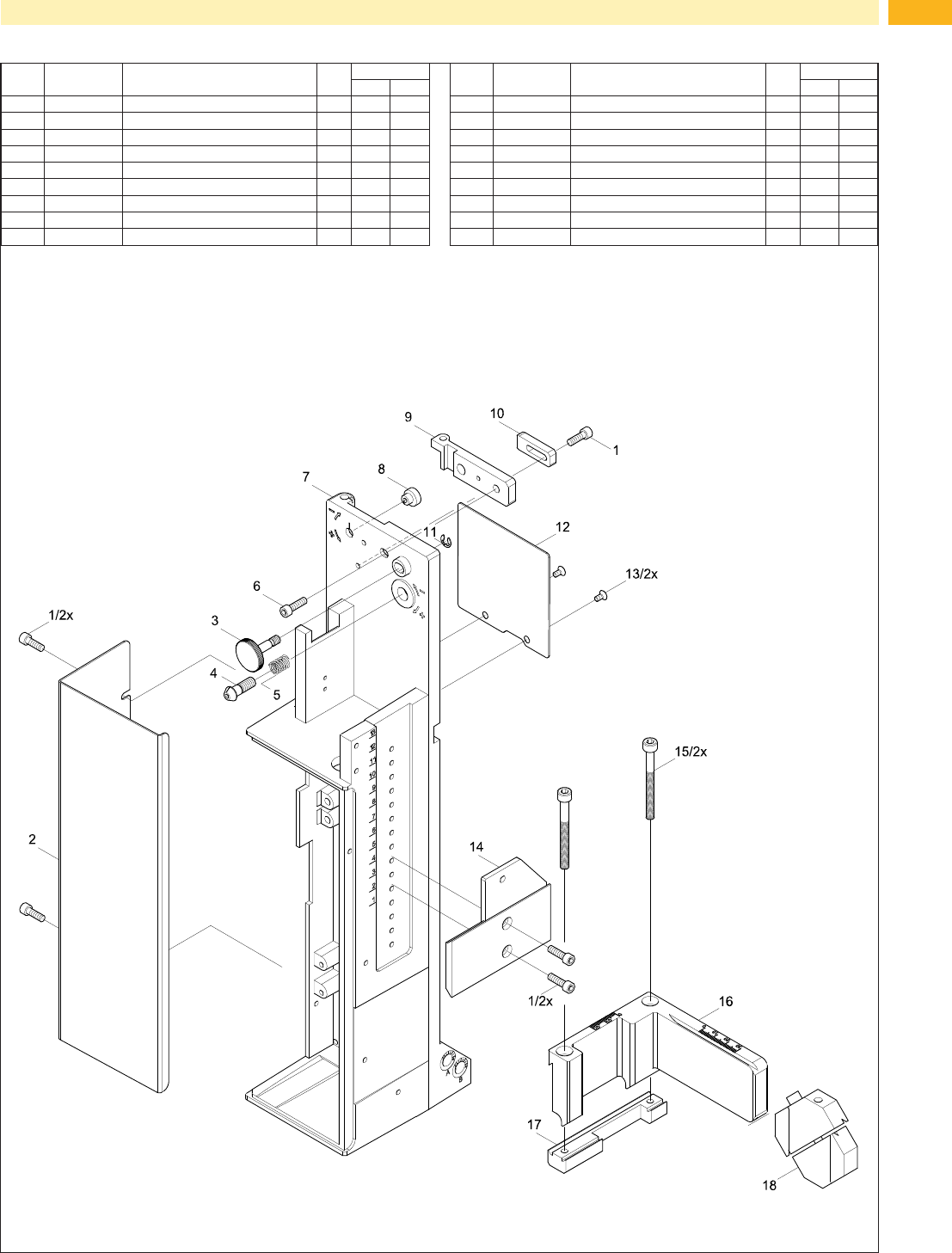
Fig. 29 Retainer Assembly - Spare Part
No. Part-No. Description PU Serial No.
from to
1 5902489.001 Screw DIN7984-M4x8 10
2 5964129.001 Cover 1
3 5964367.001 Knurled Screw 1
4 5965963.001 Set Screw 1
5 5904544.001 Spring 10
6 5902241.001 Screw DIN7984-M4x10 10
7 5964036.001 Base Plate 1
8 5966530.001 Eccentric 1
9 5966529.001 Hinges 1
No. Part-No. Description PU Serial No.
from to
10 5964090.001 Bar 1
11 5903525.001 E-Ring DIN6799-4 10
12 5964429.001 Plate 1
13 5902021.001 Screw DIN7991-M3x6 10
14 5970013.001
AdapterProle 1
15 5902167.001 Screw DIN912 M5x50 10
16 5964331.001 Crossbeam 1
17 5964328.001 Clamping Element 1
18 5964062.001 Binder 1