PPS Pro version 8.2.pdf - 第107页
4022 591 98 247 User Manual 05.07 P PS-Pro v8.2 103 Guidelines for using PPS-Pro s c h e m e m u s t b e f il l ed i n t h e Tr ansport Settings N ame te xtbox. After pr essing the OK button, the tran sport settings ar e…

User Manual 4022 591 98247
102 PPS-Pro v8.2 05.07
Guidelines for using PPS-Pro
3) The second fiducial (left) can be reached in index 1 if the distance between
second fiducial (left) and the SE point is less than 400 mm. (Not for FCM MF/
ME)
4) The second fiducial (left) MUST be reached in index 1 if the distance
between the second fiducial (left) and the SE point is less than 400 mm. If not
DFA is not possible.
NOTE: Transport lift-up position equals –440 mm for all schemes. In these cases
‘stopper out’ must be used, so in the Machine or MachineClass attributes
section write: ‘TransportStopperOutUsed’ ‘YES’
3.2.11.2 Specify custom index scheme
If a special index scheme is required it can be specified in the PPS Machine
Specific settings
(see 3.2.11.3 on page 102).
Important parameters which must be defined are described below.
• TransportStopperInX: An integer that specifies the X location of the
transport run-in stopper, relative to the machine origin.
• TransportStopperOutUsed: Specifies whether the run-out stopper
should be used. Possible values are ‘Yes’ and ‘No’.
• TransportBeamLiftupX: An integer that specifies the X location of the
beam liftup, relative to the machine origin.
• TransportNrOfBoards: An integer that indicates the number of boards
on the beam.
• TransportIndexStep: Specifies an array of integer values representing
the index steps (maximum 10 values). The sum of these steps
determine the board pitch.
There is a special order of importance of the specified index schemes, 1
overrules 2:
1. User defined project related transport settings (see 3.2.11.3 on page 102).
2. PPS defines default index schemes.
3.2.11.3 Specify project related transport settings
To specify the transport settings via the GUI of PPS-Pro the following things
must be done. Refer to Specify Project related optimizer settings
(see 2.25.1
on page 61).
To specify a new index scheme press the Add... button and the Add FCM
Transport Setting dialog appears
(see SCREEN 61 on page 103). Just fill in
every field in this dialog. After everything is specified, the name of the index
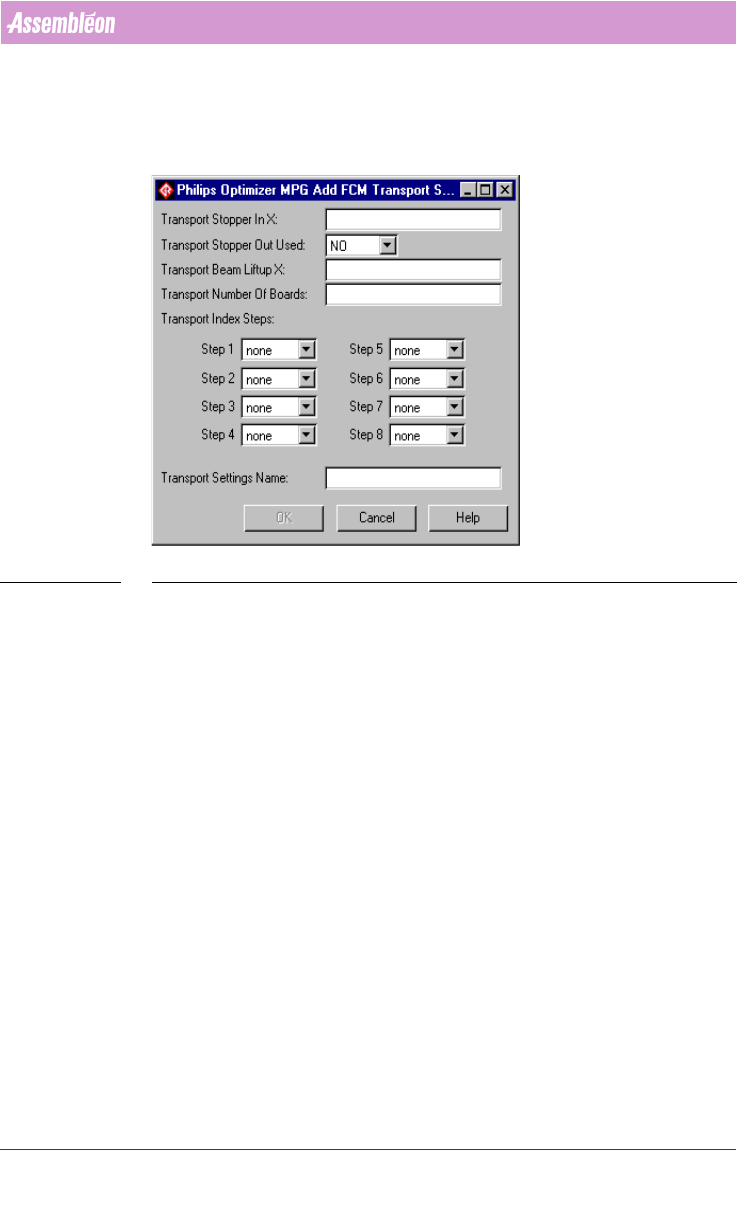
4022 591 98247 User Manual
05.07 PPS-Pro v8.2 103
Guidelines for using PPS-Pro
scheme must be filled in the Transport Settings Name textbox. After pressing
the OK button, the transport settings are added to the FCM Transport
Settings frame. The specified index scheme will be joined with the currently
specified machine in the Program Machine tab of PPS-Pro.
SCREEN 61 Add Transport Setting
3.2.11.4 Reference Pins Positions
This paragraph describes the default values for the reference pin positions for
the FCM Multiflex machine.
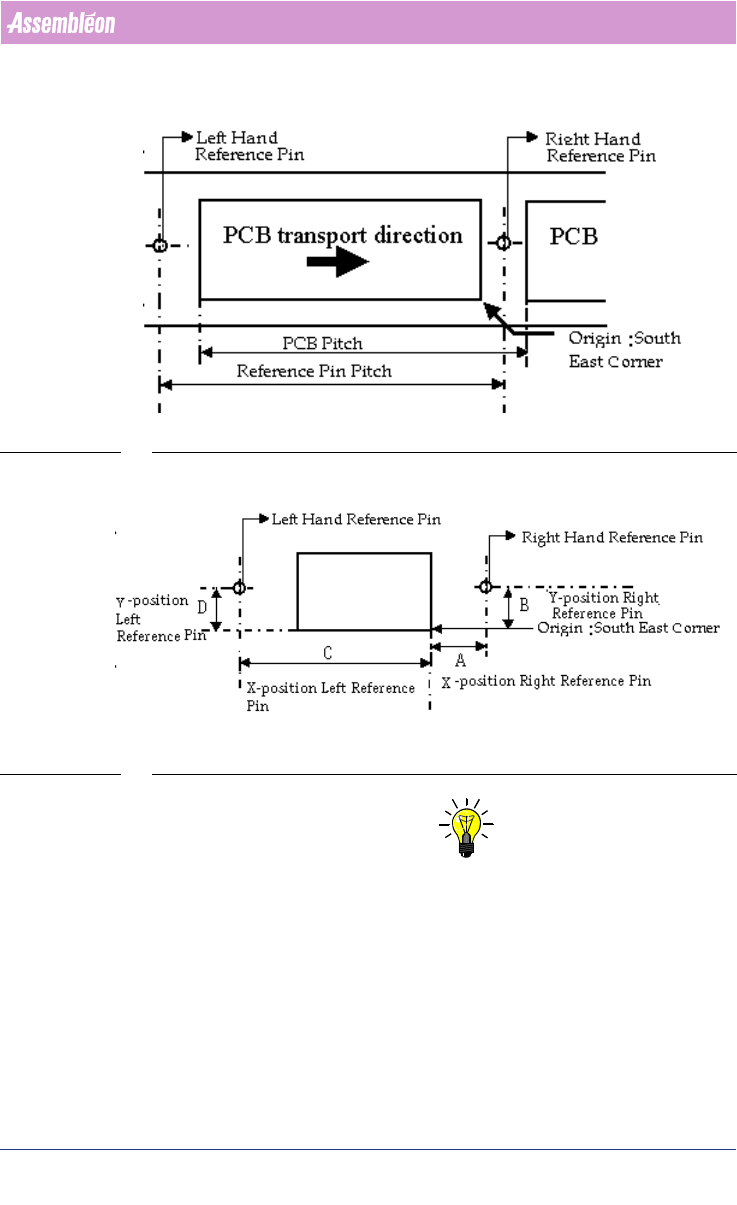
Two reference pins are in use (out of 4 possible pins) namely the right hand
reference pin and the left hand reference pin. The co-ordinates (x,y) for right
and left hand reference pins must be specified in ‘mm’ and measured with
respect to the south-east corner of the PCB
(see SCREEN 62 on page 104).
Reference pin pitch is equal to the PCB pitch.
Refer to the manual “Description ALE-file 12NC 4022 591 98715” for infor-
mation on how to set this parameters.
User Manual 4022 591 98247
104 PPS-Pro v8.2 05.07
Guidelines for using PPS-Pro
SCREEN 62 Reference Pin Positions
SCREEN 63 Reference Pin Positions Measurement
NOTE: In most cases the DEFAULT for the right reference pin and left reference pin
will be enough to make correct placement programs.
But in cases non-defaults are wanted or needed there are different ways of
manipulate these settings.
There are four different situations to set these reference pin positions and
they are described below:
Situation 1: Multiflex Board Support (MBS)