PPS Pro version 8.2.pdf - 第132页
User Manual 4022 591 98247 128 PPS-Pro v8.2 05.07 Guidelines for using PPS-Pro The PPS-Pr o marker definition can be f ound in the ALE fil e. Th e nu mbers specified th ere r efer s to the m ark er DB n umber . These mar…
4022 591 98247 User Manual
05.07 PPS-Pro v8.2 127
Guidelines for using PPS-Pro
3.4.7 Pre-assigning MultiStick feeders and TTF feeder
■ Description: When a Pre Assignment (CON file) from a previous calculation
is used for feeder-types: Multistick and TTF (Twin Tape Feeder), the RTB or
LineBalancer results in a warning 32 : “Feeder type cannot be matched to
the feeder bank” and the ‘fixed’ component is moved to other surface
mount equipment. In the created CON file the names of the feeders are not
the same. For example TTF_08 becomes S00:TTF_08 to show that the S00
multistick layout should be used for this feeder setup.
■ Advice: Modify the ALE-file:
1. Make duplicate of TTF, called "S00:TTF_08" and add it to all Gemline
related feederbanks.
2. Make duplicates of Multistick feeders (also WideMultistick and Stick-A,
etc...) with the appropriate prefixes "Sxx:" and add these to the feed
-
erbanks of all Gemline machines.
In GemLine: ITF_FeederTypesOfi.txt file: Add copies of the TTF_08 and all
other multilane feeders with the appropriate "Sxx:" prefixes. Make sure the
copies are added below the original, because the first FeederType name with
the same number will be used to write back to the CON-files.
3.4.8 Marker definition
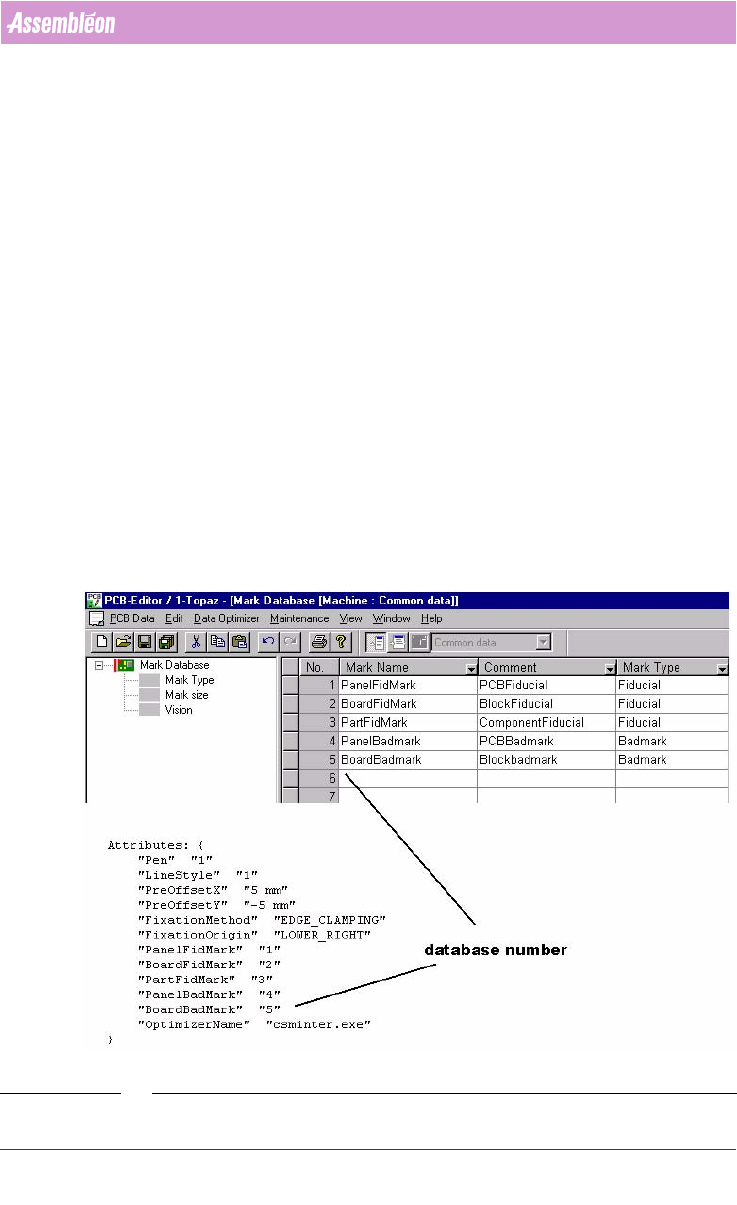
SCREEN 75 Marker Definition
User Manual 4022 591 98247
128 PPS-Pro v8.2 05.07
Guidelines for using PPS-Pro
The PPS-Pro marker definition can be found in the ALE file. The numbers
specified there refers to the marker DB number. These marker database
numbers must be defined in the PCB Editor Marker Data base
(see SCREEN 75
on page 127).
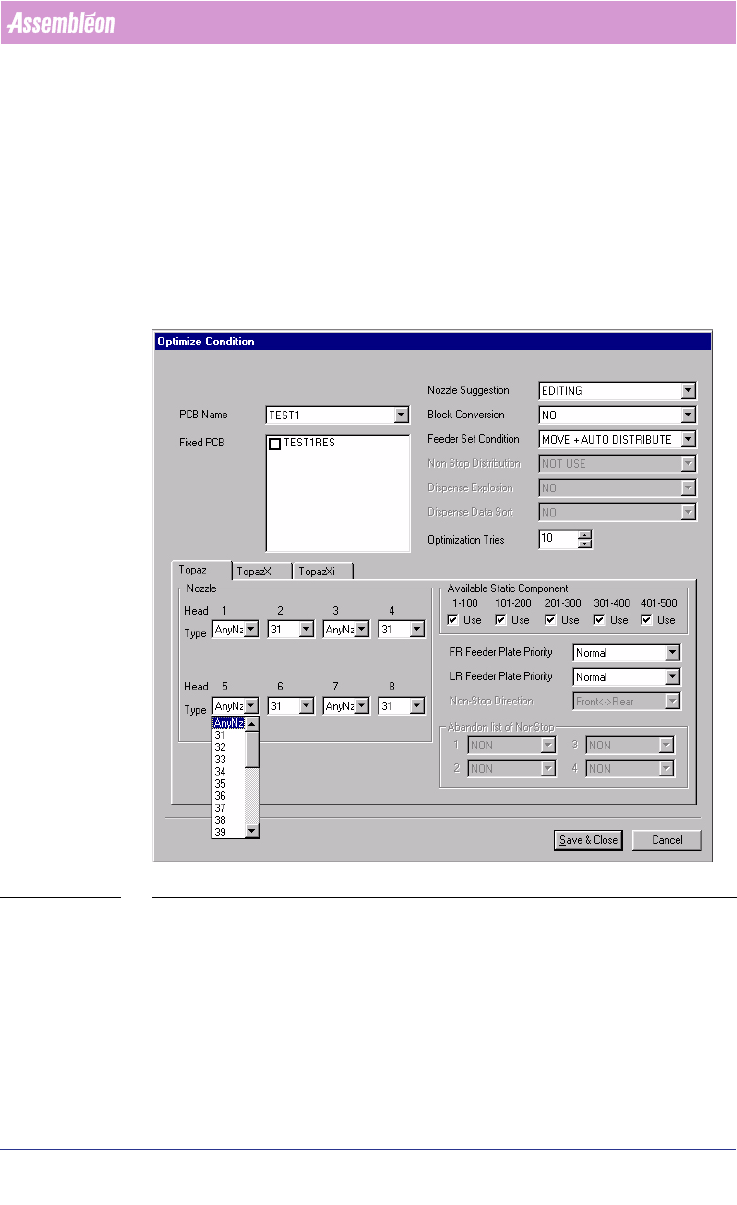
3.4.9 Head/Nozzle pre-assignments
For GemLine Machines the nozzle pre-assignment can be done by optimizing
manually. Refer to
chapter 3.4.14 "Optimize Manually". And edit the PCB
setup by adjusting the head/nozzle.
SCREEN 76 Head/Nozzle pre-assignments
3.4.10 Optimizing a PCB
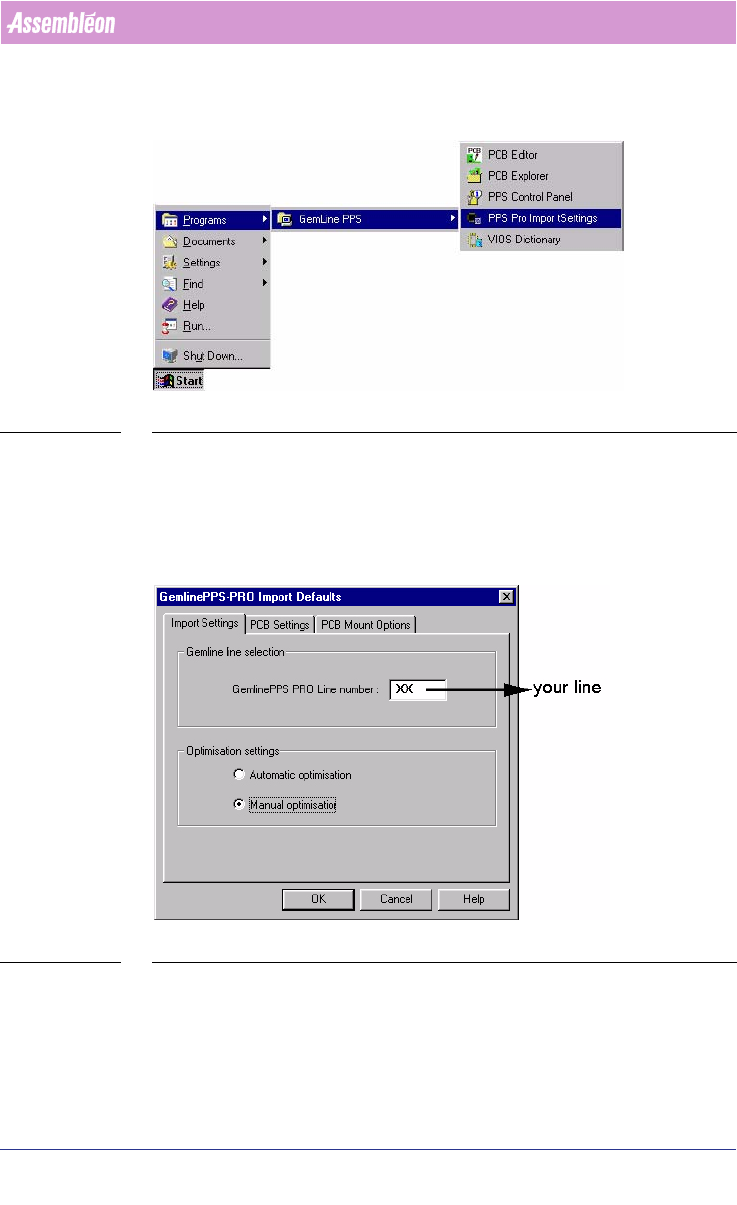
During optimization GemLine PPS uses certain Import settings these are
defined in the PPS-Pro Import Settings. Check these settings before you start
4022 591 98247 User Manual
05.07 PPS-Pro v8.2 129
Guidelines for using PPS-Pro
your first optimization (see 3.4.11 on page 129). After this check optimi-
zation can be started, see chapter 3.4.12 "Optimization"and further.
SCREEN 77 PPS-Pro Import Settings
3.4.11 GemLine PPS-Pro import default settings
Default settings can by made by screen 78, GemLine PPS-Pro Import Default
settings. Fields in 3 tabs can be set.
SCREEN 78 GemLine PPS-Pro Import Default settings
In the GemLine line selection field fill in the Line number for which an opti-
mization is required.
In the Optimization settings frame automatic or manual optimization can be
selected.