00195044-22_UM_VisionTeachStation_5.x.x_DE_EN.pdf - 第134页
5 Installing the cameras Vision Teach Station 5.x.x User Manual 5.2 Installing head cameras, type 28, 29 and 30 05/2019 Edition 42 5 Fig. 5.2 - 10 Base module with camera type 28 Key to fig. 5.2 - 10 , page 42 (1) Magnet…
Vision Teach Station 5.x.x User Manual 5 Installing the cameras
05/2019 Edition 5.2 Installing head cameras, type 28, 29 and 30
41
5
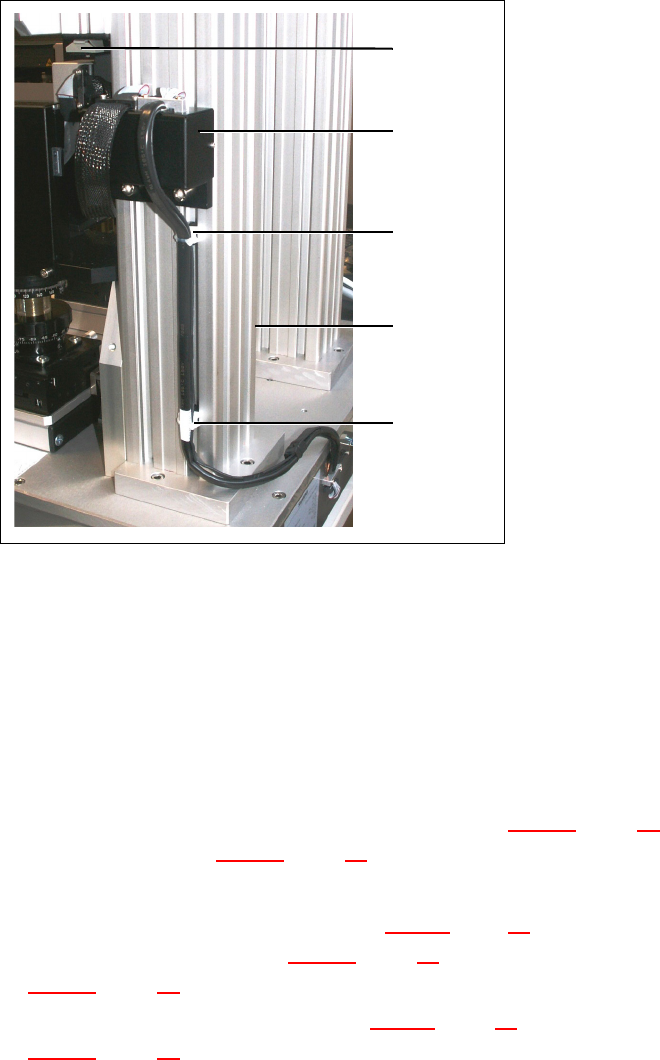
Fig. 5.2 - 9 Running the cables for the camera type SST 28/29 and 23
(1) Wire management mount
(2) Pillar
(3) Wire management mount on camera type 29
(4) Adapter for head camera
5.2.4 Fitting the component support
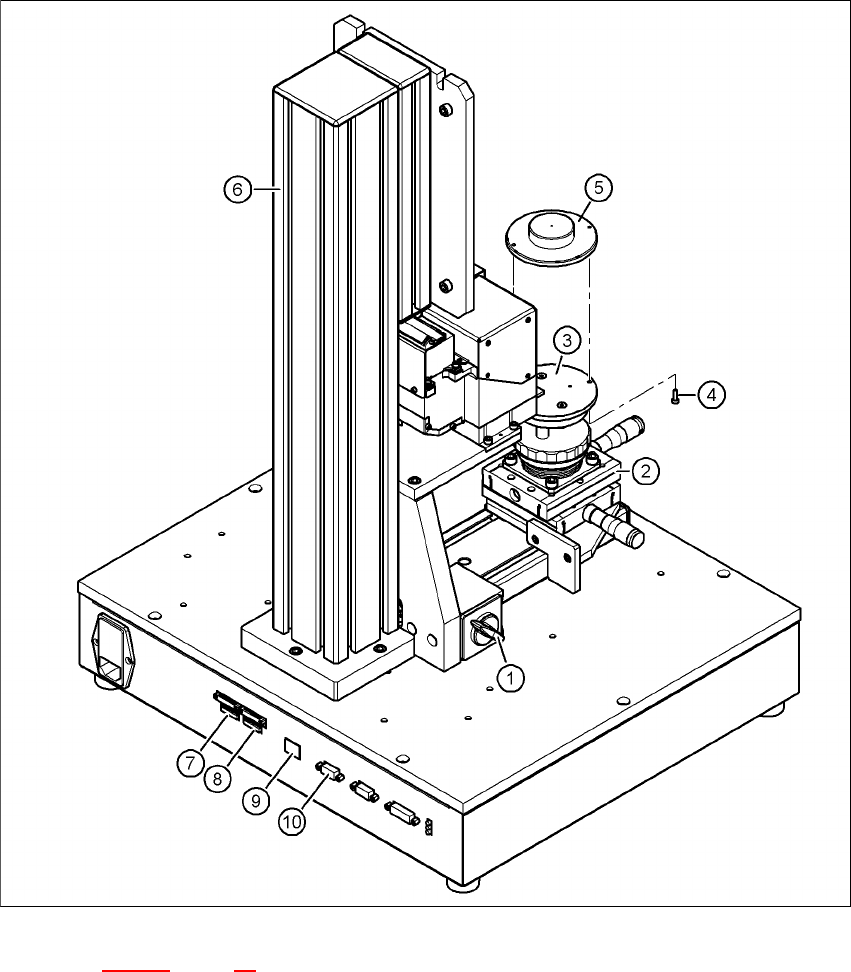
Release the lock on the positioning unit (item 2 in Fig. 5.2 - 10, page 42) using the magnetic
switch (item 1 in Fig. 5.2 - 10
, page 42)
Push the positioning unit out.
Fix the component support (item 5 in Fig. 5.2 - 10, page 42) using the two hexagon socket head
screws M3 x 8 (item 4 in Fig. 5.2 - 10
, page 42) to the holder (item 3 in Fig.
5.2 - 10
, page 42).
Push the positioning unit (item 2 in Fig. 5.2 - 10, page 42) back towards the pillar (item 6 in Fig.
5.2 - 10
, page 42) and lock the positioning unit in place.
(1)
5
(2)
5
(1)
(3)
5
(4)
5 Installing the cameras Vision Teach Station 5.x.x User Manual
5.2 Installing head cameras, type 28, 29 and 30 05/2019 Edition
42
5
Fig. 5.2 - 10 Base module with camera type 28
Key to fig. 5.2 - 10, page 42
(1) Magnetic switch
(2) Positioning unit
(3) Holder for component support
(4) Hexagon socket head screw M3 x 8, 2x
(5) Component support, camera type 28/29
(6) Pillar

Vision Teach Station 5.x.x User Manual 5 Installing the cameras
05/2019 Edition 5.2 Installing head cameras, type 28, 29 and 30
43
(7) Connection for cable, head camera 1 (03040353-W1: 26-pin, 03040353-W2: 12-pin)
(8) Connection for cable, head camera 2 (03040353-W1: 26-pin, 03040353-W2: 12-pin)
(9) Connection for camera bus cable to the PC (03040359-xx)
(10) Connection for CAN bus cable to the PC (03040362-xx)
5.2.5 Connecting the adapter, base module and PC
Connect the camera bus connection on the base module (item 9 in Fig. 5.2 - 10, page 42) to
the card for the camera bus interface in the PC (item 1 in Fig. 4.3 - 2
, page 27) with the cable
03040359-xx.
Connect the CAN bus connection on the base module (item 10 in Fig. 5.2 - 10, page 42) to the
interface card in the PC (item 2 in Fig. 4.3 - 2
, page 27) with cable 03040362-xx.