00195044-22_UM_VisionTeachStation_5.x.x_DE_EN.pdf - 第138页
5 Installing the cameras Vision Teach Station 5.x.x User Manual 5.3 Installing the type 23 head camera 05/2019 Edition 46 5.3.3 Running the cables Run the cables as described in section 5.2.3 , page 40 . 5.3.4 Fitting th…
Vision Teach Station 5.x.x User Manual 5 Installing the cameras
05/2019 Edition 5.3 Installing the type 23 head camera
45
5
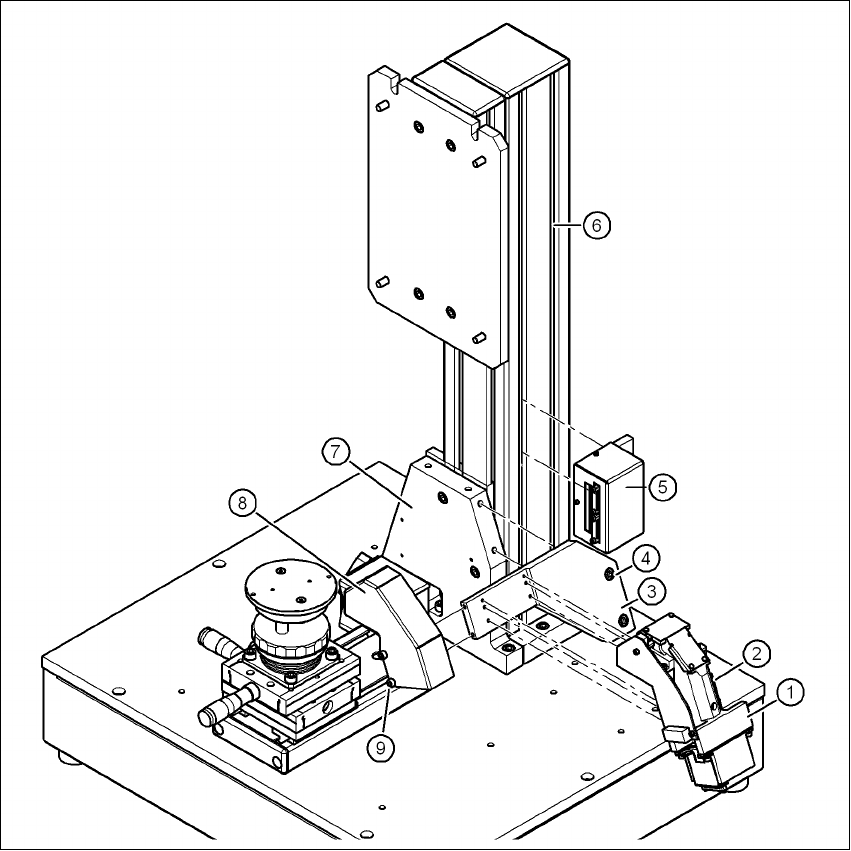
Fig. 5.3 - 11 Installing camera type 23
(1) Camera type 23
(2) Hexagon socket head screw M3 x 12, 4x
(3) Mount for camera type 23
(4) Hexagon socket head screw M6 x 12, 2x
(5) Adapter for head camera
(6) Pillar
(7) "Bottom" mounting plate"
(8) Cover for camera type 23
(9) Hexagon socket head screw M4 x 8, 2x
5 Installing the cameras Vision Teach Station 5.x.x User Manual
5.3 Installing the type 23 head camera 05/2019 Edition
46
5.3.3 Running the cables
Run the cables as described in section 5.2.3, page 40.
5.3.4 Fitting the component support
5
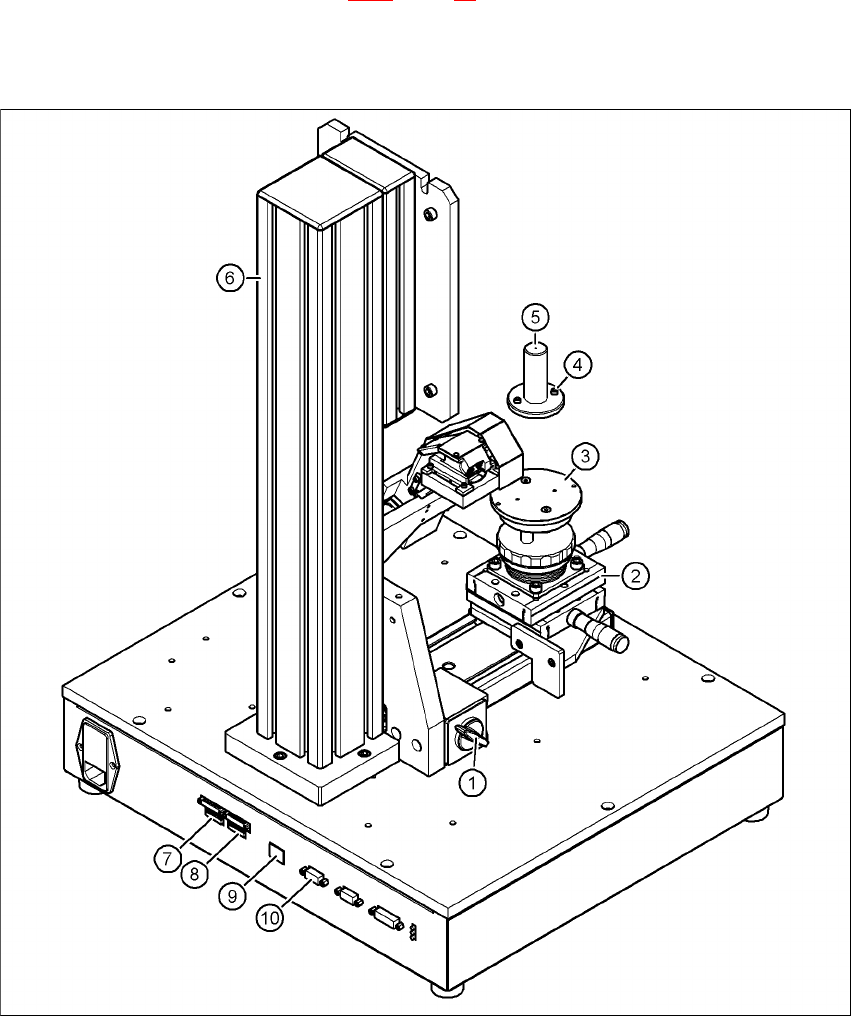
Fig. 5.3 - 12 Base module with camera type 23
(1) Magnetic switch
(2) Positioning unit
(3) Holder for component support
(4) Hexagon socket head screw M3 x 10, 2x

Vision Teach Station 5.x.x User Manual 5 Installing the cameras
05/2019 Edition 5.3 Installing the type 23 head camera
47
(5) Component support, camera type 23
(6) Pillar
(7) Connection for cable, head camera 1 (03040353-W1: 26-pin, 03040353-W2: 12-pin)
(8) Connection for cable, head camera 2 (03040353-W1: 26-pin, 03040353-W2: 12-pin)
(9) Connection for camera bus cable to the PC (03040359-xx)
(10) Connection for CAN bus cable to the PC (03040362-xx)
Release the lock on the positioning unit (item 2 in Fig. 5.3 - 12, page 46) using the magnetic
switch (item 1 in Fig. 5.3 - 12
, page 46)
Push the positioning unit out.
Fix the component support (item 5 in Fig. 5.3 - 12, page 46) using the two hexagon socket head
screws M3 x 10 (item 4 in Fig. 5.3 - 12
, page 46) to the holder (item 3 in Fig.
5.3 - 12
, page 46).
Push the positioning unit (item 2 in Fig. 5.3 - 12, page 46) back towards the pillar (item 6 in Fig.
5.3 - 12
, page 46) and lock the positioning unit in place.
WARNING 5
Always make sure that the base module and PC are switched off when you connect or re-
move connectors.
NEVER unplug the 26-pin ribbon cable while it is carrying voltage as this could damage the
LED driver board for the camera. 5
5.3.5 Connecting the adapter, base module and PC
Run the cables as described in section 5.2.5, page 43.