Operating Manual SIPLACE Multi-Docking Station.pdf - 第8页
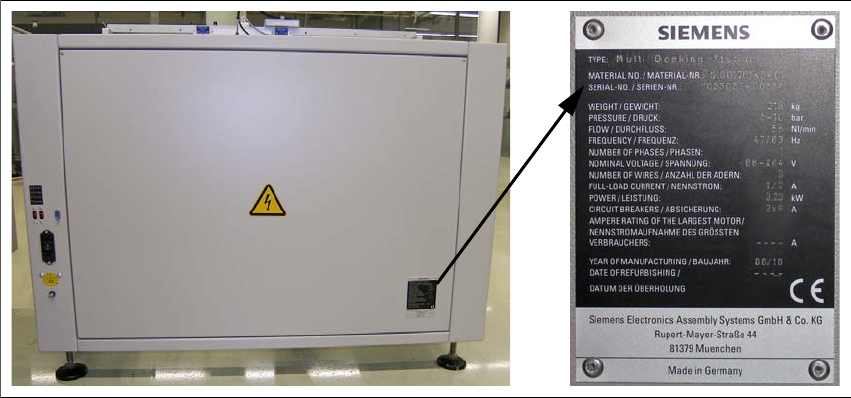
1 Operating Manual SIPLACE Multi-Docking-St ation 1.6 Serial number of the Multi-Docking St ation Operating Manual 4 1.6 Serial number of the Multi-Docking S tation The serial number of the SIPLACE Mu lti-Docking S tat…

3
SIPLACE Multi-Docking-Station 1 Operating Manual
Operating Manual 1.4 Overview of Release Versions
1.4 Overview of Release Versions
1.5 Abbreviations
ESD Electrostatic sensitive devices
EMC Electromagnetic compatibility
ESD Electrostatic sensitive device
GND Ground
IC Integrated circuit
PCB Printed-circuit board
MC Machine controller
SMD Surface-mounted device
WLAN Wireless local area network
Manual Software version Edition
First edition Operating Manual … Edition 06/2010 EN
1 Operating Manual SIPLACE Multi-Docking-Station
1.6 Serial number of the Multi-Docking Station Operating Manual
4
1.6 Serial number of the Multi-Docking Station
The serial number of the SIPLACE Multi-Docking Station can be found at the following location.
Fig. 1 - 1 Serial number

5
SIPLACE Multi-Docking-Station 2 Operating Safety
Operating Manual 2.1 Safety Information
2 Operating Safety
2.1 Safety Information
2.1.1 Hazard Symbols Convention
This manual contains information that you must observe for your personal safety and to avoid
property damage. This information is emphasised by warning triangles and shown, depending on
the severity, as follows:
DANGER or
In this operating manual means that death, serious
injury or considerable damage will occur if this
danger warning is ignored.
WARNING or
In this operating manual means that death, serious injury or
considerable damage may occur if
this warning is ignored.
CAUTION or
in this operating manual means that slight injury or damage may occur if this caution is ignored.
NOTE
In this operating manual is important information on
the product or the respective section of the
manual that the user should actively be aware of.
2.1.2 Operating Modes
You can operate the machine in “normal mode” and “special mode”.
Normal Mode
In normal mode, all functions and tasks for which the machine has been designed are executed
automatically. Normal mode also includes the removal of, e.g., jammed PCBs from areas of the
machine
that can be accessed through doors and covers without the use of tools. If a tool is
necessary to correct a problem (e.g., to unscrew a cover), this falls under
special mode.