00197728-12_IM_SE3.11_EN.pdf - 第16页
2 System Components and Configurations Installation and Configur ation Guide SIPLACE Explorer 2.3 Standard Installation of SIPLACE Explorer Edition 11/2020 EN 16 2 Fig. 2.3 - 1 Installation V aria nts: Factory Layout Cl
Installation and Configuration Guide SIPLACE Explorer 2 System Components and Configurations
Edition 11/2020 EN 2.3 Standard Installation of SIPLACE Explorer
15
2.3 Standard Installation of SIPLACE Explorer
SIPLACE Explorer provides various installation variants for the different components. This section
explains the following installation variants. 2
– Factory Layout Cl (see page 15)
– Factory Layout Dl (see page 17)
– Single Line Layout (see page 19)
We recommend that you use one of these installation variants for your system. 2
2.3.1 Factory Layout Central Installation (CI)
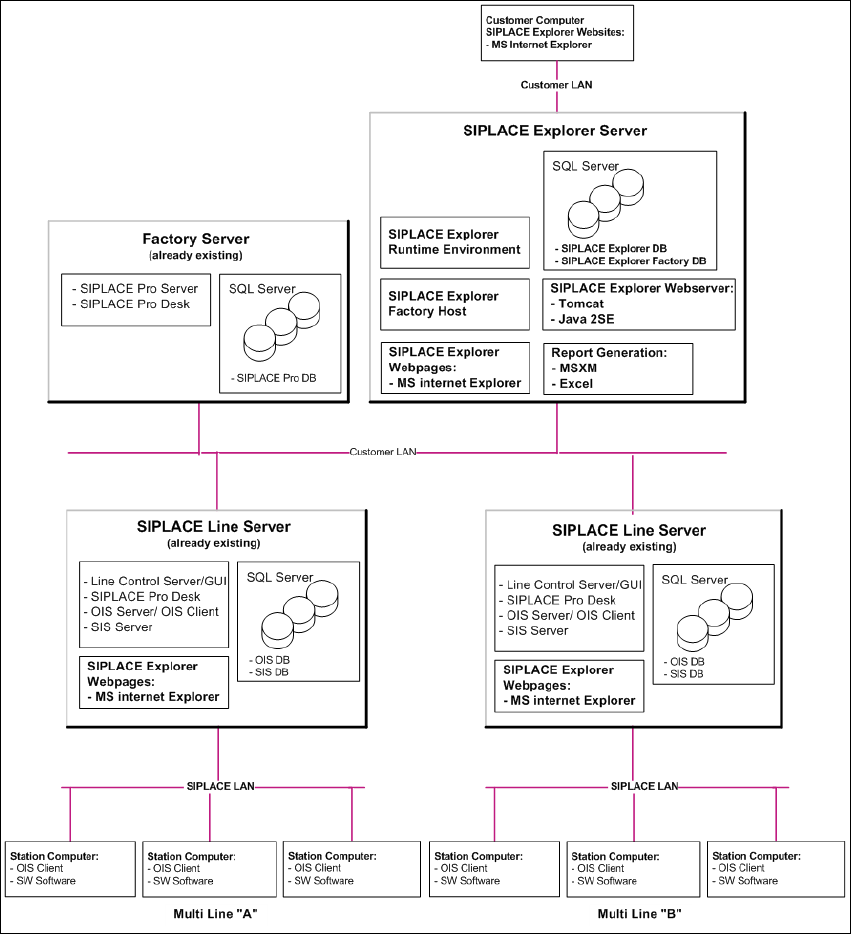
The Factory Layout Cl supports so-called "Multi Lines" supported i.e. different station software
platforms are supported within the same production line. The production line operation is con-
trolled via a central SIPLACE Pro with the relevant OIS/SIS installations. 2
SIPLACE Pro is installed on the SIPLACE line server and on the factory server, while OIS/SIS is
just installed on the SIPLACE line server. 2
In this installation variant, SIPLACE Explorer is always installed on a separate SIPLACE Explorer
server. All SIPLACE Explorer components are installed on this server. This enables the adminis-
tration and any updates of SIPLACE Explorer to be realized at one central point. 2
The data to be monitored for all corresponding production lines are collected on the SIPLACE
Explorer server. 2
NOTE
This computer can monitor data from up to 5 applications, with up to 20 machines. 2
The following overview shows an example of the "Factory Layout Cl" installation: 2
2 System Components and Configurations Installation and Configuration Guide SIPLACE Explorer
2.3 Standard Installation of SIPLACE Explorer Edition 11/2020 EN
16
2
Fig. 2.3 - 1 Installation Variants: Factory Layout Cl

Installation and Configuration Guide SIPLACE Explorer 2 System Components and Configurations
Edition 11/2020 EN 2.3 Standard Installation of SIPLACE Explorer
17
2.3.2 Factory Layout Distributed Installation (DI)
The Factory Layout Dl supports so-called "Multi Lines" supported i.e. different station software
platforms are supported within the same production line. The production line operation is con-
trolled via a central SIPLACE Pro with the relevant OIS/SIS installations. 2
SIPLACE Pro is installed on the SIPLACE line server and on the factory server, while OIS/SIS is
just installed on the SIPLACE line server. 2
In this installation variant, SIPLACE Explorer is installed on multiple computers. SIPLACE Ex-
plorer Runtime Environment is installed on the SIPLACE line server. All other SIPLACE Explorer
components are installed on the SIPLACE Explorer server. 2
The data to be monitored for all corresponding production lines are collected on the SIPLACE
Explorer server. 2
NOTE
With the SIPLACE line server (the computer on which SIPLACE Explorer "Runtime Environment"
is installed) you can monitor one production line with up to 7 stations. 2
The following overview shows an example of the "Factory Layout Dl" installation: 2