00197728-12_IM_SE3.11_EN.pdf - 第17页
Installation and Configuration Guide SIPLACE Explorer 2 System C omponents and Configurations Edition 11/2020 EN 2.3 Standard Installation of SIPLAC E Explorer 1 7 2.3.2 Factory Layout Distr ibuted Inst allation (DI) The…
2 System Components and Configurations Installation and Configuration Guide SIPLACE Explorer
2.3 Standard Installation of SIPLACE Explorer Edition 11/2020 EN
16
2
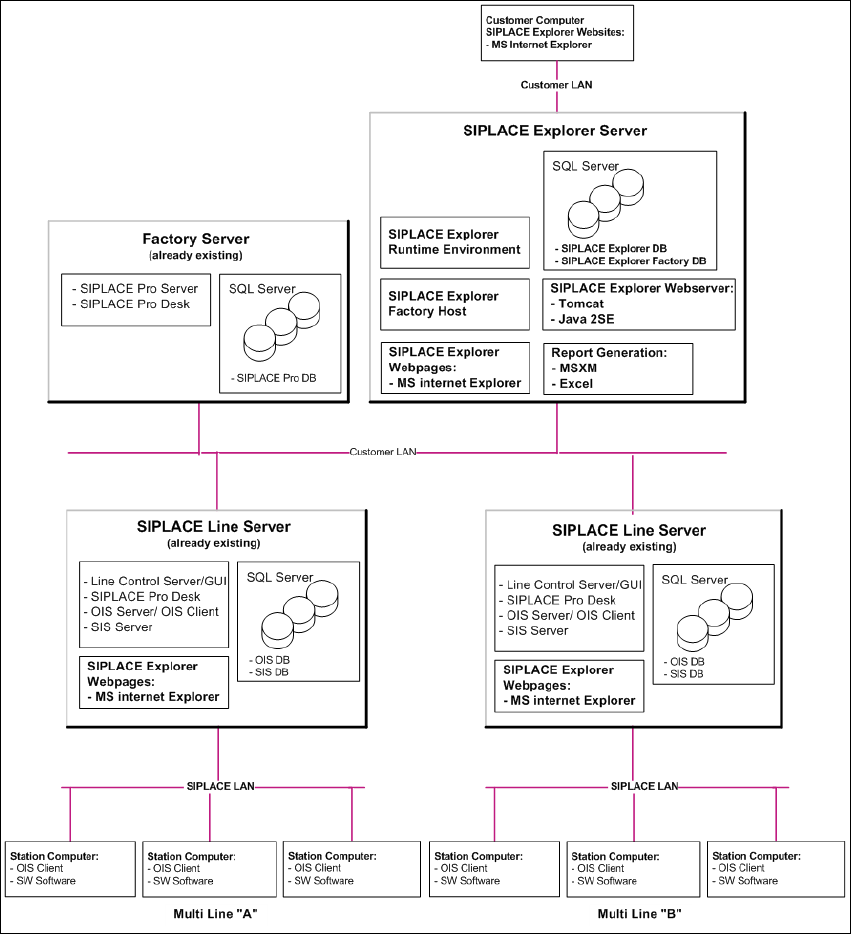
Fig. 2.3 - 1 Installation Variants: Factory Layout Cl

Installation and Configuration Guide SIPLACE Explorer 2 System Components and Configurations
Edition 11/2020 EN 2.3 Standard Installation of SIPLACE Explorer
17
2.3.2 Factory Layout Distributed Installation (DI)
The Factory Layout Dl supports so-called "Multi Lines" supported i.e. different station software
platforms are supported within the same production line. The production line operation is con-
trolled via a central SIPLACE Pro with the relevant OIS/SIS installations. 2
SIPLACE Pro is installed on the SIPLACE line server and on the factory server, while OIS/SIS is
just installed on the SIPLACE line server. 2
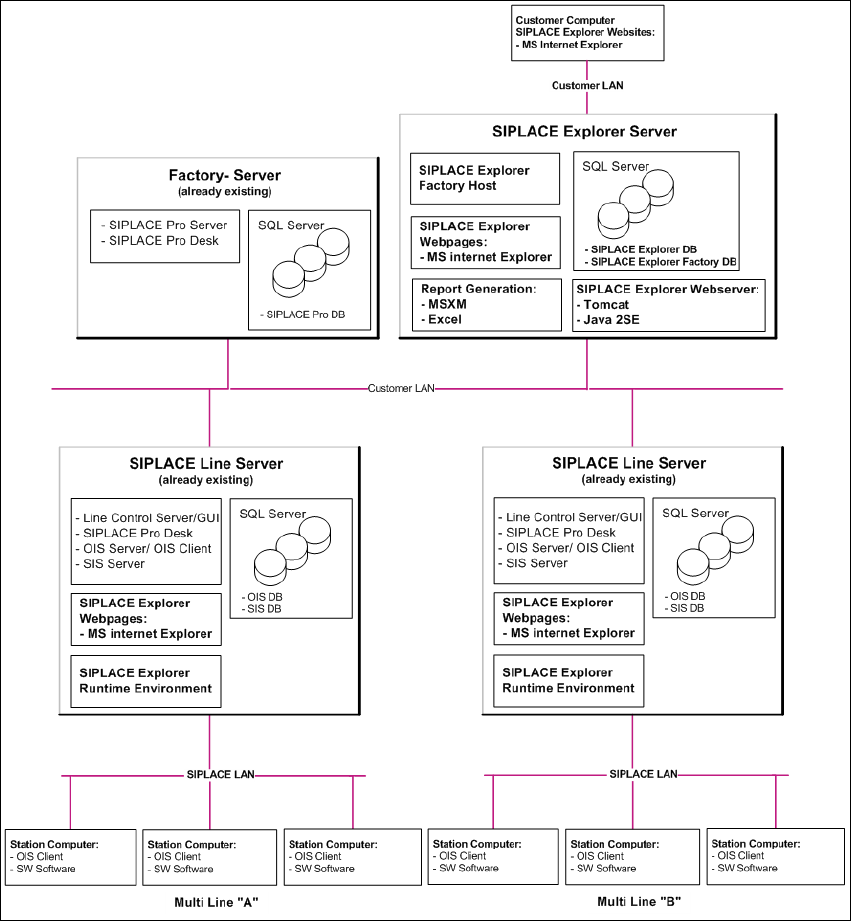
In this installation variant, SIPLACE Explorer is installed on multiple computers. SIPLACE Ex-
plorer Runtime Environment is installed on the SIPLACE line server. All other SIPLACE Explorer
components are installed on the SIPLACE Explorer server. 2
The data to be monitored for all corresponding production lines are collected on the SIPLACE
Explorer server. 2
NOTE
With the SIPLACE line server (the computer on which SIPLACE Explorer "Runtime Environment"
is installed) you can monitor one production line with up to 7 stations. 2
The following overview shows an example of the "Factory Layout Dl" installation: 2
2 System Components and Configurations Installation and Configuration Guide SIPLACE Explorer
2.3 Standard Installation of SIPLACE Explorer Edition 11/2020 EN
18
2
Fig. 2.3 - 2 Installation Variants: Factory Layout Dl